Tag: syndicated

  • TSQL for Beginners–#RGCommunityCircle

    As a part of the Redgate Community Circle, giving back in this strange time, each of the advocates for Redgate is teaching a free course. We’re doing this live each week, according to this schedule:

    I decided to watch a class of each of the others’ work and write about it. This post looks at the first class from Kendra Little on basic T-SQL.

    Basic T-SQL

    I know a lot of T-SQL, but I also don’t know a lot. I’m good, maybe above average, but not a great query writer. I learn all the time from others, and often find something interesting in basic presentations. I’m also always looking to see how others teach basic topics to improve my own skills.

    Kendra has done an interesting thing with putting her course on GitHub. That’s a great idea, though for mine, I am following articles on SQLServerCentral. Having a good outline and resources for students is a good idea, and everyone ought to be able to use a VCS, including GitHub, so I like putting pages here and code in a repo.

    Why is that good? This is what I did to start following Kendra’s class:
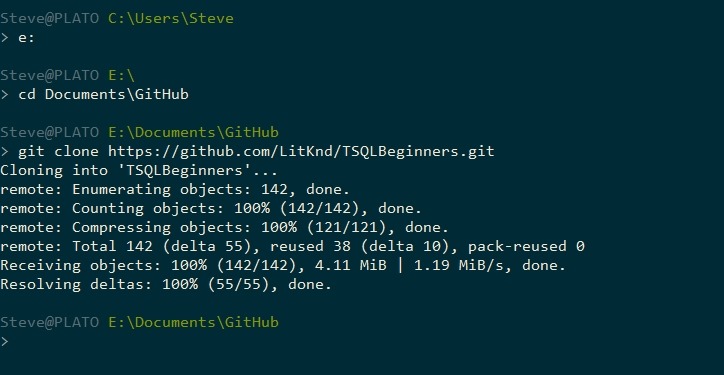
    2020-05-01 10_15_26-cmd

    Now I can open the first script in ADS. On top of seeing how Kendra teaches, I get to practice some ADS stuff.
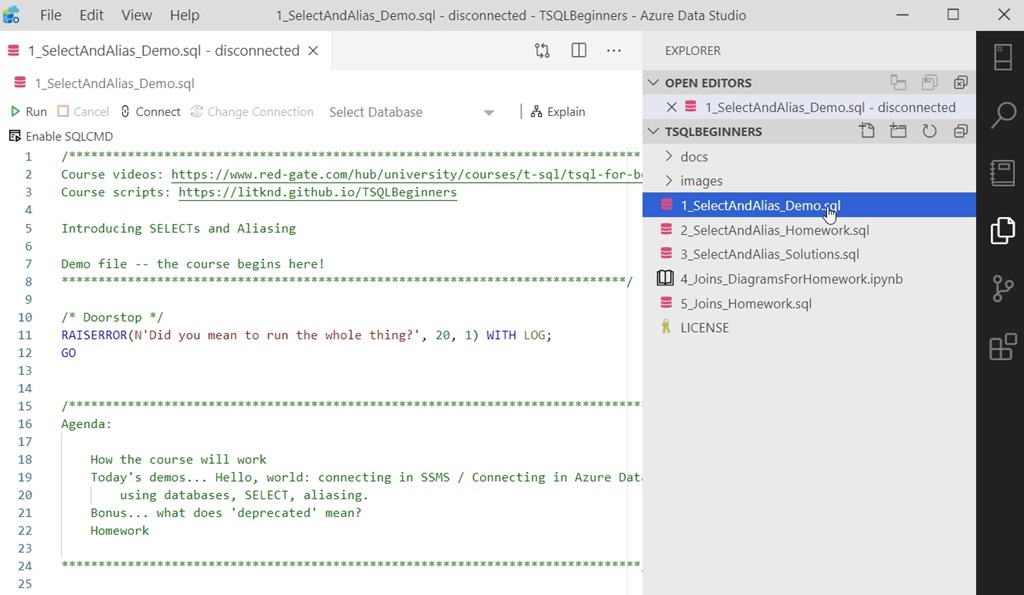
    2020-05-01 10_17_28-1_SelectAndAlias_Demo.sql - disconnected - TSQLBeginners - Azure Data Studio

    I like the doorstop at the end, and I’ll have to think about that for my demo scripts. I’ve accidentally run the entire script too many times.

    Kendra walks through a number of query concepts with a series of basic SELECT statements, including an emoji for a column alias. I’m glad she lets you know which items are not recommended.

    The first course is helping you understand some of the ways in which you can get data from tables. You do need to have a slight understanding of what a table is, but Kendra helps you learn some of the strange ways that you can put together a statement. There is a lot to cover, but this should help someone that wants to learn some basics get started.

    There is also homework, included as part of the scripts in the course. The questions are at the bottom, and called out. A good way to get you to practice. I should do this for my work in places as well.

    2020-05-01 11_09_20-1_SelectAndAlias_Demo.sql - Plato_SQL2017.sandbox (Integrated) - TSQLBeginners -

    Pass this course along to someone that needs to get better at T-SQL. It’s not too fast or hard, and will let them be sure they have a grounding in good ways to write queries.

  • Daily Coping 7 May 2020

    I’ve started to add a daily coping tip to the SQLServerCentral newsletter, which is helping me deal with the issues in the world. I’m adding my responses for each day here.

    Let someone you love know how much they mean to you.

    An easy one for me. This has been a hard time for everyone in my family, for different reasons. My wife is the most important person in the world, and I’ve been making an effort to tell her that more often during these times.

  • Weird Docker Desktop Issues – Unable to Create Hyper-V VM

    I was setting up my new machine the other day and one of the first things I did was get Docker Desktop. I grabbed this and enabled Hyper-V at the same time. When I rebooted, I had some errors, so I thought perhaps I hadn’t really enabled the Windows Subsystem for Linux and Hyper-V correctly before getting Docker running. That shouldn’t matter, but I decided to uninstall Docker Desktop, reboot, and be sure things were running.

    Once I had Hyper-V running and I connected to my local WSL, I reinstalled Docker Desktop, but still saw lots of this:

    Unable to create Hyper-V VM

    There were other errors, like the Docker.Core.Backend.BackendDestroyException, but the main problem seemed (to me) to be a Hyper-V issue.

    Checking the Hyper-V console showed no VMs created. Hmmm, what do I do?

    I tried to “Quick create” a VM, but that wizard failed. I didn’t really want to make a VM at this time, so I hesitated here, but I shouldn’t have. After searching around more, I came back and tried to ensure that I could create a VM.

    It was at this time that I noticed the default location for my Hyper-V vms was s:\virtual. I don’t have an “S:“ drive, so I was suspicious. Checking the disk location, I saw the same thing.

    This might make sense if scripting was using defaults to set up a new VM. I manually set the defaults in Hyper-V to be folders on my C: drive. Then I had Docker go back to default settings, and it worked. No errors on startup, the Docker icon in the status bar, and I could pull and start a container.

    Good to know.

    Not sure why this was an issue. This was (supposedly) a clean, new install of Windows. Strange, but something worth checking if you have issues.

  • Daily Coping 6 May 2020

    I’ve started to add a daily coping tip to the SQLServerCentral newsletter, which is helping me deal with the issues in the world. I’m adding my responses for each day here.

    Today’s tip is take a step towards one of your life goals, however small.

    Tough. Most of my goals are charity or travel. I did start on my chair, but that’s separate. Or maybe not. Coping is coping, so I’ll combine things.

    I somewhat just started laying out the chair pieces, but no real cuts. I did realize that I wasn’t quite ready, so I need to actually prep a bit. I have some cushions I’m hoping to use, so I’m going to start by working through some design. Here’s the sketch for what I want to do.

    20200506_102559

    Not a great picture, but this let’s me start to get cuts done. This is based on a plan that I found online, but I wanted to adjust the measurements slightly. I’ll mark up their plan with my slightly wider measurements to accommodate a chair pad I own.