Tag: syndicated

  • Daily Coping 30 Mar 2020

    I’ve started to add a daily coping tip to the SQLServerCentral newsletter, which is helping me deal with the issues in the world. I’m adding my responses for each day here.

    In the newsletter today, I wrote this: Share what you are feeling and be willing to ask for help.

    This is a tough one for me. I’m fiercely independent and hate asking for help if I can do something. I should be able to handle this myself. I’m not sick, my family isn’t sick. No one I know is that sick, and only a few are a little sick. I only personally know of two people that have lost their jobs.

    However, this pandemic has affected me. It’s all over the news, it’s heartbreaking and maddening.

    I am sad for those that have lost someone or are suffering.

    have sympathy for those losing their jobs, especially low income workers.

    I’m maddened by those that haven’t taken this seriously.

    I’m sharing here, and I’ve shared some of this with my wife and kids. We commiserate a bit and get things off our chests. I also have learned to ask my wife for help, to listen, to hold me, to just be there. It’s helpful, though this is still hard.

    I’m working to close off from news, but not from people, which is a challenge. I’m working to keep my temper and emotions in check. I’m asking you to help me do that. If I’m upset, I’d appreciate a gentle reminder that things will be OK.

  • Going Dark in SSMS

    I haven’t been a big fan of dark mode in many tools, but I’ve been giving it a try in some applications as my eyes age. I decided to try it in SSMS, which wasn’t as easy as I’d hoped.

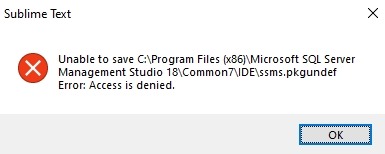
    I had heard this was coming, then found some notes it wasn’t coming, and eventually landed on Pinal Dave’s blog that shows how to enable it. I followed the instructions, but had this issue in Sublime Text.

    2020-03-19 11_09_26-Sublime Text

    That’s easy to fix. In my case, I didn’t want to restart Sublime in administrator mode, nor did I want to mess with permissions. I decided to use VS Code, since that’s the other default program that appears with many files. I started it in admin mode:

    2020-03-19 11_09_48-SQLQuery1.sql - Plato_SQL2017.sandbox (PLATO_Steve (65))_ - Microsoft SQL Server

    I accepted the UAC dialog and then clicked File | Open. From there, I pasted in this path: C:\Program Files (x86)\Microsoft SQL Server Management Studio 18\Common7\IDE

    I picked ssms.pkgundef and opened it. Uncommented the last line for the dark theme and saved the file. Then I restarted SSMS and:

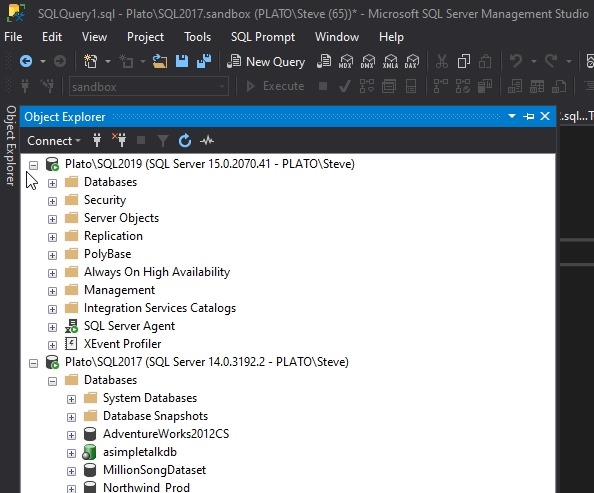
    2020-03-19 11_11_39-SQLQuery1.sql - Plato_SQL2017.sandbox (PLATO_Steve (65))_ - Microsoft SQL Server

    Voila!

    ish. Not everything is dark.

    2020-03-19 11_12_01-SQLQuery1.sql - Plato_SQL2017.sandbox (PLATO_Steve (65))_ - Microsoft SQL Server

    This one is particularly annoying to me.

    2020-03-19 11_12_12-SQLQuery1.sql - Plato_SQL2017.sandbox (PLATO_Steve (65))_ - Microsoft SQL Server

    I did try to alter some items, such as my grid results:

    2020-03-19 11_19_34-Options

    This somewhat works:

    2020-03-19 11_20_54-SQLQuery1.sql - Plato_SQL2017.sandbox (PLATO_Steve (64))_ - Microsoft SQL Server

    I’ll stick with it for a bit, but I’ll have to see how much the white sections bother me, especially with the Object Explorer.

    I don’t know why this is so hard, or why it’s a low priority. When I look at some of the feedback and posts, this is upsetting to plenty of people and it would seem like something that shouldn’t be hard to fix. However, I know this is a thick, old client, and perhaps no one wants to touch the code? I’ve certainly seen that before in other orgs. Perhaps Microsoft isn’t so different.

  • Daily Coping 27 Mar 2020

    I’ve started to add a daily coping tip to the SQLServerCentral newsletter, which is helping me deal with the issues in the world. I’m adding my responses for each day here.

    Today’s newsletter said: Contact a neighbor, friend, or family and offer to help.

    My wife and I live in a neighborhood of large ranches. There are about 18 of us, and a few years ago we all got together to address a few issues. We don’t have an HOA, but we worked together to take care of some legal things for our area.

    We sent out a note to others offering to help if they were struggling in any way with this pandemic. So far, no takers, but we’ve put this out there.

    I’ve also contacted some family to check on them. Not much we can do to help, but we are available if someone needs some supplies, shopping service, etc. for those nearby.

    Honestly, I feel like this didn’t help me cope a lot, because nothing came out of it. I know that likely means people are doing OK, or feel they are, but the inaction and inability to do anything is tough.

  • Moving to a New SqlClient

    DotNet developers, if you’re using the System.Data.SqlClient, stop. Move over to Microsoft.Data.SqlClient now.

    It’s easy to do, well, it’s relatively easy to say that. The actual work isn’t that hard, but it can be a challenge to move assemblies. In any case,  you need to reference the new assembly in your code, and ensure you’ve downloaded the NuGet package.

    Vicky Harp wrote a piece introducing this new provider, and you can find plenty of posts around the Internet (and videos) that explain how to change and why.

    Essentially, when you have the new assembly, you change this line:

    Using System.Data.SqlClient;

    to this:

    Microsoft.Data.SqlClient;

    If you haven’t fully qualified the assembly at the top and did it in code, you can search and replace.

    The big reason for the change is to allow the ADO.NET provider to release quicker and keep up with changes in technology. When the SqlClient has shipped with dotNet or dotNet Core, it upgraded rather rarely, and the pace of change was disconnected from features being added to SQL Server. Now Vicky’s team has responsibility here and is upgrading this at a more rapid pace.

    Let your friends know, and if you see System.Data.SqlClient in a code review, consider trying to refactor that out.