It was a long weekend of travel for me not too long ago, starting at 4:30am on Friday and ending at 7:30pm Sunday night. This was for SQL Saturday #884 in Pensacola, an event I’ve attended 4 or 5 times, a few with my daughter. It’s always enjoyable, and this year was no different.
However, the travel was surprisingly hard. I need to write a bit more about this, but I was surprised by both the issues that cropped up and how well the flights actually went. I’ll also mention that I had the 3 of nicest flight attendants I’ve ever interacted with on the three different flights. Thanks, @United staff.
Flight 1
This started when I hope at 430am Friday. I showered, and checked my phone, seeing a message that my flight was delayed. That’s pretty cool that two hours before flight time they can let me know of issues. I was thinking since this was such an early flight that the plane would be in Denver overnight, but I wasn’t thinking. There are early flights East of here and they can fly to arrive at Denver in time.
Or not. In this case, weather in the Chicago region delayed the plane, which is why I try to avoid Chicago. In a big deal, but about an hour delay. With a 2 hour layover, I wasn’t too concerned, and headed to the airport. I arrived, got a cup of coffee and went through email/Slack at the gate. Travel doesn’t necessarily stop me from needing to deal with other work, so I made use of the time.
Our plane arrived, people got off, I was ready to get on. Unfortunately, we were missing a flight attendant. One would think that scheduling staff is easy. It’s not, especially across time zones, locations, and potential limits on working hours. I don’t know if an employee had an issue in Denver or was on another flight or what. In any case, I know people that are in the airline industry and on call. They try to get to the airport quickly when called, but things happened. In this case, we added about 15 minutes to our delay over just over an hour.
Flight 2
One of the really neat things in the United mobile app is that I get information on gates and times, updated during the flight. Almost all United planes have wifi for entertainment, and you can purchase Internet access, but you get access to United data for free, like where your plane is flying. You can look at a map that gives you an idea of how close you are.
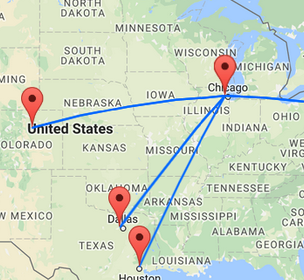
In this case, I was watching because we kept banking slightly. The generic flight map looks like this:
Mine looked more like this (I should have taken a screenshot):
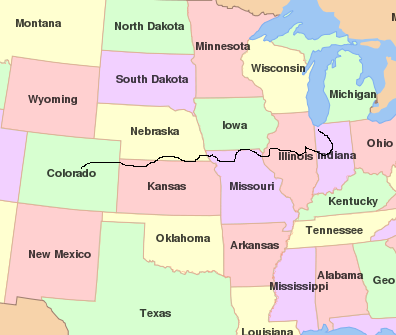
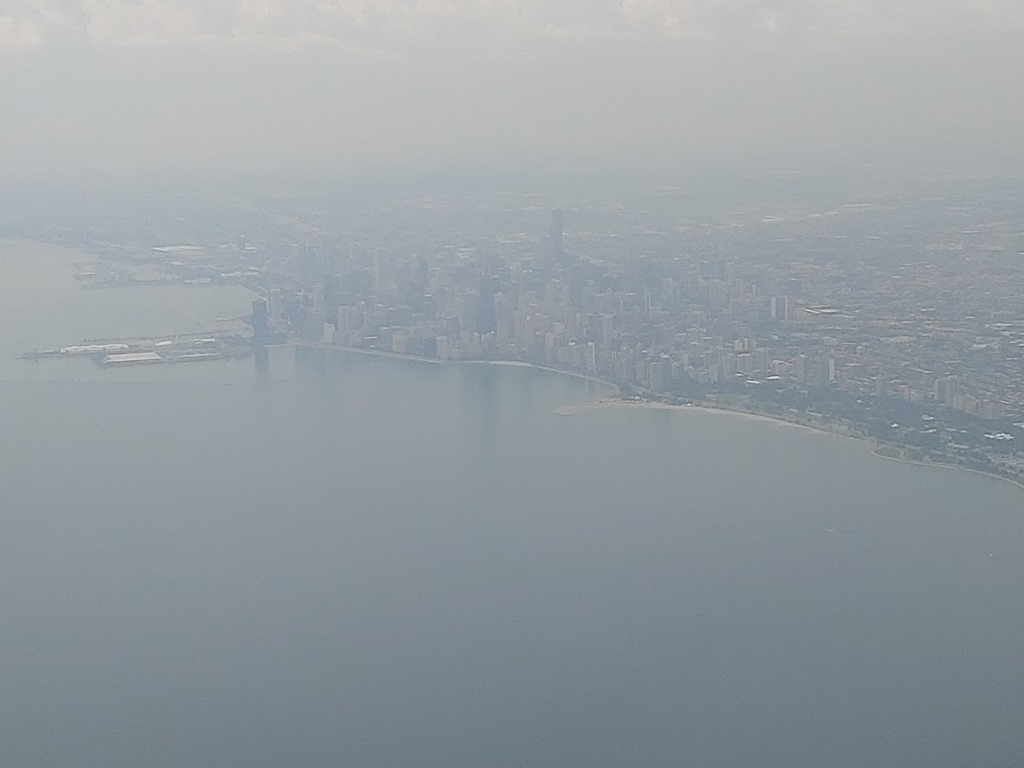
To avoid weather, we kept turning. We actually came into Chicago from the North, after circling around the East. I got a side view out of the plane of the downtown area as we came in.
We were late, and I had about 35 minutes before the other flight left, which means 25 minutes to get there. One thing I’ve learned is that the major airports have gate maps in the airline magazine. In this case I was going from one end of C concourse in O’Hare to the other end of F concourse. Not an easy journey. I jogged, and got there with about 10 minutes to spare. If I hadn’t been able to jog, life would have been rough.
Normally I get a text on delays, but I think the stack of flights was delaying messaging because as I walked up to the gate, I could see the delay message. As I talked to an agent, my phone vibrated with the delay alert. This is one place I think United could do a better job of data sharing, but in any case, this was another scheduling issue.
My plane was at the gate, workers were outside, so no lightning delays. However, our flight attendants and a pilot were in Milwaukee, which isn’t that far a drive from Chicago. They couldn’t take off because of weather, so we were delayed, even as other planes were coming and going.
About 2 hours here, but again, a great flight attendant that was very pleasant when we did get going. I took the time to eat some lunch and do a little writing. I’d started some things on the plane that I finished on the ground.
Flight 3
After the event, I was at the airport a little early. I sat at a restaurant, writing up some notes from the weekend for changing a presentation as well as reporting for Redgate. The plane arrived on time and we started boarding. I fly enough to be part of the pre-boarding group, so after those with disabilities and families, I scanned my pass and started down the jetway. There I found a line of 6 or 7 people, with a few already on the plane. Since someone had gone with a wheelchair first, I assumed that this was the delay.
Then I heard someone on the plane tell us to drop people from coming down the jetway. A few minutes later an agent came down and had us all walk back up the jetway and back into the terminal.
Apparently there was a ground stop in Denver that the pilot had heard, so I can forgive the app not updating me. A 45 minute delay, under mostly sunny skies in Pensacola, though clouds in the distance. This was more concerning, and a little stressful. No work getting done now as I was worn out and annoyed.
Almost an hour later, we start boarding and get on. The pilot will try to hurry and we take off. I have a couple drinks, thinking this is the end of a long weekend. It’s not.
As we get close to Denver, we get good news and bad news.
Good news: Denver is landing planes, albeit slowly.
Bad news: we need to circle a bit and have an hour of fuel. If we don’t get landing clearance in an hour, we’ll go land somewhere else. Fortunately we have a little plane, so lots of choices.
30 minutes later we get clearance and land. About two hours later than planned, but still, I’m home.
Lots of Challenges
I wrote this because I was thinking about all the challenges in flight operations and trying to coordinate many moving parts. It’s quite a logistical challenge, and while computers can help, I’m sure many humans need to be involved in some decisions along the way.
These were really minor hassles in my life, and I’m not complaining. More, I’m in awe of the amount of data that must be managed and used to make decisions and direct humans. I didn’t check bags, but I have, and I’m always amazed how well my bags get from point A to point B, especially when I’m running to make connections.
Nothing went as planned in my flights, but it all worked out well for me. Not for some others, but weather can be a big factor in traveling. I think the main thing I’ve learned is avoid Chicago and Chicago based planes whenever I can.



 Voice of the DBA