Tag: syndicated

  • Great Access to Data with Google Fi

    I’ve been a subscriber to the Google Fi (formerly Project Fi) network for a couple years now. Like many of you, I depend on my mobile device for lots of data items, usually email, but I’ve also been able to get work done at times, and certainly Slack and Skype are a regular part of my work.

    I made the switch because I often travel to the UK and a few other countries. Getting access from the US carriers is a pain. I’ve switched SIM cards before (never like doing that), carried a second phone that I can put a SIM in, and even tried to live on Wi-Fi. These are all compromises and a hassle.

    I used to have Verizon and the had great coverage, but at $10/day, that adds up quickly. T-Mobile had free data, but low speed. My kids have Sprint and get the same, low speed connection that’s almost useless in today’s very chatty applications.

    The last couple years have had me use the Google network in my travels. I’ve gotten phone and text calls in many places, tethered my computer, and been able to keep in touch in same way I do every day, regardless of where I am. I’ve been in these countries with Google Fi:

    • United States
    • United Kingdom (GB, Scotland, and N Ireland)
    • Ireland
    • France
    • Switzerland
    • Greece
    • Norway
    • Denmark
    • Canada
    • Australia
    • New Zealand
    • Hong Kong

    In all of these countries, my phone connects and gives me 4G speeds, with my same data plan. I pay a bit for international calls, but texts are included. What’s even better is that my data cost is capped at $60. I pay $10/GB, but if I go over $60 (And I did while in Australia), there’s no extra charge. If I use less, I get charged on a pro-rated basis.

    If you decide to move, I’ve got a referral link. You’ll save some money and I’ll get a little credit. Referral: https://g.co/fi/r/KAF848
  • Containers make easy upgrades

    I’ve been working with containers and writing a bit about them for awhile. I find them to be fascinating and useful as a technology, and I’ve come to really believe these will change how we work with the SQL Server data platform.

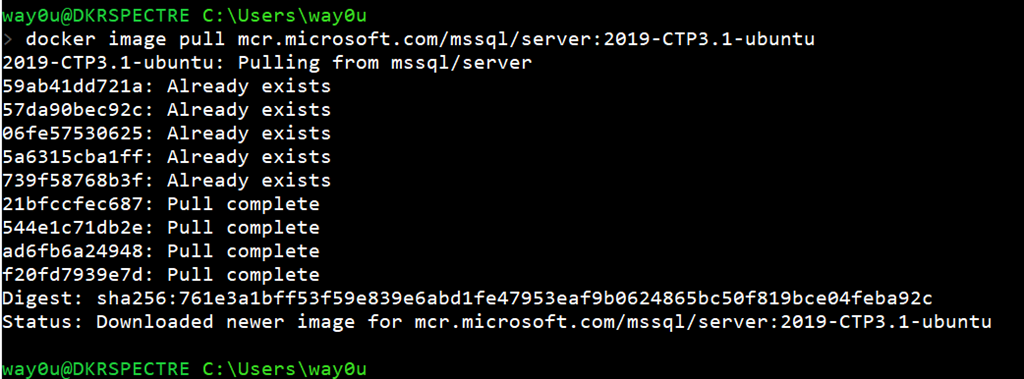
    In any case, I wanted to get the latest SQL Server 2019 version recently, so I decided to download the container image. I’ve had a few on my machine, and so upgrading to the latest was a question of running this:

    docker image pull mcr.microsoft.com/mssql/server:2019-CTP3.1-ubuntu

    The main SQL Server 2019 image exists in a few flavors on my machine, so as you can see, I don’t even download the entire image.

    2019-07-03 19_15_29-cmd

    There were only 4 layers I needed to pull since I already had the other 5 layers. This took about 10 minutes on my nice, but not great, 15MBps download speed. That’s much quicker than I could download an iso to install, plus I’d need to uninstall the previous CTP.

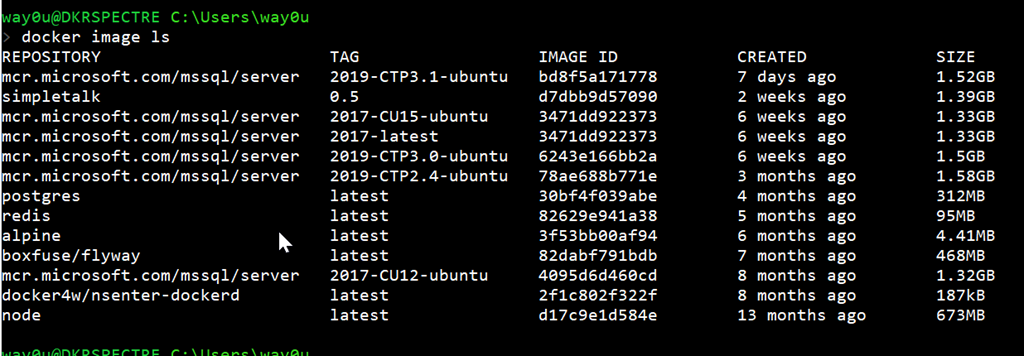
    With containers, I can just run any CTP by picking the image from my list.

    2019-07-03 19_18_01-cmd

    If you haven’t tried working with containers, I’d urge you to start learning a bit. This is amazing technology that your developers already use, or want to use, and I expect data professionals to follow suit in the next few years.

  • T-SQL Tuesday #116–Always Linux

    tsqltuesdayThis month is an interesting invitation from Tracy Boggiano. It’s on Linux, which I like. I hadn’t thought about this in terms of T-SQL Tuesday, but I think it fits and more than that, I think Linux will be the future of the backend data platform from Microsoft. I’ve said it in a few presentations, and I think we’ll get there in 10 years.

    In any case, I wanted to write about how I use Linux and SQL Server.

    Containers for Work

    One of the technologies that I see gaining a foothold in many companies is containerization. More and more developers are using containers, and asking for their databases to work in containers. At Redgate, we’ve been investigating this and are looking to build solutions that will use containers.

    As a result, I’m experimenting with SQL Server in containers on my laptop ad giving some presentations that share the way in which they work. I’ve written a little at SQLServerCentral as well as on this blog.

    In setting up my laptop, I installed Docker and experimented a little with Windows and Linux containers. I’ve standardized on Linux containers, because they’re more mature for production (Windows containers are in preview now), and I think with Kubernetes and the growth of how the SQL Server 2019 Big Data Clusters will work, I expect more Linux for servers in the future.

    I’m also using this as an opportunity to brush up on some bash and Linux skills, connecting to my containers with the –it (interactive) switch, as well as using the Windows Subsystem for Linux.

    It’s slow learning, and it’s interesting trying to juggle things in bash and PowerShell at the same time, but I expect these skills will become more hand in the future.

  • Learning More about Kubernetes (K8s)

    I know a bit about this, but I’m always looking for more. I had the chance to see Brendon Burns recently and I was impressed. That is one seriously smart dude. In any case, I saw a link from Microsoft: 50 days from zero to hero with Kubernetes. It’s at this link: aka.ms/learnkubernetes

    I decided to dig in a bit, because it’s a complex subject in some sense and going through some resources can help solidify how this works.

    Day 1

    It’s a children’s story of a visit to a zoo, with an attempt to explain what pods, replica sets and other items. The first few items made sense to me since I’d worked with K8s slightly before.

    However, as the story delved into more complex subjects, like Ingresses and Daemon Sets, I had a vague idea of what ese were, but not really. I’m not sure I could explain back what some of these do. I hope future days will help me understand.

    Day 2

    Day 2 is a video on Containers from Brendon Burns. He talks about the history of VMs and then lightly on what a container is and how this fits together. Since I’ve watched some of Nigel Poulton’s courses at Pluralsight, this makes sense and reinforces what I know. It also gives me another way to explain things.

    However, for others, I wonder if this makes sense to them. It’s a very high level, but fast view of containers. Worth watching if you want to know more.

    I’ll continue on with the series as I get time, likely a very sporadic look at this technology.