Tag: syndicated

  • Finding Inconsistent Key Values–#SQLNewBlogger

    Another post for me that is simple and hopefully serves as an example for people trying to get blogging as #SQLNewBloggers.

    I was reading Iris Classon’s blog recently and ran across a post on her day at work. I think it’s a fantastic post that does help younger people understand what a job is like. I’m looking forward to seeing more.

    One quick thing struck me in the post, which was that she has clients that are missing key value settings in a table. I’ve dealt with this, and want to write more, but a quick post on just finding out that there are missing settings.

    Finding the Data Inconsistencies

    Each client should have a set of key value pairs in a settings table. However, because of application problems, not every client does. In the sample data (below), there are 8 clients, each of which should have 5 values in the GlobalSettings table. However, there are only 20 rows in this table when there should be 40.

    This is the type of issue I’ve had occur in an application, especially one that evolves over time. We add a key-value item to the application, which new clients get, but older ones are never populated. This is the same type of issue I saw in a post by Iris Classon.

    How can I find the items that don’t match? One simple way is to count the values, but include a HAVING clause to limit the results. If I want to see who has all the values, I can do this:

    SELECT gs.ClientID, COUNT(*)
    FROM dbo.GlobalSetting AS gs
    GROUP BY gs.ClientID
      HAVING COUNT(*) = 5

    In my sample data, this returns one row, for Client 1. If I change the HAVING clause to < 5, I get the other seven rows.
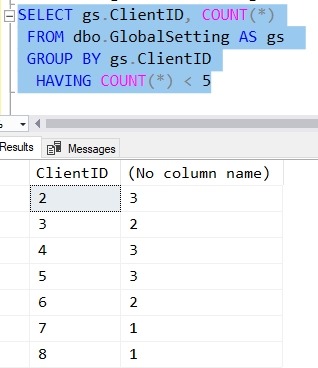
    2018-06-29 14_46_00-SQLQuery1.sql - (local)_SQL2016.sandbox (vstsbuild (56))_ - Microsoft SQL Server

    There are other considerations here, and this isn’t the best way that you might ensure you have the values. I might have a table, or a derived table that ensures I’m checking the right 5 values.

    I’ve written more about this in an article at SQLServerCentral.

    The Setup

    I built a couple quick tables and added data with this script. Note that there are 8 clients, and that each has a series of settings in a table. There are 5 possible settings (Position, Height, Weight, Number, College)

    CREATE TABLE Client
    (ClientKey INT IDENTITY (1,1) NOT NULL CONSTRAINT ClientPK PRIMARY KEY 
    , ClientName VARCHAR(200)
    , ClientStatus TINYINT)
    go
    CREATE TABLE GlobalSetting
    ( GlobalSettingKey INT IDENTITY (1,1) NOT NULL CONSTRAINT GlobalSettingPK PRIMARY KEY 
    , ClientID INT NOT NULL CONSTRAINT GlobalSettingFK_Client_ClientID FOREIGN KEY REFERENCES Client
    , GlobalSettingName VARCHAR(100)
    , GlobalSettingValue VARCHAR(500)
    )
    GO
    INSERT client VALUES ('Shaquil', 1), ('Von', 1), ('Bradley', 1), ('Shane', 2), ('Todd', 2), ('Jerrol', 3), ('Jeff', 3), ('Josey', 3)
    
     Position, College, Height, weight, number
    INSERT dbo.GlobalSetting
    (
        ClientID ,
        GlobalSettingName ,
        GlobalSettingValue
    )
    VALUES
      (1, 'Position', 'OLB')
    , (1, 'Weight', '250'),
    (1, 'College', 'CSU') , (1, 'Height', '74') , (1, 'Number', '48') , (2, 'Weight', '250') , (2, 'Number', '58') , (2, 'College', 'Texas A&M') , (3, 'Height', '76') , (3, 'Weight', '269') , (4, 'Position', 'OLB') , (4, 'College', 'Missouri') , (4, 'Height', '75') , (5, 'Weight', '230') , (5, 'Number', '51') , (5, 'College', 'Sacramento St') , (6, 'Weight', '235') , (6, 'Position', 'LB') , (7, 'Weight', '249') , (8, 'Number', '47')

    SQLNewBlogger

    This only took about 10 minutes to write, though I had to build the tables and data. Of these, the data took the longest, because I had to look up the values Winking smile.

    This is a basic example of checking data in a business situation. I might write about this in my job, perhaps showing a daily integrity check or a custom metric that I use to ensure the system is working. You can do the same thing and ensure that your data is correct.

  • Code I Can’t Live Without–T-SQL Tuesday #104

    tsqltuesdayBert Wagner has a good invitation this month, a T-SQL Tuesday question about code, specifically code you can’t live without. I’ve got my thoughts below.

    This is a monthly blog party, and you can participate. Write a post on this topic, and publish it on your blog. Drop a comment on Bert’s post. You can read the rules on his invitation, but you can really post anytime. It’s fun and good for your brand.

    The Critical Code

    I’ve managed lots of instances in my career. Some mission critical, some just important, some not important to me or the business, but important to someone.

    One thing I’ve found is that there are plenty of common things I do on most systems. I’ve had lots of code that I’ve written to manage all aspects of DBA work, from backups to maintenance to monitoring. I’ve had routines that handled all sorts of security or auditing.

    The code that I can’t live without, isn’t my code, but I’ve used it on probably every instance I’ve managed at some point. The code is actually from Microsoft, and it’s indispensable.

    The code is sp_helprevlogin from this support article.

    While I tend to be distrustful of keeping passwords the same for too long, and I usually don’t attempt to recover them in any way, just reset them. There are cases, however, when we’re moving an app, failing over to DR, or recovering some system and we need to keep the password the same.

    At least in the short term. When systems are down, I need them back up, and I can argue about a password reset later.

    This has been the most useful piece of code for me, and one that I think most of you could use as well.

  • Another MVP Award and a Few Thoughts

    I got the news of my MVP award last week. I’m honored that Microsoft feels I do quite a bit for the community. This was my 10th or 11th, though I’m not sure since they changed around the award periods. In any case, it’s been a long time.

    As I saw quite a few people posting their award (or re-award), I also noted a few people that weren’t renewed. I wasn’t surprised, even at some of the big names, since I haven’t seen them in the community much in the last year. Keep in mind, the award is for the most recent award period, not your past.

    I ran across this Twitter account, which I’m guessing is someone that wasn’t re-awarded as an MVP. Personally, I think this is a poor showing of one’s professionalism. I’m sure this is why the account is somewhat anonymous.

    This year we had quite a few that weren’t renewed that have been MVPs for a long time. Usually this isn’t a surprise to the individual, as they often know if they’ve been doing lots of blogging, speaking, etc. This can be surprising to others, since often we assume that person XX is always helping others. The thing I always think about is whether someone has done enough in the most recent period, not in the distant past.

    And, of course, done enough in the area Microsoft cares about. If you’re the number one expert in the world with Notification Services, writing and speaking about how to keep it alive, I’m not sure you’re getting designated as an MVP.

    I have no doubt that if I stopped blogging here and speaking at events, I wouldn’t be renewed. I do some work at SQLServerCentral, but I’m not sure it would be enough if I weren’t volunteering more of my time and knowledge in other ways.

    The award is recognition by Microsoft. It isn’t, nor should it be, any validation of your efforts to help others. You might be a great community volunteer that does a lot of writing, speaking, organizing, and more. Those are all efforts to be proud of and continue to do, if you enjoy them. They just might not be enough to beat out everyone else, again, in Microsoft’s view.

    As a friend told me, play your game. Do what works for you, and reap the rewards if they come. If they don’t, you should still be happy with what you’ve done.

  • Setting Up Pi-Hole.Net

    I saw a tweet a short time ago from Drew Furgiuele about pi-hole.net. He noted this was a near use of a Raspberry Pi, and I wanted to give it a try. I got one awhile ago, and used it for a few things. We started with a media streaming device, but when I got a Fire Stick, this wasn’t needed or used. Then I tried a Bluetooth audio bridge to the stereo. It wasn’t as reliable as I’d like, and it added complexity to turning this on, letting it boot, etc.

    As a result, it’s been sitting a bit as I thought of some other project. The pi-hole seemed like something to try, so I decided to give it a go. It was pretty easy, and it blocks some ads. Not all of them, but

    First, I grabbed the latest release, Stretch, of Raspbian. I chose the lite version, since this will be headless. I downloaded that and also grabbed Etcher to flash the card. This took a bit, but I let it run in the background as I did other things.

    From there, I used Explorer to connect to the drive and create an empty “ssh” file. I read this tutorial, and ended up just creating a new text file in Windows, and removing the extension.

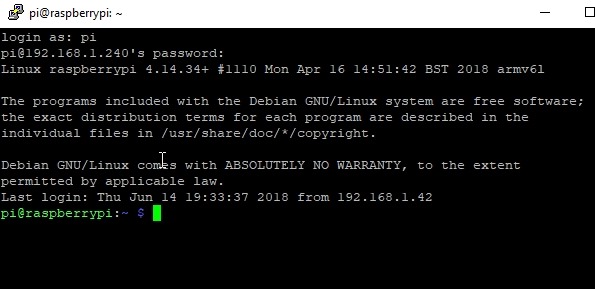
    Once this was done, I took the device up and plugged it into the router, both the Ethernet and the USB cables. This booted and connected the device. Back at my machine, I used Putty to connect. I did have to upgrade Putty to get the proper encryption level, but if you get a new copy, you’ll be fine.

    2018-06-14 14_00_42-pi@raspberrypi_ ~

    A few people pointed out ssh is in Windows now. Great, that works, I like Putty.

    Once connected, I ran the curl command to get pi-hole installed. It was fairly simple, and once installed, walks you through some basic config and networking. I use the 192.168.1.0/24 network that most people do, but my DHCP is set to give out addresses from 2 to 199. 200 and above are statics for me, so I configured this to use one.

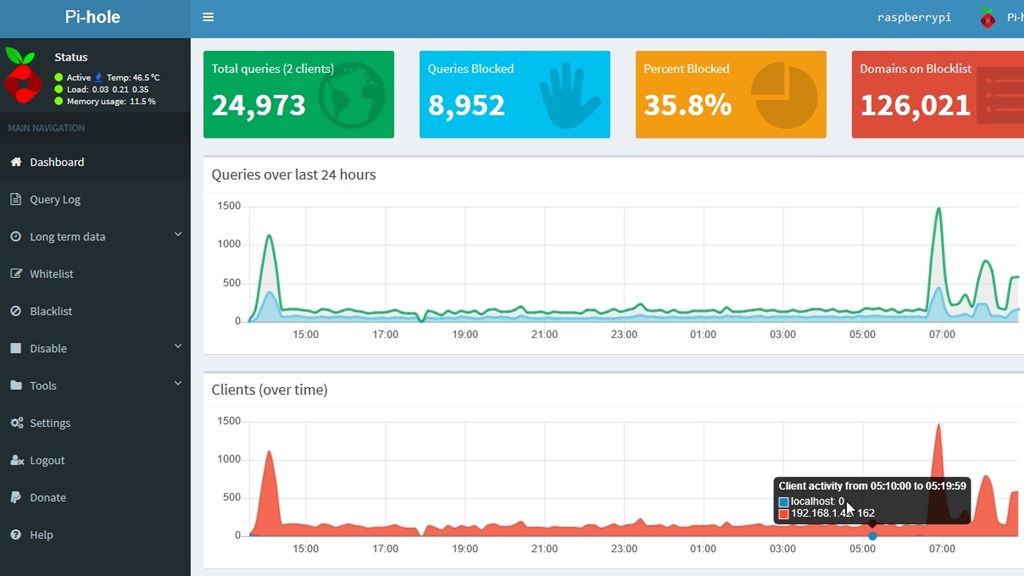
    After that, I got a password for the device and I went to my static IP/admin to see the Pi-hole dashboard. I logged in and I could see traffic. This is from the next day.

    2018-06-15 09_11_16-Pi-hole Admin Console

    It’s an interesting project and I’ll see how this goes. I could add a other software to this device, and I may. We’ll see.

    I’m not against advertising, but there are some shady sites and some data gathering. Right now, a lot of blocks are for some telemetry service, which is fine. I can’t get info on it, so I’m guessing it’s not legitimate.

    In case you are wondering, there are lots of queries to telemetry.servers.getgo.com that are being blocked.

    If you want to try it, this is a cheap experiment, and you can also play with Linux, some hardware, and SSH.