Tag: syndicated

  • Testing BackBlaze Restores

    The most important thing for a data guy is having a way to restore data. If security, performance, etc. are broken, those can be fixed is we have the data. If we don’t have data, does security matter? It’s important, but secondary.

    When Crashplan stopped providing a multi computer setup, I needed to get a new solution for home. I asked on Twitter and then wrote a bit about my evaluation and choices.  These were my particular requirements, and yours may be different. In any case, I decided to evaluate BackBlaze under their couple week evaluation and keep the system simple for both my wife and I. As a part of that evaluation, I tested restores.

    Missing a File

    I didn’t simulate a crash and restore all my files, but instead decided to test this while out of town. I was in the UK, at the Redgate Software office and wanted to check an expense report I’d submitted. I also wanted to get the latest expense report to add some items to it. I keep these on my desktop, but I haven’t setup a home VPN for access, nor would that have helped. My desktop was powered down for my 11 day trip.

    I decided to see how BackBlaze was working. My first step was to connect to my account on the BackBlaze.com site. I logged in and saw my machine listed in the Overview. (I reshot these images later, so the dates aren’t shown)

    2018-06-28 08_41_14-Window

    Note: I didn’t have Backblaze software installed on my laptop.

    I selected Restore and went to a new screen where I had a choice for the restore. I selected getting a ZIP file, but it’s nice to have other options for large files. If I were pulling back 2TB of images, I might just pay for a hard drive.

    2018-06-28 08_41_24-Window

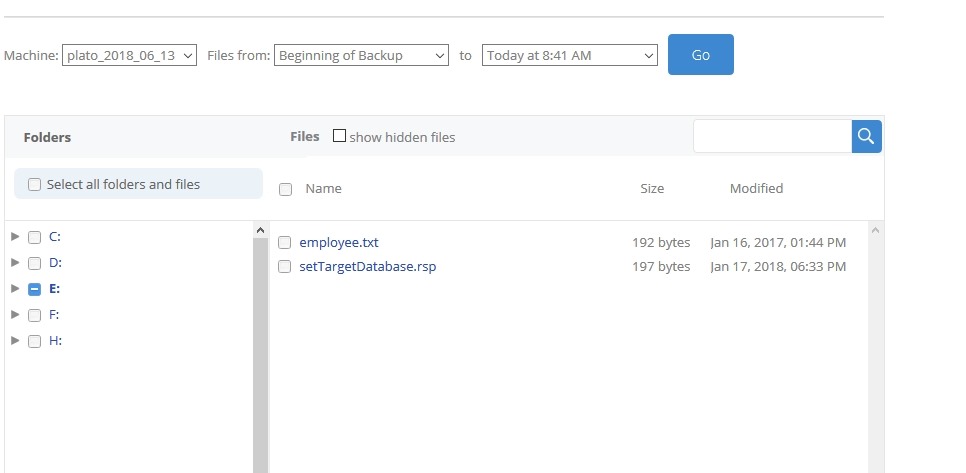
    Below this, I saw my drives and I could navigate to select select files.
    2018-06-28 08_44_21-Window

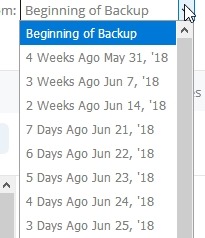
    I also had options to  see different versions of backups.
    2018-06-28 08_44_42-Window

    Once I found files, I picked the one I needed and started the restore. Just for a test, I picked a file on a different drive to see what would happen.

    2018-06-28 08_42_14-Window

    I went on with my day, and within an hour, I’d gotten an email. This let me know my restore was ready and I needed to securely sign in to get the download. I like that this was a sign in and now just a link to some random file.

    2018-06-28 08_47_19-Window

    I downloaded the zip file and inside were the files I’d selected. I unzipped them and filled out more of my expense report.

    This was a smooth process and validates my decision to use BackBlaze. It’s easy for my wife, which she’ll appreciate, and I can easily access things on the road.

    My trial goes until the end of June, but I’ll sign up for the service once I return home as this will work well for me.

  • Updating VSTS to SQL Change Automation

    We (Redgate) released SQL Change Automation a few weeks back. This is the first stage to implementing a combined toolset that works with both state/comparison development and migrations based development. The change updated both our migrations toolset (previously ReadyRoll) and our build/release cmdlets (DLM Automation) to SQL Change Automation (SCA).

    I have pipelines that are setup with Redgate DLM Automation tasks. This post shows how I updated the first of these to SCA.

    Finding the Build

    Here’s my current VSTS build pipeline for a project. Note that these are DLM Automation 2 tasks. There is a single task that you configure with the Operation (on the right) to build, test, or sync a database.

    2018-06-28 16_56_49-SQL Server Builds - SOC-CI - Visual Studio Team Services

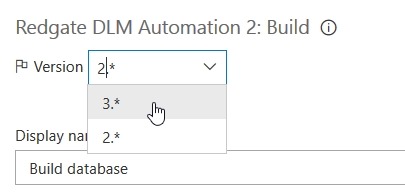
    Note that there is a version drop down at the top of the right side. Here I need to drop this down to find the SCA task, which is version 3.

    2018-06-28 16_58_05-SQL Server Builds - SOC-CI - Visual Studio Team Services

    Once I select this, you’ll see that my task changes to SCA, both on the left and right.

    2018-06-28 16_58_14-SQL Server Builds - SOC-CI - Visual Studio Team Services

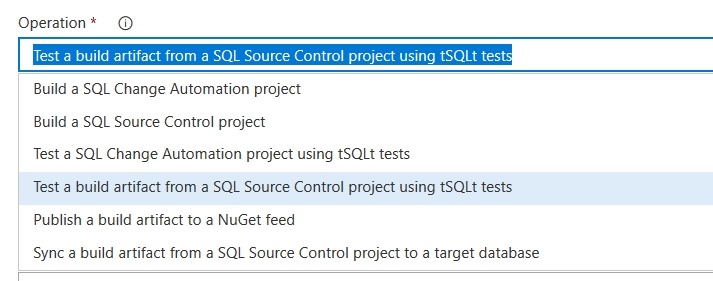
    I can change both tasks to v3 and I’m set. This is really the change that we’ve done, and we’ve combined operations. If you drop this down you will see there are SCA (migrations) projects here along with SQL Source Control state projects.

    2018-06-28 16_59_28-SQL Server Builds - SOC-CI - Visual Studio Team Services

    This means that if I convert from a SQL Source Control/state project, my pipeline stays intact. I’ll just change the operation from a build with SQL Source Control to one with SCA.

    This mostly works, but there are some path differences for release, so I’ll talk about those in another post.

    This is a simple change, but it’s important for future strategy. You can watch a bit of our strategy in this SQL in the City video on the database deployment pipeline. If you want to give this a try, download SQL Source Control and/or SQL Change Automation and start a test project.

  • Building Better Test Data on the Redgate Hub

    I have a new piece published over at the Redgate Hub: Building Better Test Data with SQL Provision. Part of my job is helping people learn to use our products better, and provide not only solutions to issues, but also ideas that might help them think about new ways to use products.

    I’m a big believer in testing and having good test cases in your data. This piece gives a technique I’ve used in the past to ensure we test everything we need.

  • Mastering Index Tuning–Day 3

    This is a short series of posts on the courses I took with Brent Ozar. I actually completed the courses in the past, but I wrote notes and wanted to revisit the way things went.

    This post looks at the Mastering Index Tuning class. Other  posts are:

    Day 3

    As with Day 2, we begin with reviewing the labs from yesterday. These were harder labs, and Brent spent time looking at how he solved the labs, referencing parts of solutions some people had. This took awhile, with a break in the middle.

    As usual, we can ask questions and discuss the solutions in Slack, which Brent keeps an eye on.

    We start the lectures with artisanal food, which Brent does enjoy. Hand crafted items from the chef, which felt funny since my car killed something and left an organ of some sort in the bathroom.

    The analogy is that there are artisanal indexes, like those on computed columns, indexed views, and filtered indexes. These are items that can help in specific situations, but in general we don’t want to use them.

    I like that Brent brings in the experience they’ve had with clients, noting that some of these features don’t work well.

    The afternoon lab is fix some really bad reporting procedures with indexes (regular or artisanal) or changing code. I know I can’t always change code in databases, but this gives us a chance to try things. I ended up changing some code, but not much. The lab review after lunch was interesting, as Brent had a strange result with the last proc. Looking forward to seeing his debugging of this later.

    The lecture after lunch moves to the end of D.E.A.T.H, heaps. I hate heaps, so this was interesting. Brent agrees with me, you really need a CI on the table. Maybe there are some reasons to not use one in a situation, but most of you need to just add a key.

    The last part of the afternoon looks at the impact of CIs and then constraints and FKs. The CI part is interesting. I see lots of people talking about how to decide on this. I tend to lean towards Brent’s view, which he’s presented on and it’s in the class. Take the class if you want to learn (I don’t want to republish here).

    For FKs/constraints, the module had lots of discussion. People think about FKs in interesting ways. I’ll have to re-watch this as I got busy in the middle with other stuff and missed some lecture.

    The final lab is a big one. Use all the skills from the three days of the class. Restore the db, run a setup that messes up indexes, then fix things. It was a challenge, and I burned about 12 minutes deduping and eliminating indexes, then about 20 coming up with more to add. The creation took quite some time, so I never really got around to tuning, and since this is only part of my day, I had to stop. I do have some real work to do.

    The final lab solution goes up the day after, and what Brent came up with was interesting. I liked watching the videos later to see how he approached the issues and solved them. I like that there wasn’t “one” solution, and he talks about how we might solve the lab that would be different than production.

    That’s important, and it’s something that I appreciated in this class. I know better, but it’s always good to be reminded that the class is a game, a model of what could happen, but in the real world, these are just tools that might help, but could hurt. Judgment is still needed.

    The Aftermath

    One thing I like about this class, which I’ve missed in some live classes, is that I can re watch sections of the class later. The class page has a list of all the lectures and labs, with each containing a video. Some might be from my class, some from previous ones. Since this is delivered and recorded in a modular fashion, Brent can update sections over time.

    I went back to watch the first Artisanal index module, as I was distracted that morning by something at work. That was a nice benefit.

    The Final Word

    This was a great class. I haven’t been to a real class across multiple days in awhile, and I think the format of some lecture, a lab (with interactivity), and then a review of the lab, was great.

    The lectures were interesting, and I learned a few things. The labs were challenging, designed to force you to work within constraints to tune something. Indexing is often a place where you can make changes and rapidly affect your system. The effects could be good or bad, so you need to be sure you are proceeding in a methodical fashion and also capturing metrics on the changes.

    If you’re interested in the class, you can visit the Mastering Index Tuning page to learn more and purchase the class.