Tag: syndicated

  • Prepping for Mastering Index Tuning with Brent Ozar Unlimited

    I got the chance to sign up for a few courses from the Brent Ozar Unlimited team and took it. I struggle to find time for training, between work commitments, travel, and family time, it’s hard to fit in a day or two. I’ve almost given up on going to in-person classes mostly because of the time involved.

    I’m trying this online, both to learn something and see how the experience is. I’ve watched Brent present many times, and I think he does a good job of explaining concepts. While I suspect there’s a good amount of things in this course that I’ll already know, my experience is that it’s both good to get reminded of concepts from a different point of view as well as get some tips/tricks that I might not know. I’m always amazed how I might learn one small thing in a beginner session that I never knew.

    Signup

    The signup is simple. Go to the class page and add this to your cart and pay for it. The process is simple, and you get a good agenda as well as a schedule. I really appreciate the schedule, including the breakdown into what’s covered during different blocks.

    There are multiple dates/times to choose from, but this is online during the workday, Eastern US time, so plan accordingly. For me, this means a slightly early morning, but since I can turn up the speakers and walk to the coffee machine, this works out well.

    There are other classes on their home page, including Database DevOps, PowerShell, SSIS, and Data Science. There are plenty of more mainstream DBA/developer type SQL Server classes as well.

    Prep

    A couple weeks before the class, I got one of those automated emails from GoToWebinar. I’m used to receiving 3-4 of these before an event, so I promptly ignored it.

    Then I got a second one a few days later, and I decided to look at this one. I managed to actually read this section:

    “To get ready, go here:
    https://BrentOzar.com/xxxxxx
    And read the “0.1 Before the Class” module. There’s a ton of prep work and instructions in there for you, including a few videos to watch to prep, and you can download the slides to follow along. ” 

    I removed the URL, since I’m not sure this is public, but in any case, I clicked the link to find a description of the class, in usual well-written Brent style. There was also a series of links on the side, for various slides and labs.

    The Before the Class is a page with 4 videos from Brent that are supposed to prep you and give you some background. It’s 69 minutes, so I set aside some time and got moving.

    And I ran out of time. I watched 3 of the videos, but ended up not getting the fourth one done before the class because of family and travel commitments. I should have tried to watch more in short periods, but I kept putting things off. I know a lot of this stuff, but if you’re new to the class and want to learn this, spend the time to get some basics down.

    Testing Equipment

    I didn’t bother, mostly because I use GoToWebinar every few weeks, between my work or watching other things. As a result, I know my PC works. If you don’t do that, make sure you set things up.

    Contact and Notifications

    I went back and looked. I got these notifications:

    • A confirmation of the purchase
    • A 2 week notices that asked me to go to the class page, and also get started on Slack.
    • A 2 week (minus 1 day) email that asked me to read the “0.1 Before the Class” module.
    • Two 4 day notices, a day apart (one was a 3 day notice). Not sure if this was correct, but these were roughly the same.
    • An email the day before the class with a VM URL and credentials
    • A “start in 1 hour” notice

    That might seem like a lot, but I think this is pretty good. I might miss one of the advance notices in a busy world, so it’s nice to get the second one. I could glance at it and delete it if I had read the previous one.

    There’s a good amount of prep stuff out there, and Brent has each module of his class recorded, so I could have gotten ahead and watched some of the class ahead of time. I could have also played with labs a bit, though he warns you IN CAPS to be careful about not breaking some things.

    Overall

    The process before the class was well done. There is a good amount to help me prepare, but I won’t know until I get to the class if the prep was good enough.

    Looking forward to starting. Actually, but the time this publishes, I might have started, so we’ll see.

  • A Broken Linux VM

    I have no idea if this is the best thing, but I went to boot up a Linux VM today and got this:

    2018-05-23 09_35_37-Ubuntu 64-bit SQL Server .210 - VMware Workstation

    My Linux skills are rusty, but this looks like a disk error. I rebooted and found this:

    2018-05-23 09_39_33-Ubuntu 64-bit SQL Server .210 - VMware Workstation

    A search on Stack showed this page: https://askubuntu.com/questions/697190/fsck-error-on-boot-dev-sda6-unexpected-inconsistency-run-fsck-manually

    I ran the utility, and answered yes to about 20-30 items. I have no idea what to do, but I figured this was worth a try. Once this completed, I rebooted again.

    The boot sequence in text took awhile, with a “start job” running about about 2 minutes on the disk device. While 2 minutes isn’t that long, it’s an eternity when you are hoping something works.

    Eventually it completed and I found this:

    2018-05-23 09_45_33-Ubuntu 64-bit SQL Server .210 - VMware Workstation

    Good news, as I wasn’t looking forward to rebuilding the machine. It’s just a lab machine, but I need to check something that day, and so I needed it. While installing Ubuntu and SQL Server is fairly quick, it’s still time.

    Fortunately things appear to be working and I can connect from SSMS to the server, so I’m guessing things are mostly working. Fingers crossed.

  • Getting SQL Agent going for SQL Server on Linux–#SQLNewBlogger

    Another post for me that is simple and hopefully serves as an example for people trying to get blogging as #SQLNewBloggers.

    It’s actually a simple procedure, but I thought I’d write a short note to help me remember. The procedure is documented in Books Online.

    When I first started playing with this version, I noticed that SQL Agent was disabled. That’s not great, since SQL Agent is a great tool for various tasks in SQL Server. I can’t start the agent from here, as the underlying implementation is different, and I’m not really a host OS admin when connecting in SSMS.

    2018-05-23 15_19_26-SQLQuery4.sql - ubuntu.master (sa (56))_ - Microsoft SQL Server Management Studi

    After checking which patch level I was at (CU6), I changed to my Linux console, and ran the configuration utility. For Linux, this is mssql-conf.

    2018-05-23 15_20_34-Ubuntu 64-bit SQL Server .210 - VMware Workstation

    The next step is to run the command listed to restart the system. I actually just ran

    sudo sysmctl restart mssql-server

    Once this was done, I refreshed SSMS.

    2018-05-23 15_22_52-SQLQuery4.sql - ubuntu.master (sa (56))_ - Microsoft SQL Server Management Studi

    This appears to work, but let’s test it. I’ll create a new job that does a backup of a database. This should be simple, and I’ll use defaults, just a filename for a full backup. I’ll use this command:

    backup database dbaadmin to disk = ‘dbaadmin.bak’ with init

    I save the job and run it. Sure enough, I have a backup.

    2018-05-23 15_28_37-Ubuntu 64-bit SQL Server .210 - VMware Workstation

    Tada, now I can move forward with work.

    SQLNewBlogger

    This is a fairly simple thing to do, but the writing helps me remember, but more importantly, I can document that I’ve done some learning here and experimenting.

    The next person thinking about interviewing you wants to know that you can learn and solve problems.

  • Cleaning up Azure Client IPs

    I travel around, and as a result, I may find myself accessing my Azure databases from different locations. Since it’s a quick click and login to add my IP from SSMS, I’ll end up with multiple ones. I don’t want to leave systems open for a long time, and certainly don’t want to just add 0.0.0.0 without good reason.

    As a result, I periodically clean things up. I’d like to do this after each trip, but I sometimes forget. Here’s how I do this in the Portal.

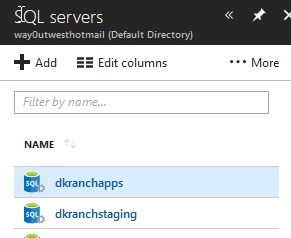
    First, I need to access my server, not my database. Servers are separate from databases, as you can see below. This isn’t an instance, but rather a logical construct for holding multiple databases.

    2018-05-22 08_26_04-Window

    From here, I get a list, and I can click one.

    2018-05-22 08_26_10-Window

    When I do this, I get the details of the server. On the right side of the overview are the firewall settings.

    2018-05-22 08_26_21-Window

    Click this and you see the list of firewall rules. Each of these has a name, a starting and ending IP range. You don’t really need to worry about this much if you’re a dev. If you want to give access to a group of IPs because your  company has them, talk to your network admin about the addressing.

    On the right side are three dots. Click these to get the delete option.

    2018-05-22 08_28_14-Window

    I click through these and it’s really quick. I can remove 10 IPs in about 20 seconds, so I don’t bother with too much automation here. I could use PoSh, but it might take me longer to figure out what to do than just click a few times.

    I can also edit a row. If I click the middle, I get edit boxes, and as you see, I can rename a rule that makes sense. I ought to do this for other times, but since I add access from SSMS in hotels, I don’t often go to the server at that time.

    2018-05-22 08_29_00-Window

    It can be a pain, and if I tended to work with a lot of different servers (I have 4), I’d likely automate this more.

    Actually I’ll automate it in another post as it’s a good skill to have.