Tag: syndicated

  • More Azure Database Creation in Powershell

    I wrote about Azure SQL Database for T-SQL Tuesday #82, but I had a few mistakes in my process, at least from a cost standpoint. Since I’ll probably use this a bit more as I flesh out some CI/CD, I decided to document a bit more about the database creation process.

    The Old Code

    One of the problems I noticed right away was that I created an S2 level database in my post, which was too large. That wasn’t needed, and it might eat up my database credits. My original code was:

    New-AzureRMSqlDatabase –ResourceGroupName “Default-SQL-WestEurope” –ServerName “dkranchapps” –DatabaseName “TSQLTuesday” –Edition Standard –RequestedServiceObjectiveName “S1”

    In here, there are a few things that are obvious to me, and some that might not be. I won’t delve into detail on how to choose some of these, but I’ll define what they mean. There is a doc page for the cmdlet, which I used to check what I knew.

    ResourceGroupName

    This is the way you organize Azure resources. In my case, I have one resource group, which I named “Default-SQL-WestEurope”. This was the first group I made, intending this to be for SQL servers, and it’s in the West Europe region. Hence the name. 

    ServerName

    This is self explanatory, but you create servers to host resources in Azure. The one I created a long time ago for experiments was “dkranchapps”. I re-used it here, though I could have created another one.

    DatabaseName

    I’m not defining this. If you don’t know, stop reading.

    Edition

    This is the basic edition for your database. There are multiple options, but I used “Standard”, which was in the sample documentation code. However, a Standard incurs a charge from $0.0202/hr to $0.2016/hr. That doesn’t sound like much, but there are 720 hours in a 30 day month. That’s $14.44 to $145.15 a month. Again, not much, but this is per database. This could cause me issues with my $150/month credit.

    ServiceObjectiveName

    This is the scale within the Edition. I’m not sure why this the Edition is needed if we specify this here, but we can use a name or a value (GUID). In my case, I neglected to check the S2 syntax when I made the database. What I’d want for most things is a Basic or maybe an S level if this is short lived.

    Other Options

    There are other options. I can specify the subscription in a parameter, do a “WhatIf” to see what this would do, Force the command without user conformation, set a maximum size, and more. 

    While you might not need these options, I’d encourage you to look through the list and make sure that it’s not your intention to omit something that might be important in your situation.

    Creating a Basic Database

    One of the things I want to try is scripting the creation of a database in my CI process. That’s not quite simple, and it’s a task for another day, but here’s a basic call that I can work on adding to my builds.

    New-AzureRMSqlDatabase –ResourceGroupName “Default-SQL-WestEurope” –ServerName “dkranchapps” –DatabaseName “” –Edition Basic –RequestedServiceObjectiveName “Basic”

    Once I run this, I can check the portal, and sure enough, I see my database at the correct size.

    2016-09-21 10_52_49-SQL databases - Microsoft Azure

    That’s the first step to automating some builds. Now I need to worry about security and API keys, but for now, I can build a database.

    And, of course, remove it with Remove-AzureRMSqlDatabase.
  • Quick #SQLPrompt Tips – Expanding Wildcards

    I tend to try and get code on the screen quickly and then start to remove things. I’m a visual person, and it’s helpful for me to see some tables, joins, filters, and columns as I’m structuring a query.

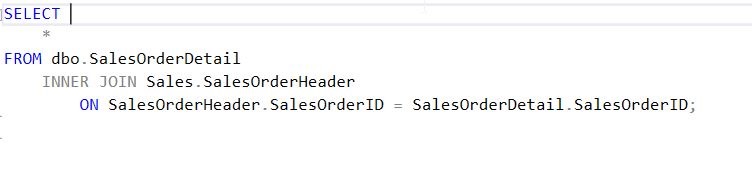
    One of the ways I work quickly is with SQL Prompt is that I’ll write a query, using the SELECT * to hold the place where columns will appear. Since I’m not always sure what columns exist in a table, using the asterisk allows me to complete a valid query.

    2016-08-26 08_46_03-30113.sql - (local)_SQL2014.AdventureWorks2008 (PLATO_Steve (73))_ - Microsoft S

    However, I don’t want to leave the asterisk there. Let’s put the cursor behind it. As you can see here, a tip pops up.

    2016-08-26 08_53_16-30113.sql - (local)_SQL2014.AdventureWorks2008 (PLATO_Steve (73))_ - Microsoft S

    When we hit Tab (or your completion hotkey), the entire column list expands. All columns, from all tables, qualified if necessary, according to my SQL Prompt settings.

    2016-08-26 08_53_25-30113.sql - (local)_SQL2014.AdventureWorks2008 (PLATO_Steve (73))_ - Microsoft S

    Now I have a well written query, or if I don’t need all columns, I can easily remove those that I no longer want to retrieve.

    This is a quick tip, one that doesn’t do a lot, but has the potential to make developers really think about all the data being returned in large queries with a SELECT *.

    Give this a try the next time you find yourself writing a SELECT * query and then remove the columns that you really don’t need. You might also check out a similar piece I wrote for the Redgate blog.

    If you aren’t a SQL Prompt user, then think about downloading an evaluation and becoming a more efficient T-SQL developer.

    You can see a complete list of SQL Prompt tips at Redgate.

  • T-SQL Tuesday #82–Azure SQL Database

    tsqltuesdayIt’s T-SQL Tuesday time and this month we have Jeffrey Verheul giving us the topic of the cloud, or Azure SQL Database. It’s a good topic, given how many people are talking about working in the cloud. There are also the tremendous resources that Microsoft is investing in Azure, so cloud database posts are a good thought for this month.

    Whether you are writing today (Sept 13) or at some point in the future, it’s fun and informative to participate in the T-SQL Tuesday blog party. Learn something and write about it.

    Azure SQL Database

    I have done a little work with Azure SQL Database, but not a log. I have a few ideas, but finding time and focusing has been a challenge. When I saw this topic I had all sorts of ideas, but since I was traveling and busy, I ended up arriving at the deadline without any work done.

    However, there was one thing I’ve been wanting to try in Azure, so I decided to make this the post. I wanted to create an Azure SQL Database using Powershell. This is a topic that I think lends itself to better orchestration and development, so here goes.

    The first step was a quick Google search, which led me to this post on how to Manage Azure SQL Database with Powershell. That’s what I really wanted to do, so I read a bit. The first step was to download the latest Azure Powershell. I did that and ran an install. This required a reboot, something I rarely like, but I swallowed my annoyance and restarted the desktop.

    Once that was done, I ran a couple cmdlets to get connected and check what resources I had. First, I had a login prompt.

    2016-09-13 14_10_50-Windows PowerShell credential request

    Then I got results. As you can see, I had a few, and the list actually scrolls down quite far.

    2016-09-13 14_23_23-powershell

    I then tested another cmdlet, Get-AzureRMResourceProvider, to get a list of regions.

    2016-09-13 14_25_22-powershell

    That worked, so let’s create a database. I used the New-AzureRMSqlDatabase cmdlet, which worked well. I provided the resource group name and servername I already had with a new database.

    2016-09-13 14_14_44-powershell

    That completed, and things looked good. I connected to the Portal, and sure enough, I had a new database.

    2016-09-13 14_15_23-dkranchapps - Microsoft Azure

    Of course, an S1 will eat up all my credits, so I changed that right away.

    2016-09-13 14_15_57-TSQLTuesday - Microsoft Azure

    That was pretty easy. I can see how I might now string together the creation of a database with some other work, perhaps adding data, certainly using the Redgate DLM Automation or ReadyRoll scripts to create objects, and then I can run things and tear them down.

    Speaking of which.

    2016-09-13 14_32_24-powershell

  • Bringing Database Devops to DevConnections

    Another alliteration post. Maybe I’ll make all my titles tongue twisters to test your talents?

    This is my new favorite session. I’m slated to deliver this at a few different conferences this fall, and hopefully you’ll come see it in Las Vegas at DevConnections on Oct 10-13.

    The talk is called Bringing DevOps to the Database, and this presentation is designed to show how many of the software development processes that we take for granted with .NET, Java, and other front end applications can be applied to the database. I’ll cover how version control, Continuous Integration (CI), and Release Management (RM) can be applied to database changes.

    This has been a focus of mine as an evangelist for Redgate Software, and I’ve found a number of ways that you can adopt common, best practice software engineering in the database development process. I’ll show how Redgate makes this easy, but I cover the process in a tool independent way. You’ll learn what needs to happen. How you get that working is up to you, but if help is needed, Redgate can cover that part.

    If you’re looking for some training, some inspiration, and are a full-stack developer, or multi-technology IT worker, think about coming out to DevConnections. There are a slew of technologies being covered (VS, ASP.NET, C#7, Azure, PowerShell, AWS, SQL Server, Sharepoint, Exchange, Hyper-V and more).

    Register today, use 500SPKR to save $500, and I’ll see you in Las Vegas this October.