Tag: syndicated

  • Git Pull in SQL Source Control

    I wrote recently on Git Push in SQL Source Control (SOC), and now wanted to add the other side of the story, pull. This process is even simpler.

    I’ll be working with a new database, one that has two client systems set up already with Git support. I know I haven’t tackled that part of SOC and Git, but I’ll do that in a new post.

    In this case, I’ve got a repository on Github for my Redgate and SQL in the City demos. It’s a sample database, but I’ve been making multiple changes to the database across time, using Version Control as a way of continuity, and then being able to rollback changes or see history.

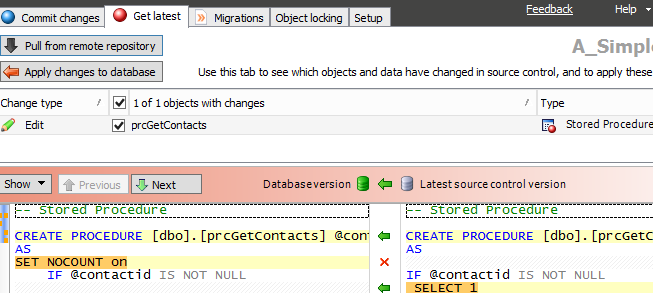
    I’ve got a connection in a VM to a second development machine. When I launch my VM, and SSMS, I go to the second SOC tab, the one that is labled “Get Latest.” You can see the image below, and notice that there are two buttons in the upper left. There is the familiar “Apply changes to database,” which has been the way that we pull changes from TFS and SVN, but now there is a new “Pull from remote respository.” This is the one specific to Git.

    2015-10-22 23_19_54-OneNote

    In this case, I’ve refreshed my database previously in sync with the local Git repo. Therefore the button is grayed out. However, I don’t know if there are remote changes until I click the other button.

    I do that and get the familiar four step dialog from SOC that checks for changes and then compares them to the local database. However what you don’t see is that a “git pull” is issued first, pulling changes from the remote repo. In my case, I had one change I’d made in London, actually, and hadn’t synced with my VM.

    2015-10-22 23_20_15-salesdemo-2015-02-25-1422-export-i-fgg5cstb - VMware Workstation

    This is the familiar SOC actions now where I see the changes and can use the “Apply changes to database” to compile this code in my local database.

    In some sense, this is less exciting then push, but it’s nice to be able to do this in the client.

    I’ll write some more on the workflow as I develop changes in the coming posts, which are going to be aimed at building a small database in Azure SQL database and moving changes from my local system to Git for tracking, and then to Azure for production use.

  • Webinar: Unit Testing with SQL Server and tSQLt

    I ran into Sebastian Meine at the PASS Summit a few weeks ago and we were talking testing. Sebastian is the founder and developer of tSQLt, which I really like using. We’ve done some teaching together and I’ve delivered a number of sessions on tSQLt at various events, but we wanted to get more people interested in testing code.

    I had a session at PASS, which was very well attended. 150+ people came, which was stunning to me. I was expecting to see 20, and afterwards Sebastian and I started talking about what else we could do.

    We’ve decided to do a webinar, but one driven by you. We are looking for you to ask questions about code you’d like tested, or which you’re unsure of how to approach. Leave a comment here, or put your question in the webinar registration. The details are:

    Unit Testing in SQL Server with tSQLt
    https://attendee.gotowebinar.com/register/7623481833734658561
    Thurs, Nov 19, 2015 11:00 AM – 12:00 PM EDT

    Join unit testing experts Steve Jones and Sebastian Meine for this exciting opportunity to learn about unit testing and the tSQLt framework to improve your T-SQL code quality and maintainability. If this day/time is not good for you, register anyway so you receive a link to the recording when it is available.

  • Updating Extended Properties

    Another post for me that is simple and hopefully serves as an example for people trying to get blogging as#SQLNewBloggers.

    I wrote recently about adding extended properties. Updating them is very similar. There’s an analogous procedure called sp_updateextendedproperty that changes the value of properties.

    The arguments are again, unintuitive, but the more I work with extended properties, the more comfortable I become. In this case, I have the same name and value, and then the level 0,1, 2 items with both a type and name.

    I highly suggest, however, that you name your parameters, including the names in your calls so programmers running across the T-SQL aren’t depending on position for an understanding of the parameter.

    If I look at the table from the previous post, I can update the value of my property with this code:

    EXEC sys.sp_updateextendedproperty
      @name = 'PKException'
    , @value = 0
    , @level0type = 'schema'
    , @level0name = 'dbo'
    , @level1type = 'table'
    , @level1name = 'SalesHeader_Staging' -- sysname
      ;
    GO


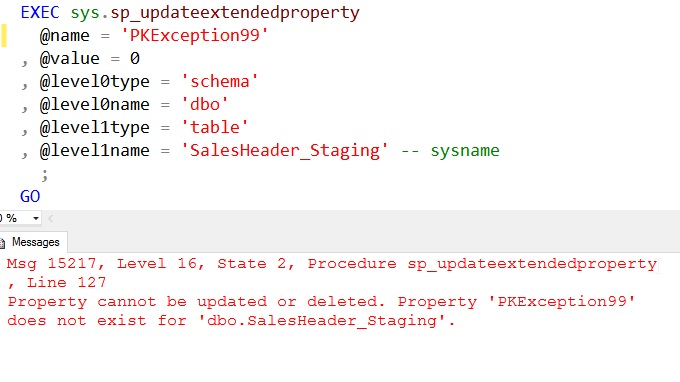
    However my property needs to exist. If I call this procedure with the wrong property, I get an error.

    2015-11-02 17_25_03-Cortana

    This means that you need to be sure that the property exists before you update it. Good code would have the error handling somewhere.

    SQLNewBlogger

    After writing the previous post, this one took only about ten minutes to do the typing. I’d been working with extended properties, so I had the code and just needed to take the screenshot.

    Reference

    A few items from BOL

    sp_updateextendedproperty – https://msdn.microsoft.com/en-us/library/ms186885.aspx

  • Poor Data Modeling – T-SQL Tuesday #72

    tsqltuesdayThis month Mickey Stuewe hosts the T-SQL Tuesday and she has a great topic. Data Modeling is something few people seem to do, especially developers, and it often can go wrong. That’s the topic, and I have a short story.

    T-SQL Tuesday is a monthly blog party, on the second Tuesday of the month. The rules are on Mickey’s blog, and you can read them there, but essentially you write a post every month.

    Or later.

    The Aging Model

    I once worked at company that shall rename nameless. We had a system built before my time which had a hierarchical set of entities. I can’t disclose the exact industry, but imagine that we had a list of items like this:

    • Manufacturers of products
    • Distributors of products
    • Warehouse holding products
    • Vendors selling products.

    In this structure, we have a strict linkage where each item below the next is contained in the item above it. In other words, a manufacturer works with specific distributors and only those distributors. Distributors don’t work with other manufacturers.

    I know this sounds contrived, and it is for a supply chain. However not for the industry in which I worked. So imagine we’re 100 years ago when power was more concentrated with supply chains.

    This resulted in tables like this:

    CREATE TABLE Manufacturers ( manufacturerid INT IDENTITY(1, 1) CONSTRAINT manufacturer_PK PRIMARY KEY ( manufacturerid ) , manufacturername VARCHAR(200) , primarycontactid INT -- ... ); GO CREATE TABLE Distributors ( distributorid INT IDENTITY(1, 1) CONSTRAINT distributor_PK PRIMARY KEY ( distributorid ) , manufacturerid INT CONSTRAINT Distributor_Manufacturer_FK FOREIGN KEY REFERENCES dbo.Manufacturers ( manufacturerid ) , manufacturername VARCHAR(200) , PrimarySalesPersonid INT -- ... ); GO CREATE TABLE Warehouses ( warehouseid INT IDENTITY(1, 1) CONSTRAINT warehouse_PK PRIMARY KEY ( distributorid ) , distributorid INT CONSTRAINT Warehouse_Distributor_FK FOREIGN KEY REFERENCES dbo.Distributors ( distributorid ) , warehouse VARCHAR(200) , regionid INT -- ... ); GO


    Each of these links to the item above it. This means that I might have a Manufacturer  table like this:

    manufacturerid  manufacturername   …

    ————–  —————-  

    1               Acme

    2               Big Product Corp

    With warehouses linked as shown.

    warehouseid  manufacturerid warehousename   …

    ———–  ————– ————-  

    1            1              Denver Central

    2            1              Kansas City East

    3            2              Santa Fe

    4            1              Billings Depot

    This would mean that I used distributors that worked with a warehouse, and their data would be.

    distributorid warehouseid distributorname  …

    ————- ———– ————-  

    1            1            Denver City

    2            1            Denver South

    3            1            Aurora

    4            2            Kansas City Distributors

    5            3            New Mexico Wholesale

    If I wanted to get a list of the distributors that carried a manufacturer’s products, I’d have to join through the warehouse table.

    SELECT manufacturerid , ... FROM dbo.Manufacturers AS m INNER JOIN dbo.Distributors AS d ON d.manufacturerid = m.manufacturerid INNER JOIN dbo.Warehouses AS w ON w.distributorid = d.distributorid ...

    Not a big deal, but we had 5 levels of this appear over time. Which means that queries that might need a higher level had to cross tables in between to join data. These also weren’t narrow tables, with a decent amount of meta data for each entity. Indexing helped, but certainly we needed better rollups of data, and performance suffered as the amount of legacy data grew.

    What’s more, over time, we learned that business changes. A warehouse might start to work with multiple distributors, and our model couldn’t cope.

    Eventually we embarked upon a project that set of link tables between entities, so that we had just IDs in a table that showed linkages where appropriate. This was ongoing when I left, but it was a major disruption and problem for the company.

    I’ve tried to avoid embedding hard relationships based on business contracts in my models. Certainly some FKs make sense, like order details linked to a specific order, but many other relationships aren’t as tightly bound, and it is possible that they will change. It doesn’t cost me a lot in modeling to treat suspect relationships as many:many, and if application development does this from the start, it’s an easy architecture to incorporate in their development.

    Data modeling is always a struggle as we often work with incomplete information because an organization will morph over time. It is, however, worth taking some time to think about the possible ways in which things might change in the future and allow for some flexibility in your model where possible.