Tag: syndicated

  • Custom Column in SQL Data Generator

    This is a series on SQL Data Generator, covering some interesting scenarios I’ve run into. If you’ve never tried it, SQL Data Generator is a part of the SQL Toolbelt. Give it a try today with an evaluation today.

    One of the interesting things with Redgate’s SQL Data Generator (SDG) is that it allows the user of custom data patterns for your columns. The user of regular expressions (RegEx) is used, which is something I find many SQL Server DBAs don’t really work with often.

    While there are plenty of RegEx tutorials out there, I wanted to give some simple ideas here that I’ve used to make slightly more realistic data.

    Help

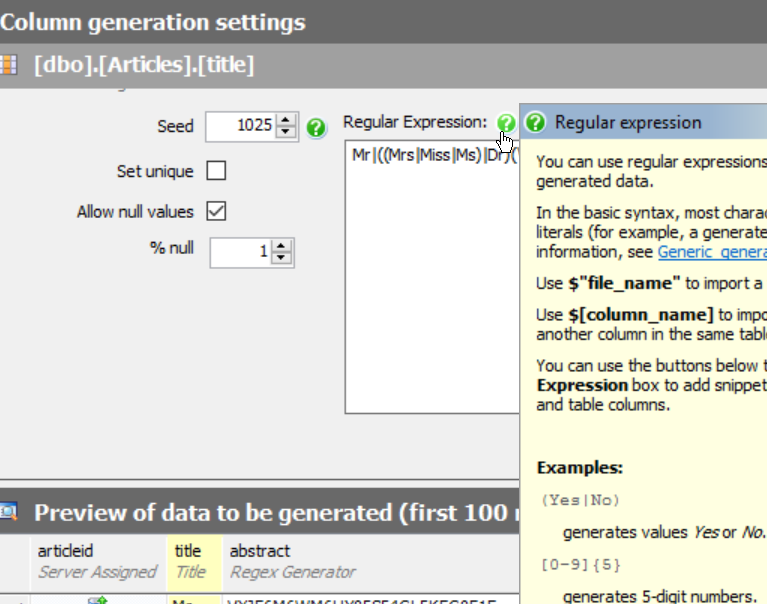
    There’s a help icon available if you choose a column in one of your tables and have a regular expression selected. In this case, I can see there are a few different suggestions for the “title” column.
    2015-08-28 09_30_34-

    SDG guesses that title is a Mr/Mrs/Ms field, but it’s not. I really need something that looks like the title of an article. If I scan through some of the articles on SQLServerCentral, I see titles like:

    In this case, there are a few patterns. SQL Server appears in a few places, Some articles user a “top x” type of format. The word lengths vary, and are in the 6-12 range. Around six or so words are in many titles.

    Building a Regular Expression

    I could certainly do something like this, which just gives me a few words made up of random letters, of the specified lengths.

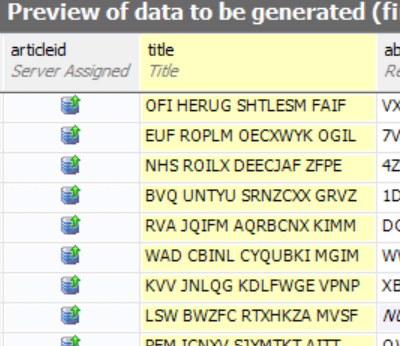
    [A-Z]{3} [A-Z]{5} [A-Z]{7} [A-Z]{4}

    I’ve got a 3 letter word, then a 5 letter one, then 7, then 4. All upper case, all random. That gives me results like this:
    2015-08-28 09_38_37-SQL Data Generator - TestSDG.sqlgen _

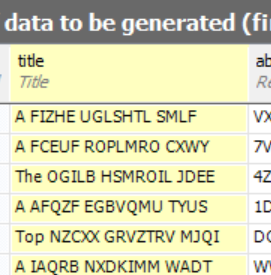
    Not quite what I want. I’d rather have some words at the beginning like “A”, “The”, or “Top”. I can do that with literals.I enclose those in parenthesis rather then brackets.

    (A|The|Top) [A-Z]{5} [A-Z]{7} [A-Z]{4}

    This gives me something slightly better.
    2015-08-28 09_41_23-Get Started

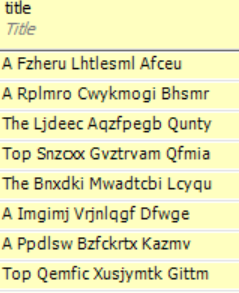
    Not perfect, but better. Let’s clean up the words themselves, following some capitalization rules for titles. In this case, we’ll use a pattern like this:

    [A-Z]{1}[a-z]{5}

    Now I see something a bit better. This doesn’t make complete sense, but it does look like random word structures.
    2015-08-28 09_43_20-SQL Data Generator - TestSDG.sqlgen _

    Let’s change the “Top” item to include a number. I can do that, but changing just the part of the OR (|) that includes Top. I’ll do that like this:

    (A|The|Top [3-7]{1})

    Now I see a number, randomly from 3 to 7, when Top comes up.
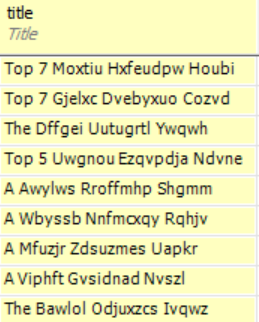
    2015-08-28 09_46_20-SQL Data Generator - TestSDG.sqlgen _

    This still isn’t great. How about if I include SQL Server at the end? I’ll use a space, or something with SQL Server.

    ( |(in|for|on) SQL Server)

    That shows me a random addition to SQL Server a the end of some titles.
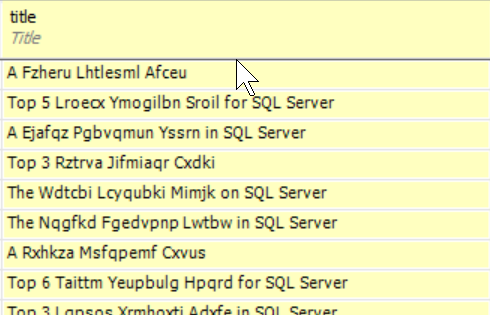
    2015-08-28 09_48_31-SQL Data Generator - TestSDG.sqlgen _

    Getting better. I can even use the space or something to get the versions of SQL Server.

    ( |(in|for|on) SQL Server ( |2005|2008|2012|2014))

    Now I see some interesting titles. What if I want real words instead of random ones? There’s nothing wrong with random data for testing, but if I’m actually trying to compare data values in queries, it’s hard to focus on and remember random patterns. I could use the same OR values.

    (A|The|Top [3-7]{1}) (Blocking|Indexing|Tuning|T-SQL) (Tips|Techniques|Methods) (for| |in) ( |(in|for|on) SQL Server ( |2005|2008|2012|2014))

    Now I get some interesting, and perhaps memorable titles.
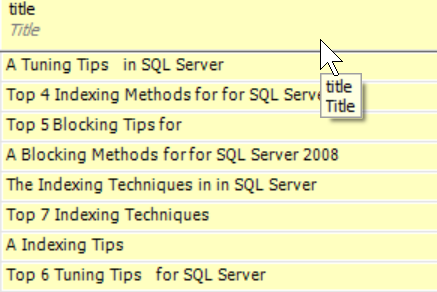
    2015-08-28 09_53_41-SQL Data Generator - TestSDG.sqlgen _

    Have Fun

    For much of our development work, the data itself doesn’t matter, but if needs to be easily discerned if you want to ensure that it’s easy to examine in queries. While random values work fine, I find them hard to deal with.

    I like the idea of using random words. Often the results are still nonsense, but they can be fun to work with. They remind me of a set of magnets my kids have on the fridge. Each is a word that will get randomly combined with others for humorous sentences.

    You can do the same thing with some RegEx and SDG.

  • T-SQL Tuesday #70 – The Enterprise

    tsqltuesdayIt’s hard to believe this is the 70th edition of T-SQL Tuesday. I haven’t missed many, and I’ve enjoyed them all. I hope more of you are participating in this monthly blog party started by Adam Machanic (b / t). Whether you write today, or you write at some time in the future, T-SQL Tuesday topics are good ways to showcase your knowledge.

    This month’s invitation comes from Jen McCown, of Midnight DBA. Jen asks us to write about managing an Enterprise of SQL Servers. That’s a good topic, since many of us struggle to manage multiple instances. Whether you have 5 or 500, there are some good ideas that you might implement in any environment, and I’m looking forward to reading what people have to say.

    Decoupled Consistency

    A long time ago I was thrust into the role of managing hundreds of SQL Server instances at a large company. I’d managed dozens of machines before, but this was a whole new level of scale. What’s more, the majority of machines were set up completely independently of each other, with no concerns other than a mandate to try and keep versions close to each other. That was a challenge in and of itself.

    The only common tool in use was Patrol, which was mainly used to monitor performance counters, but we didn’t have the SQL Server specifics, so we really could only get general performance counters, and even those were difficult to access when thousands of hosts were being monitored.

    I brought an idea with me from a previous job that had served me well with a handful of disparate instances. We’d consistently set up each instance, both installation, configuration, and monitoring, however we’d decouple each instance from others. Our goal was each machine capable of operating independently from all the others.

    We had found that central servers go down, that we had no good way of tracking the status from machines when this happened, and most importantly, there are always exceptions.

    With this in mind, we

    • built a procedure to install SQL Server, but included a number of scripts for post installation that would standardize settings. This allowed our server build people to easily handle SQL Server installation as part of their job. These days I’d use something like FineBuild to make this easy.
    • set up a DBA database on each instance that monitored jobs and other important status for the instance. If the instance was up and SQL Agent running, we’d know the status of that instance.
    • Performed basic monitoring of some key performance counters for a quick trend of the latest performance over the last week, similar to what SQL Monitor shows. Getting a quick snapshot was quicker than accessing central monitoring, especially in a crisis.
    • Assembled a report for the instance each day, calling out exceptions at the top, and leaving expected data below. We needed documentation for our ISO certification, and our auditors loved this.
    • We did use a central server to assemble the reports from all instances and compile them for the DBAs to review. All exceptions were at the top, and we used a left join to compare the list of instances with current reports. If any were missing, we bubbled that to the top as an exception.

    These were all good, simple ideas that allowed a team of 3 DBAs to manage 400-500 instances of SQL Server. We were flexible enough to handle the needs of mission critical Finance instances as well as often changing development machines. Our data was simple and always available for us to give to clients when they had questions.

    Most importantly, we built a system that allowed us to deal with exceptions, but not review the mundane stuff. Our time was precious, and that’s the case in any enterprise situation. You need to focus on the 10-20% of systems that really need regular attention while ensuring the other 80-90% of them are still being maintained.

  • How Many Times Will You Change a Password?

    Another post for me that is simple and hopefully serves as an example for people trying to get blogging as #SQLNewBloggers.

    If you create a login and the user can’t log in, how many times will you change the password?

    It turns out I’ll do it 5 times.

    I was setting up a new installation of DLM Dashboard on a test machine. In the setup it asks for an account to run under. I dislike setting my own account (even for tests), so I flipped over to SSMS and added a new login, entered a password, unchecked “require change” and set this as a sysadmin. I clicked OK and returned to Chrome.

    I entered the password and hit “Add”, only to get the “login failed” message for the user. Surely I mistyped something, so I typed the password again, with the same result.

    Maybe I mistyped it in SSMS. Go back, change it to the same thing, adding a character in SSMS (let’s call this the first change) and then hit enter in Chrome.

    Failure.

    Maybe I mistyped it. Go back to SSMS, change the password again (now twice), this time making it simpler. Uncheck the “policy check” and try again.

    Failure.

    Hmmm. I’m confused. Let me type a password in Notepad. I’ll copy paste that in SSMS (now 3 times) and into Chrome.

    Still a Failure.

    At this point I’m confused. Why can’t a new user log in? I’m wracking my brain.

    Maybe I have a sticky keyboard key? I’ll change the password again, this time to 5 of the same character (now 4 changes). I go slowly, typing the same 5 characters into Chrome.

    Failure.

    What’s the cause? I’m starting to wonder if perhaps logins aren’t allowed on a protocol, and it hits me. SQL Authentication.

    I go to the instance properties and I never allowed SQL Authentication when I installed SQL Server. After all, this is a test machine.

    Change that and restart SQL Server. Change the password again (5 times) to a decent password that won’t be guessed if someone gets to this machine.

    DLM Dashboard setup proceeds.

    SQLNewBlogger

    We all make mistakes. We do things wrong. Talk about how you learn and figure things out. This is a good story and lesson for me.

    Resources

    I should know better.

  • Growing Pains for the Networking Dinner

    A few years ago Andy Warren had this idea for a networking dinner. We had been chatting about all the parties and events at PASS, with many of them limited to select individuals. We talked about trying to get more people involved in the community and giving them something to do, so they wouldn’t get stuck in a hotel, as Tim Mitchell did years ago.

    This has been a success, but we have growing pains, and we’re looking for some ideas from people in the community, especially those of you going to the PASS Summit for the first or second time.

    Skip the history part and drop down if you want to know the issues.

    History

    We decided we’d host this as a meet-up, just publishing a location and seeing who showed up. We choose a small restaurant in the Pike Place Market that wasn’t busy on Monday night and put the word out. Evidently we know a lot of people because the place was packed. The staff struggled, service was slow, it was hard to move around, but it was fun.

    We moved the location to the small mall and the Gordon Biersch in downtown Seattle the next year and sent a notice out earlier. Once again, Andy and I met people at the door, tried to pair them up in groups of four, and let them eat. Once again, it was a bit of a madhouse.

    Last year we had a reservation at Buffalo Wild Wings, but apparently some wires got crossed and they lost our reservation. Andy couldn’t make the Summit, but fortunately some friends helped me out, finding a good spot at The Yard House. A couple of us greeted people at BWW and sent them down to the Yard House. It wasn’t ideal, but it worked.

    Issues

    This year we’re having some trouble nailing down a location. The invitation is up, as is the EventBrite, but we don’t have a location. Here are a few of the issues.

    Busy Places – A few places we’ve checked are busy on Monday nights with Monday Night Football promotions. Many don’t take reservations. We could just go, and we’ve asked them if they might bring in extra staff, but we worry that the waits will be ridiculous there.

    Reserving a Bar – We did find a couple places that take reservations, but they’ve asked for $600+ for the space, before food and drinks. Andy and I don’t mind spending some money on this, but we weren’t really looking to rent space at $300 apiece.

    Possible Solutions

    This is where you come in. We’ve talked about a few different ideas, but we don’t like any of them. Let us know what you think.

    Using the Convention Center

    We could probably get space from PASS. However, food and drink is expensive in the convention center, it’s not great, and it’s a pain. Plus we’re spending all week there, so we wanted to get out.

    Finding a Sponsor

    I work for Redgate Software, and both Andy and I have good relationships with lots of vendors. We could try to get a sponsor for the event and cover the cost.

    However.

    If Redgate sponsors, someone will be upset. If someone else sponsors, my boss might be upset. However I’m OK with most of that. What neither Andy or I want is someone using a casual networking event to promote something. We don’t really want to be in the stadium name game and sell the name of the event. We don’t want to push emails out to attendees from a vendor.

    In short, we don’t love this plan.

    Charging Attendees

    We’ve gotten around 200 people each year, and I bet we’ll get the same. Certainly we could charge $3-5 for tickets, and I think people would pay. We’d rather not, but it’s an idea.

    Raffles

    We could raffle off something. Prizes cost money, however, and they could easily turn us more upside down than we are already for the space. We did think about raffling off easy things, like:

    • a private dinner with Andy or I (or some well known volunteers) – We’d fund part of the dinner, or ask our hosts to donate this. However then we’re asking others to spend their own money.
    • some old swag, like some of my Friday shirts. Not sure how much money this raises
    • Some mentoring time – Perhaps some dedicated,private time for mentoring from Andy, myself, or others. Personally I don’t like this as I think mentoring is a gift, and gifts should be given, nor purchased.
    • ??

    Staggering Times

    We’re already getting tickets reserved (no charge), so we hesitate to change things, but one idea is to limit the number of tickets to a set number every half hour. Say 30-40 people, with multiple sets of tickets. We’d probably do

    • 5:30 – 30 tickets
    • 6:00 – 30 tickets
    • 6:30 – 30 tickets
    • 7:00 – 30 tickets
    • 7:30 – 30 tickets
    • 8:00 – 100 tickets

    This might make it easier to just pick a restaurant, but it doesn’t mean that there won’t be waits or that any additional staff will be on hand.

    Multiple Locations

    We’ve thought about picking 3-4 places in a small area, having attendees meet us somewhere, and we’d pair them up and send them out to restaurants, round robin style. This could work, but I dislike splitting up the crowd.

    Thoughts?

    A Good Solution

    We haven’t come up with  a good solution, but we’re still looking. If you’ve got ideas, especially if you’ve been to one of the other dinners, let us know.

    Ultimately this is about getting people to meet each other and interact, so we’d like to keep it low key, low cost, and casual.