Tag: syndicated

  • Allowing a User to Create Objects in a Schema

    I was testing something the other day and realized this was a security area I didn’t completely understand. I decided to write a few posts to help me understand the issues.

    I want to give a developer rights to create objects in a schema. In this case, I’ll stick with procedures, but the same thing would apply for tables, views, etc. How do I do this, allow someone to create objects in their schema?

    Let’s create a login and user:

    CREATE LOGIN steve WITH PASSWORD = ‘AR3allyStr0ng!P@**Wo9d’;
    GO
    USE Sandbox
    GO
    CREATE USER Steve FOR LOGIN Steve
    GO

    Now I have a user, and want them to be able to create this:

    SETUSER ‘Steve’;

    CREATE PROCEDURE Steve.MyProc
    AS
        SELECT
                1;
    RETURN

    If the user does this, they get:

    Msg 262, Level 14, State 18, Procedure MyProc, Line 3
    CREATE PROCEDURE permission denied in database ‘sandbox’.

    That’s no good.

    We can see from the error that we don’t have writes to create procedures. Let’s fix that. First, we change our context and then we grant permissions.

    SETUSER
    GO

    GRANT CREATE PROCEDURE TO Steve;

    GO

    With this done, let’s now try creating the procedure again with the SETUSER statement and the CREATE PROC statement. We then get:

    Msg 2760, Level 16, State 1, Procedure MyProc, Line 5
    The specified schema name "Steve" either does not exist or you do not have permission to use it.

    This didn’t used to be the case in SQL 2000, where schemas didn’t exist. Now we don’t have any implicit schema for our user. Let’s see if we can make anything.

    CREATE PROCEDURE MyProc
    AS
    SELECT 1;
    RETURN
    GO

    Returns this:

    Msg 2760, Level 16, State 1, Procedure MyProc, Line 11
    The specified schema name "dbo" either does not exist or you do not have permission to use it.

    At this point Steve doesn’t have permissions to any schema. Let’s start by adding a new schema.

    CREATE SCHEMA Steve
    GO

    Once this is done, can I now create a procedure?

    SETUSER ‘Steve’;

    CREATE PROCEDURE Steve.MyProc
    AS
        SELECT
                1;
    RETURN

    I get this:

    Msg 2760, Level 16, State 1, Procedure MyProc, Line 5
    The specified schema name "Steve" either does not exist or you do not have permission to use it.

    The same error as before. This makes perfect sense because although the schema exists, I don’t have permissions to use it.

    That’s the default in SQL Server. You don’t get any permissions by default. You need to explicitly set them.

    In this case, I want Steve to have control of the schema [Steve], so I really want the user, Steve, to own it. How do I do this?

    The key is that I want to use the Authorization clause with CREATE SCHEMA. I can’t use this with ALTER SCHEMA, only with CREATE SCHEMA.. so I need to do this:

    SETUSER
    GO
    DROP SCHEMA Steve;
    GO
    CREATE SCHEMA Steve AUTHORIZATION Steve;
    GO

    Once this is done, I can now let my user create procedures.

    SETUSER ‘Steve’
    GO
    CREATE PROCEDURE Steve.MyProc
    AS
    SELECT 1;
    RETURN
    GO

    This works, and my developer can work in their own schema. Of course I need to ensure the developer has access to other objects, hopefully using a role of some sort that I’ve created for my application users.


    SELECT SUSER_NAME();

    DROP SCHEMA Bob
    DROP SCHEMA steve

    REVOKE CREATE SCHEMA FROM Steve

    CREATE SCHEMA Steve AUTHORIZATION Steve

    ALTER SCHEMA Steve AUTHORIZATION Steve

    SETUSER ‘Steve’;
    SELECT SUSER_NAME();

    CREATE PROCEDURE Steve.MyProc
    AS
        SELECT
                1;
    RETURN

    CREATE PROCEDURE MyProc2
    AS
        SELECT
                1;
    RETURN

    SETUSER;
    SELECT SUSER_NAME();

    GRANT CREATE PROCEDURE TO Steve

    SETUSER
    DROP PROC steve.MyProc;
    DROP PROC steve.MyProc2;
    DROP SCHEMA Steve;

  • Altering a Column with NOT NULL

    A short piece, as I ran into the need recently to alter a column to NOT NULL status. I’ve rarely done this in the past, usually specifying NOT NULL when I create the table. Often in future changes, I’ve been wary of not allowing NULLs since I’ll always find an application, or worse, a business situation where there is no good value available. However that’s a separate discussion.

    Altering the Column

    Let’s say I have a column that is specified as NULL in a table, and I want to change that. I initially tried this:

    ALTER TABLE Tags ALTER COLUMN Status NOT NULL;

    However, I got a syntax error. For the life of me, I couldn’t understand why, so I looked up the syntax. If you look at the ALTER TABLE syntax, it shows that the ALTER COLUMN item needs the type included. While I am not changing the data type, to alter the column, I need to do:

    ALTER TABLE Tags ALTER COLUMN Status tinyint NOT NULL;

    Another inconsistency in SQL. We don’t provide the whole definition again, and here we need to provide the column definition, even when only changing one of the settings.

  • Parsing SQL Saturday Data – Getting Titles from the XML document

    I’m continuing on with my project to grab SQL Saturday data and automatically insert it into a SQL Server database. In this piece, I’m picking up from the last one where I had a loop to load all XML documents in a folder based on a pattern.

    This time I want to query the XML and get out specific elements and capture them.

    The Source

    The XML source looks like this for the sessions:

    </event>
    <event>
      <importID>2102</importID>
      <speakers>
        <speaker>
          <id>2102</id>
          <name>Jason Strate</name>
        </speaker>
      </speakers>
      <track>Track 3</track>
      <location>
        <name>2520C (Conference room)</name>
      </location>
      <title>Using XML to Query Execution Plans </title>
      <description>SQL Server stores its execution plans as XML in dynamic management views. The execution plans are a gold mine of information. From the whether or not the execution plan will rely on parallelism to what columns are requiring a key lookup after a non-clustered index seek. Through a the use of XML this information can be available at your fingertips to help determine the value and impact of an index and guide you in improving the performance of your SQL Server databases. In this session we’ll look at how you can begin to understand and query the structure of the execution plans in the procedure cache. Also, we’ll review how to uncover some potential performance issues that may be lurking in your SQL Server.</description>
      <startTime>9/18/2010 12:15:00 PM</startTime>
      <endTime>9/18/2010 1:30:00 PM</endTime>
    </event>
    <event>
      <importID>2109</importID>
      <speakers>
        <speaker>
          <id>2109</id>
          <name>Jason Strate</name>
        </speaker>
      </speakers>
      <track>Track 4</track>
      <location>
        <name>2520D (Seminar room)</name>

    I’m showing the end of one element, one whole one, and the start of a third. There is a lot of extraneous information in the document that I don’t want (for now). As a result, it’s not as simple to query this as I’d thought before. Especially as I’ll want to capture each session title and insert it into a database.

    I decided to use a SelectNodes to get to the <event> nodes and then loop through them. The code looks like this:

    # get the event node
    $sessions = $doc.SelectNodes("//event")

    # loop through the various //event nodes
    foreach ($session in $sessions) {

    Note that this is inside of the code from the previous post.

    Inside of this loop, I decided to create another loop. Initially I didn’t, but that made it more difficult to determine the end of the event node and capture the values, especially the speakers. As a result, I have a sub loop at well:

    # probably a better way, but I wanted to loop through the various elements and only pick out certain ones
    foreach ($detail in $session.ChildNodes) {

    If anyone has a better way, let me know. I’ll have all the code below, but this technique allows me to look for specific nodes. I know I could query for them, but since I’m looking for a few specific items, I thought I’d do this rather than multiple queries later.

    Get the Title

    I actually need the title and the speaker child node, but I’m doing titles only here. Here’s the whole node loop code:

    foreach ($detail in $session.ChildNodes) {

      # If we’re on the title node, get the value
      if ($detail.Name -eq "title") {
        $title = $detail.’#text’
       }

      if ($detail.Name -eq "speakers") {
        #placeholder
       }
    #end foreach for $detail
    }

    Here if I have the title element in the foreach loop, I capture it. This allows me to use this variable later. I’ll go into the speaker code later, but for now, I left a placeholder.

    That’s really it. At the end of the outer foreach, I write out the $event and $title variables. This gives me a nice output to the screen. From here I can easily substitute some ADO code to send this to SQL Server instead of the write-host, but that’s a good programming technique for me to see if I’ve got the data I want.

    sqlsatloop_d

    As you can see, there are sessions that I don’t want, but there’s nothing in the data for me to tag them as non-educational sessions. I’m not sure I care, since the speakers associated with these won’t impact my results for reports, so I’ll leave them.

    Next Steps

    From here I need to extract the speakers before I insert data into SQL Server. That will be the next step before I create the database and then insert data.

    The Code

    Here’s the entire code:

    #ViewXML_Basic
    # View XML file data from a website

    $debug = 0;
    # counter for events
    $i = 1

    #when do we stop?
    $loopend = 400
    $baseURL = "E:\SQLSatData\SQLSat"
    $loop = 1
    $doc = New-Object System.Xml.XmlDocument

    do {
    #start large loop

      # get the filename
      $sourceURL = $baseURL + $i + ".xml"

      # debug information
      if ($debug -eq 2) {
        Write-Host $sourceURL
        }

      #test the path first. If it exists, load the XML
      if (Test-Path $sourceURL) {
        $doc.Load($sourceURL)

        #trap the event number. This will be the ID I use in the database table.
        $event = "SQL Saturday #" + $i

        # get the event node
        $sessions = $doc.SelectNodes("//event")

        # loop through the various //event nodes
        foreach ($session in $sessions) {
     
        # probably a better way, but I wanted to loop through the various elements and only pick out certain ones
        foreach ($detail in $session.ChildNodes) {

          # If we’re on the title node, get the value
          if ($detail.Name -eq "title") {
            $title = $detail.’#text’
           }

          if ($detail.Name -eq "speakers") {
            #placeholder
           }
         #end foreach for $detail
         }

        write-host $event ": " $title
       
        # placeholder – insert into table here. $i, $title

        $title = ""
        $speakers = ""

       #end foreach for $sessions   
       }

       # end test path
       }
      # increment loop
      $i++

    #end outer loop
    } while ($i -lt $loopend)

    write-host "end"

  • Missing Full Text Extensions in Express

    I was tasked recently with removing the full text indexes in Adventureworks for a demo. The full text indexes were causing a few extra items to appear in a SQL Compare demo and weren’t needed. The individual that had set up the VM I was using wasn’t sure what to do, so they asked me.

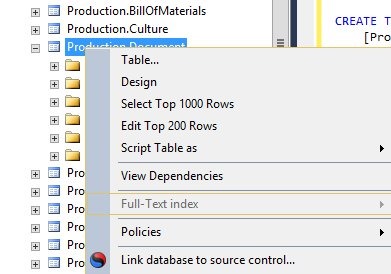
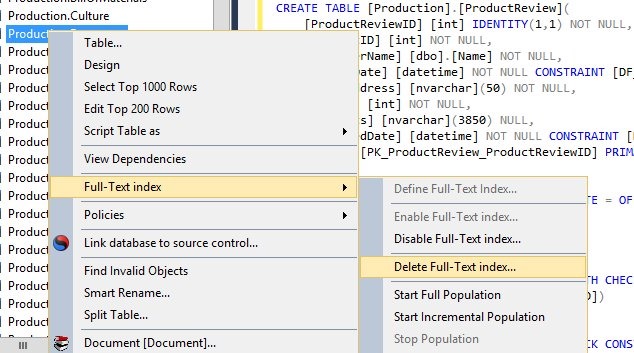
    I logged on to AdventureWorks and right clicked the Production.Document table. I knew that had full text indexes because I’d tested them before. However, what I got was this:

    fts1

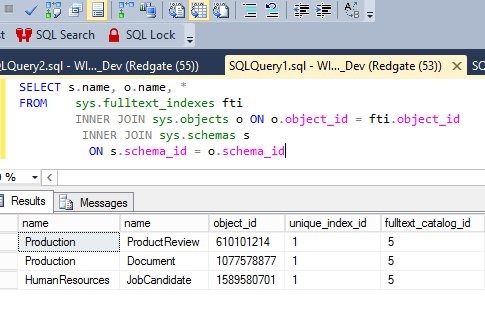
    The Full Text index part was grayed out. Strange, since the database was attached, and with a query, I could see FTS indexes below.

    fts2

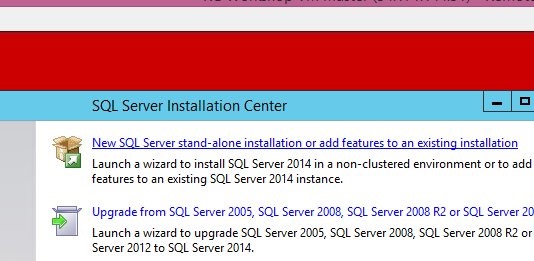
    I suspected that the FTS extensions weren’t installed. I decided to check by running setup. When it started, I clicked the top item to "add features", as shown here.

    fts3

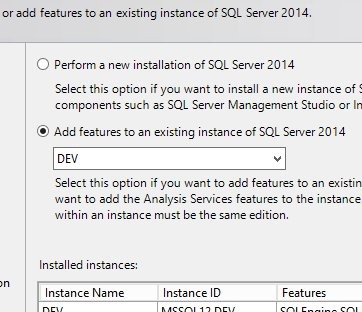
    That brought up a list of instances. The default is the top radio button below, but I selected the second one, which let me select an existing instance.

    fts4

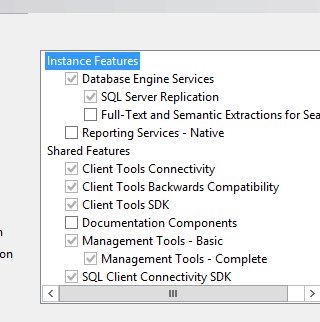
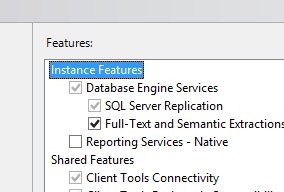
    Next, I saw the features, and sure enough, FTS wasn’t checked.

    fts5

    I checked it and then clicked next to continue the installation.

    fts

    Once this was done, I could run SSMS and sure enough, I could delete the FTS indexes (shown below).

    fts6

    I actually had two instances on this VM, but this FTS feature isn’t in SSMS. It comes from the instance. After I deleted these three indexes, I connected to the second instance and tried to delete the FTS indexes, but things were grayed out, as shown in the first image above.

    I had to re-run setup for the second instance and add the FTS components there as well to delete the indexes from that database. Once that was done, I could easily delete all the FTS indexes and complete this simple task.