Tag: syndicated

  • The April Blogger Challenge

    I’d encourage you to take Ed Leighton-Dick’s challenge to blog in April. Read his post, start writing, and put your post out there. Tweet about it, and be proud.

    However, if you’ve never blogged, I have a modification for you. Publish privately. The important thing is to just start writing and communicating.

    If you’re looking for help getting started, I’ve got a few posts for you:

    Blogging is a great way to give potential employers some insight into who you are. My view is this can only help you find a better job that’s a good fit for you. If you work at it and to it well.

  • tSQLt with TRY..CATCH

    Someone asked me the question recently about how tSQLt works with TRY..CATCH blocks and the exceptions that we might test for. It works fine, just as it would with other code, but you need to understand that a CATCH still needs to re-throw an exception.

    Here’s a short example. I’ve got this query, which has issues.

    SELECT TOP 10
             cs.CustomerID
         ,   cs.LastSale
         ,   cs.Salesman
         ,   CAST(cs.SaleValue AS NUMERIC)
         FROM
             dbo.CustomerSales AS cs;

    If I run it, I get this:

    Msg 8115, Level 16, State 6, Line 1
    Arithmetic overflow error converting varbinary to data type numeric.

    The CAST here has issues, but that’s fine. Perhaps it’s a data issue, perhaps something else. I can test for that, but for now, I want to be sure I handle these errors correctly.

    Now, I embed that in a TRY..CATCH block.

        BEGIN TRY
            SELECT TOP 10
                    cs.CustomerID
                ,   cs.LastSale
                ,   cs.Salesman
                ,   CAST(cs.SaleValue AS NUMERIC)
                FROM
                    dbo.CustomerSales AS cs;
        END TRY
        BEGIN CATCH
            SELECT @@ERROR
                ,  ‘A CASTing Error has occurred.’
            ;

        END CATCH;

    If I do this, and in the CATCH block I "handle" the error, I’m not really error handling. I’m error swallowing. Here are my results.

    EXEC spGetCommission 12

    casterror

    I could log this, or try to return some data with a new query, maybe alter something that ensures the client gets results, but what I really need to do is give an error back, but one I’m aware of.

    We could delve into error handling, but I won’t do that here. Instead, I want to be sure the application gets an error, when we have an error. It can then decide what the user does or sees.

    If I write this test:

    ALTER PROCEDURE [misc procs].[test spGetCommission Exceptions]
    AS
    BEGIN

    — Assemble
    EXEC tsqlt.ExpectException;

    — ACT
    EXEC dbo.spGetCommission @userid = 0 — int

    — Assert
    END;

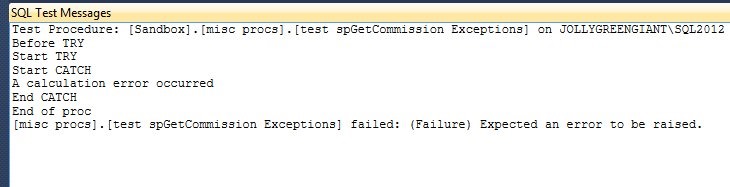
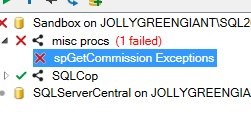
    Now I can run it, but it fails. I see the failure

    test1

    and I see this in the results

    test2

    What I should have is something more like this:

        BEGIN CATCH
            THROW 51001,  ‘An CASTING Error has occurred.’, 1;
        END CATCH;


    Then my test should be looking for that message.

    ALTER PROCEDURE [misc procs].[test spGetCommission Exceptions]
    AS
    BEGIN

    — Assemble
    EXEC tsqlt.ExpectException
       @ExpectedMessage = ‘An CASTING Error has occurred.’
       , @ExpectedErrorNumber = 51001
    ;

    — ACT
    EXEC dbo.spGetCommission @userid = 0 — int

    — Assert

     
    END;

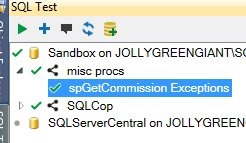
    If I do that, things work well. The error is handled, but also re-thrown, and my test passes.

    test3

  • The Basic TRY..CATCH

    Have you written a TRY..CATCH statement in T-SQL? I hadn’t done it for most of my career, since the construct hadn’t existed. As a result, my code over the years is littered with catching @@error in a variable and then acting on that result. 

    However I’m trying to do better, and when I went to write one recently, I realized that I wasn’t doing it enough as I needed to check some syntax. Here’s a short post to try and capture that information and burn it into my brain.

    The Syntax

    The basic syntax is this:

    BEGIN TRY

    — do some work here.

    END TRY

    BEGIN CATCH

    — error handling code here.

    END CATCH

    This almost seems funny as I’d expect a TRY with a BEGIN END block in the SQL language, but this reads better, and I think this is (Syntactically) a better implementation in the language.

    Using TRY . . CATCH

    The use of this is to do some work in the TRY block (BEGIN TRY..END TRY) and expect it to work. For example, I recently had this:

    BEGIN TRY
        SELECT TOP 10
                cs.CustomerID
            ,   cs.LastSale
            ,   cs.Salesman
            ,   CAST(cs.SaleValue AS NUMERIC)
            FROM
                dbo.CustomerSales AS cs;
    END TRY

    BEGIN CATCH

    — CATCH BLOCK

    END CATCH

    SELECT @@rowcount

    The TRY block is the place where I perform some work. If it works as expected, then I just continue on. In this case, this should be a simple query that runs, and when it finishes, the SELECT for the rowcount executes.

    However, if some error occurs, execution immediately goes to the CATCH block. In that case, whatever I have in that space will execute and then the execution will continue.

    Example

    Let’s look at an example of how this works. Here’s my full TRY..CATCH with a few print statements to track the activity.

    ALTER PROCEDURE spGetCommission
    @userid INT
    AS
    PRINT ‘Before TRY’;

        BEGIN TRY
            PRINT ‘Start TRY’;
            SELECT TOP 10
                    cs.CustomerID
                ,   cs.LastSale
                ,   cs.Salesman
                ,   CAST(cs.SaleValue AS NUMERIC)
                FROM
                    dbo.CustomerSales AS cs;
            PRINT ‘End TRY’;
        END TRY
        BEGIN CATCH
            PRINT ‘Start CATCH’;
            THROW 51000, ‘A calculation error occurred’, 1;
            PRINT ‘End CATCH’;
        END CATCH;

    PRINT ‘End of proc’;

    GO

    If I not execute this, with a parameter, I get this:

    Before TRY
    Start TRY

    (0 row(s) affected)
    Start CATCH
    Msg 51000, Level 16, State 1, Procedure spGetCommission, Line 20
    A calculation error occurred

    That might not be what you expected. The TRY works as expected, with the error in my query sending execution to the CATCH block, before the final print statement in the TRY block.

    However I didn’t get the complete execution of the CATCH block, as the THROW throws an error and completes its execution. If I changed this to not re-throw the error, the final statement executes.

    ALTER PROCEDURE spGetCommission

        BEGIN CATCH
            PRINT ‘Start CATCH’;
            PRINT    ‘A calculation error occurred’
            PRINT ‘End CATCH’;
        END CATCH;

    PRINT ‘End of proc’;

    GO

    In this case, I’ll get all my print statements.

    Before TRY
    Start TRY

    (0 row(s) affected)
    Start CATCH
    A calculation error occurred
    End CATCH
    End of proc

    A basic look at TRY..CATCH, and worth knowing about. I’d suggest you use this in future code, and even refactor code where you can to include this instead of looking at @@error to trap issues.

  • Speaking at SQL Saturday #389 – Huntington Beach

    I’ll be traveling to CA next month for SQL Saturday #389 – Huntington Beach as well as a Red Gate DLM training session run by Ike Ellis. I’m assisting Ike in running a Database Continuous Integration class. It’s a paid for event, but you’ll learn how to set up and run a CI process with your database.

    Come.

    CI is all the rage and companies are improving their development processes, building applications faster with it. We go into depth, using Red Gate tools, on how you can get your database development working in a CI environment, and integrate it closely with your application development work.

    I don’t have details on my SQL Saturday session, but that should be coming soon. I will do a Red Gate presentation during lunch, so if you want to know how we can help you or have questions, come by at lunch.