It’s T-SQL Tuesday time again, and this month the invite comes from Mike Donnelly (@sqlmd). The topic is Teach Something New and it’s a good one.
I try to learn something all the time, and this post is about something I ran into recently with a submission from a user that I needed to check. I had to dig in a bit and see how XML worked in computed columns and I decided to write about it for this month’s entry.
T-SQL Tuesday is a monthly event on the second Tuesday of each month. There’s a new invite each month, and you need to watch Twitter and the #tsql2sday tag to find the next one. I keep a running list of past topics, and feel free to write on any of them and post something.
Learn Something New
I haven’t done a lot of work with computed columns or XML in my career. At least not in SQL Server. I do remember using VB and traverse XML documents and pull out nodes, but that was years ago.
Recently I had to verify how XML computed columns work and that required me to dig in a bit to the rules for both. This post looks at the way in which I learned how to return part of an XML column from a table.
Imagine that we have a table storing some XML data inside it. For my demo, I have a table storing profile information for users. I’ve actually seen a table like this, grabbing information for a website and then shredding it later if there are changes needed in the database. Here’s the setup of the table with a row of data inserted.
CREATE TABLE UserProfile
(
  UserID INT IDENTITY(1,1)
, profile XML
);
GO
INSERT INTO dbo.UserProfile
        ( profile
        )
    VALUES
        ( N'<user>
             <username>way0utwest</username>
             <history>
               <pageurl>/default</pageurl>
               <pageurl>/scripts/</pageurl>
               <pageurl>/scripts/id/2433</pageurl>
             </history>
             <points>
                <forums>32432</forums>
                <qotd>1123</qotd>
             </points>
        </user>'
        );
If I want the username from this table, I can use this query:
SELECT
   profile.value('(/user/username)[1]', 'varchar(max)')
    FROM
        dbo.UserProfile AS up;
That will return this data:

However, suppose I don’t want to use that code in all my queries in the application. Certainly it’s not bad for stored procedures, but I don’t want to repeat that over and over either.
Instead I want to use a computed column. I’d think that we could do something like this:
ALTER TABLE dbo.UserProfile
 ADD Username AS (profile.value('(/user/username)[1]', 'varchar(max)'));
However that doesn’t work. I get this error:
Msg 435, Level 16, State 16, Line 1
Xml data type methods are not supported in computed column definitions. Create a scalar user-defined function to wrap the method invocation. The error occurred at column "Username2", table "UserProfile", in the ALTER TABLE statement.
I haven’t seen this documented in Books Online, but it’s a restriction. However, there is a specific document on using XML in computed columns, which gives a workaround. The way to do this is to use a user-defined function. I need to build a function with my query:
CREATE FUNCTION UserProfile_XML_UserName(@xml xml) RETURNS varchar(200)
AS
BEGIN
 RETURN @xml.value('(/user/username)[1]', 'varchar(max)')
END
;
GO
Now, I can use my function in the computed column
ALTER TABLE dbo.UserProfile
 ADD Username AS (dbo.UserProfile_XML_UserName(profile));
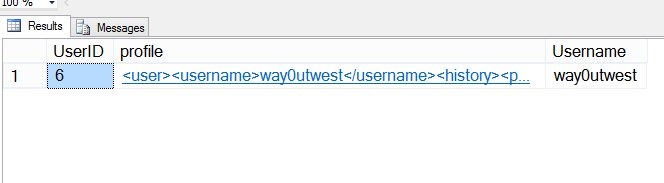
Now when I query the table, I have a new column with the username:
SELECT top 10
  *
 FROM dbo.UserProfile AS up
Here are my results

That’s what I learned in the last month in working with T-SQL. This came from a user submission, and it required me to dig into BOL and find out how I could make this work.
References
Here are the references I used to learn about this:

 Voice of the DBA