Tag: syndicated

  • T-SQL Tuesday #61 – Giving Back

    tsqltuesdayIt’s that time of month again, the time when we have a day where everyone writes on the same topic.

    This month Wayne Sheffield is the host and has chosen Giving Back as his theme. It’s a good one with the holidays and it’s one that really inspired SQLServerCentral. We built a business, but one that was founded on helping others and giving back to the community. The same could be said for SQL Saturday as well.

    Volunteering

    First the soap box. Everyone should give back to the world at some point in their lives. Perhaps it’s when you’re younger, perhaps when you retire, maybe it’s this weekend, but you should volunteer to make the world a better place.

    Now for my plans for giving back.

    They won’t change a lot from the past few years. I look to speak at various SQL Saturdays and User Groups in 2015. While Red Gate funds my travel and sometimes asks me attend events, I choose many on my own. I also donate my time as I don’t get a shorter week when I’m delivering a talk or two on Saturday. I still have the same responsibilities and deadlines to manage during the week.

    In 2015, I’m going to try and get to 8 SQL Saturdays. I did 11 in 2014, but I’m not sure I’ll end up with the same number. We’re still planning out 2015, and I don’t have any SQL Saturdays in the first quarter, but I’m hoping to make up a few later in the year.

    I also plan to get to each of the Denver area user groups in 2015. I managed to speak in Boulder, Denver, and Colorado Springs in 2014 and I hope to do the same in 2015.

  • SQL Server Disk Space Emergencies

    One of the things I’ll see happen often with SQL Server instances is that the system will run out of space on a drive. This could be for a variety of reasons, some of which can be prevented, and some cannot. You might have:

    • Don’t delete old backup files
    • Data growth fills the disk over time, usually years
    • tempdb rapid growth that uses all space
    • old import files not deleted over time

    There are other reasons, but I’ve often found that some process will cause an emergency and the SQL Server stops working, or stops backing up database, and administrators are in a panic to free space so the server can continue to function.

    Here’s what I suggest to smooth the way with a series of placeholders and a job.

    Create Placeholders

    First, create a folder on your SQL Server (or really every server) called Placeholder. I’d put it in the root to make it easy to find and standardize on it.

    placeholders3

    In the folder, place a series of files to save space. If you don’t know how to do this, I can show you an easy way. I have 4GB reserved here.

    placeholders4

    Now create a SQL Server Agent job. I might standardize this on every server I have with the same name and path.

    placeholders5

    The job has one step, which is designed to delete one file, each time it’s run.

    Note that I had a slight bug in what I shot above. I had the contig.exe utility in the folder and the first execution of the job deleted that file. Not a big deal in an emergency, because I can run the job again, but I’d make sure that only the place holder files are in this folder on machines.

    Here’s the job. It’s a PoSh type of step.

    placeholders6

    The actual PoSh code is here:

    $fileEntries = [IO.Directory]::GetFiles(“d:\placeholder”);
    $delete = 1;
    foreach($fileName in $fileEntries)
    {
    if ($delete -eq 1)
    {
    Remove-Item $fileName
    $delete = 0;
    }
    }

    When I run this, each time I run it, it’s just a single click or sp_start_job call.

    placeholders7

    After it runs, I have 1GB more free space. If I need more, run it again.

    placeholders8

    However, once you clear your low space condition, I’d be sure I put the placeholders back.

    For the next emergency.

  • SQL in the City 2014 – Washington DC

    I’m off today, traveling to SQL in the City 2014 – Washington DC to meet Grant and deliver another database delivery seminar. We’ll be talking about Version Control, testing, continuous integration, and database delivery, and showing off some of the Red Gate tools that can make the process easier.

    I really think that you will reap benefits if you start to build a software delivery pipeline and incorporate some of the agile/ALM/DLM processes into your software build system. It’s some work up front, and maintenance ongoing, but it does allow you to regression test, rapidly review changes, and consistently deploy software to your production systems.

    Not easy, but it does build solid engineering habits and should help you deliver software reliably, and quickly.

    We’re looking at doing more seminars in 2015 and are planning things now. If you’re interested in having us some to your city, perhaps around a SQL Saturday, or maybe just because you don’t have any events, send a request to Red Gate. Use sqlinthecity@red-gate.com and let them know you want Grant and myself to swing by.

  • SQL Injection Issues–Password Hashing

    I’ve got a demo for one of my talks that really highlights some issues we have with SQL Injection. It’s part of my encryption talk, and it goes like this.

    NOTE: I am showing a simple example here, not one that I would deploy into production. The concepts are similar, but this specific code is not designed or applicable for cut/paste into a production system.

    Imagine I have a simple table of users and passwords.

    go
    create table UserTest
    ( firstname varchar(50)
    , passwordhash varbinary(max)
    );
    go
    -- insert passwords
    insert usertest select 'Steve', HASHBYTES('SHA2_512', 'AP@sswordUCan!tGuess');
    insert usertest select 'Andy', HASHBYTES('SHA2_512', 'ADiffP@sswordUCan!tGuess');
    go

    I’ve got two users and a fairly strong hash of their passwords. I’m using the SHA2 algorithm, at 512 bits, and complex passwords. I’m showing this in T-SQL, though you could easily hash these passwords in the application layer and just store the values in the database.

    I create a simple proc that takes a username and a password as parameters.

    create procedure CheckPassword
       @user varchar(200)
     , @password varchar(200)
    as
    if hashbytes('SHA2_512', @password) = (select passwordhash 
                                     from UserTest
                                     where firstname = @user
                                    )
      select 'Password Match'
    else
      select 'Password Fail'
      ;
    return
    go

    NOTE: This is shown at the DB layer for simplicity, but having a user’s password transit the network in plaintext and be passed to a proc is a poor practice. It would be better to hash this and only send the hash to SQL Server.

    If I want to verity a user, I can do this:

    declare @p varchar(200);
    select @p = 'AP@sswordUCan!tGuess';
    exec CheckPassword 'Steve', @p;
    go

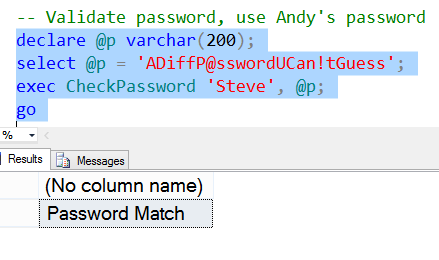
    The result of this call is the password matches.

    pwd1

    If I try a different password, say the one for the other user, it will fail.

    pwd2

    That’s good. This is very similar to how many applications, including AD and SQL Server, validate users. However, here’s one problem with a simplistic implementation like this.

    Imagine that through SQLInjection, someone learns the structure of the table. Not hard to do. Now the data in the table is hashed, and there are lots of hashing algorithms. Certainly it’s a lot of work to try all different combinations of possible passwords, and algorithms to find a match. It’s possible and it’s a brute force attack.

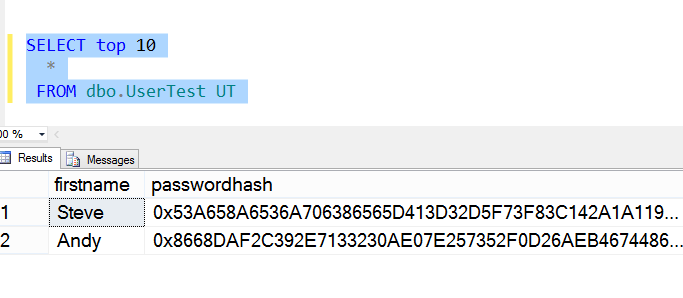
    Here’s the data in the table.

    pwd3

    However, the hacker, Andy,  doesn’t need to decode the password. Imagine that the hacker creates his own account, which is probably a low level account. However the hacker runs code like this, substituting different accounts for “Steve” until a privileged account is found.
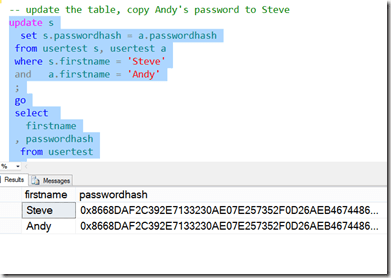
    pwd4

    Now the attacker does this. They use my (Steve’s) privileged account, with their password:
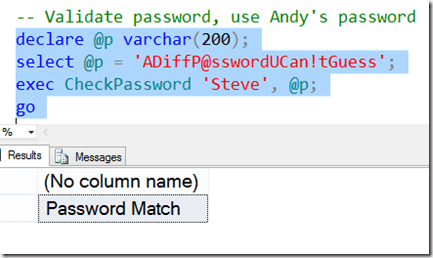
    pwd5

    The hacker (Andy), can now log in as Steve using his password. Any rights that are assigned to Steve are available for Andy.

    We have an attack without decryption.

    This is one reason that SQL Injection is a big problem in applications, especially those that implement some type of their own security. Solving this is slightly tricky, and I’ll talk about it in another post.

    One side note, the only way this is usually detected is if Steve logs in with his password. He’ll see this:

    pwd6

    Even then, unless Steve suspects an attack, he might write this off to a mistyped password, try multiple times and eventually reset his password without a second thought.