Tag: syndicated

  • Using multiple CTEs in one query

    This is a fairly simple thing to do, but I had to look it up the other day and thought it would make a good blog. This is a good example of a blog that everyone should write to show they know a particular skill.

    TL;DR: Use a comma between CTE definitions.

    Let’s imagine that you need to combine a few queries together and the code is complex. You decide to use a CTE to make things easier. Suppose I have this query:

    SELECT p.title , p.firstname , p.lastname FROM Person.BusinessEntity be INNER JOIN Person.Person p ON p.BusinessEntityID = be.BusinessEntityID WHERE ( SELECT COUNT(*) FROM Person.BusinessEntityAddress bea WHERE bea.BusinessEntityID = be.BusinessEntityID ) > 1 AND ( SELECT COUNT(*) FROM Person.PersonPhone pp WHERE pp.BusinessEntityID = be.BusinessEntityID ) > 1

    That’s ugly, and I want to move the subqueries. I know this is slightly contrived, but imagine that what you really want is a couple views like:

    CREATE VIEW BEACount AS SELECT bea.BusinessEntityID , cnt = COUNT(*) FROM Person.BusinessEntityAddress bea WHERE bea.BusinessEntityID = be.BusinessEntityID CREATE VIEW PersonPhoneCount AS SELECT bea.BusinessEntityID , cnt = COUNT(*) FROM Person.PersonPhone pp WHERE pp.BusinessEntityID = be.BusinessEntityID

    However you don’t want to create views, what you really want is to make both of these queries CTEs and then call them from the original query.

    I wasn’t sure how to do this, so I Googled. The first result was my friend, Pinal Dave’s blog. It took me about 10 seconds to read his explanation and apply it to my issue.

    WITH BEACountCTE AS ( SELECT bea.BusinessEntityID , cnt = COUNT(*) FROM Person.BusinessEntityAddress bea GROUP BY bea.BusinessEntityID ) , PersonPhoneCountCTE AS ( SELECT pp.BusinessEntityID , cnt = COUNT(*) FROM Person.PersonPhone pp GROUP BY pp.BusinessEntityID ) SELECT p.title , p.firstname , p.lastname FROM Person.BusinessEntity be INNER JOIN Person.Person p ON p.BusinessEntityID = be.BusinessEntityID INNER JOIN PersonPhoneCountCTE pp ON pp.BusinessEntityID = p.BusinessEntityID INNER JOIN BEACountCTE bea ON bea.BusinessEntityID = p.BusinessEntityID WHERE BEA.cnt > 1 AND PP.cnt > 1

    Note that at the top I have one WITH statement and both of my CTEs are separated by commas.

    Easy enough, a quick thing to look up, and a handy item to know. If you are breaking up queries and using CTEs to make things easier to read, use a comma between your CTEs.
  • Powershell in a Month Day 11 – Filtering

    This is part of my Powershell Challenge, to learn more about PowerShell (PoSh) using the Learn Windows Powershell 3 in a Month of Lunches book by Don Jones.

    I’ve learned that the dash (-) is going to be my friend. Filtering and comparisons are the backbone of SQL. We use them all the time in our WHERE clauses. In Powershell, we have similar comparisons as I’ve seen, but almost always as I use the eq, ge, le, ne, etc. comparisons, there is the need to include a dash before them. Same thing for -and and -like (see I’m doing it).

    This chapter looks at filtering, and how you can reduce the information returned from cmdlets to just those items that you need. The idea of “filtering left”, meaning including the filter as soon as possible in the command. Since commands are interpreted and executed left to right, filtering left means less processing where possible. However since not all cmdlets include a -filter parameter, you must use the WHERE-OBJECT cmdlet.

    Overall, the idea of filtering and using comparisons is very much core to what we do in SQL and what happens in many programming algorithms as we look to make decisions in our applications. This chapter helps to understand this.

    I also learned about the “$_.” syntax, which is really  a way to specify a generic object and then specify a property for all instances of that object. So if I’m looking at the name for something, I want to use “$_.Name” syntax. I had wondered what that was for in the last chapter, but now this makes sense.

    The lab, however, was challenging. I want to use the WHERE syntax when I can do things easier. For example, getting a list of services whose names are “conhost” or “svchost”. I entered:

    PS C:\Windows\System32\WindowsPowerShell\v1.0> get-process | where {$_.Name -match "Conhost" -or $_.Name -match "Svchost"}

    Way too much overkill. This would do it.

    get-process -name conhost,svchost

    That’s an area where I need more practice and need to work on things. I suspect much of my initial Powershell work will be more complex, without filtering occurring in the most left point it could unless I manage to understand the details of various commands.

  • Counting the Existing, and Missing, Rows

    I saw this as a problem recently from someone and thought it would make a good post. As I was building a quick solution, someone else posted theirs, but I decided to save mine as a blog post. It was a good, quick, T-SQL exercise for me to work on.

    I decided to take the Christmas season and use that as my example. My wife and I buy presents for the family and we try to understand what we’ve bought each year to balance out our efforts for each kid.

    My setup:

    CREATE TABLE People ( id INT , firstname VARCHAR(20) ); CREATE TABLE presents ( id INT , present VARCHAR(20) , value NUMERIC(6, 2) ); INSERT INTO People VALUES ( 1, 'Kyle' ), ( 2, 'Delaney' ), ( 3, 'Kendall' ), ( 4, 'Tia' ), ( 5, 'Steve' ) INSERT INTO presents VALUES ( 1, 'Book', 10 ), ( 1, 'Fire', 157 ), ( 3, 'Book', 8 ), ( 3, 'tablet', 162 ), ( 3, 'hat', 12 ), ( 4, 'bracelet', 80 )

    I’ve modeled this with two tables: one holding people and one with the presents. I need to join them together and see what I’ve bought.

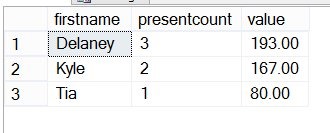
    SELECT p.firstname , presentcount = COUNT(ps.present) , value = ISNULL(SUM( ps.value), 0) FROM people p INNER JOIN presents ps ON p.id = ps.id GROUP BY p.firstname


    That gives me a count of gifts and money spent

    giftsa

    The problem is that it doesn’t let me know what people I haven’t bought for. For that I need to change to an outer join, in this case I’ll choose a left outer join since the people table is the one I need all rows from:

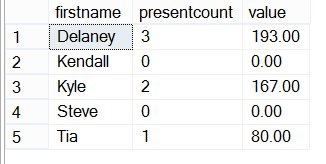
    SELECT p.firstname , presentcount = COUNT(ps.present) , value = ISNULL(SUM( ps.value), 0) FROM people p LEFT OUTER JOIN presents ps ON p.id = ps.id GROUP BY p.firstname

    Now I can see that Kendall and Steve haven’t received any presents yet. More work to be done:

    giftsb

    Outer joins are a quick way to find issues, but be sure you understand how they work. In this simple case, it’s an easy change.

    Now this looks like software I might actually use. Perhaps this would make a good project for me?

  • Powershell in a Month Day 10 – Formatting

    This is part of my Powershell Challenge, to learn more about PowerShell (PoSh) using the Learn Windows Powershell 3 in a Month of Lunches book by Don Jones.

    Not an exciting chapter for sure. This chapter deals with the formatting of results, or objects, for display (or saving to a file or printing). It’s mundane, and not the most interesting stuff to learn. As an analogy to the SQL world, it’s like learning the difference between

    select *
    and
    select name, id, status
    We typically don’t deal with a lot of formatting in SQL Server. We let SSMS handle things, and we include, or don’t include, results. This chapter shows how to do that, and builds a little on some of the things from previous chapters.
    The Get-Process and Get-Service items are the main examples. The chapter starts with some theory, looking at Get-WMIObject and how the system knows whether to display things in a list or a table, but for the most part we don’t alter those default formats natively, so that wasn’t very interesting.
    However, the format-table and format-wide items are interesting. I could see those being handy when you are trying to cull through information and want to only deal with certain items. I practiced a bunch of the formatting, playing with the results, and practicing expressions. Especially when we get to the point where we want to do math and calculate the results of something. Like normalizing memory or recompiles, or something else.
    The chapter looks at grouping, choosing columns, breaking into separate tables, and in general a light understanding of formatting capabilities. There isn’t much time spent on format-list or format-wide, and not much on out-GridView, do you have to do those on your own. I think out-gridview will be really handy to try and work with a set of data, resort it on the fly, and without re-running commands.
    Overall an easy chapter, light on content, but handy in that it will teach you things that you’ll want to do at some point and won’t want to figure out on the fly. I did OK with most of the lab, but being in a bit of a hurry, I didn’t want to figure out how to get a list of log files and cheated, looking at the answers. I should have dug into help, but help is annoying at times. I’ll have to get over that.