Tag: syndicated

  • SQL in the City

    Photo Sep 27, 4 11 59 PM

    That’s where we were on Friday. 780 Third Avenue, in the middle of Manhattan. The start of our 2012 US SQL in the City tour.

    I arrived Thursday, getting into the city in time to go running in Central Park. A solo #sqlrun, but one I enjoyed on a beautiful fall afternoon in the city. Then it was a short walk to rehearse a few things for the event.

    Photo Sep 27, 4 14 25 PM

    Coming out of the elevator, I could see a bunch of new swag on the book shelf. Water bottles? Very cool. I snagged one for my daughter, and she loved it.

    Photo Sep 27, 4 14 33 PM

    A nice setup, lots of demo booths, all ready for people to arrive.

    Photo Sep 27, 4 14 36 PM

    Plenty of coffee cups, sugar, etc. ready to be stocked

    Photo Sep 27, 4 14 45 PM

    And a big banner in our library. There was a set of almost every book we’ve published over the last couple years, and it’s quite a list of books. We have most of these available as free ebooks on SQLServerCentral, so check them out.

    Photo Sep 28, 5 52 53 AM

    Rehearsals went fine in the main room. I think everyone checked out their laptop on the projector. Since I walk, I took a few minutes to see how the projector would affect me. It was right in my line of sight, but I mentally prepared myself to cross over it a few times.

    Photo Sep 27, 4 16 19 PM

    Then it was off to dinner and an early bedtime. Friday morning I was up at 6:15 for a run. As I came downstairs, I noticed Grant had already run, and checked out his route. Not the one I was planning on.

    grantrun

    The streets were wet, and I almost went back inside, but decided not to. I ended up having a nice run as the sun came up on the city. Lots of people out in the early morning, which is strange for someone that lives in the middle of nowhere. Even in most cities I visit, there aren’t that many people running at 6:30am.

    steverun

    As you can see, my run was more organized. I cleaned up and headed to the venue, arriving just before the rain came down.

    Photo Sep 28, 6 14 51 AM

    We had banners outside, but had to bring them in. Fortunately I had my hat to keep dry. People wandered in and filled up the main room. Simon Galbraith, one of the joint CEOs at Red Gate, gave a nice keynote, talking about the challenges we face as an industry and how Red Gate is working to better serve our customers. Not only are we trying to build great products at value prices, but we are also putting on events like this, working with the community to educate users. We even support Open Source, funding the Glimpse project.

    Photo Sep 28, 7 12 23 AM

    I had the first two sessions, talking about essential database maintenance and preparation for disaster. Lots of developers and accidental DBAs in the crowd and while I didn’t have many questions in the session, I did get some in the hallways later.

    I watched a bit of other sessions, but mostly ended up chatting with different people throughout the day. It’s great to meet people at events, and the diversity and variety of people I meet in New York is amazing.

    We had a great time, though I ducked out just before the closing ceremony, prizes, and drinks. With a busy tour, I wanted to get to the airport and get home Friday night. I made it, though it was a challenge. Huge thanks to United for outstanding customer service in moving my flight arrangements.

    A great start to the tour, and I’m looking forward to Austin today.
  • Full Text Search – CONTAINS

    I’ve been working on a new presentation for full text search and brushing up on some of my T-SQL operators. Part of my talk goes into the CONTAINS operator, which is one of the full text search keywords you need to know.

    This operator is only used with full text indexes, so if you have a column that isn’t full-text indexed, it returns an error. If I issue this:

    SELECT *
     FROM dbo.salary
      WHERE CONTAINS(empname, 'Steve')


    I get this:

    Msg 7601, Level 16, State 2, Line 3

    Cannot use a CONTAINS or FREETEXT predicate on table or indexed view ‘dbo.salary’ because it is not full-text indexed.

    I have a table that is full text indexed and I can issue a basic query, which looks like so many other T-SQL queries.

    SELECT
     name
     FROM authordrafts
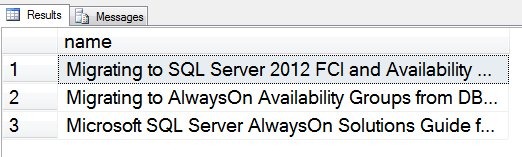
     WHERE CONTAINS(*, 'AlwaysOn')
     ;
     go
    

    This returns me all the rows where the columns in the full-text index (I used the star, *), have the term “AlwaysOn” in them. In this case, I’m hitting a FileTable table with lots of whitepapers in there.

    fts_1

    This query is essentially a LIKE search, but it isn’t doing character matching. Instead it is working with those keywords in the full text index. I’ve used a simple search above. I could replace the * with the column, in this case the file_stream column.

    SELECT
     name
     FROM authordrafts
     WHERE CONTAINS(file_stream, 'AlwaysOn')
     ;
     go
    

    I could also use a prefix term and the * wildcard, similar to LIKE.

    SELECT
     name
     FROM authordrafts
     WHERE CONTAINS(file_stream, 'Always*')
     ;
     go


    These match other rows where “always” is the document, which matches “always” as a standalone word as well as “alwayson” as a term.

    I could also limit the search to particular columns, using parenthesis and commas to separate them out. The BOL example from the CONTAINS page does a nice job of showing this.

    Use AdventureWorks2012;
    GO
    SELECT Name, Color
     FROM Production.Product
     WHERE CONTAINS((Name, Color), 'Red');


    This is just a very basic look at CONTAINS. In another post, I’ll look at a few more possibilities with this term.

  • Off to the Center of the Universe

    “New York City…center of the universe..” – Rent

    I’m off to New York this morning for the start of the 2012 SQL in the City US Tour. It kicks off tomorrow in New York City.

    As this posts, I’ve just dropped my son off at school early for a Future Business Leaders of America field trip as I head off on a field trip of my own. This is the start of a few busy weeks as I deliver presentations in 5 cities in two weeks.

    I’ve got a group with me as well. A number of talented developers and business people from Red Gate software, along with my co-worker Grant Fritchey (b | t) will be at all the events. We have some special guest speakers at each stop as well from the local areas and I’m hoping we deliver some great talks that you enjoy.

    We had a great time this past July in London and I’m looking forward to these events over the next two weeks.

    I don’t love the travel, and I’m popping in and out of home the next two weeks between some of the stops. However I love my family and my bed, and the chance to get home for a day is worth a little extra travel.

    New York is an amazing city, and I love visiting it. I’m hoping to get into the city and checked in by 4pm at the latest. Then I’ll head over the Central Park for a run. If you want to join me, I’ll be coming up 7th to the park, hopefully by 4:15 at the latest, but watch Twitter.

    Red Gate puts on a great event, and I look forward to seeing some of you in New York, or at any of the other cities on the tour.

    If you wonder where the lyrics at the top come from, watch this:

  • Transferring Table Types

    An interesting idea. I saw this question asked after I was playing with table types a bit. “Can you move a table type between schemas?”

    Suppose I had two schemas:

    CREATE SCHEMA OldSchema
    ;
    GO
    CREATE SCHEMA NewSchema
    ;
    GO

    In one of them, I create a table type and a procedure:

    CREATE TYPE OldSchema.MyTable AS TABLE
    ( IDCode INT
    , Location VARCHAR(200)
    )
    ;
    
    CREATE PROCEDURE OldSchema.MyProc 
    AS
     SELECT * FROM dbo.MyLogger
    ;
    

    There’s nothing fancy here. Just two objects created in one schema. I now have the need to move these to the other schema. Perhaps it’s a mistake. Perhaps I have developers working in one schema and I do integration testing in the other schema. In any case, it’s easy to move the proc with the ALTER SCHEMA syntax:

    ALTER SCHEMA NewSchema TRANSFER OldSchema.MyProc
    ;

    I can easily script something to move multiple procs, but if I do this:

    ALTER SCHEMA NewSchema TRANSFER OldSchema.MyTable
    ;

    I get this:

    Msg 15151, Level 16, State 1, Line 1

    Cannot find the object ‘MyTable’, because it does not exist or you do not have permission.

    I know it’s there; I just created it. What’s wrong?

    The problem is that this isn’t an object per se, but a type. As a result, to move a type, I need to use a different syntax:

    ALTER SCHEMA NewSchema TRANSFER type::OldSchema.MyTable
    ;
    GO

    That works fine and the type has moved. The class attribute of the notation is

    CLASS::Schema.Object

    I haven’t found good documentation of this, but there are numerous examples in BOL that show this is how you address various “types” in SQL Server.