Tag: syndicated

  • Disabling DDL Triggers

    Suppose you want to stop using a DDL trigger for a short period of time, such as the login trigger I created recently. If you want to disable an index, you use

    ALTER INDEX xxx DISABLE

    That doesn’t work for triggers. The ALTER TRIGGER syntax is used for changing code.

    You could use ALTER TABLE on DML triggers, but not for DDL triggers. The DISABLE TRIGGER DDL can be used.

    To stop tracking user logins, I can use:

    DISABLE TRIGGER CatchLogins ON ALL Server
    ;
    

    There is an ENABLE TRIGGER syntax as well to turn the triggers back on. These two commands allow you to save the trigger code, but have it enabled or disabled as needed.

  • Running in Central Park at SQL in the City New York

    I just booked my tickets for New York City. I’m coming into the city on Sept 27, at 2pm, with just enough time to get to my hotel, drop my bags, and then hit Central Park for a run. I love to run, and Central Park is great. It’s on my list whenever I get back to the city.

    SQL in the City is coming to New York City on Friday, Sept 28, 2012. It’s a free day of training from Red Gate Software, and I’m delivering two out of many SQL Server sessions there. Mine are one on database essentials, and one on preparing for disasters. In addition, Grant Fritchey (b | t) will deliver a few on development, we will have Red Gate developers talking about tools, and a few Friends of Red Gate will have sessions on development and administrative topics.

    Red Gate is sponsoring a mini-tour of free training days across the US this fall. We did this last year in Los Angeles, and recently finished a two events in London. This is a chance to learn about topics that are important to SQL Server professionals, just like so many other one day conferences. We’ll feed you, provide coffee and snacks, and good conversation, knowledge, and debate on different ways to attack the challenges you face at work.

    We’d love to have you attend. Registration is free, and I hope you’ll join us at the Concierge Convention Center in New York City on Sept 28. Come meet all of us, and please feel free to stop any of us and shake our hands.

    You can even join me for a run in Central Park on Thursday night if you’re inclined. I’ll post details on Twitter once I figure out how quickly I can get there. I’m guessing I’ll be at the park around 4:30, SE side, but we’ll see.

    I love New York, and my kids keep asking if they can come. I’ve been there many times, from road trips in college to taking my oldest to see a Broadway play one weekend. I’ve toured much of the city, and one fond memory is standing on the 80th floor of the World Trade Center in 2000, looking out over the Hudson. I wish I could take a kid and spend a few days there, but this is a quick trip, starting off the US SQL in the City tour.

    Register today if you can come. I hope to shake your hand in New York.

    This is part of my SQL in the City series, covering a few thoughts on the US tour.

  • Home Backup for the DBA

    I’ve been giving a Prepare for When Disaster Strikes talk at SQL in the City this year, and it’s designed to get you to think about problems before they happen and take steps to mitigate issues. It’s important at work, but it’s also important at home.

    If you read the story of the Amazon/Apple hack, you might worry about the security of your information, and you should. However I was more concerned over the data loss, specifically pictures, when I read that account. I take a lot of pictures, all of them digital these days, along with various writings and videos, and I worry about preserving those for my own memories and for my kids. I don’t trust Facebook/Google/etc, to store them, so I needed my own solution.

    I installed Windows Home Server (WHS) a few years back on an old Dell Dimension E520. It was a good workstation, and plenty powerful to run the previous version of WHS (prior to WHS 2011) on its’ AMD CPU. It worked well, but across two years I had 3 boot drive failures. Each time I needed to not only replace the drive, but reinstall WHS and then copy off and back my files from the data drives. A PIA.

    I’d looked at Drobo, and other NAS type solutions, but none were very automated, rather expensive. I had a desktop, a laptop, my wife’s laptop, the kid’s iMac, and sometimes another machine to back up. After my 3rd boot drive failure, and the server sitting idle for a couple months, I decided to virtualize my WHS.

    I had planned on using Win7 for a host, but the older desktop didn’t seem to want to install it with my new RAID card in it. Rather than futz with it, since it wasn’t critical and isn’t connected to the Internet on my home network, I installed WinXP and then Virtual Box. Inside of Virtual Box, I installed the older WHS software, putting my data on separate virtual drives that were protected by RAID. I used 2 separate arrays, which should give me some protection if any of them fail. The host WHS drive is also on a RAID array, which should give me some protection from drive failures.

    And if my boot drive fails, I replace it, install WXP, Virtual Box, and then run my VM without messing with data.

    I like WHS as a central place for us all to share pictures, video and music, and for backups. I’ve recovered a few files from the system that I had accidently deleted, and I know all our machines are protected right now.

    It’s not perfect, and I really need an offsite solution for a second backup since I’m a DBA. I get a little paranoid about restoring things, and I know one copy isn’t good enough.
  • Where’s My Certificate Backup?

    If you’re like me, you take advantage of the default backup paths in SQL Server. It makes my code cleaner, and if I need to move the instance somewhere else, all my code works. No pathing issues.

    A certificate backup might look like this for me:

    USE master
    ;
    go
    BACKUP CERTIFICATE SteveCert
    TO FILE = 'SteveCert'
    WITH PRIVATE KEY 
    (
        FILE = 'SteveCertPrivateKeyFile',
        ENCRYPTION BY PASSWORD = 'R@ndomP3ssW0rd'
    );
    GO
    

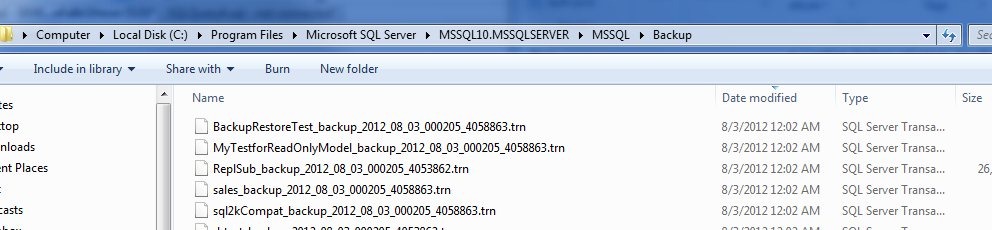
    If I run this, and immediately go to my backup folder, sorting by the last modified date for files, I see this:

    backupcert1

    No certificate backup file. What happened?

    The answer is actually documented, and you should be aware of this. In the BACKUP CERTIFICATE page, it says this: “The default is the path of the SQL Server DATA folder. “

    That’s interesting, and it makes sense to me. This folder is more likely to be secured than the backup folder, where developers and who knows who else may have access to the folder. By limiting it in the data folder, you provide a little obfuscation, perhaps more protection, and you force the administrator, the DBA, to get the files.

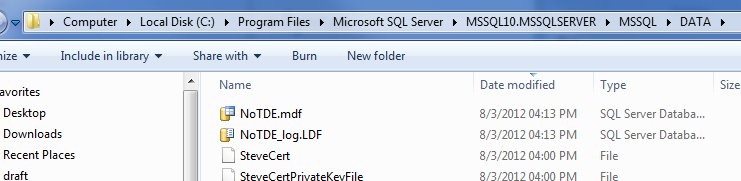
    However the files are also ACL protected. If I go to my data folder, I see the files.

    backupcert2

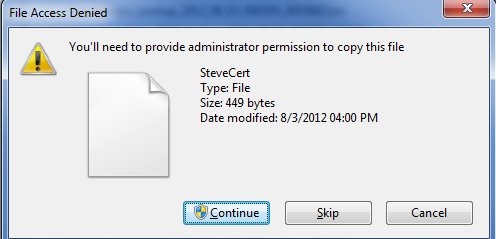
    If I select the certificate and CTRL+C (copy) it, and then go to the backup folder and try a CTRL+V (paste), I get this:

    backupcert3

    The service account has permissions to this file, not administrators by default. This action invokes the UAC command to require me to make a conscious decision to make this copy.

    Of course, I can just provide a path to make sure I can find the file.

    BACKUP CERTIFICATE SteveCert
    TO FILE = 'c:\SQLBackup\SteveCert'
    WITH PRIVATE KEY 
    (
        FILE = 'c:\SQLBackup\SteveCertPrivateKeyFile',
        ENCRYPTION BY PASSWORD = 'R@ndomP3ssW0rd'
    );
    go

    Whatever you do, make sure you backup your certificate files and keep them safe. If they go, you do lose data.