Tag: syndicated

  • Removing a DDL Trigger

    In a recent post I talked about how to create a DDL trigger. You’d think to drop that trigger, I’d run this:

    DROP trigger CatchLogins

    That returns me this nice message:

    Msg 3701, Level 11, State 5, Line 1

    Cannot drop the trigger ‘CatchLogins’, because it does not exist or you do not have permission.

    I was logged in as a sysadmin, and I’d created the trigger in the same session, so it doesn’t make sense.

    Instead you need to add a little phrase:

    DROP trigger CatchLogins
     ON ALL SERVER
    ;
    

    Then you get the wonderful

    Command(s) completed successfully.

  • Identity Insert and Table Variables – CONNECT issue

    I was running some code the other day and was surprised by the result.

    DECLARE @tmp TABLE (myID INT IDENTITY,MyChar VARCHAR(200))
    
    INSERT INTO @tmp(MyChar) Values('Apple')
    INSERT INTO @tmp(MyChar) Values('Peach')
    INSERT INTO @tmp(MyChar) Values('Pear')
    
    DELETE FROM @tmp WHERE myID = 2
    
    SET IDENTITY_INSERT @tmp ON
    
    INSERT INTO @tmp(MyID, MyChar) Values(2,'Banana')
    
    SELECT * FROM @tmp

    My result?

    Msg 102, Level 15, State 1, Line 9

    Incorrect syntax near
    ‘@tmp’.

    Line 9 is the SET IDENTITY_INSERT statement.

    I can understand why this is an issue. If you set this on a table variable, you could cause problems in other parts of the DB, since this can only be set on one table, but perhaps that’s not a huge issue? I don’t know, but either the functionality or documentation is wrong.

    I submitted this on Connect. Vote if you agree.

  • Who’s Responsible

    This is really scary. Someone being sued for downloading a porn movie illegally. I have nothing against porn, and I certainly think that downloading stuff that’s a copyright violation shouldn’t be mainstream as in Amazon giving away movies for free without compensating owners of the copyrights.

    Setting that aside, there’s something fundamentally disturbing about our computing devices, which are assumed to be under our control, but may not be, even when they are.

    I need to write more, but as a quick analogy, if I’m using my car, no one else can use it. At least not without me being somewhat aware of the actions. Someone could hide contraband in my trunk, where I rarely look, but they’re not going to get it transported anywhere I’m not going.

    Contrast that with your computer. You could be infected with a virus (as an all-encompassing term for rouge processes) that could potentially be downloading (or uploading) something you don’t expect, including copyrighted content, or even attacking other computers (for example, as part of a DDOS botnet). It could do this while you were working on a flyer for your kid’s birthday party in Word, or checking your email.

    Is that your fault? If you use an A/V program? If your kids hit a site returned in a Google search that installed malware? If you bought a piece of software that had it embedded? I’m not avoiding responsibility here, but it’s a thorny issue as to who’s at fault, and more importantly, to what extent do we expect people to be aware of what’s happening?

    Tough times ahead if we don’t get a handle on security and digital laws.

  • Startup Jobs

    Are there things you need to make sure are running when your SQL Agent starts? Did you know that you can run a job when the Agent starts?

    I haven’t often used this, but there are cases where it was handy. In one system I administered, we wanted very fast inventory lookups for one of our groups. I know that we could have easily let the first few people just wait for their queries, but it constantly generated complaints from workers, and the VP in that area didn’t technically understand why. Explaining buffer pools, and caches weren’t an option.

    Our solution was a quick fix, which “hid” the problem. When the instance started, we had a startup procedure that ran, running a few queries that would load lots of data into memory. By the time people could connect to the server, it was usually warm, and complaints went away.

    A similar feature exists for SQL Agent. When you build a job, you can select a schedule that runs when the Agent starts. Imagine that I have a procedure that logs when my agent starts. I want this to log the datetime when the agent starts. I know it’s in the errorlogs, but if I have a lot of restarts in a short time, I could lose that information.

    I can create a table and procedure to log this:

    CREATE TABLE Startups
    (
      StartDate DATETIME
    )
    GO
    CREATE PROCEDURE spStartAgent
    AS
    INSERT Startups SELECT GETDATE()
    RETURN
    GO

    If I create a new job, I can enter a step that runs my job.

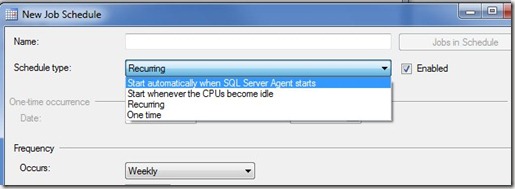
    I do that, and then click the scheduling tab (in SQL Server 2008 R2). Once I do that, I can drop down the Schedule type box, which defaults to “Recurring”.
    startup

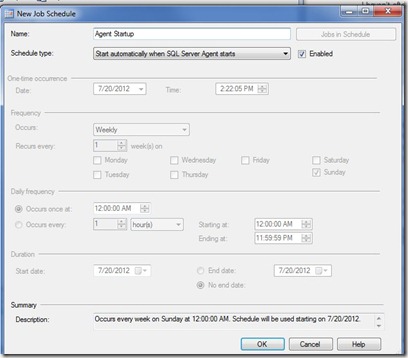
    In the drop down, the first selection is “Start automatically when SQL Server Agent starts”. If I select this, all the other fields on the form get disabled.
    startup2

    I named this Agent Startup, so I can re-use this schedule if I need to. Now this schedule will run my job every time the Agent starts.

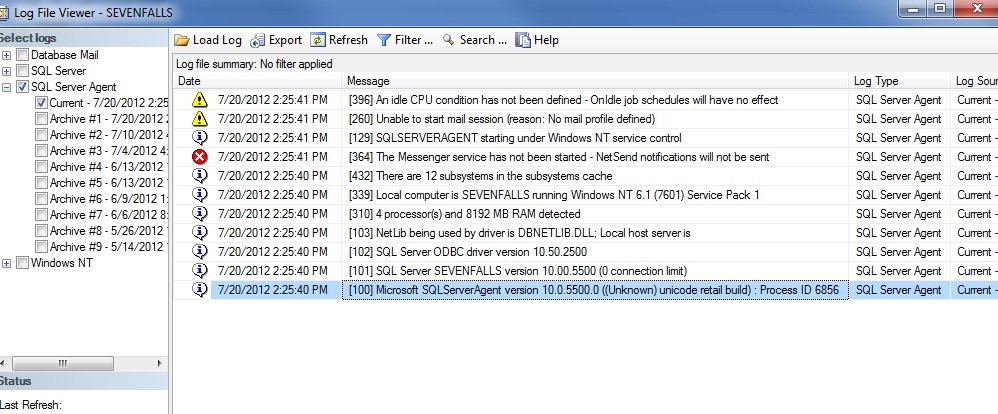
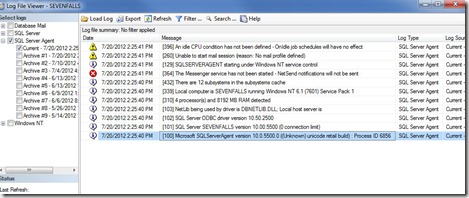
    If I restart my Agent (not my instance), and check my log, sure enough I see a note in my table that logs startups. However the execution of the job isn’t logged in the Agent error log.
    startup3

    Perhaps another good job would be to copy over the most recent error log into an archive folder, one where a hacker might not think to look. I could even set the rights for the agent to only allow files to be created, not altered or deleted. That way I could retain the file for auditing purposes.