Tag: T-SQL Tuesday

  • Shipping Database Changes–T-SQL Tuesday #90

    tsqltuesday

    This is a good T-SQL Tuesday topic from James Anderson: shipping database changes. It’s especially poignant for me since I talk and present often on this topic. Much of my work at Redgate involves helping people implement DevOps for Databases, deploying changes smoothly and efficiently to databases.

    I’ve got lots of stuff here, but let me go back to a previous position, many years ago before TFS, when Visual SourceSafe (VSS) was in heavy use in development. We implemented DevOps before DevOps was a thing, and included our database changes.

    Smoothing Deployments

    I worked at a startup company and we were trying to respond to requests from management and sales. As we grew from 4 developers to 10, plus a DBA (me) and a QA person, we needed to smooth out our process. Over a few months we got into a particular schedule:

    • Monday noon – Package up all completed changes for deployment to QA.
    • Monday afternoon – Discuss and plan changes for the following week
    • Tuesday-Wednesday – Bug fixes as needed
    • Late Monday to the following Monday – write code for the next deployment
    • Wednesday evening after 8 – deploy changes to production

    I had a foot in both the development and operations world and had to reconcile the need for production to work and remain stable while also ensuring new changes could be deployed every week. We were a young, new company, and we often had database changes included each week in our package.

    When I started, we would talk to developers on Monday, start to gather all the changes from VSS for our web application, script out all database code, and then deploy to QA. Inevitably, some code would be forgotten or wrong, and we’d track it down sometime between Monday noon and Wednesday noon. Then we’d (hopefully) have a good folder of changes that we could deploy to production on Monday night, manually running .sql files or copying web code to remote servers.

    The Old Process

    When I started deploying code with this group, I’d get some dinner Wednesday afternoon and then return to the office with 2-3 other developers to deploy code. I usually had notes from various issues that QA had discovered in their testing, sometimes altering scripts in real time to ensure they would deploy and work correctly on the production database.

    Myself and the web developers would work to get code deployed in an hour or so each week, and things usually went well. We’d have hiccups and issues, but we worked through them and talent helped. It was a good team and we could usually solve our issues.

    Getting Better

    The lead developer and I both had little children at the time. Spending 12+ hours at work on Wednesday wasn’t an ideal situation for us, and we decided to get better.

    The first thing we did was ensure that all code was tracked in VSS. We had most web code here, but there were always a few files that weren’t captured, so we cleaned that up. I also added database code to VSS with the well known, time tested and proven File | Save, File | Open method of capturing SQL code. This took a few months, and some deployment issues, to get everyone in the habit of modifying code in this manner. I refused to deploy code that wasn’t in VSS, and since our CTO was a former developer, I had support.

    The other change was the lead developer and I started building a release branch of code each week. We’d move over the changes that were going to be released to this branch, which simplified our process. We could now see exactly which code was being deployed. This was before git and more modern branching strategies, but we were able to easily copy code from the mainline of development to the release branch as we made changes for this week.

    Since some changes might be in development for a few weeks, we couldn’t just grab the latest version of every file. We needed to know which pages, and which database changes would be released and which were still in development.

    Automation

    Once we had the code tracked, we began to automate deployments. Both the web developer and I built separate scripting tools because we had different needs. Web code is easier, mostly just copying files to the correct locations. We had a few token replacement issues, but some creative scripting solved those.

    For the database, I had a single application and a single database, which is a simple problem to solve. Deploying database changes were always taking the latest version of object code, which might be a CREATE, or it might be an ALTER. In my case, I separated code into folders (tables, views, etc.) and then added scripting to ensure that I deployed objects in order. For the most part, we could work in gross orders (Tables first, then views, then procs, etc.). We had a few items that were out of order, but hard coded deployment checks ensured these issues were handled.

    My additional challenge was managing QA, which was my test environment for deployments as well as the application. I added processes that would automatically refresh the QA environment from production. This was a button click to start the process. Once this was done, I’d use my deployment process to deploy the database changes for the week from VSS.

    If we found issues in QA, and code changes were needed, we went back to development, made the changes there, committed to VSS, and then repeated the process. With automation and a small database, we could rebuild the QA environment with a new package in about 15 minutes.

    Going Live

    The first couple times we deployed to production, the lead developer and I still went into the office and made sure the deployments ran. After two weeks of watching our process run in about five minutes, we realized this was silly.

    For over a year, we would continue to deploy changes every Wednesday. The lead developer and I would get on the phone every Wednesday at 8pm. We’d VPN to the office and I’d deploy database changes (5 minutes or so) and then he’d run his application scripts (2-3 minutes). We’d check a few things and then sign off.

    Life got much better, we built confidence in our ability to deploy, which meant the business trusted us to get changes out to customers every Wednesday. Perhaps most importantly, we started working more normal hours rather than crazy startup schedules. We could even make quick patch deployments on a Thur or Fri if needed, and because we could smoothly roll out changes, we were under less pressure to pile as much as possible into the next deployment. If something didn’t get done in time, it would just roll to the next week.

    Modern Tools

    I work for Redgate Software now, and we’ve spent a lot of resources (and brainpower) to try and help you deploy code in an easier way. Deploying database changes is hard, because we need to maintain the state of our system.

    These days, I might still use a home-grown, scripted approach if I had one application and one database. However, I’d really consider using other tools, because they mean my developers don’t spent time doing simple scripting, they spend time solving application problems.

  • T-SQL Tuesday #89–Changing Times

    tsqltuesdayThis month the invitation is from Koen Verbeeck and it has to do with the cloud changes coming to the data world, especially SQL Server. That’s an interesting topic, not necessarily technical, but it is an interesting one to think about.

    I’m going to be a little short because life is busy, but I think this is an interesting item to keep an eye on for many people. Not necessarily at your current position, but what if you need to move on?

    If you’re interested, I host all the T-SQL Tuesday topics at tsqltuesday.com.

    The Cloud is Changing Things

    I sat in a talk at SQL Bits from Conor Cunningham of Microsoft. He’s one of the principal architects of SQL Server and Azure SQL. In the talk he talked about some interesting ideas in how SQL Server engineering has changed in the last decade. Victoria Holt wrote a short piece on some of the things Conor talked about.

    There are a couple interesting things that the cloud is enabling. First, Microsoft runs their cloud without any Ops team, really having developers be responsible for things in production. This is 1.7mm databases, without any DBAs. Why? They gather lots of data, so they learn when things are broken, unstable, or problematic. They do this with the 600TB of telemetry they gather every day.

    Of course, you and I won’t have that much information, but the cloud does enable Microsoft to think about how to make SQL Server more stable, and also how to add automation capabilities into the product. We haven’t seen much of this change in current versions, but the Query Store is the start of one thing, and Adaptive Query Processing (coming in v.Next) is another. I wouldn’t be surprised to see more, and that means our jobs as DBAs will change.

    I think there will be less, check, configure, verify, maybe even some less tuning work for DBAs. There will always be developer needs, especially with more complex reporting, visualizations, and just understanding large data sets. There will also constantly be the need to write better SQL as the optimizer can only do so much with bad queries.

    The cloud interests me and excites me. There are issues, concerns, and challenges. However, I also find working with Azure through Powershell, being able to access different services from various places, keeping some data there (non PII) and avoiding the need to manage infrastructure to be key.

    I don’t know if it will happen, but I would hope at some point that the Azure cloud, the AWS cloud, the Google cloud would license their service, or even allow others to resell and manage portions to encourage competition and give us some choice in who we might choose to deal with. If so, they I could see more and more companies just considering moves to the cloud for more data, especially when there could be different levels of service and protection for different needs.

    The cloud is changing things, even if you aren’t in the cloud. That can be opportunity if you take advantage of it.

  • TSQLTuesday.com – Quick WordPress Setup in Azure

    When I agreed to host the T-SQL Tuesday site, I wasn’t sure what to do. I thought about just putting up a static page, one I’d edit, but in some conversations with Adam Machanic, he wanted to have a few people able to manage the site. That makes sense and means I have less to do.

    My first thought had been to build a SQL database, set up a web page, maybe add some logins for people, etc. Sounds great, but that can be a lot of work, and while I don’t mind some projects, I don’t want a big project that’s just a small service. Especially for data that’s really just historical logging.

    When I woke up one morning and found a domain transfer request, I felt some pressure to get something up quickly. One of the great things about using domains on the web is that I could build something quick, point the domain to it, and build something else in the background, moving the domain later. There might be redirect issues, but in this case I expect most people just hit the domain, tsqltuesday.com, so I decided to focus there.

    Azure Websites

    I had experimented a bit with Azure websites, setting a few up, and thought this might be easy. In fact, it was really easy, so I decided to write a bit about the experience. Note, this is what the experience is like in Mar 2017. It could change quarter to quarter, so use the process and images as a rough guide.

    To get started, log into your portal. If you don’t have an Azure account, google how to create one, set it up, and then come back.

    Once you have an account, click New and choose .

    2017-03-11 21_01_53-Web   Mobile - Microsoft Azure

    From here, pick “See All” and then find WordPress.

    2017-03-11 21_02_15-Untitled

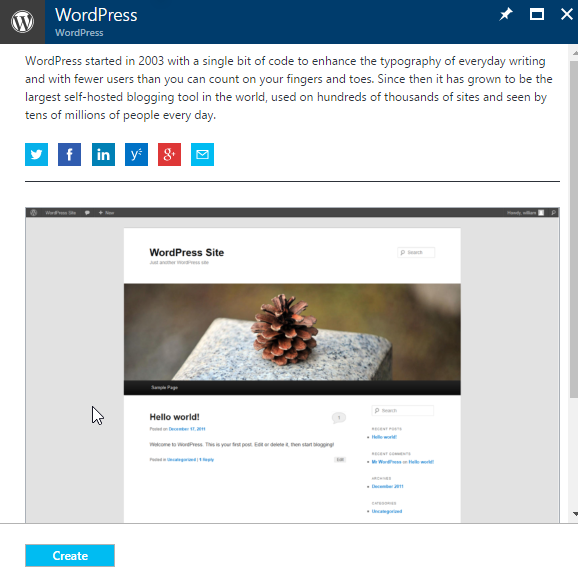
    Once you select WordPress, you just click Create.

    2017-03-11 21_02_56-WordPress - Microsoft Azure

    I tried to keep this simple, and picked these options.

    2017-03-11 21_03_47-WordPress - Microsoft Azure

    one thing I had to do was pick a size above the free service. This is because the free services don’t allow custom domains, and while tsqltuesday.azurewebsites.net works, it’s not as cool at tsqltuesday.com. Plus Brent had already transferred the domain to me, so I was on the hook.

    Once this was done, I had the site created.

    2017-03-11 21_07_42-tsqltuesday - Microsoft Azure

    Once the deployment completes ,you have a blank WordPress site. You log in with your credentials and start configuring, just as you’d do on wordpress.com or with your own installations.

    2017-03-11 21_09_56-WordPress › Installation

    I took a few guesses on how to organize the site, but I’ll discuss those late. This is really about getting a quick site up, one for your business, for your blog, or whatever you’d like. This is my second WordPress site on Azure, and I’m amazed at how easy it is.

    I’

  • T-SQL Tuesday #88 – WTF

    tsqltuesdayIt’s T-SQL Tuesday time again, and this is a good one. The host this month is Kennie Pontoppidan, who I had the pleasure of running with one morning in Copenhagen. His theme is The daily (database-related) WTF.

    You can read about T-SQL Tuesday at tsqltuesday.com and see all the archived invitations. Join in the fun by watching the site, or the #tsql2sday hashtag on Twitter. If you want to catch up on old invites, feel free.

    WTF

    I’m not sure if I have a great story, but I certainly have had a few “WTF” items in my career. Some of them caused by me, some by others, and often not a good thing.

    The one item that I’ll relate here goes back quite some years in history, but it was one that affected me for many years in my career. I do quite a bit of work with DevOps and software development these days, trying to help people build better software.

    Part of that is ensuring your code, including your database code, is in a version control system (VCS). I’ve worked in a variety of environments, using different source code control methods, and I have to relate a story that taught me how important it can be to manage code and track the versions in production.

    A long time ago I went to work for a small startup. The company had been in business for 5 or 6 years, and had a number of customers that depended on our service. However, our developers and admins were a mess. I was brought in to try and straighten out the the database and infrastructure side of our codebase.

    One of the first things I found was that all our stored procedures in the production server were encrypted. I wasn’t sure why, since we hosted our machines, but that wasn’t a big deal.

    Until it was.

    One day we had an issue on one of our SQL Server 2000 servers (we had two, supposedly identical). In troubleshooting and putting some sample data in both systems for a fake customer, we got different results. Hmmm, not what I wanted to see.

    I checked the VCS (SourceSafe at the time) and checked out the code. I then loaded my test data and … got a third, different result. Now I was concerned as this was a production bug that was delaying work for a customer.

    This was early in my tenure at the company, so I asked the other DBA for some information. He had been passed over in favor of me by management and wasn’t a great deal of help. He told me that he likely had the source code for server 1 on his machine.

    You might start to guess why this is a WTF post. Rather than get upset, I wanted to see the code, which he produced. His version was one one of the servers, but not the other. Where was that code? He thought it was on the lead developer’s machine, who conveniently, was on vacation. We checked, and it wasn’t in his checked out folder structure.

    What about our former developers, who had moved out of state? We still had their machines, which were supposedly going to be shipped to them so they could continue working for us. The checkout folder wasn’t right, but we found 2 other folder structures, copies of the source code tree, with different code. At this point, I just needed to fix the issue, and managed to find a copy of the stored procedure that matched my issue, built a correction, and deployed it to both servers. Unencrypted.

    Detective Time

    At this point, I paused some work that the DBAs were assigned. We spent a day or so pouring over all developer’s machines, finding 6 or 7 different copies of source code (plus our SourceSafe install). Multiple files were different, and we essentially had no idea what was running in production.

    Apparently our developers had decided that when they checked in code, they would leave it on their machines. If they wanted a branch, in essence, they’d copy this folder over, make changes, and sometimes copy things back, but mostly just assume they knew what was good, and leave the updates on disk, uncommitted to the VCS.

    I couldn’t come up with a rational reason for this. Back then, we didn’t have any sort of integration like SQL Source Control and we checked code in and out of the VCS manually. I had previously set all my machines to remove the code from my local disk, ensuring I’d go to the VCS to get code when I needed to change something. I suspected this was one way of creating ”job security” by a few developers and DBAs. Hint: it didn’t work with me.

    Solving the Issues

    This necessitated a complete reboot of our system. Together with a new lead developer (you can guess where the old one went), we paused development for 3-4 days. I found a routine to decrypt SQL Server 2000 stored procedures, and we all spent time decrypting the stored procedures from both instances and committing them back to a new tree in SourceSafe. If we had an discrepancies, then we had at least two developers examine the code, merge the differences and commit code.

    After a week of lost work, we had a clean source code tree of what was running in production, and both database servers synchronized. From there, we could start new development. Learning from the issues, I also would only deploy changes from the VCS (manually back then), which ensured the developers had an incentive to commit their changes and not just alter the database objects on the development server.

    Of course they still did, and we had numerous deployment issues. If only we’d had a few better tools back then for CI and CD in the database world.