Tag: T-SQL Tuesday

  • T-SQL Tuesday #41 – I Love Presenting

    tsqltuesday.jpgThis edition of the T-SQL Tuesday blog party isn’t a technical one. Hosted by Bob Pusateri, this one is timely for me. Bob invites us all to write about how we came to love presentating. That’s good timing as I’m actually giving two sessions at the SQL Intersection conference today.

    T-SQL Tuesday is the monthly blog party, on the second Tuesday of the month. If you’d like to host, contact Adam Machanic(@AdamMachanic).

    I’m Scared

    That’s actually how I felt the first time I had to stand up in front of the class in school and give some sort of report. I can’t tell you when the first time I did it, but I do know that all through high school, and even college, I was scared to be in front of people, palms sweaty, bowels rumbling, and cheeks flushed. I couldn’t imagine voluntarily choosing to stand in front of people and talk about anything. Even talking to a group of 10 people at a party in college made me nervous.

    I Need Money

    College is expensive. When I went through college it was a fraction of the cost today, but it was still expensive. To help out my family, I worked almost full-time to cover my living expenses. The most efficient way to do that was to work in the restaurant business. I learned to cook, clean, and wait on tables. I never had to really speak to a group larger than 8 people, but I was constantly meeting new people and talking to them every night.

    One summer, while home working at a local hotel, our bartender called in sick. I volunteered to jump in, did a good job, and spent the rest of my college career mixing drinks. Around this time the movie Cocktail was released, and many of my fellow workers learned to toss and spin bottles, myself included. It was a little like being on stage in front of groups of people, and over the next few years, much of my shyness in front of strangers disappeared.

    Watch and Learn

    I worked hard early in my technology career to learn as much as possible. I read books, magazines, trade articles, and more, trying to learn as much as I could about the various pieces of technology in my companies. I also attended lots of talks at user groups and MSDN local events. I watched many speakers talk about subjects that I had read about, and worked with myself. I learned lots of things, but more and more I realized that I knew much of what speakers were presenting. I started to think that I could present as well as others. I gained confidence from watching others validate my knowledge.

    Eventually I started SQLServerCentral and there was a year when the founders wanted to do some joint presentations. Brian Knight and I had a debate about identities v GUIDs. It was my first time speaking at the PASS Summit and it wasn’t so bad. We had a lively debate, some input form Microsoft in the audience, and I realized presenting wasn’t so bad. I didn’t jump right in, but a couple years later I was asked to do a short presentation at a local user group and accepted. Fortunately for me this was a small group, and I ended up presenting for 15 minutes while seated a a conference table. Much like being in a corporate meeting, I felt the same mix of nervousness and confidence, but sitting down helped me.

    Over the years I’ve had some good and bad presentations, but I’ve tried to learn from what has worked well and from what other presenters have done. I have written about presenting and tried to help others. These days I’m fairly comfortable talking in front of groups. I know I’ll make mistakes, and that someone in the audience might know more than I do. I know I’ll stumble over sentences. However I move on and don’t worry about those issues. I try to learn from them, but I don’t view them as failures.

    Today I love presenting about various topics. I speak on SQL Server and professional development topics 10-15 times a year. I usually end up giving 25-35 talks, often on 8-10 topics a year. It’s fun, and I really enjoy the chance to teach people something or help them improve their careers.

  • T-SQL Tuesday #40– File and Filegroups

    tsqltuesdayIt’s the second Tuesday of the month and time for T-SQL Tuesday again. This is a monthly blog party, where the participants write on a particular theme. This month Jen McCown, of Midnight DBA fame, invites us to talk about files and filegroups in SQL Server.

    If you’re like to participate, write a post and drop a comment (or pingback) on Jen’s blog. Watch the #tsql2sday hashtag on twitter for next month’s invitation.

    Filestream and Filegroups

    I have a couple talks that deal with Filestream related topics, so I decided on a quick introductory lesson on how this works.

    Filestream was built into the AdventureWorks 2008 sample database. Requiring administrators to turn on Filestream caused some confusion and complaints, despite the fact that it’s easy to do.

    What does Filestream have to do with filegroups? In a database that is enabled for Filestream data, you need to add a filegroup specifically for the Filestream data. This is actually a folder on your file system, which you can access through T-SQL, or through the Win32 API. If you are using SQL Server 2012 or later, you can also access this data with a Filetable, which is built on Filestream.

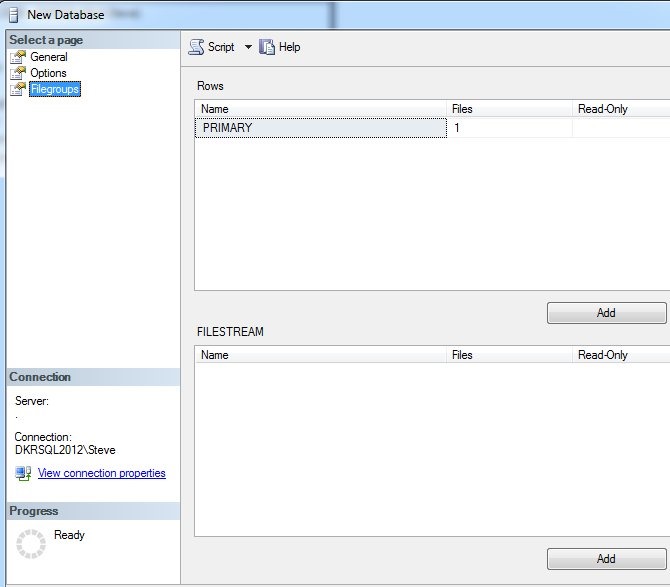
    Let’s create a database, and add a filegroup for Filestream. We start with the “New Database” dialog in SSMS.

    fs_a

    With the normal defaults, we see a data file (FS_Test) and a log file (FS_test_log). For Filestream data, we need a new place to store it. Let’s add a file:


    fs_b

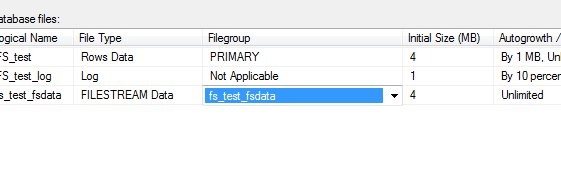
    Once I add the file, I mark it as storing Filestream data. The other options are rows (data files) or log files. However this presents a problem. When I scroll right, I see that there is no filegroup for Filestream data. I can’t put this in an existing filegroup.

    fs_c

    Let’s add one of those. Here’s the default filegroup dialog.

    fs_d

    I can click add, and put in a filestream filegroup. The name doesn’t matter, it’s just for administrative purposes. Once I do that, I can go back to the files dialog, and if I select the dropdown, my new filegroup appears.

    fs_e

    Now I need a location. Outside of SQL Server, I created a folder in my data directory. This can be anywhere, but I did it in the default location. It’s called FilestreamDataTest.

    fs_g

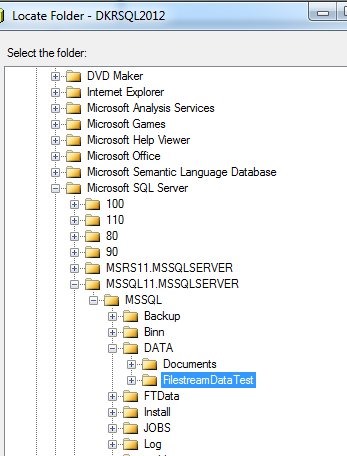
    I then select this in the files dialog, using the ellipsis to the right of the Path column.

    fs_f

    I see my folder in the file picker and choose it.

    fs_h

    Once I’ve selected it, I don’t click OK. I click “Script” and get the script below:

    CREATE DATABASE [FS_test]
     CONTAINMENT = NONE
     ON  PRIMARY 
    ( NAME = N'FS_test', FILENAME = N'C:\Program Files\Microsoft SQL Server\MSSQL11.MSSQLSERVER\MSSQL\DATA\FS_test.mdf' , SIZE = 4096KB , MAXSIZE = UNLIMITED, FILEGROWTH = 1024KB ), 
     FILEGROUP [fs_test_fsdata] CONTAINS FILESTREAM  DEFAULT 
    ( NAME = N'fs_test_fsdata', FILENAME = N'C:\Program Files\Microsoft SQL Server\MSSQL11.MSSQLSERVER\MSSQL\DATA\FilestreamDataTest\fs_test_fsdata' , MAXSIZE = UNLIMITED)
     LOG ON 
    ( NAME = N'FS_test_log', FILENAME = N'C:\Program Files\Microsoft SQL Server\MSSQL11.MSSQLSERVER\MSSQL\DATA\FS_test_log.ldf' , SIZE = 1024KB , MAXSIZE = 2048GB , FILEGROWTH = 10%)
    GO

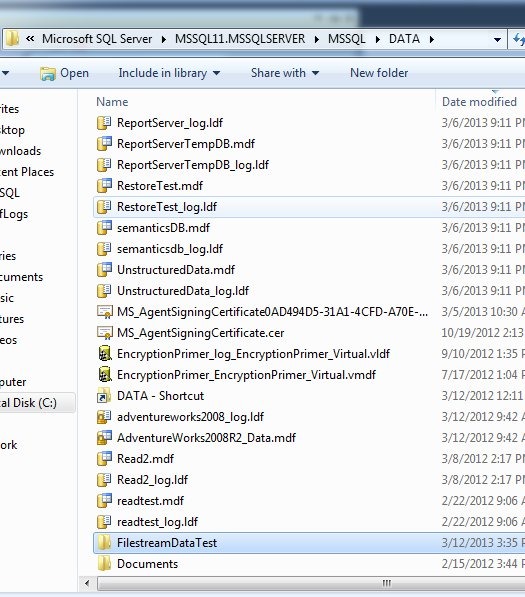
    I can run this, and once I do, if I go into the folder that contains my Filestream file, I see this:

    fs_i

    As I create tables that hold Filestream data, including FileTable data, I’ll see entries in here for each column (or Filetable) that holds this data. There is a folder that holds logging information for this data, which I do not manage.

    Hopefully this is a quick, short piece that helps you understand Filegroups and Filestream.

  • T-SQL Tuesday #39 – PowerShell

    tsqltuesdayThis month the invitation is from Wayne Sheffield, asking if you have a PowerShell story for everyone. That’s fitting since Wayne is currently writing a month of PowerShell blogs, and they are worth reading.

    The second Tuesday of each month is T-SQL Tuesday, with a new theme each month. If you follow the community on Twitter, you should get an invite every month, and I also keep a history page on my blog that I try to update.

    PowerShell

    I believe in PowerShell. It’s one of the few directives that Microsoft has taken in their products that I think is both a great idea, and one that will last for a long time. As far as I’ve heard, all their future products in the server space need to support Powershell and include hooks to incorporate it into the administration of those products.

    That being said, I don’t use PowerShell (PoSH) a lot. Scripting tasks is good for repetitive actions. However since I work at home and manage a couple instances, with disparate requirements, the time to write a PoSH script seems to outweigh the time it takes just performing a few tasks.

    I’m always looking for places that I can use PowerShell, and where it makes sense for me and I found one last year.

    Binary Data in SQL Server

    I wrote a presentation last year that looked at binary (BLOB) data in SQL Server, and worked with the FileStream/Filetable features. In building a demo, I wanted to show that binary documents in SQL Server work well with Filestream and that you can query the binary fields just like any other. However to render something like an image, you really need to stream the data into an application, or a file.

    I chose a file, and built a short PoSH script to do just that. Here’s the script:

    .csharpcode, .csharpcode pre
    {
    font-size: small;
    color: black;
    font-family: consolas, “Courier New”, courier, monospace;
    background-color: #ffffff;
    /*white-space: pre;*/
    }
    .csharpcode pre { margin: 0em; }
    .csharpcode .rem { color: #008000; }
    .csharpcode .kwrd { color: #0000ff; }
    .csharpcode .str { color: #006080; }
    .csharpcode .op { color: #0000c0; }
    .csharpcode .preproc { color: #cc6633; }
    .csharpcode .asp { background-color: #ffff00; }
    .csharpcode .html { color: #800000; }
    .csharpcode .attr { color: #ff0000; }
    .csharpcode .alt
    {
    background-color: #f4f4f4;
    width: 100%;
    margin: 0em;
    }
    .csharpcode .lnum { color: #606060; }

    $server = "SevenFalls"
    $database = "AdventureWorks2008"
    $query = "SELECT TOP 10 Document, FileName +'.' +  FileExtension FROM Production.Document WHERE Document IS NOT NULL"
    $dirPath = "C:\Users\Steve\Documents\Presentations\UnstructuredData\Docs\"
     
    $connection=new-object System.Data.SqlClient.SQLConnection
    $connection.ConnectionString="Server={0};Database={1};Integrated Security=True" -f $server,$database
    $command=new-object system.Data.SqlClient.SqlCommand($query,$connection)
    $command.CommandTimeout=120
    $connection.Open()
    $reader = $command.ExecuteReader()
    while ($reader.Read())
    {
        $sqlBytes = $reader.GetSqlBytes(0)
        $filepath = "$dirPath{0}" -f $reader.GetValue(1)
        $buffer = new-object byte[] -ArgumentList $reader.GetBytes(0,0,$null,0,$sqlBytes.Length)
        $reader.GetBytes(0,0,$buffer,0,$buffer.Length)
        $fs = new-object System.IO.FileStream($filePath,[System.IO.FileMode]'Create',[System.IO.FileAccess]'Write')
        $fs.Write($buffer, 0, $buffer.Length)
        $fs.Close()
    }
    $reader.Close()
    $connection.Close()


    The script works by essentially setting variables to a server, database, and a query. In this case I use the AdventureWorks database from 2008 that includes FileStream data. I then open a connection to the instance, run the command and look through the results, streaming out the data in the “Document” field to a file which has the name from the FileName+FileExtension fields.

    If you run this on your system, assuming fix the file paths, you’ll get 9 new documents in the file system, each one a document from the AdventureWorks sample database.

    That’s the best example of where I’ve used PowerShell in my daily work, but I know if I had to manage multiple instances, I’d be using this tool all the time.

  • T-SQL Tuesday #38 – Standing Firm

    tsqltuesdayIt’s T-SQL Time again, and this time it’s #38, from Jason Brimhall (b | t | li). The topic this month is Standing Firm. You are supposed to look at any of these words, and write something that fits with one of them.

    • resolve
    • resolution
    • resolute

    This is the monthly blog party, with each month hosted by someone in the SQL Server community. To participate, just write a blog post on the top, include the logo, and link to Jason’s invitation.

    If you’d like to host, contact the founder, Adam Machanic (b | t).

    Standing Firm

    I decided to write about being Resolute.

    res·o·lute

    /ˈrezəˌlo͞ot/

    Adjective

    Admirably purposeful, determined, and unwavering.

    (from the Googles)

    One of the things that I’ve found in my career is that so many people are unwilling to stand up for what is important to them. They’ll argue points, they’ll debate about what is better or worse, but ultimately they are often afraid to make a stand for things that are important for their own personal well being. It’s not even the things that they feel strongly about that they give in to, often it’s subtle pressure from managers, from peers, or from the community to act, say, or do certain things.

    In short, they can’t say no.

    Most of us like to please others. We want to do a good job. We want others to like us, and we want to solve problems. We want to get things done and be seen as a positive part of the community.

    That’s good, and I admire that. I also know it’s not sustainable. As humans, we need flex in our lives. We need some down time to compensate for the busy times. We need practice time in between learning times. We need balance.

    One of the hardest things I’ve learned to do in my career is say no. I learned it’s important from Andy Warren, and this part year I’ve finally felt like I can comfortably say no. I can say “no” to more work. I can say “no” to another opportunity for a client or job. Most importantly, I can say “no” to myself, when my goals, ambitions, and desires greatly impact my family, my wife, or my opportunity for downtime.

    I would urge you to learn to say no. It’s harder than you think, and it takes practice. However learning to stand up for the balance in your life is important to your long term career, health, and enjoyment of life.