I’m not a T-SQL guru. When I have something that will run often, or I have performance concerns, I’ll ask someone like Jeff Moden or Wayne Sheffield to help me write a solution.
However I have a few tricks to check things out quickly and determine what’s a better solution. Recently I ran across a thread asking for a solution to a problem that needed to sum data, but also pick values from a certain row. I posted a quick solution, and a few minutes later there were two others.
I didn’t think mine was great, using a CTE and a subquery felt slightly inefficient, but was it really inefficient? I grabbed the third solution, which was similar to mine, and put both in SSMS. I then ran both pieces of code together, after clicking CTRL+M (include Actual Execution Plan).
; WITH MyCTE (acc_no, c_name, cnt)
AS
( SELECT acc_no
       , c_name
       , COUNT(c_name)
   FROM #testing a
   GROUP BY acc_no
          , c_name
)
SELECT
  t.acc_no
, c.c_name
, number_sum = SUM( t.number)
, r_value_sum = SUM( t.R_Value)
 FROM #TESTING t
   INNER JOIN mycte c
     ON t.acc_no = c.acc_no
 WHERE c.cnt = (SELECT MAX(d.cnt)
                 FROM MyCTE d
                 WHERE d.acc_no = c.acc_no
               )
 GROUP BY t.acc_no
        , c.c_name
;

with cte1 as (
select acc_no,number,c_name,
       sum(R_Value) over(partition by acc_no) as R_Value,
       sum(time_spent) over(partition by acc_no) as time_spent,
       count(*) over(partition by acc_no,c_name) as cn
from #TESTING),
cte2 as (
select acc_no,number,c_name,R_Value,time_spent,
       row_number() over(partition by acc_no order by cn desc,number desc) as rn
from cte1)
select acc_no,number,c_name,R_Value,time_spent
from cte2
where rn=1
;
With all this code, I ran it and got this in the execution plan window (the results were the same and correct).

If you look at the top of each section, where it says “Query 1” and “Query 2”, and then look to the right, you’ll see the relative percentage of cost of the batch. With two queries in this batch, but solution was only slightly worse than the other solution (52% to 48%). That quickly tells me these are similar solutions.
Now this isn’t an end-all, be-all way to look at queries. This is limited data, and unindexed tables. You’d want to test this with a few loads, and examine the details more closely if you are trying to tune these queries, but as a quick check, this helps to decide if you should think about abandoning one solution quickly.
When I ran all three solutions (mine first, the 48% one above last), I got this:
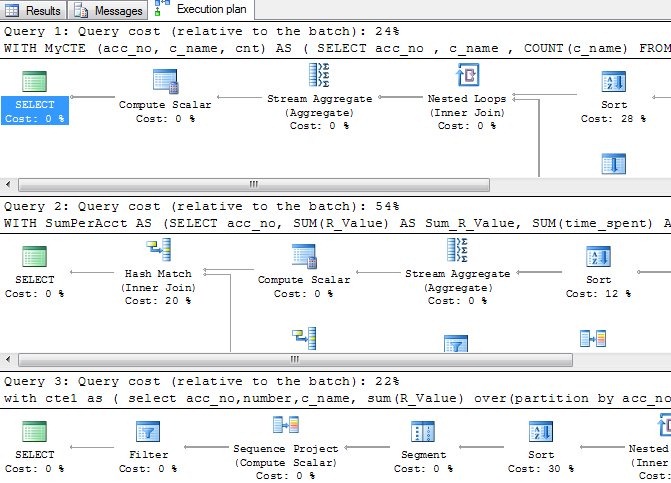
The second solution is much worse, almost twice as bad here, so I’d give that up and look at both of the other solutions in more detail if I wanted the optimum solution.
And probably ask Jeff or Wayne for their opinion in the SSC forums.