Tag: Tesla

  • Model Y Multi-Day Road Trip in the Country

    This is part of a series that covers my experience with a Tesla Model Y.

    Recently I was up in Greeley, CO for a 3 day volleyball tournament. Greeley is a small city in Colorado, but it’s fairly rural in character. Lots of farms and ranches around the area and a lot of cattle industry there. There’s a “smell” that permeates the area and most people are aware of when visiting.

    We took the Model Y, and while things went well, it was an interesting experience as an electric car owner. The short list of learnings:

    • Plan ahead and charge extra before leaving.
    • Take time to charge for at least 10-15 if you are near a Supercharger
    • 6kW chargers are useless

    The First Day

    We headed up on Friday, needing to be up there for an evening event. My wife had driven the car to an appointment early in the day, and I neglected to plug in the car and charge up the car. We ended up leaving in a hurry around 4pm with about 70% charge.

    We headed to Loveland, which is about 80 miles from the house. We were near a Crossroads Blvd exit, where a Supercharger is located. After our event, rather than charge, we drove over to Greeley, which is about 15 miles. We got to the hotel with about 30% charge. It wasn’t that cold overnight, about 30F, so we weren’t too worried. The hotel had no place to charge, not even a 110 that we could plug into. Not sure it would have mattered as there were 3-4 Teslas in the lot, so even a couple charging spots would likely be in use.

    We woke up and got some breakfast, and found ourselves with about 23-24% charge. Since the plan was to be busy for the afternoon and evening, we were slightly concerned about another overnight without charging.

    Chargepoint

    I downloaded the ChargePoint app at breakfast and saw a lot of chargers nearby, so I wasn’t worried. There were various wattage listings, and when I sorted by adapter, I saw a number of J1772 plugs. We drove over to find a L2 charger, and there was one in the parking lot of a hospital. I attached the adapter, plugged in, and scanned my phone, and charging started.

    Well, not really. The Tesla screen showed 10+ hours to charge. We sat there for 5-10 minutes, but didn’t see any increase in mileage and no power was flowing.

    We were worried, so I dropped my wife off at the hotel and made my way over to Loveland. I was pressed for time as I needed to be back in Greeley in about 75 minutes, and Loveland was about 25 minutes away. This was a little stressful.

    SuperCharger

    The SuperChargers in Loveland are located behind the Embassy Suites. I’d seen them before, so I knew were to go. I arrived with about 25 minutes of time to charge before I needed to head back. I backed into a stall and connected the car.

    As I was doing this, the next car down rolled down their window and reminded me that we both charge slower if we use the adjacent chargers. I’d known this, and I think he was confused as I parked with a space between us. It can be confusing sometimes as the chargers are sometimes offset with parking, but you look at the numbering. I used 1A, with 1B being free. The guy realized he was in 2A and apologized.

    When I got in my car, I verified it was charging. The spot rate was adding about 520mi/hr, fluctuating up or down a bit. That put me at around 30 minutes to get from the 10% to 91% (my limit). I walked inside to use the restroom and then came back to sit and read a little in the car.

    Someone else pulled in next to me. I was about to say something, as I didn’t want to slow my car, but two more Teslas drove up, so someone was going to be sharing charging circuits. When the driver plugged in, my rate dropped into the 320-350mi/hr range.

    I ended up reaching 64% in about 23 or so minutes. I had mapped the route back to Greeley, and when I ran out of time, I unplugged and headed back.

    Two More Days

    In light use across Saturday, Sunday, and Monday morning, we had the Tesla down to about 30% when we finished the tournament. We drove to the hotel to pack up and then headed back to Loveland. This time we grabbed some takeout lunch and brought it with us. I plugged in and only got about 410-420 mi/hr being added, even without another car close.

    We ate and chatted with my daughter on the phone for about 20 minutes. Once we reached 60%, I unplugged and headed home, as that gave us plenty of charge. We arrived home with about 32%, and I even went back to the gym later before plugging in for the night.

    A couple interesting things for us. First, charging needs some planning. We need to account better for pre-trip charging, as well as mapping out a plan and a backup plan for these trips. We are sometimes time-constrained, so we need to think about when we can charge, and where.

    Second, I could have tried another ChargePoint charger, but I was assuming we’d be able to get a good 20% charge fairly quickly. That was a poor assumption on my part, and I know better now to expect I could have problems.

    Third, SuperChargers are awesome. We’ve used them a few times, and across 15-20 minutes, while having a snack or coffee, they usually give me enough charge to feel comfortable. Slower than adding petrol to a car (5 minutes), but not bad when combined with a break of some sort.

    It was interesting to us that charging in some places is not simple, and not convenient. Finding diesel can be a hassle sometimes on the road, but not as much as finding chargers and hoping they work.
  • Chill v Standard Mode in the Tesla

    This is part of a series that covers my experience with a Tesla Model Y.

    I bought the “slow” Tesla. The Model Y Long Range, which is fine. I wanted range more than performance. If you look at the 0-60 times, you can see a variety, but for 2021 this is how things rank.

    • 2021 Model S Plaid – 2.1s
    • 2021 Model S Long Range – 3.5s
    • 2019 Model 3 Performance – 3.1s
    • 2019 Model 3  Long Range – 4.1s
    • 2021 Model Y Performance – 3.6
    • 2021 Model y Long Range – 4.4
    • Model X – 3.3-5.5 s, depending on model

    What’s crazy is that I can “buy” a boost of acceleration for US$2000 that will drop me down around 4s. It’s a software upgrade.

    Is It Tempting?

    Getting into the Tesla and nailing the accelerator is exciting. The car really moves, and people that haven’t experienced it before are often surprised. I try to avoid it, usually playing the “video game” of how little power can I use, but it is fun once in awhile.

    When the weather changed, and I needed snow tires, I became more cautious. In fact, I accidentally had some slippage from pressing a little too quickly on the accelerator a few times. One of the things I changed for snow was setting the accelerator to “Chill” mode, which reduces how quickly the car reacts.

    Across the last few weeks, I’ve left Chill mode on for daily driving, even without snow. The car is still plenty fast, and I know I use less power. The other day I was curious how much of a difference it makes, so I turned it off in town. With a bright sunny day, no snow or moisture on the ground, I nailed the accelerator.

    It’s neck snapping quick. I can feel my neck muscles bunch up. In fact, I turned it right back off at the next traffic signal.

    A few days later I turned the Standard mode back on and drove for day. It’s fun, but I realized that most of the time I don’t really need that much acceleration. I tend to leave it off today most of the time, only turning it on if I want to have a little fun or I think I might need to be ready to accelerate quickly in traffic.

    That’s rare, so no, I’m not tempted by a $2000 upgrade for more speed.

  • Getting Started with TeslaMate

    This is part of a series that covers my experience with a Tesla Model Y.

    One of the things that a Tesla car does is make a lot of data available. From the mobile app I can not only control the car, but I get see where it is an how fast it’s going. There is more, but it’s a neat idea that I saw lightly implemented in my BMW X5, but in a very crude, 2000-era way.

    Tesla is gathering a lot of data, and they’ve made it available to owners. You can log in with your Tesla account and get access to data. In fact, quite a few people are offering services, like StatsTezlab, and TeslaFi. I tried a couple, but really I didn’t like the idea of my data flowing out to third party services. There’s already been a hack with one.

    Then I found TeslaMate, a project that a Tesla owner built, allowing you to run your own service, capture data in a PostgreSQL database, and run your own dashboards in Grafana. There’s a lot of setup here, but I decided to run it in Docker, which was easier. My plan is to move this to the cloud at some point, but for now it’s on my home machine.

    This is what I did.

    Setup

    I have Docker Desktop running, so pulling the container down was easy enough to do. Then the instructions have you set up a docker-compose file. If you’ve never done this, it’s basically a YAML description of the containers and options you want to run. In this case, I’m configuring four containers: the teslamate service, the mosquito message broker, the granada site,  and one for postgres.

    I set up a folder on my machine and put the docker file inside of it. I changed the config with my own passwords and left the port alone. I left the volumes along, which was a bit of a pain as I had to track down the location for the data to back it up. Not hard, but a pain.

    I then downloaded the Tesla Tokens app, which allows me to see the tokens that the Tesla website will return to me when I log in. This took a little googling around the Internet to figure out, but once you have this, then your container can log into your account and access data.

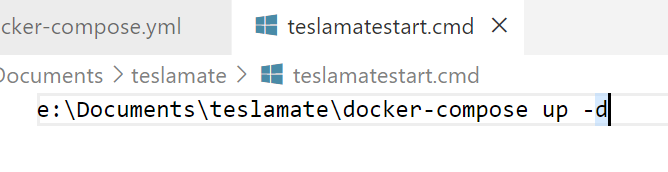
    Then I built a CMD file, which looks like this:

    2022-02-12 13_53_02-teslamatestart.cmd - sqlsatwebsite - Visual Studio Code

    I set this up in the Task Scheduler to run whenever the machine boots. This ensures that if I restart, my containers are running. Overall, this ensures I get most data.

    Once I had it running, I can connect to port 4000 on my local machine. To make this easier, I set up DNS entries (since I own a domain) that map from a name to 192.168.100.200 (I have a different internal network). This makes it easy to get to the dashboards.

    The View

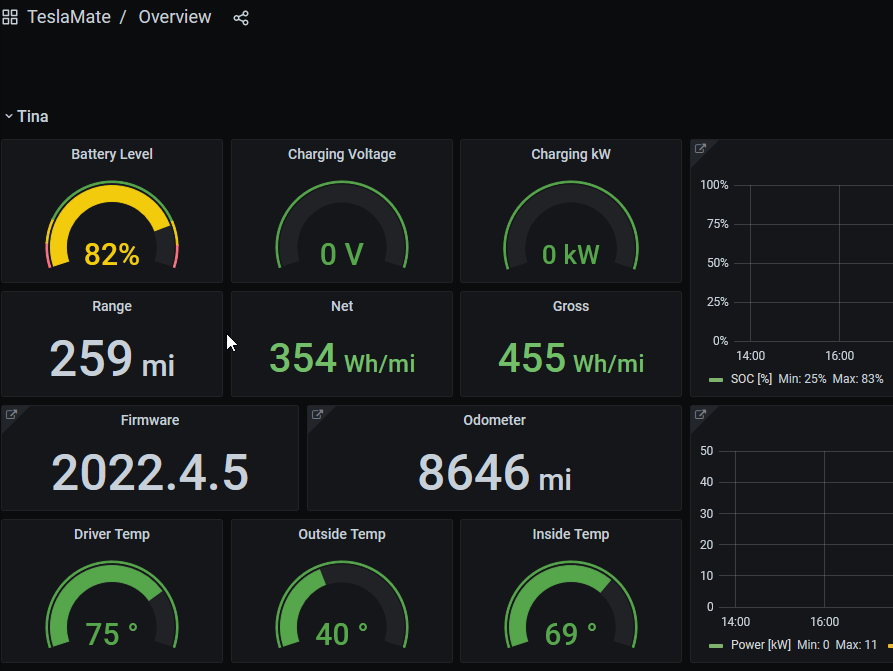
    Once I had the containers running, I can go into the Overview, and I’ll see things like this:

    2022-02-12 13_38_19-Overview - Grafana — Mozilla Firefox

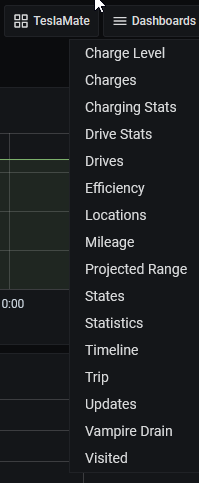
    I have this list of dashboards:

    2022-02-12 13_55_53-Overview - Grafana — Mozilla Firefox

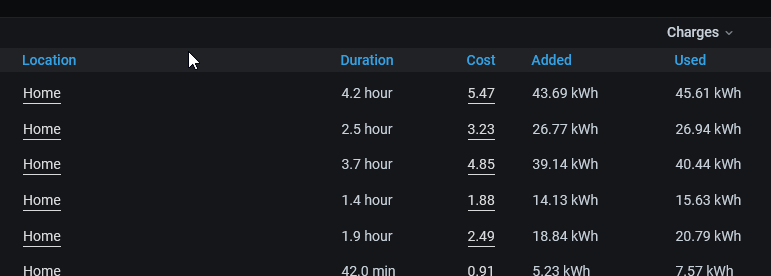
    Each of these has different sets of data available for me to view. For example, I can geofence my house, and then enter the cost of charging at home. This lets me see my charges:

    2022-02-12 13_56_46-Charges - Grafana — Mozilla Firefox

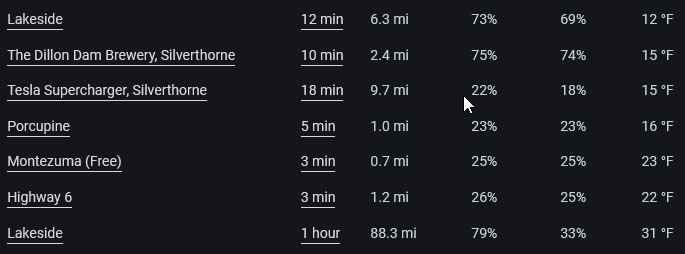
    I can also see my drives and get an idea of how much it costs me in power to go places. Here’s one of the recent ski trips I wrote about.

    2022-02-12 13_57_35-Drives - Grafana — Mozilla Firefox

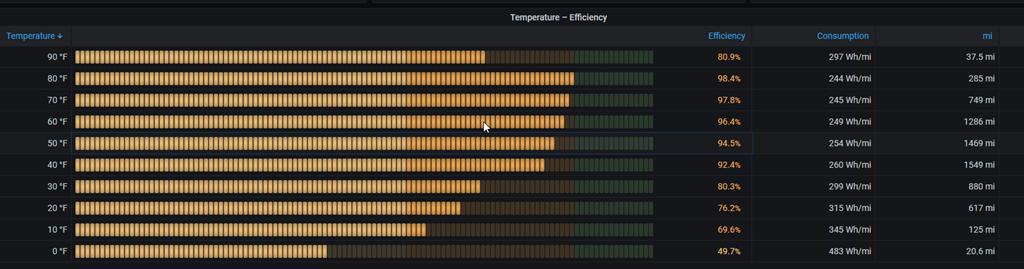
    There’s a lot more data to analyze, and most of it I don’t care about, but I do like to see how much power I’m using on average and where I’m going often. It’s not that helpful, but it is interesting. One thing I could have guessed is how temperature affects things, but living in Denver, the most efficient times are the majority of the weather here.

    2022-02-12 14_00_05-Efficiency - Grafana — Mozilla Firefox

    I like the ability to gather my own data, and analyze it. At some point, I want to move the containers into AKS or another cloud service and monitor from there.

    Of course, I back up my data periodically, and need to get an automated system running (I do have BackBlaze). Something for another day.

  • The First Tesla Ski Trips

    This is part of a series that covers my experience with a Tesla Model Y.

    After a bit over 4 months, we finally had a long road trip in the Tesla Model Y. As I live in Colorado, we went to the mountains to ski. This post covers two trips, a day trip and a multi-day trip.

    Day Trip

    My wife and I took a day off and drove to the Keystone on a Thursday for a day ski trip. I charged the Tesla up to 93% overnight and we headed up on a snowy day. A fairly heavy snow was falling as we left the house and kept falling until we were well into the Colorado mountains on I-70.

    The snow tires worked well, and I felt the car was gripping well on the road. Traffic wasn’t too bad, and the drive went as smoothly as it had gone in other cars.

    The one place where I was careful was driving through Dillon, CO, where the roads were snow-packed, and there are some substantial curves. I was careful here, as the Model Y is a heavy car and slips a bit more near the bottom

    A few stats from the drive up (109 miles)

    • Power: 48% of the charge (93%->45%)
    • Cost: $4.81 (37kWh * $0.13)

    The drive down:

    • Power: 38%
    • Cost: $3.64 (28kWh)

    As a comparison, 110 miles in the X5 costs about $20 (at $3.50/gal). The Prius would have been about $9.20 or so.

    We skied most of the morning in about 20-25F weather. We then left and headed home, having lots about 2% of charge while the car was sitting in the parking lot. We drove down to Idaho Springs, and at around 28%, we stopped at the Supercharger to add some power.

    We spent about 10-15 minutes adding power (about 25%). We sat in the car, checked some email and chatted, though this location is walking distance from a number of restaurants in Idaho Springs. On another day we might have walked over to have a quick lunch and left the car, as many others did.

    It was an easy trip and a pleasant experience for our first trip into the mountains.

    A (Cold) Three Day Trip

    The next week we went back, staying up at Keystone for three days. I charged the car up to 87% and we drove to coach kids and then left from the gym for a late night drive up. It was cold, around 20F, and we again used about 50% of the power. In this case, 87->33% with a few stops  along the way.

    The next morning, we were down to 26% on a night that dropped to about 8F. That was a 7% drop overnight. An interesting data point.

    We drove over and skied, and then went to the Silverthorne Supercharger, arriving with 18% power left. Our plan was to get a cup of Starbucks while it charged, as the chargers are in the parking lot for Starbucks, but the store was closed. Not enough staff with a few out sick..

    Sad smile

    Not a problem. Rather than drive over to another place, we just charged and talked with our kids on the phone. Interesting, I pulled into charger 4B and plugged in. The car would say “starting to charge” and after 2-3 minutes it would say that something was wrong and I needed to unplug and plug it back in. I did that twice, and got the message.

    I switched to a different flow and things worked flawlessly. The charger immediately jumped to about 50Kwh, putting around 240miles/hour of charge into the car. We spent about 25 minutes there, getting up to 75% before I decided to stop. I was hungry, so we left.

    Overnight the temps were close to 0F, and we dropped about 15%of charge that night. The next night was –8F when I woke up, and we’d dropped about 18% of charge. Not insignificant, and I can see why people recommend waking up and charging in the am before a long trip.

    If we were planning on a long drive, I’d have gotten up, gotten coffee and then gone and parked at the supercharger to eat, work a bit, and fill up. Slightly more cumbersome than a gas station, but really, I’d be moving some work time into the car rather than sitting inside and then hitting a gas station.

    Overall, the car worked well under cold, winter conditions. We didn’t have any range issues, and easily charged up at the Superchargers along our route. I could pre-heat the car before driving, and I’m getting used to remembering to do this. Most of the time I think about this about 10 minutes before we pack up and go, which isn’t inconvenient. It certainly is nice to pre-heat the car as I’m paying a bill in a restaurant and have the heat going when we get in the car.

    Tires worked well and gripped in the snowy conditions. It was informative to see how the battery faired driving into the mountains, as well as overnight in some of the coldest conditions I’ve seen in years. Not a lot of battery/range anxiety and charging was smooth and easy. Taking 15-20 minutes with a cup of coffee and my wife wasn’t a big interruption to our lives, and we didn’t mind taking a few breaks during our short holiday.