Tag: testing

  • tSQLt with TRY..CATCH

    Someone asked me the question recently about how tSQLt works with TRY..CATCH blocks and the exceptions that we might test for. It works fine, just as it would with other code, but you need to understand that a CATCH still needs to re-throw an exception.

    Here’s a short example. I’ve got this query, which has issues.

    SELECT TOP 10
             cs.CustomerID
         ,   cs.LastSale
         ,   cs.Salesman
         ,   CAST(cs.SaleValue AS NUMERIC)
         FROM
             dbo.CustomerSales AS cs;

    If I run it, I get this:

    Msg 8115, Level 16, State 6, Line 1
    Arithmetic overflow error converting varbinary to data type numeric.

    The CAST here has issues, but that’s fine. Perhaps it’s a data issue, perhaps something else. I can test for that, but for now, I want to be sure I handle these errors correctly.

    Now, I embed that in a TRY..CATCH block.

        BEGIN TRY
            SELECT TOP 10
                    cs.CustomerID
                ,   cs.LastSale
                ,   cs.Salesman
                ,   CAST(cs.SaleValue AS NUMERIC)
                FROM
                    dbo.CustomerSales AS cs;
        END TRY
        BEGIN CATCH
            SELECT @@ERROR
                ,  ‘A CASTing Error has occurred.’
            ;

        END CATCH;

    If I do this, and in the CATCH block I "handle" the error, I’m not really error handling. I’m error swallowing. Here are my results.

    EXEC spGetCommission 12

    casterror

    I could log this, or try to return some data with a new query, maybe alter something that ensures the client gets results, but what I really need to do is give an error back, but one I’m aware of.

    We could delve into error handling, but I won’t do that here. Instead, I want to be sure the application gets an error, when we have an error. It can then decide what the user does or sees.

    If I write this test:

    ALTER PROCEDURE [misc procs].[test spGetCommission Exceptions]
    AS
    BEGIN

    — Assemble
    EXEC tsqlt.ExpectException;

    — ACT
    EXEC dbo.spGetCommission @userid = 0 — int

    — Assert
    END;

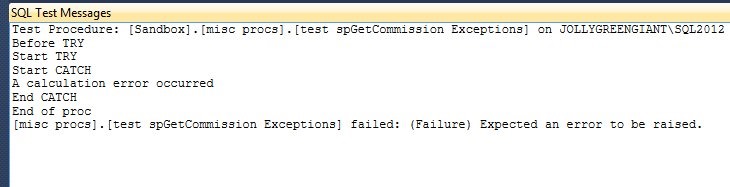
    Now I can run it, but it fails. I see the failure
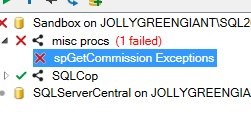
    test1

    and I see this in the results

    test2

    What I should have is something more like this:

        BEGIN CATCH
            THROW 51001,  ‘An CASTING Error has occurred.’, 1;
        END CATCH;


    Then my test should be looking for that message.

    ALTER PROCEDURE [misc procs].[test spGetCommission Exceptions]
    AS
    BEGIN

    — Assemble
    EXEC tsqlt.ExpectException
       @ExpectedMessage = ‘An CASTING Error has occurred.’
       , @ExpectedErrorNumber = 51001
    ;

    — ACT
    EXEC dbo.spGetCommission @userid = 0 — int

    — Assert

     
    END;

    If I do that, things work well. The error is handled, but also re-thrown, and my test passes.
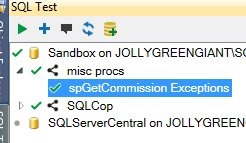
    test3

  • tSQLt – SQLCop – Checking Naming Conventions

    I’ve been using tSQLt a bit to do some testing and one of the things I’ve tested is standards for code. I’ve been using a framework on top of tSQLt called SQLCop. These are a series of tests written to look for specific things. One of the items I do check is for sp_ named procedures. I’ve mostly gotten out of the habit of doing this, preferring spProcName, but at times I make a mistake in typing. This catches those simple errors.

    Using SQL Cop

    You can Download the SQLCop tests and install them in your database after you’ve setup tSQLt. If you are using SQL Test, then you also get the SQLCop tests installed when you add the framework to a database. For me, I see the tests in the SSMS plugin.

    tsqlt7

    There are a lot of tests, but in this piece, I’ll look at the Stored Procedures Named sp_ test.

    If I edit the test, I see it’s fairly simple code. I’ve included it here.

    USE [EncryptionPrimer]
    GO
    SET ANSI_NULLS ON
    GO
    SET QUOTED_IDENTIFIER ON
    GO
    ALTER PROCEDURE [SQLCop].[test Procedures Named SP_]
    AS
    BEGIN
    -- Written by George Mastros
    -- February 25, 2012
    -- http://sqlcop.lessthandot.com
    -- http://blogs.lessthandot.com/index.php/DataMgmt/DBProgramming/MSSQLServer/don-t-start-your-procedures-with-sp_

    SET NOCOUNT ON

    Declare @Output VarChar(max)
    Set @Output = ''

    SELECT @Output = @Output + SPECIFIC_SCHEMA + '.' + SPECIFIC_NAME + Char(13) + Char(10)
    From INFORMATION_SCHEMA.ROUTINES
    Where SPECIFIC_NAME COLLATE SQL_LATIN1_GENERAL_CP1_CI_AI LIKE 'sp[_]%'
    And SPECIFIC_NAME COLLATE SQL_LATIN1_GENERAL_CP1_CI_AI NOT LIKE '%diagram%'
    AND ROUTINE_SCHEMA <> 'tSQLt'
    Order By SPECIFIC_SCHEMA,SPECIFIC_NAME

    If @Output > ''
    Begin
    Set @Output = Char(13) + Char(10)
    + 'For more information: '
    + 'http://blogs.lessthandot.com/index.php/DataMgmt/DBProgramming/MSSQLServer/don-t-start-your-procedures-with-sp_'
    + Char(13) + Char(10)
    + Char(13) + Char(10)
    + @Output
    EXEC tSQLt.Fail @Output
    End
    END;

    This code looks at the meta data in the database for an routines, stored procedures, that start with sp_ as part of their name. If any results are returned from the query, the IF statement will be true and the @output will be returned as part of the tSQLt.Fail call.

    Using the Test

    Let’s write a stored procedure. If I do this:


    CREATE PROCEDURE spLetsTestThis
    AS
    BEGIN

    SELECT TOP 10
    e.EmployeeID
    , e.EmpTaxID
    , e.FirstName
    , e.lastname
    , e.lastfour
    , e.EmpIDSymKey
    , e.EmpIDASymKey
    , e.hashpartition
    FROM
    dbo.Employees AS e;

    RETURN 0;
    END;

    GO

    This is a simple procedure. I wrote it, execute it a few times and be sure it’s what I want. I’ve done basic testing, not let’s check it before I commit it to VCS.

    The easy way to execute all the SQLCop tests is to right click them in SQL Test and execute them. I can also use T-SQL to run tests. However since I just want to show this one, I’ll right click it and select "Run Test".

    tsqlt8

    This runs the test selected. I can also run an entire class, or all tests, but clicking in the right spot. In this case, the test passes and I see a green mark.

    tsqlt9

    Now let’s write a new procedure:

    CREATE PROCEDURE sp_GetArticles
    AS
    SELECT *
    FROM dbo.Articles

    GO

    This is a bad procedure for a variety of reasons, but let’s execute my test. I see it fail, and a red mark appears next to my test.

    tsqlt10

    In this case I also get a window from SQL Test popping up with more details. This contains the output from the test, which is also inserted into a table by the tSQLt framework.

    tsqlt11

    Note that there is a URL with more information on this particular test. That is a part of the SQL Cop test code above. I could easily replace this with something particular to my environment if I chose.

    At this point, I can rename the object, drop and recreate it, etc. to correct the issue. However running this test helps me to be sure I’ve gotten good code into the VCS. If I have this also run as a part of a CI process, it then prevents bad code from other developers appearing.

    Meeting Standards

    There are all sorts of SQLCop tests, and I’ll write about more, but this is an easy one to implement to prevent a bad practice in your coding by a team of developers. Allowing each developer to test themselves, as well as an overall check by some CI process means that our code quality improves.

    If I have other standards, I can even write my own tests to enforce them, which I’ll do in another piece.

    Downloads

  • Debugging SQL Server

    One of the tools that I found useful early in my development career was the debugger. Being able to track the values of variables, check the call stack, and pause execution of programs was handy. Early in my career, the tools were very rudimentary, but the latest debuggers in Visual Studio are quite advanced. I remember using a great debugger in Rapid/SQL years ago that helped me with some SQL Server 2000 code.

    There are debugging tools included with SQL Server, but the last time I used them, they seemed to be a bit flaky. However the need to follow your code slowly along it’s execution plan hasn’t changed. I’m curious this week, what many of you do inside of SQL Server to debug your code. I wanted to ask you this week:

    How do you debug your applications that work with SQL Server?

    These could be .NET applications that query the database. You could have ETL processes using SSIS or some other tool that you work on. Perhaps you have a system that runs entirely inside SQL Server and you need to untangle your T-SQL.

    Do you use Visual Studio tools? Have you configured the T-SQL debugger? Are you a PRINT statement or temp-table-for-results developer? Perhaps you have logging or some other mechanism that you use?

    Let us know this week what works well for you, and if you’ve found a particular technique to be handy in a situation, we’d love an article that might teach someone else how to debug their code.

    Steve Jones


    The Voice of the DBA Podcast

    Listen to the MP3 Audio ( 1.7MB) podcast or subscribe to the feed at iTunes and LibSyn.

  • Testing

    It seems that software always contains bugs. No matter how much time and effort is spent building an application, there will be issues. Sometimes this is because of a lack of testing, and sometimes this is because of poor testing, but in any case, the expectation that we will test our code is becoming more prevalent as we depend more and more on computer software. Users expect our software to work.

    It seems there is never enough time to properly test software after it is complete. Perhaps your deadlines are too tight, perhaps there aren’t enough resources to devote to comprehensive testing processes, but it really doesn’t matter. We will never have enough resources in our QA and testing teams to do as much testing as we would like. We need to expect this and find ways to raise the quality of our work, given those constraints.

    One solution to increasing code coverage and ensuring more testing takes place is to move some of the testing burden into the development process. While this sounds like a bad idea, overburdening developers that already struggle to meet deadlines, I’d note that part of the burden of development is fixing the mistakes they make. Perhaps a bit more testing in the development process will help us release fewer mistakes.

    The idea of regular, repeatable, automated unit testing has become quite commonplace in many software development tools and environments, but it hasn’t caught on in database development. There are some frameworks for testing T-SQL, and I’d encourage you to look at our Stairway for TDD as a way to get started or download tSQLt and give it a try.

    We can fix mistakes after our software is released, or we can fix them before the software is completed, but we’ll be fixing them either way.

    Steve Jones

    The Voice of the DBA Podcast

    Listen to the MP3 Audio ( 2.1MB) podcast or subscribe to the feed at iTunes and LibSyn.