Tag: tsqlt

  • tSQLt Tests for Advent of Code 2017 Day 4

    This is day 4 of the Advent of Code 2017. If you want to read about the puzzles, start with Day 1. As I worked through the puzzles, I decided that I should be testing using their test sets and solving the issues that way. This lets me use the sample data, but also add in my own sets to cover strange situations.

    Here are the tests that I used for each part of day 4.

    Part I

    This is a fairly simple test. I’m returning a result set since the solution is a single query, but this is really a scalar. In this cas,e I’ll create a one row, one column expected table and then get the results from my solution (inside a proc) and insert into Actual.

    The rest is standard tSQLt testing framework. Fake a table, enter data.

    CREATE OR ALTER PROCEDURE tDay4.[test Day4a sample data]
    AS
    BEGIN
         -- Assemble
         EXEC tsqlt.FakeTable @TableName = N'Day4';
         
         INSERT dbo.Day4
    (
         passphrase
    )
    -- SQL Prompt formatting off
    VALUES
        ('aa bb cc dd ee' )
      , ('aa bb cc dd aa')
      , ('aa bb cc dd aaa')
    
    -- SQL Prompt formatting on
        CREATE TABLE #Expected (valid INT);
        INSERT #Expected
        ( valid)
        VALUES
        (1  );
        SELECT *
         INTO #actual
         FROM #Expected AS e
         WHERE 1 = 0;
    
    
         -- Act
       INSERT #actual
        EXEC dbo.Day4_a;
    
        -- Assert
         EXEC tsqlt.AssertEqualsTable @Expected = N'#Expected' ,
                                      @Actual = N'#Actual' ,
                                      @Message = N'Incorrect number of valid passphrases';
         
         
    END
    GO
    
    EXEC tsqlt.run 'tDay4.[test Day4a sample data]';

    Part II

    This is the same as part I, but I change the inputs and results.

    CREATE OR ALTER PROCEDURE tDay4.[test Day4b sample data]
     AS
     BEGIN
     -- Assemble
     EXEC tsqlt.FakeTable @TableName = N'Day4';
    
    INSERT dbo.Day4
     (
     passphrase
     )
     -- SQL Prompt formatting off
     VALUES
     ('abcde fghij' )
     , ('abcde xyz ecdab')
     , ('a ab abc abd abf abj')
     , ('iiii oiii ooii oooi oooo')
     , ('oiii ioii iioi iiio')
    
    -- SQL Prompt formatting on
     CREATE TABLE #Expected (valid INT);
     INSERT #Expected
     ( valid)
     VALUES
     (3  );
     SELECT *
     INTO #actual
     FROM #Expected AS e
     WHERE 1 = 0;
    
    -- Act
     INSERT #actual
     EXEC dbo.Day4_b;
    
    -- Assert
     EXEC tsqlt.AssertEqualsTable @Expected = N'#Expected' ,
     @Actual = N'#Actual' ,
     @Message = N'Incorrect number of valid passphrases';
    
    END
     GO
    
    EXEC tsqlt.run 'tDay4.[test Day4b sample data]';
  • tsqlt Tests for Advent of Code 2017 Day 2

    This is day 2 of the Advent of Code 2017. If you want to read about the puzzles, start with Day 1. As I worked through the puzzles, I decided that I should be testing using their test sets and solving the issues that way. This lets me use the sample data, but also add in my own sets to cover strange situations.

    Here are the tests that I used for each part of day 2.

    Part I

    This wasn’t a tough puzzle, and the test is fairly simple. I had a function that solves the puzzle with the help of input. My test just sets up the sample input in the table, tab delimited, and then calls the function to calculate the total.

    EXEC tsqlt.NewTestClass @ClassName = N'tDay2'
    go
    CREATE OR ALTER PROCEDURE tDay2.[test day2 sample input]
    AS
    BEGIN
         ---------------
         -- Assemble
         ---------------
         DECLARE
             @expected INT  18,
             @actual   int;
         
         EXEC tsqlt.faketable @TableName = 'Day2', @SchemaName = 'dbo';
         INSERT dbo.Day2 (DataRow)
          VALUES ('5    1    9    5')
               , ('7    5    3')
               , ('2    4    6    8')
    
        ---------------
         -- Act
         ---------------
         SELECT  @actual = SUM(b.diff)
          FROM day2 a
          CROSS APPLY dbo.AdventChecksum (a.DataRow) b
    
        ---------------
         -- Assert    
         ---------------
         EXEC tSQLt.AssertEquals
             @Expected = @expected,
             @Actual = @actual,
             @Message = N'An incorrect calculation occurred.';
    END
    GO
    EXEC tsqlt.run 'tDay2.[test day2 sample input]';

    Part II

    The test here just calls a different function and has different input.

    CREATE OR ALTER PROCEDURE tDay2.[test day2 b sample input]
    AS
    BEGIN
         ---------------
         -- Assemble
         ---------------
         DECLARE
             @expected INT = 9,
             @actual   int;
         
         EXEC tsqlt.faketable @TableName = 'Day2', @SchemaName = 'dbo';
         INSERT dbo.Day2 (DataRow)
          VALUES ('5    9    2    8')
               , ('9    4    7    3')
               , ('3    8    6    5')
    
        ---------------
         -- Act
         ---------------
         SELECT  @actual = SUM(b.divmatch)
          FROM day2 a
          CROSS APPLY dbo.AdventChecksum3 (a.DataRow) b
    
        ---------------
         -- Assert    
         ---------------
         EXEC tSQLt.AssertEquals
             @Expected = @expected,
             @Actual = @actual,
             @Message = N'An incorrect calculation occurred.';
    END
    GO
    EXEC tsqlt.run 'tDay2.[test day2 b sample input]';
    
    GO


  • Testing a Birthday Month Query

    I ran across a post from a tester, wondering  how to write a query for birthday months. This makes sense, as I’m sure some businesses want to notify or track customers that have birthdays this month and give them something.

    The post was good, with DDL and test data, and ignoring the discussion about database design, how would you test htis? If you look through the test data, surely you might decide to check for Jan, or Feb, etc., but are you use as the query might change that you’re checking everything?

    This is where testing can help. I’d start with a simple test. One that uses some data and checks that nothing is returned.

    CREATE OR ALTER PROCEDURE tTSQLTests.[test birthday queries for a Jan with no birthdays in range]
    /*
    Description:
    
    Changes
    11/22/2017
    */
    AS
    BEGIN
         -------------
         -- Assemble
         -------------
         DECLARE @begin DATETIME = '1994-01-01' ,
                 @end DATETIME = '2000-01-01' ,
                 @month TINYINT = 1;
    
        EXEC tSQLt.FakeTable @TableName = 'birthdays', @SchemaName = 'dbo';
         INSERT dbo.birthdays
         (
             cust_id ,
             cust_fname ,
             cust_lname ,
             cust_dob
         )
         VALUES
         (94, N'Jamie', N'Aguiar', '2017-06-02 00:00:00.000') ,
         (346, N'Keith', N'Brady', '1993-03-29 00:00:00.000') ,
         (361, N'Kelsea', N'Britto', '1994-03-25 00:00:00.000') ,
         (715, N'Tia', N'Delguidice', '1999-02-04 00:00:00.000') ,
         (994, N'Holly', N'Hamilton', '2017-11-12 00:00:00.000') ,
         (1110, N'ISABELLE', N'HYDER', '1993-04-06 00:00:00.000') ,
         (1295, N'RAELYN', N'LITTLE', '1995-02-15 00:00:00.000') ,
         (1403, N'ALLISON', N'RIPA', '1993-10-14 00:00:00.000') ,
         (1486, N'Rayvon', N'Miller', '1984-11-09 00:00:00.000') ,
         (1559, N'Alexandra', N'Sousa', '1989-09-17 00:00:00.000') ,
         (1897, N'Patrick', N'Snow', '1976-10-10 00:00:00.000') ,
         (1749, N'Justine', N'Zienowicz', '1998-03-12 00:00:00.000'),
         (2209,N'Brittany',N'Kosboski','1987-01-22 00:00:00.000')
         ;
    
        CREATE TABLE #Expected
         (
             cust_id INTEGER NOT NULL PRIMARY KEY ,
             cust_fname NVARCHAR(50) NOT NULL ,
             cust_lname NVARCHAR(50) NOT NULL ,
             cust_dob DATETIME NOT NULL
         );


        SELECT TOP 0
             cust_id ,
             cust_fname ,
             cust_lname ,
             cust_dob
         INTO #Actual
         FROM #Expected;
    
        ---------------
         -- Act
         ---------------
         INSERT #Actual
         SELECT cust_id ,
                cust_fname ,
                cust_lname ,
                cust_dob
         FROM birthdays
         WHERE cust_dob >= @begin
               AND cust_dob < @end
               AND MONTH(cust_dob) = @month;
    
        ---------------
         -- Assert    
         ---------------
         EXEC tSQLt.AssertEqualsTable @Expected = N'#expected' ,
                                      @Actual = N'#actual' ,
                                      @Message = N'The query doesn''t work';
    
    END;
    
    
    GO
    -- GRANT EXECUTE ON tTSQLTests.[test birthday queries for a month] to userrole
    EXEC tsqlt.run 'tTSQLTests.[test birthday queries for a Jan with no birthdays in range]'

    Then I’d test for one birthday.

    CREATE OR ALTER PROCEDURE tTSQLTests.[test birthday queries for a Jan with one birthdays in range]
    /*
    Description:
    
    Changes
    11/22/2017
    */
    AS
    BEGIN
         -------------
         -- Assemble
         -------------
         DECLARE @begin DATETIME = '1984-01-01' ,
                 @end DATETIME = '2000-01-01' ,
                 @month TINYINT = 1;
    
        EXEC tSQLt.FakeTable @TableName = 'birthdays', @SchemaName = 'dbo';
         INSERT dbo.birthdays
         (
             cust_id ,
             cust_fname ,
             cust_lname ,
             cust_dob
         )
         VALUES
         (94, N'Jamie', N'Aguiar', '2017-06-02 00:00:00.000') ,
         (346, N'Keith', N'Brady', '1993-03-29 00:00:00.000') ,
         (361, N'Kelsea', N'Britto', '1994-03-25 00:00:00.000') ,
         (715, N'Tia', N'Delguidice', '1999-02-04 00:00:00.000') ,
         (994, N'Holly', N'Hamilton', '2017-11-12 00:00:00.000') ,
         (1110, N'ISABELLE', N'HYDER', '1993-04-06 00:00:00.000') ,
         (1295, N'RAELYN', N'LITTLE', '1995-02-15 00:00:00.000') ,
         (1403, N'ALLISON', N'RIPA', '1993-10-14 00:00:00.000') ,
         (1486, N'Rayvon', N'Miller', '1984-11-09 00:00:00.000') ,
         (1559, N'Alexandra', N'Sousa', '1989-09-17 00:00:00.000') ,
         (1897, N'Patrick', N'Snow', '1976-10-10 00:00:00.000') ,
         (1749, N'Justine', N'Zienowicz', '1998-03-12 00:00:00.000') ,
         (2209, N'Brittany', N'Kosboski', '1987-01-22 00:00:00.000');
    
        CREATE TABLE #Expected
         (
             cust_id INTEGER NOT NULL PRIMARY KEY ,
             cust_fname NVARCHAR(50) NOT NULL ,
             cust_lname NVARCHAR(50) NOT NULL ,
             cust_dob DATETIME NOT NULL
         );
    
        INSERT #Expected
         (
             cust_id ,
             cust_fname ,
             cust_lname ,
             cust_dob
         )
         VALUES
         (2209, N'Brittany', N'Kosboski', '1987-01-22 00:00:00.000');
    
        SELECT TOP 0
             cust_id ,
             cust_fname ,
             cust_lname ,
             cust_dob
         INTO #Actual
         FROM #Expected;
    
        ---------------
         -- Act
         ---------------
         INSERT #Actual
         SELECT cust_id ,
                cust_fname ,
                cust_lname ,
                cust_dob
         FROM birthdays
         WHERE cust_dob >= @begin
               AND cust_dob < @end
               AND MONTH(cust_dob) = @month;
    
        ---------------
         -- Assert    
         ---------------
         EXEC tSQLt.AssertEqualsTable @Expected = N'#expected' ,
                                      @Actual = N'#actual' ,
                                      @Message = N'The query doesn''t work';
    
    END;
    
    
    GO
    -- GRANT EXECUTE ON tTSQLTests.[test birthday queries for a month] to userrole
    EXEC tSQLt.Run 'tTSQLTests.[test birthday queries for a Jan with no birthdays in range]';
    EXEC tSQLt.Run 'tTSQLTests.[test birthday queries for a Jan with one birthdays in range]';

    Next, I’d add a few more tests for other cases, perhaps checking that leap years, etc. run correctly.

    Is this hard to setup? Well, I might argue that the time you spend examining result sets and checking random queries is about the same. Once I’ve written this test, which took about 10 minutes with a template, I can easily copy/paste the test, change the name and move data around. Ideally I’d stick this query in some procedure instead and run the test that way, which makes it easy for me to alter the query and re-run a ton of tests quickly.

    The time saved isn’t in the initial development, but in the checking when I touch this code again, or tune it. What if I decided to replace the MONTH() check with a computed column, as suggested by some responders? Then my tests should still pass with a new query.

    Testing builds better software. Not perfect, but better. And I can get better as developing over time by adding more tests.
  • SQL Grouping on Sums (with testing)

    I ran across a post recently that I thought was an interesting T-SQL problem. The user wanted to group values into a running total, but the groups would reset based on a sum.

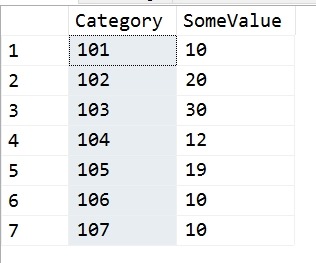
    In this case, the user had this set of data:

    2017-09-14 18_09_39-SQLQuery1.sql - (local)_SQL2016.sandbox (PLATO_Steve (72))_ - Microsoft SQL Serv

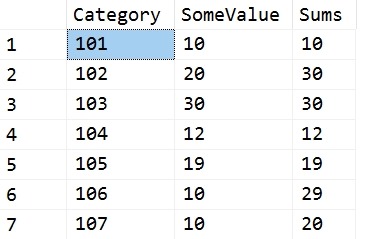
    Their goal was to run through these values, in Category order, and whenever the running total sum of SomeValue exceeded 30, reset the sum. Their requirement was that this could only be a single value or two values, which boxes in the problem nicely. In other words, they wanted these results:

    2017-09-14 18_12_02-SQLQuery1.sql - (local)_SQL2016.sandbox (PLATO_Steve (72))_ - Microsoft SQL Serv

    The first two rows equal 30, so we reset for the third row. The third row is 30, so we reset for the fourth. The fourth and fifth would exceed 30, so each gets a reset. Five and six give 29, so we stop there.

    I don’t know what the use case is here, but it’s an interesting problem.

    My Solution

    I had a quick solution using Lag. I created a quick query that looked back 1 and 2 rows. I could have stopped with one, but originally I thought that the poster might go to three rows if the 30 value wasn’t met. I use a CTE to get the current row and previous values, then  a simple CASE to sum values or return the current row.

    WITH lagCTE
    AS (SELECT
              Category,
              SomeValue,
              LagValue1 = LAG(SomeValue, 1, 0) OVER (ORDER BY Category),
              LagValue2 = LAG(SomeValue, 2, 0) OVER (ORDER BY Category)
         FROM Source
        )
    SELECT
          lagCTE.Category,
          lagCTE.SomeValue,
          Sums = CASE
                     WHEN lagCTE.SomeValue + lagCTE.LagValue1 > 30 THEN
                         lagCTE.SomeValue
                     ELSE
                         lagCTE.SomeValue + lagCTE.LagValue1
                 END
    FROM lagCTE;

    I also created a test, because, why do the math. Once I’ve done this, I want to ensure any code changes, any logic changes will still pass the same test. Here’s my test code:

    EXEC tsqlt.NewTestClass @ClassName = N'tTSQLTests'
    GO
    CREATE PROCEDURE tTSQLTests.[test running total reset]
    AS
    -----------------------------------
    -------   Assemble
    -----------------------------------
    EXEC tsqlt.FakeTable
         @TableName = N'RTSource'
    
    INSERT RTSource
    VALUES ('101', 10),
            ('102', 20),
            ('103', 30),
            ('104', 12),
            ('105', 19),
            ('106', 10),
            ('107', 10);
    
    CREATE TABLE tTSQLTests.Expected
    (   Category     VARCHAR(5),
         SomeValue    INT,
         RunningTotal INT
    );
    INSERT INTO tTSQLTests.Expected
    VALUES
           ('101', 10, 10),
           ('102', 20, 30),
           ('103', 30, 30),
           ('104', 12, 12),
           ('105', 19, 19),
           ('106', 10, 29),
           ('107', 10, 10);
    SELECT
           Category,
           SomeValue,
           RunningTotal
    INTO  tTSQLTests.Actual
    FROM  tTSQLTests.Expected
    WHERE 1 = 0;
    
    -----------------------------------
    -------   Act
    -----------------------------------
    INSERT tTSQLTests.Actual EXEC RunningTotalQueries
    
    -----------------------------------
    -------   Assert
    -----------------------------------
    EXEC tsqlt.AssertEqualsTable
         @Expected = N'tTSQLTests.Expected',
         @Actual = N'tTSQLTests.Actual',
         @Message = N'incorrect query'
    GO

    Adding Counters

    The poster then asked for a group counter, which becomes much harder. I was about to try for another CTE that would give me some counter I could work with when Jeff Moden used the quirky update to build a better script. You can read his code here.