Tag: tsqlt

  • Getting the tSQLt Run Adapter working in Visual Studio 2017

    Last year I heard about the tSQLt test Adapter for Visual Studio from Ed Elliot. I’ve been wanting to try it, but various items got in the way. Finally I had the chance to play and it worked well in Visual Studio 2015, but I needed it in VS 2017. Fortunately Ed had a tSQLt Run Adapter beta for Visual Studio 2017, but I had a few issues. This is a debugging post.

    I downloaded the file and ran setup. Since this can cause issues with VS 2015, I unchecked that box. Unfortunately, I think I messed up my VS 2015 project. No matter, we’ll forge on.

    I had a Readyroll project where I was doing some work. In following some of the work at Redgate from a developer, I set up a new test project according to the tutorial. I got through and no tests.

    Hmmm.

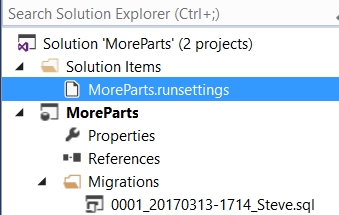
    The .runsettings file is set in the root of my solution, as shown here:
    The contents are:

    <?xml version="1.0" encoding="utf-8"?>
    <RunSettings>
      <TestRunParameters>
        <Parameter name="TestDatabaseConnectionString" value="Data Source=.\SQL2016;Initial Catalog=PartsUnlimitedDB;Integrated Security=True;" />
        <Parameter name="IncludePath" value="Tests" />
      </TestRunParameters>
    </RunSettings>

    My local instance is .\SQL2016, a named instance, and I have a PartsUnlimitedDB database on this instance.

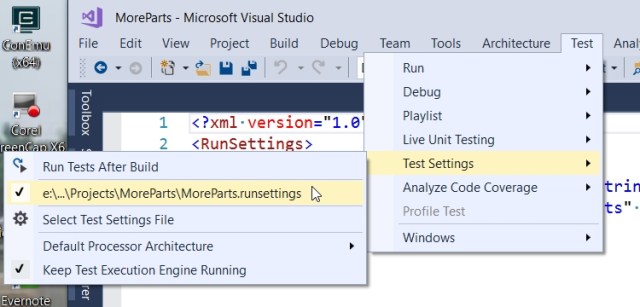
    Here the file is selected:
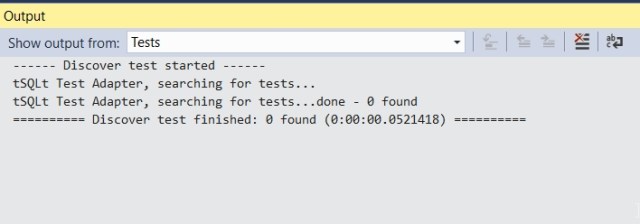
    When I run all tests, I get this:
    I heard from Ed that I needed to have the name “tests” in the filename, so I changed that. Here’s the test and the file name
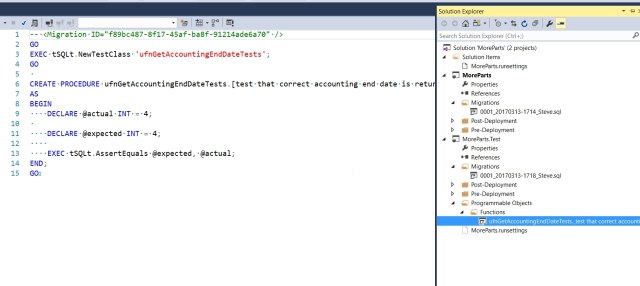
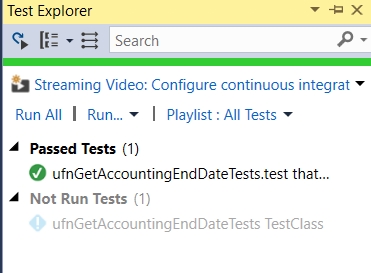
    Now I see my tests in the test explorer. Success!
    Just to check a few things, let’s try another file. Here I’ll use a shorter name, though still descriptive.
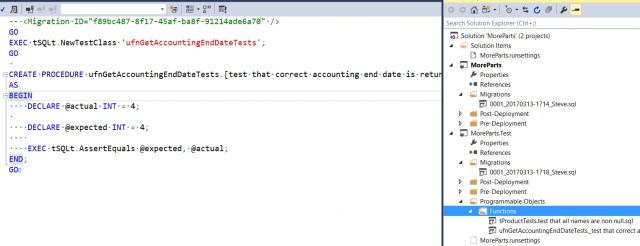
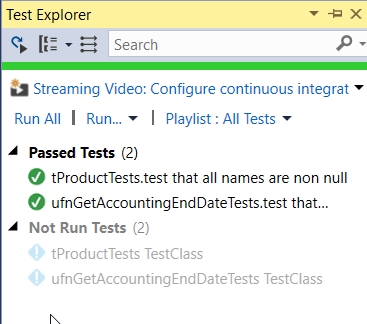
    And again, success.
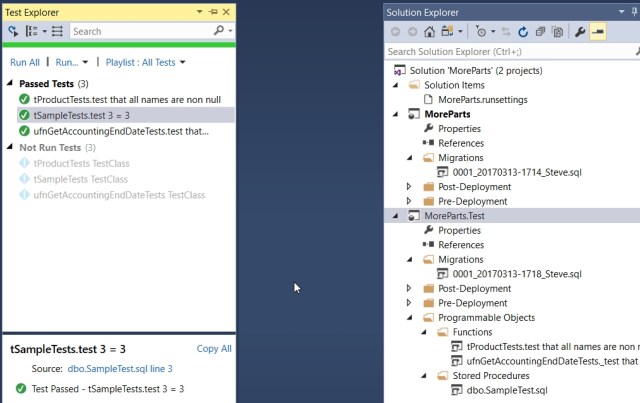
    That felt strange, but some back and forth with Ed showed me that the IncludeFile filter in the .runsettings file needs to be set to some value. In the default file I used, it’s set to “tests”. If I change it to test, and include a new test, then I things still work:
  • Using tSQLt to Find Min/Max Times

    I love tSQLt. It’s a good way to write tests that can determine if your code is actually working. Since I’m a fan of unit testing, I think using tests to verify your logic is great. What’s excellent with tSQLt is that I can verify a number of cases at once.

    I ran across this post asking for help with a query. Given the sample data and results, I wrote this proc and test. In the test, my “Act” is calling a proc I wrote that executes the first post’s query.

    CREATE OR ALTER PROCEDURE RunTimeTests
    AS
    BEGIN
        SELECT
            Taskid,
            MIN(StartTime),
            MAX(EndTime),
            DATEDIFF(MINUTE, MIN(StartTime), MAX(EndTime))
        FROM TimeTests
        GROUP BY Taskid;
    END;
    GO
    EXEC tsqlt.NewTestClass @ClassName = N'tTimeTests'
    GO
    CREATE OR ALTER PROCEDURE [tTimeTests].[test calculation min max time from timetests]
    AS
    BEGIN
        -- assemble
        EXEC tsqlt.FakeTable @TableName = N'TimeTests', @SchemaName = N'dbo'
    
        INSERT into TimeTests
            VALUES 
            (1, '2017-02-23 09:48:47.413',NULL ),
            (1, '2017-02-23 09:50:47.413', '2017-02-23 10:59:47.413' ),
            (1, '2017-02-23 09:49:47.413',Null ),
            (2, '2017-02-23 10:40:47.413','2017-02-23 11:55:47.413' ),
            (2, '2017-02-23 10:39:47.413', NULL ),
            (2, '2017-02-23 10:11:47.413','2017-02-23 11:30:47.413')
    
        CREATE TABLE tTimeTests.Expected
        ( taskid INT, Mindtime DATETIME2(3), maxtime DATETIME2(3), Minutes int)
    
        INSERT tTimeTests.Expected
         VALUES (1, '2017-02-23 09:48:47.413', '2017-02-23 10:59:47.413', 71)
              , (2, '2017-02-23 10:39:47.413', '2017-02-23 11:55:47.413', 76)   
    
        SELECT *
         INTO tTimeTests.Actual
          FROM tTimeTests.Expected
          WHERE 1 = 0;
        -- act
        INSERT tTimeTests.Actual EXEC RunTimeTests;
    
        -- assert
        EXEC tsqlt.AssertEqualsTable
         @Expected = N'tTimeTests.Expected', @Actual = N'tTimeTests.Actual', @Message = N'Incorrect times'
        
    END

    When I run this, it easily verifies the answer that the data is incorrect from the poster.

    2017-02-24 13_08_32-SQL Test - Microsoft SQL Server Management Studio

    If I change my expected results:

        INSERT tTimeTests.Expected
         VALUES (1, '2017-02-23 09:48:47.413', '2017-02-23 10:59:47.413', 71)
              , (2, '2017-02-23 10:11:47.413', '2017-02-23 11:55:47.413', 104)

    and re-run the test, it succeeds.

    2017-02-24 13_09_53-SQL Test - Microsoft SQL Server Management Studio

    Now, does this mean the developer wouldn’t make this mistake? After all, if you think you should be getting those results, you will struggle with the query.

    It doesn’t help there. However, it does help if you modify this code later and start to have strange results. This also means that I can add in more rows to the data, even more cases, and determine if the procedure still works. If I’m trying to cover a dozen cases, it’s much easier to re-run a tSQLt test than manually looking through results.

    Give tsqlt a try. It’s free, and if you have the SQL Toolbelt, you can get a GUI with SQL Test for executing your tests.

  • Test Coverage

    This editorial was originally published on Nov 12, 2013. It is being re-run as Steve is on holiday.

    I’ve never had to work full time in a QA group, but I have had to perform software testing of an application and it wasn’t fun. Even as I worked through the various features, looking for edge cases, common mistakes, etc., I realized that running tests was something that really required more discipline and process than I was giving it at the time. Too often I ‘d realize that my regressions weren’t 100% duplicates of previous executions because I’d allowed too much “human effort” into my process.

    These days most testing of software is automated. I know QA groups still exist, and they need to handle some of the manual checks that are very hard to automate. However more and more testing is being pushed back onto developers to handle, with frameworks like NUnit and JUnit. In the database world, we haven’t done a great job of including testing into the code we write, but there’s a great testing framework we can use.

    TSQLT is a framework written by Sebastian Meine and Dennis Lloyd and it’s free. It’s been developed to help you write tests that can exercise your T-SQL code to determine if it’s doing what you expect. I’ve used it a little, and while I see the potential, I also realize that this will take some practice to learn how to more easily write tests that can cover the various potential places where bugs can be introduced.

    However, if you use version control, and you should, then you can easily spread the load of writing tests to all of your developers. Since the tests are stored procedures, they can be included in your VCS project and shared by all your developers. With a little effort from each member of your team, you might be surprised at the code coverage you can achieve with this framework.

    Testing is important, as we see over and over again as software is released and doesn’t work as expected. I think much of that is our fault, as software developers, for not improving our testing skills and discipline.

    Steve Jones


  • Quick Tests for a Function

    I was writing a poorly performing UDF the other day and then wanted to replace it with a better performing one. However, I wanted to be sure that the function was the acting the same externally. In other words, does all my code that calls the function work the same?

    It’s a no brainer for me to use tSQLt to do this. I can quickly put together a few tests for my function. In my case, my function was proper casing a string. In this case, I make a class and add a quick test.

    My function is dbo.udfProperCase(@string). This takes a string value and returns a string value. My test needs then only a few variables.

    DECLARE @i VARCHAR(500) = ‘steve’
    , @expected VARCHAR(500) = ‘Steve’
    , @a VARCHAR(500)

    These are my input, my expected, and actual values. The rest of the test is simple.

    EXEC @a = dbo.udfProperCase @input = @i

    EXEC tsqlt.AssertEquals @Expected = @expected, @Actual = @a, @Message = N’single name failure’

    This calls the function, gets the return, and the asserts this is equal to the Expected value. I wrap this in a procedure definition. My complete definition is then:

    EXEC tsqlt.NewTestClass
      @ClassName = N’StringTests’;
    go
    CREATE PROC [StringTests].[test propercase single name]
    AS
    BEGIN
    DECLARE @i VARCHAR(500) = ‘steve’
    , @expected VARCHAR(500) = ‘Steve’
    , @a VARCHAR(500)

    — Act
    EXEC @a = dbo.udfProperCase @input = @i

    — assert
    EXEC tsqlt.AssertEquals @Expected = @expected, @Actual = @a, @Message = N’single name failure’

    END

    That test took me about 2 minutes to write. It’s fairly trivial, but this gives me a happy path test. I easily copied this multiple times, changing the input and Expected values.

    DECLARE @i VARCHAR(500) = ‘steve jones’
    , @expected VARCHAR(500) = ‘Steve Jones’

    and

    DECLARE @i VARCHAR(500) = ‘steve von jones’
    , @expected VARCHAR(500) = ‘Steve von Jones’

    and

    DECLARE @i VARCHAR(500) = ‘J steve Jones’
    , @expected VARCHAR(500) = ‘J Steve Jones’

    That gives me a few items. However I also want to look for issues, so I include a few other items.

    DECLARE @i VARCHAR(500) = ”
    , @expected VARCHAR(500) = ”

    as well as

    DECLARE @i VARCHAR(500) = null

    , @expected VARCHAR(500) = null

    This lets me quickly run a series of tests against my function. While this might not seem like much, they do give me flexibility. If I change the function from a loop to something more like Tony Rogerson’s code, I should get the same results.

    That’s the power of testing. Not so much that this verifies my code is correct, though it does that. Testing provides me the freedom to change code, without worrying I’ve subtlety broken things. I get a complete test run against new code quickly.

    Certainly I could have bugs in code, but I can easily write a new test when I find a bug and include it in my suite of tests to run against the function for the future.

    Testing isn’t that hard, and the more you practice writing tests, the better (and faster) you’ll get at it.