Tag: VCS

  • Creating an Empty Repo in GitHub–#SQLNewBlogger

    I saw someone struggling with getting started with a Visual Studio project and Azure DevOps. They got a conflict, which I’ll show and then get you started with an empty repo.

    Another post for me that is simple and hopefully serves as an example for people trying to get blogging as #SQLNewBloggers.

    The Problem with Initialized Repos

    I wrote about this recently with Azure DevOps and empty repos.. If I initialize a repo in GitHub, or any online provider, and try to push up a local repo, it returns an error that I have conflicts.

    I’ve learned that when I want to start a new project, either I create the repo locally and then make an empty one online, or I create it online, clone it, and then start working.

    I try to do the second (create online first), but I don’t always remember.

    Creating an Empty Repo

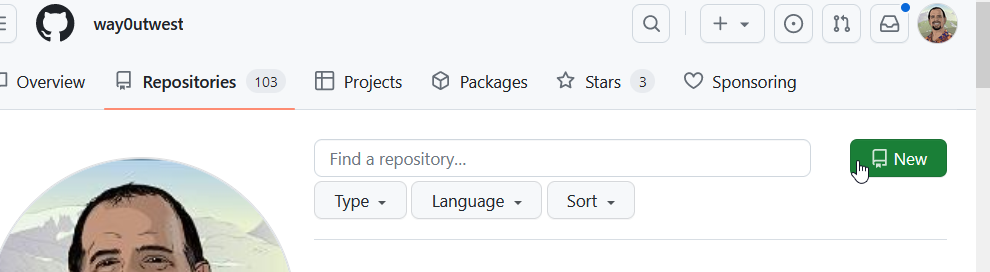
    In GitHub, if you go to your repositories page, you can see a “New” button on the right.
    2023-08-25 16_56_06-Your Repositories — Mozilla Firefox

    Click this and enter a name, as I’ve done below. BTW, I love the suggested name.

    2023-08-25 16_56_30-New repository — Mozilla Firefox

    If you look at the image above, near the bottom, you can see my mouse pointer.

    DO NOT check this box if you want an empty repo. Don’t add a .gitignore either. You’ll be adding code from your own project, which likely has a gitignore file and might have a repo. If not, just create a readme.md file in your local git repo.

    Don’t add a license file either.

    Pushing My Project

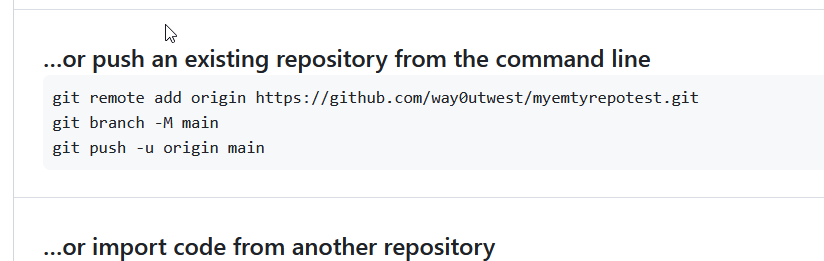
    Now when you create this, you get the details of how to push your repository. If you have never used git, just open a command prompt and paste these lines in one by one and run them.
    2023-08-25 17_00_57-way0utwest_myemtyrepotest — Mozilla Firefox

    That’s it and now you can work and commit in either repo and deal with merges.

    SQLNewBlogger

    This post was easy for me, but I’ve been in the situation where I’ve made this mistake. In this case, I’d written the other post, so I knew what to do here. I spent another 10 minutes getting GitHub set, taking images, and writing this.

    Easy to do, 2 posts from one idea, and showcasing knowledge on another platform. I could do another one with BitBucket or somewhere else, and maybe I will. I have customers that use other platforms.

    Maybe you should do this and showcase your versatility to the next person that wants to interview you. If you want to work with software and Git, show them you know the basics. Or even more.
  • Friday Flyway Tips–Commit and Push

    Flyway Desktop includes version control features with Git. One thing that was added in v6.5+ was the ability to commit and push.

    I’ve been working with Flyway Desktop for work more and more as we transition from older SSMS plugins to the standalone tool. This series looks at some tips I’ve gotten along the way.

    All in One Press

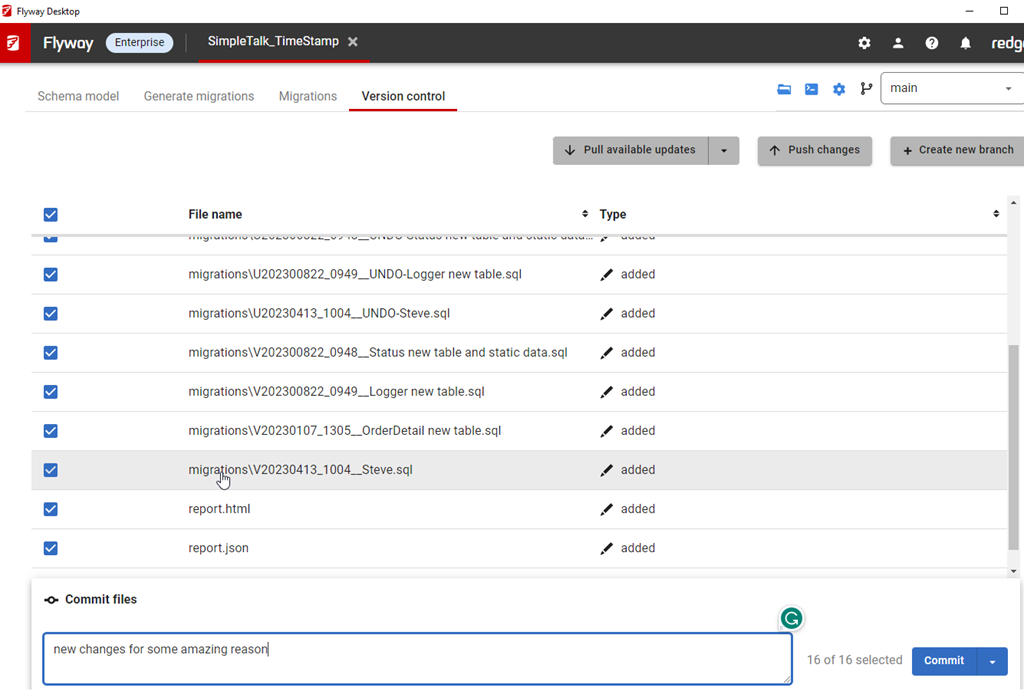
    This isn’t a big change, but it is one that customers have asked for. On the version control tab, when you have changes, they are listed with a commit button in the lower right.

    2023-08-25 16_06_35-Flyway Desktop

    We’ve added a drop down to this.

    2023-08-25 16_07_13-Flyway Desktop

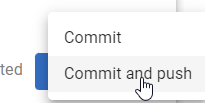
    If you click this, you now have commit or commit and push options.

    2023-08-25 16_07_17-Flyway Desktop

    Pick the lower one, and you’ll get things committed and pushed up.

    2023-08-25 16_17_42-Flyway Desktop

    The choice isn’t saved, which I think isn’t a great design choice, but for now, you do have the option with each commit.

    Try it out today. If you haven’t worked with Flyway Desktop, download it today. There is a free version that organizes migrations and paid versions with many more features.

    Video Walkthrough

    I made a quick video showing this as well. You can watch it below, or check out all the Flyway videos I’ve added:

    https://youtu.be/QsWVcYxFdnM

  • A Good Reason to use a VCS

    Imagine that you have some important year end procedures in your SQL Server database. Or maybe you have some important, but rarely run code. No matter what the circumstance, if this is a large amount of code, it might be difficult to remember how it’s structured or even how it works on different sets of data.

    Now, imagine that you have a malicious individual that thinks like Andy Mallon talks about in this post. They run an ALTER PROCEDURE and replace the entire procedure body with “RETURN 0”. Now imagine that you don’t find out about this until months later when the important code is run. That would be a bad day, and certainly one that might have you struggling to recover the code from backups. Do you have months of old backups? I used to, in a place where we kept an end of month backup from every month for a year. I always had the previous 12 months, but I wouldn’t want to restore them all to find out where code got changed.

    In most places, we don’t have that many backups, and we often assume we’d only go back a few full backups at most in the event of a disaster. I’ve also been a consultant for more than a few companies that found out that they had 2-10 full backups, all of which were corrupt and from the last few weeks. Sometimes there were older backups on dev/test machines, but in some cases, lots of data was lost.

    It’s important to run DBCC to catch corruption, but it’s also important to keep track of your code. There might not be maliciousness, but simple errors in code that’s changed without comprehensive testing. This can be especially problematic for rarely run code that we don’t test as thoroughly and won’t detect issues for a significant amount of time.

    Save your code in a VCS. Git is free. File|Save is in every editor on the planet. There’s no excuse not to use a VCS and save code. Redgate has tools to make this easy, but I worked in a file|save environment for years, and it worked. Learn about a VCS and build the habit to backup your code in a repository. It’s simple and easy, and you won’t know you need it until you do. At that point, it’s too late.

    Steve Jones

    Listen to the podcast at Libsyn, Stitcher or iTunes.

  • Protecting Code

    There are so many data breaches taking place, that it’s hard to keep track of them. While I rarely find my email in any of the breaches loaded into haveibeenpwned.com, I do see Mr. Hunt regularly loading more data sets into the database. I don’t know how many you’ve been a part of, but I certainly hope you know, and I hope you’ve changed shared passwords and updated accounts.

    While we do need to protect data, we also need to ensure that we protect our code, as that might be where the vulnerabilities lie that others might discover. While I’m not a big fan of encrypting or hiding the code in a database from customers, I certainly don’t want that code, or the application code, to be visible to outsiders, especially potential hackers.

    While your team might not be are careless as the Boeing research team, I’d hope that you don’t expose your code on the Internet, as they did. Perhaps more importantly, I hope no one does a Black Hat talk about potential issues in your code. A researcher did this to Boeing, talking about potentially being able to jump from a customer network and application to a more privileged one to the command and control network. Boeing denies this is possible, and I’m not worried about my future Dreamliner flights, but I think Boeing should do more publicly here. Let the researcher have a few days on a plane and truly pen test the software.

    I’ve seen lots of “hidden” features in software that administrators use to get work done. I’ve seen sloppily written tooling that solves a problem and isn’t intended for general use. I’ve also see far too many of these features “discovered” by ordinary users. Even assuming your internal network is completely free of malicious users is a bad idea. We’ve seen plenty of viruses and trojan software that can be used maliciously.

    We don’t want to lock our networks and applications so tightly that we create impediments to work, but we certainly can do better jobs in limiting access, keeping tight privileges, ensuring administrative accounts are protected and more. Those might be hard to get done today, but you certainly can prevent simple things, like securing your VCS. Don’t use public places like GitHub, or ensure you have private repositories that only your organization can see. It’s not perfect, but it does stop the researchers and lazy criminals that are just scanning for easy targets on the Internet.

    Steve Jones

    Listen to the podcast at Libsyn, Stitcher or iTunes.