Day: November 29, 2023

  • SQL Prompt Tips–Using $surroundtext$ in a Snippet

    A user on the SQL Community Slack was asking about what the $surroundtext$ variable. This post looks at how this can be used in snippets.

    This is part of a series of posts on SQL Prompt. You can see all my posts on SQL Prompt under that tag.

    A Scenario

    I find that I want to convert some inline SQL to a stored procedure. We have a lot of code in an application that looks like this:

    SELECT 
         SUM(sod.OrderQty) OVER(ORDER BY sod.SalesOrderID, sod.ProductID) AS Total
      FROM Sales.SalesOrderDetail AS sod
      WHERE sod.ProductID = <somevalue>

    The application replaces <somevalue> with an actual value and runs this code. This potentially is a SQL Injection vector, but this also isn’t easily tuned on the server, and can get copied and pasted into different places in the code. It would be better to have this as a stored procedure.

    Make the Conversion Easy

    To make this a stored procedure, I would want this query to look like this:

    CREATE PROCEDURE dbo.GetGroupedSales
         @Id INT
    AS
    BEGIN
    SELECT 
         SUM(sod.OrderQty) OVER(ORDER BY sod.SalesOrderID, sod.ProductID) AS Total
      FROM Sales.SalesOrderDetail AS sod
      WHERE sod.ProductID = @id
    
    END

    I can create a snippet that looks like the skeleton of a stored procedure with this code:

    create procedure $procname$
    $param1$ $paramdt$
    as
    begin
    $SELECTEDTEXT$
    end
    go

    I’ve got a screenshot of this below, showing some default values for the various parameters. This makes it easy for me to build a proc. However, there is one variable that isn’t in the list: $SELECTEDTEXT$.

    This variable will take any text that is selected in SSMS (or VS) and put it inside of the snippet in that location specified.  That will help us wrap our query with the other code in the snippet.

    Here is my snippet:

    2023-11-10 14_17_05-SQL Prompt - Edit Snippet

    Using the Snippet

    Let’s see this in action. In SSMS, I have highlighted my query.Notice the little Prompt popup near the cursor.

    2023-11-10 14_23_22-SQLQuery2.sql - ARISTOTLE_SQL2022.AdventureWorks2017 (ARISTOTLE_Steve (71))_ - M

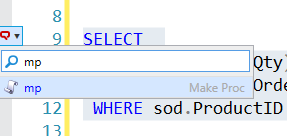
    When I see this, I can hit the CTRL key and I’ll get a drop down list. I will type “mp” which is my snippet code.
    2023-11-10 14_23_29-SQLQuery2.sql - ARISTOTLE_SQL2022.AdventureWorks2017 (ARISTOTLE_Steve (71))_ - M

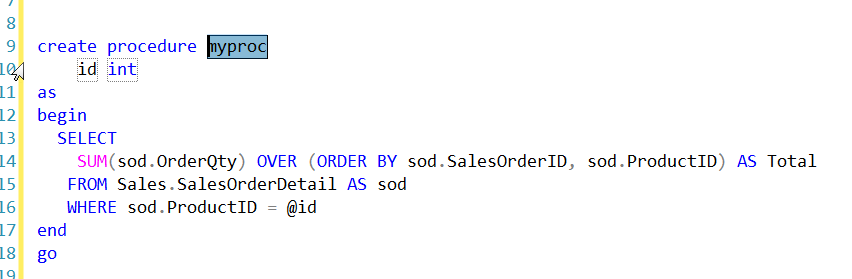
    This finds my snippet. I can hit Tab and my snippet is inserted, with my default variable values and also the text I selected in the place where $SELECTEDTEXT$ was in the snippet.
    2023-11-10 14_23_58-SQLQuery2.sql - ARISTOTLE_SQL2022.AdventureWorks2017 (ARISTOTLE_Steve (71))_ - M

    Now like any other snippet, I can tab between the variables and change them. When I’m done, I hit Enter and I have my code.

    Now I just need to save this in version control and deploy it to my production system.

    If you haven’t tried SQL Prompt, download the eval and give it a try. I think you’ll find this is one of the best tools to increase your productivity writing SQL.

    Video Walkthrough

    I made a video of using $surroundtext$ that you can watch. All my SQL Prompt tips are in this playlist.


  • A Lack of Privacy in Smart Cars

    I own a Tesla, and I love having a bunch of data about my usage of the car. I can see how much I’ve charged it, what it costs to power, where I drive, aggregates of my monthly usage, and more. It’s especially cool when my wife is coming to pick me up, and I can see where the car is, so I know when to go outside if the weather isn’t great. I also like the ability to cool or heat the car in advance of going outside in extreme temperatures.

    However, all that data also means there are potential issues with privacy and certainly security. I am well aware that location and other data are being captured by Tesla as I use the car. However, it’s not just Tesla. Lots of modern cars are collecting lots of data. Mozilla had a report on data privacy in cars, and all the manufacturers failed their data privacy test. There’s also a summary at Engadget of the results.

    Reading through the report, it seems that many of the manufacturers of cars are covering themselves from liability. Cars are sold and used in many jurisdictions and often there can be a wide variety of regulations about data, even inside of a single country. It seems that the policies are often written just in case something happens and they collect data from your use of the car (or they record you using the car).

    A point I hadn’t considered in the article dealt with the deletion of data when a car is sold. That could get tricky as not only is your usage data in the car, some data might potentially be in a manufacturer’s database. Or it might be stored in devices at a service center. Who knows what gets stored and copied in modern cars as they are serviced. Will we potentially have issues with mechanics or other workers stealing and selling data from entertainment or other information systems in cars? The possibilities make my head hurt in this modern world where everything can, and often does, collect data.

    I don’t know what data is stored inside modern vehicles or other systems. In some sense, I think that companies ought to disclose what they collect, and include examples of what this data looks like. Even when I read policies, like this one from Microsoft, I’m not completely sure if I know what data they may be collecting.

    The world of data privacy is complex, and as I’ve written before, I’m not even sure exactly how I would like my data handled. I think the GDPR is a good start, but I hope that we continue to evolve protections that ensure humans have more control over their data than the companies that collect it.

    Steve Jones

    Listen to the podcast at Libsyn, Spotify, or iTunes.