Author: way0utwest

  • Who’s Got a Preteen SQL Server?

    This year we will have the end of extended support for SQL Server 2005. Microsoft has been reminding people they should upgrade, which may be important if your organization requires support for the running software. Personally I think if you’re still running SQL Server 2005, and it works for you, why upgrade?

    It’s been ten years since that version was released, and while it was a huge step forward with the SQL CLR, better mail, and more, it had plenty of issues. Since that time we’ve had 4 major releases with a fifth coming this year. All of those versions have built on the base of SQL Server 2005’s completely rewritten codebase and have improved many features.

    Recently I got a note from someone that noted that they have been upgrading their SQL 2005 systems over the last few years (along with SQL 2008 instances) and have made great progress. however they still have a few SQL 2005 instances that they are racing to upgrade. This person was wondering how many others are out there facing similar struggles.

    So this week I’m wondering. How many of you have those instances growing up and getting close to double digit ages? Are you working to upgrade SQL 2005 instances? Have you been thinking about those 2008 instances who are already out of mainstream support and will leave extended support in a few years?

    Let us know how you think about your aging database software.

    Steve Jones

    The Voice of the DBA Podcast

    Listen to the MP3 Audio ( 2.0MB) podcast or subscribe to the feed at iTunes and LibSyn. 

  • The New Operating System

    I often see pieces written about startup companies and the methods they use to develop software. Small companies often adapt quickly to new ideas and processes. However, many of us work in larger, more established corporations and don’t get the flexibility to change our processes. In fact, for many of us, the idea of developing software faster doesn’t even seem to make sense. Most of us in large organizations (private or public) have fundamentally different views of our clients and market.

    However I read an interesting piece on adaptive, more flexible, startup-type companies that does seem to indicate that many of our larger organizations might want to rethink how they work. The piece looks at an operating system as a way of building products or services. What’s most fascinating to me is that this piece looks at the way in which large, established companies have failed while smaller, younger companies that operate differently have succeeded.

    In many ways, software is eating the world. As playing fields level in many industries because of both cheap computing power and complex software, I suspect more and more organizations will feel pressure to become more adaptive. I would especially think this will happen as new, younger managers mature, with new ways of thinking. Those managers that haven’t spent decades working in a factory mentality will see the power and advantages of trusting people, setting a vision, and then allowing people to build software that does the work.

    However there are plenty of organizations where you have a wide range of skills, and of employee motivation. There are certainly employees that don’t want to innovate and just want to do the job they’ve been doing. There will always be a need for some grunt style work (though maybe less in technology). We certainly need to adapt any system to ensure those employees that need more supervision to transition to new ways of working get that help.

    I expect that we’ll also see more public groups adapt these techniques as well. There is increasing pressure on reducing costs, as well as the need to accomplish more and more, perhaps with smaller groups of people. In many cases this means that software should do more. I would hope that more public organizations adapt their processes in order to meet the demands they face. Those that have, already stand out.

    It’s going to be an interesting world the next decade to two, and I really do think we will see more companies adapting the way they work to something that leans towards embracing and allowing creativity and innovation more than following rules by rote.

    Steve Jones

    The Voice of the DBA Podcast

    Listen to the MP3 Audio ( 2.8MB) podcast or subscribe to the feed at iTunes and LibSyn. 

  • Loading a Text File with a Line Feed

    Loading text files is a skill that probably every DBA needs. I know that the import wizard is available, but there are times that you might want to automate this without using SSIS. In those cases, it’s nice to know how to load data from a programmatic standpoint.

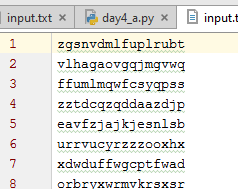
    I had the need to do this recently with a text file that looked normal. When I opened it in my editor, it looked like a normal text file, one column of data.

    2016-01-28 17_44_07-Start

    I thought this would be easy to load, so I created a simple table:

    CREATE TABLE MyTable ( teststring VARCHAR(100))

    I then ran a simple BULK INSERT command.

    BULK insert MyTable
         from ‘C:\SampleFiles\input.txt’

    And I received this:

    Msg 4863, Level 16, State 1, Line 3
    Bulk load data conversion error (truncation) for row 1, column 1 (mychar).

    That’s not good. I suspected this was because of the format of the file, so I added a row terminator.

    BULK insert MyTable
         from ‘C:\SampleFiles\input.txt’
    with ( ROWTERMINATOR = ‘\r’)

    That didn’t help. I suspected this was because of the terminators for some reason. I also tried the newline (\n) terminator, and both, but nothing worked.

    Since I was worried about formatting, I decided to look at the file. My first choice here is XVI32, and when I opened the file, I could see that only a line feed (0x0A) was used.

    2016-01-28 15_43_19-Settings

    However, I wasn’t sure how to get this in my code.

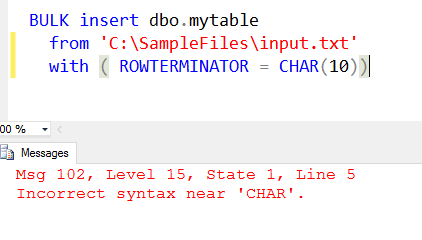
    I tried CHAR(), and that didn’t work.

    2016-01-28 17_58_47-Cortana

    I could look to edit the code with XVI32, but that seems odd. However, let’s try that.

    2016-01-28 17_57_28-Settings

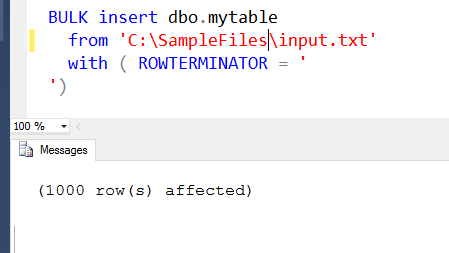
    I replaced the \r with 0x0A and then deleted the r. Once I saved this, and reloaded into SSMS (do not normalize to CRLF), I could run this.

    2016-01-28 17_58_09-Start

    I suppose I could also do this with the ALT key, and a number pad, though I couldn’t get that to work on my laptop. I need to try that on my desktop, but it’s not a great way to code. Easy to forget that characters are in the code.

    I tried searching a bit and found that SQLDenis had a solution. He used dynamic SQL, but with a little formatting, the code is still easy to read, and this works fine.

    DECLARE @cmd VARCHAR(8000)
    SELECT @cmd = ‘BULK insert Mytable
                    from ”C:\SampleFiles\input.txt”
                    with ( ROWTERMINATOR = ”’ + Char(10) + ”’)’
    EXEC(@cmd)

    I executed this and loaded my file just fine.

    It’s not often you might need to do this, but it’s a handy little trick for those files that might be formatted from other OSes.

  • Queues in Databases

    I ran across this post, The Database as a Queue Anti-Pattern, and it struck a chord. I both agree and disagree with the premise, and certainly see this as another case of the “it depends.” However, I am curious what others think.

    I had just written about this for T-SQL Tuesday #74, talking about our use of the database for queuing emails as a part of the site. It was a high volume system that worked for us. We were, of course, looking at SQL Server as a hammer, and in 2002/2003, there weren’t many messaging systems available at a reasonable cost. These days it seems that Amazon SQS or Azure Service Bus are low cost ways to move messages around, but are they better than a database?

    In our case, cost mattered, knowledge and skill mattered, though certainly we could have learned how to work with a messaging system. However we also had the need to feedback potential status and progress information. We also wanted the ability to re-point emails to another process if one failed. For example, if SenderB fails after having retrieved an email, we can update the table and have SenderA pick up the row(s) that haven’t been processed.

    I do believe that messaging is an extremely powerful architecture technique for for distributing work as well as scaling to high workloads. I’d like to see more messaging implemented in applications, even those that aren’t Twitter scale. After all, if I exceed the power of a 4 core machine for my small application, it’s much easier for me to add another 4 core machine that can deal with messages than upgrade to an 8 core machine and just delay the scale problem to another day.

    I’m curious what the rest of you think. Is the database a good platform for a queue?

    Steve Jones

    The Voice of the DBA Podcast

    Listen to the MP3 Audio ( 2.3MB) podcast or subscribe to the feed at iTunes and LibSyn.