Author: way0utwest

  • Quick Tests–Function Returns

    I ran across a neat piece of code recently from Gail Shaw. She answered a question on returning the base path from a path in a string. Meaning if I had this string:

    c:\Users\Sjones\Documents\text.txt

    I’d want to return this:

    c:\Users\Sjones\Documents

    Her code looked like this, which is a nice, simple, elegant way of finding the path, no matter how many backslashes.

    LEFT(@FullPath, LEN(@fullpath) – CHARINDEX(‘\’, REVERSE(@fullpath)))

    Of course, you can easily add the last backslash with a slight change to the math.

    However I wanted to add some tests. Does this really work? What if I don’t have a backslash? I thought the best way to do this was with a few tSQLt tests, which I quickly built. The entire process was 5-10 minutes, which isn’t a lot longer than if I had been running random tests myself with a variety of strings.

    The advantage of tests is that if I come up with a new case, or another potential bug, I copy the test over, change the string and I have a new test, plus all the regressions. I’m not depending on my memory to run the test cases.

    I first put the code in a function, which makes it easier to test.

    CREATE FUNCTION GetParentPath
      ( @fullpath VARCHAR(4000)
      )
    RETURNS varchar(4000)
    AS
    BEGIN
      RETURN LEFT(@FullPath, LEN(@fullpath) – CHARINDEX(‘\’, REVERSE(@fullpath)))
    END

    Here’s my base test:

    EXEC tsqlt.NewTestClass ‘StringTests’;
    go
    CREATE PROCEDURE [StringTests].[test simple path with one backslash]
    AS
    BEGIN
    — Assemble
    DECLARE @input VARCHAR(4000) = ‘c:\myfile.txt’
       , @expected VARCHAR(4000) = ‘c:’
       , @actual VARCHAR(4000)

    — Assert
    EXEC @actual = dbo.GetParentPath
      @fullpath = @input

    — Assert
    EXEC tsqlt.AssertEquals
      @Expected = @expected
    , @Actual = @actual
    , @Message = N’Incorrect Path’
    END
    GO

    I can easily copy this and add new inputs with different paths, and matchout outputs, to test new cases. For example, my first cut produced five tests for these inputs:

    • c:\myfile.txt
    • c:\
    • c:
    • c:\Documents\myfile.txt
    • c:\Users\sjones\Documents\myfile.txt

    There are certainly other tests, but this 5-10 minutes of work gives me repeatable testing, and if I needed to include this function in a larger project, I already have a series of tests that can be run in my CI process.

    What’s more, if I replaced this with a CLR function, such as something with SQL#, I could still use these tests.
  • The Push to Upgrade from SQL Server 2005

    It was interesting to see the results of my straw poll last week on SQL Server 2005. Quite a few people still run that version, and some aren’t looking to upgrade anytime soon. However when support ends, you should be aware that there is potentially an impact to your organization.

    If you work for a government, or you are bound by regulations such as PCI, HIPAA, or something else, you need to upgrade. I would hope that an audit sometime in the last 3-4 years would have alerted you to the issues of running unsupported software, but given the wide variability in auditors in the world, perhaps not. In any case, consider this a warning that you should be sure any databases that contain data regulated by law are upgraded by April 12, 2016. Otherwise your organization will likely be out of compliance with the regulations.

    If you haven’t upgraded, and want to avoid an upgrade for the next decade, this is a tough time. I’m not sure that SQL Server 2016 will RTM before support ends, which is the version you’d like to pick. This means that counting on this event is unwise. Even if you were sure SQL Server 2016 will release on April 1, is that really enough time to test your application?

    That’s really the bottom line for most of us. We need to test and be sure that an upgrade will, in fact, work for our particular environment. We need extensive testing, which probably means that those of us aiming to upgrade should be aiming for SQL Server 2014 (or SQL Azure Database). Microsoft would like you to choose one of these, as it benefits their bottom line, and they are pushing customers to upgrade. However, that’s somewhat the nature of software. We need to upgrade at times in order to maintain our systems, and vendors won’t support old software indefinitely.

    There are a couple months left, and I think you’ll need all that time to be sure your software still runs fine. I’d recommend you use new hardware, a completely separate instance (side by side upgrade) and use Distributed Replay to capture a workload on your existing instance and replay it on the upgraded server to check that your system performs well. To do this, you really need to be sure you are monitoring your current (and the upgraded) server to measure timings and performance.

    Monitoring isn’t simple, but it’s not that hard either. You should always be monitoring your system (we use SQL Monitor at SQLServerCentral), as well as keeping baselines, including wait statistics, that you can use to analyze the performance of your database. This is invaluable in determining if your new database will outperform the old (hint, it should).

    However you approach your upgrade from SQL Server 2005, be aware that you need to be on SP4. I recommend you use the Upgrade Advisor, perform a side by side upgrade, and don’t be afraid to use the compatibility level to allow the database to continue to behave as a 2005 instance. Above all, be sure you have good backups you’ve tested, just in case things fall apart.

    Lastly, SQL Server 2008 and SQL Server 2008 R2 are both out of mainstream support, so don’t forget about future planning for those versions as well. Best of luck with your upgrades, and please let us know if you find specific issues or problems in upgrading. Post a note in the forums to get help, or maybe help someone else complete their own upgrade.

    Steve Jones

    The Voice of the DBA Podcast

    Listen to the MP3 Audio ( 4.4MB) podcast or subscribe to the feed at iTunes and LibSyn.

  • Limiting Database Permissions for DLM Dashboard

    I was talking with some of our support people recently about permissions on DLM Dashboard. A client was having issues, and we weren’t sure what was wrong. As a result, I decided to dig in a bit and see how limited I could be with permissions for the login/user that is used to track changes.

    My first step was to create a new login in SQL Server, giving the public server role and then granting very limited permissions in master and the Redgate database. Those permissions were:

    • master – VIEW ANY DEFINITION
    • master – execute on dbo.RG_SQLLighthouse_ReadEvents
    • RedGate – SELECT ON SQLLighthouse.DDL_Events

    That’s a nice, limited set of permissions. You do need sysadmin for setup, but after that, you can set these permissions for the user that you’ve configured in DLM Dashboard. The permissins are documented on the DLM Dashboard documentation site.

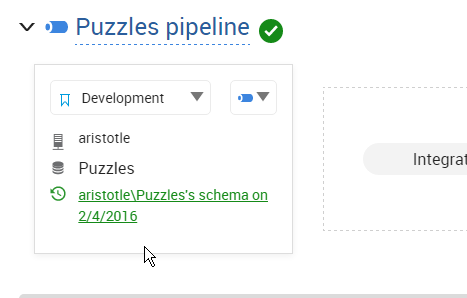
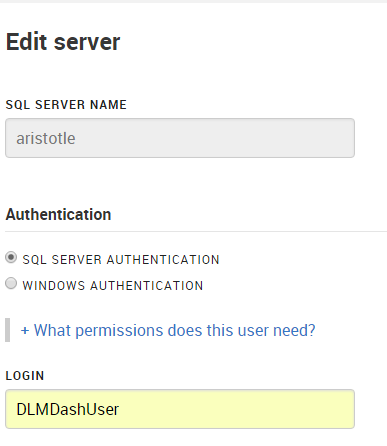
    In my case, I have a login/user, DLMDashUser, configured in the tool.

    2016-02-04 17_32_21-New notification

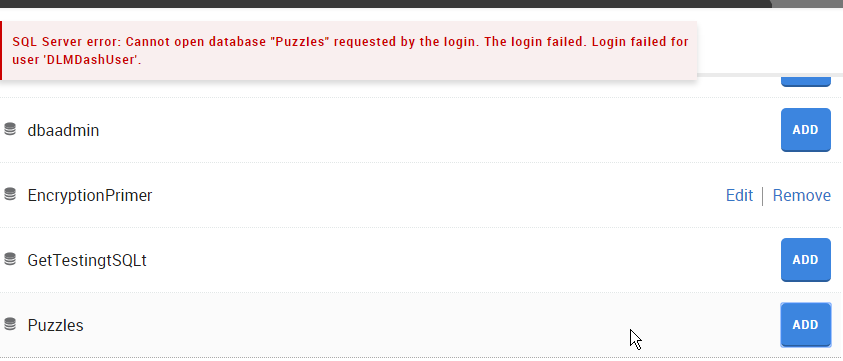
    I then went to add a new database on my local instance.  However since this login isn’t mapped to a user, nor has any high server privileges, I got an error.

    2016-02-04 17_08_18-Movies & TV

    To fix this, I connected to my instance and modified the user. Scripting is a better way to do this, and in my case, I used this script:

    USE Puzzles
    GO
    CREATE USER DLMDashUser FROM LOGIN DLMDashUser;
    GO
    GRANT SELECT ON sys.sql_expression_dependencies TO DLMDashUser
    GO

    This grants the necessary permissions to a new user in this database. You can save this script, which is especially handy for production systems where we don’t want monitoring tools to have elevated permissions.

    Now when I go to add the database, I click add and it works.

    2016-02-04 17_09_02-Movies & TV

    And I can then see the database in my monitoring dashboard.

    2016-02-04 17_09_23-Start

    The principle of least privilege should apply everywhere, certainly in production, but also in development. If you limit permissions in development, you might cause a few headaches, but you’ll understand the issues and solve them early on. More importantly, if you have security flaws, they aren’t in production systems where data is exposed.

    SQL Server security isn’t that hard, but it can be cumbersome. Set it up properly in development, keep your scripts (even from the GUI), and then use those scripts for your production systems.

    NOTE: Typically I’d create a role for this system, which is perhaps what I should do. Having a role like this would make switching users in DLM Dashboard at some point much easier.

    CREATE ROLE Monitoring
    GO

    GRANT SELECT ON sys.sql_expression_dependencies TO Monitoring

    GO
    ALTER ROLE Monitoring ADD MEMBER DLMDashUser

    In fact, I just changed to use this role, and added the role to the other databases so that my dev system is propery set up.

  • Reasonable Timeframes

    Many of us hear about problems with various systems on a regular basis. We report them in Database Weekly far too often, and I’m sure a few of you have been informed (or found) bugs, nagging issues, even vulnerabilities in your systems.

    What’s a reasonable time to fix a system after an audit?

    It’s a simple question, but it’s not very simple to answer. After all, most of us don’t have a lot of slack development time built in to fix issues. Unless the issue is a broken application that doesn’t work, the items disclosed in an audit need to scheduled in among other work. After all, most of the time the audit finds something that no one is aware of, or no one has wanted to fix. This is work that no one really planned on completing.

    I ran across an interesting piece about the Employment Department for the state of Oregon hasn’t fixed a number of issues after an audit last year. While some strides have been made, there are still outstanding issues, the sum total of which it is estimated will take a decade to complete. That’s a long time, but in large systems, especially ones where the entire application cannot be rewritten because of resources, it’s not unusual. I’ve worked in a few places where we had large scale systems that we knew had issues, but we couldn’t easily re-design and implement fixes in any reasonable length of time. Often this was because of downstream dependencies, but certainly culture and management hadn’t made change a priority.

    I sympathize with those people dependent on mainframe systems. The power and reach of those systems, the poor documentation, not to mention the complex training required to change clients’ habits is huge. I would hope that the government groups using these large scale systems would work together to jointly proceed on development, with politicians also involved to help standardize the requirements across state lines (or countries’ borders) and simplify the software needed.

    However, no one ever makes software simpler, especially when it’s being designed.

    The Voice of the DBA Podcast

    Listen to the MP3 Audio ( 2.4MB) podcast or subscribe to the feed at iTunes and LibSyn.