I’ve been on a testing kick, trying to formalize the ad hoc queries I’ve run into something that’s easier to track. As a result, when I look to solve a problem, I’ve written a test to verify that what I think will happen, actually happens.
The Problem
I saw a post recently where someone wasn’t sure how to get the sum of a series of data items by month, so I decided to help them. They asked for a year number, a month number, and a total, so something like this:
Year Month Sales
2012 1 1500.23
2012 2 1480.00
2012 3 1945.00
…
2015 7 8933.11
They mentioned, however, that the had sales data stored as an integer. Not as 201201, but as 1, 2, 3, with a base date being Jan 1, 2012. That’s strange, but it’s a good place to write a test.
I like to start with the results, since if I don’t know the results, how can I tell if my query works? Let’s get a test going. I’ll start by created my expected results. I’ve come to like using temporary tables, and limited data. I also like to test some boundaries, so Iet’s cross a year.
CREATE PROCEDURE [tArticles].[test sum of sales by month for multiple months]
AS
BEGIN
-- Assemble
CREATE TABLE #Expected (
  yearnum INT
, monthnum TINYINT
, salestotal NUMERIC(10,2)
)
SELECT *
INTO #actual
FROM #Expected AS e


 INSERT INTO #Expected
    ( yearnum
    , monthnum
    , salestotal
    )
  VALUES
    ( 2012, 11,  2500.23 )
,   ( 2012, 12,  2200.15 )
,   ( 2013, 1,  2656.75 )
I like to create the actual results table here as well, which allows me to then easily insert into this table from a procedure as well as a query. In this case, I’ll use a query, but I could use insert..exec.
Once I have results, I need to setup my test data. In this case, I’d probably go grab the rows from a specific period and put them in a temp table and use Data Compare to get them. Or make them up. It doesn’t matter. I just need the data that allows me to test my query.
EXEC tsqlt.FakeTable @TableName = N'MonthlySales';

INSERT MothlySales
  VALUES
    ( 11, 1000.00)
,   ( 11, 1500.23)
,   ( 12, 2200.15)
,   ( 13, 1000.00)
,   ( 13, 1656.00)
,   ( 13, 0000.75);
I don’t try to make this hard. I use easy math, giving myself a few cases. One, two, three rows of data for the months. If I think this isn’t representative, I can add a few more. I don’t try to be difficult, I’m testing a query. If I had rows that might not matter, or I wanted to test if 0 rows are ignored, I could do that.
Now I need a query. Something simple, a SUM() with a GROUP by is needed. However I need to also change 11 into 2012 11, so that’s an algorithm.
An easy way to do this is start with a base date. I’d prefer this is in a table, but I can do it inline.
INSERT #actual
SELECT
yearnum = DATEPART( YEAR, DATEADD( MONTH, datenum, '20120101'))
, MONTHNUM = DATEPART(MONTH, DATEADD( MONTH, DATENUM, '20120101'))
, SALESTOTAL = SUM(ms.salesamount)
FROM dbo.MonthlySales AS ms
GROUP BY
DATEPART( YEAR, DATEADD( MONTH, datenum, '20120101'))
, DATEPART(MONTH, DATEADD( MONTH, DATENUM, '20120101'))
ORDER BY
DATEPART( YEAR, DATEADD( MONTH, datenum, '20120101'))
, DATEPART(MONTH, DATEADD( MONTH, DATENUM, '20120101'))
;
GO
I’ll insert this data into #actual, which tests my query.
The final step is to assert my tables are equal.
-- Assert
  EXEC tsqlt.AssertEqualsTable
    @Expected = N'#EXPECTED',
    @Actual = N'#actual',
    @FailMsg = N'The calculations are incorrect';
The Test
What happens when I execute this test? I can use tsqlt.run, or my SQL Test plugin.
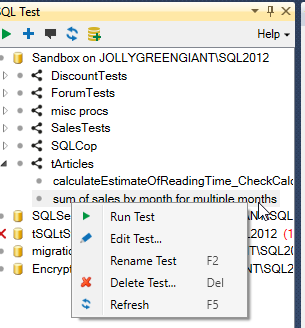
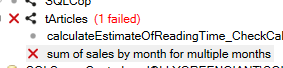
In either case, I’ll get a failure.
When I check the messages, I see the output from tSQLt. In this case, none of my totals seem to match.
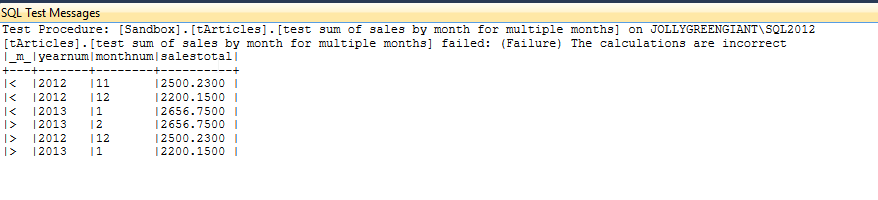
What’s wrong? In my case, I’m adding the integer to the base month, but that means a 1 means 2012 02, not 2012 01. I’m a month off. Let’s adjust the query.
-- Act
INSERT #actual
SELECT

 yearnum = DATEPART( YEAR, DATEADD( MONTH, datenum, '20111201'))
 , MONTHNUM = DATEPART(MONTH, DATEADD( MONTH, DATENUM, '20111201'))
 , SALESTOTAL = SUM(ms.salesamount)
  FROM dbo.MonthlySales AS ms
 GROUP BY
 DATEPART( YEAR, DATEADD( MONTH, datenum, '20111201'))
 , DATEPART(MONTH, DATEADD( MONTH, DATENUM, '20111201'))
ORDER BY
  DATEPART( YEAR, DATEADD( MONTH, datenum, '20111201'))
 , DATEPART(MONTH, DATEADD( MONTH, DATENUM, '20111201'))
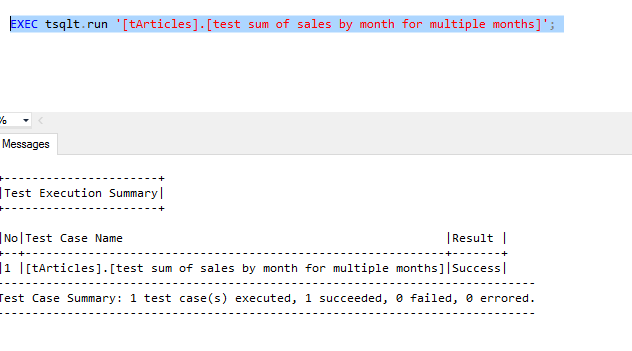
Now when I run my test, it passes.
Why Bother?
This seems trivial, right? What’s the point of this test? After all, I can easily check this with a couple quick queries.
Well, let’s imagine that we decide to move this base date into a table, or that we alter it. We want our queries to continue to work. I can have this test as part of an automated routine that ensures this test will run each time the CI process runs. Or each time a developer executes a tsqlt.runall in this database (shared or populated from a VCS). I prevent refactoring queries.
More importantly, I can take results and alter them first, say if someone decides to change this to a windowing query. I could plug a new query in the test (or better yet, use a proc and put that call in the test) , and if I change code, I can verify it still works.
Write tests. You need them anyway, so why not formalize them? The code around this query, mocking test data, is something I do anyway, so this gets me a few more minutes to verify that the code works. I can tune the query, alter indexes, perf test, and be sure that code is still running cleanly.
http://www.sqwhere lservercentral.com/Forums/Topic1716471-1292-1.aspx#bm1716535