Author: way0utwest

  • The Work of the Ancients

    I was reading a post from someone recently where they noted that they didn’t worry to much about the architecture of the system since it wouldn’t likely last very long. The poster had a comment that many systems are replaced inside of a few years.

    In my experience, that’s not usually the case. In fact, while I don’t expect many applications I’ve worked on to last for 25 years, I suspect many of them will exist for ten years or more, especially if they are receiving regular development resources. With that in mind, I wanted to see how your databases are faring these days. I suspect a database might last longer than a particular application, as it seems most organizations are loathe to ever let data go.

    What’s the age of your oldest, regularly used database?

    I’m looking for an age in years. If the answer is less than one, I’m not sure I’d call that old at all. I am sure many of your  systems are older, and might have changed, but let us know the year when the system went into production.

    I can tell you the SQLServerCentral systems are old in some ways, not so old in others. We’ve grown from one database to three over the years. The oldest database is circa 2003. Some of the data from that one was migrated to other databases around 2007. We’ve got data in the system since 2001, but we’ve certainly changed structures and storage over the years.

    I’d guess that most of you that are working in companies that are older than ten years will have a database that’s at least that old. However let us know this week, and if you have any interesting notes, feel free to share them.

    Steve Jones

    The Voice of the DBA Podcast

    Listen to the MP3 Audio ( 2.4MB) podcast or subscribe to the feed at iTunes and LibSyn.

  • Standing Desk Update

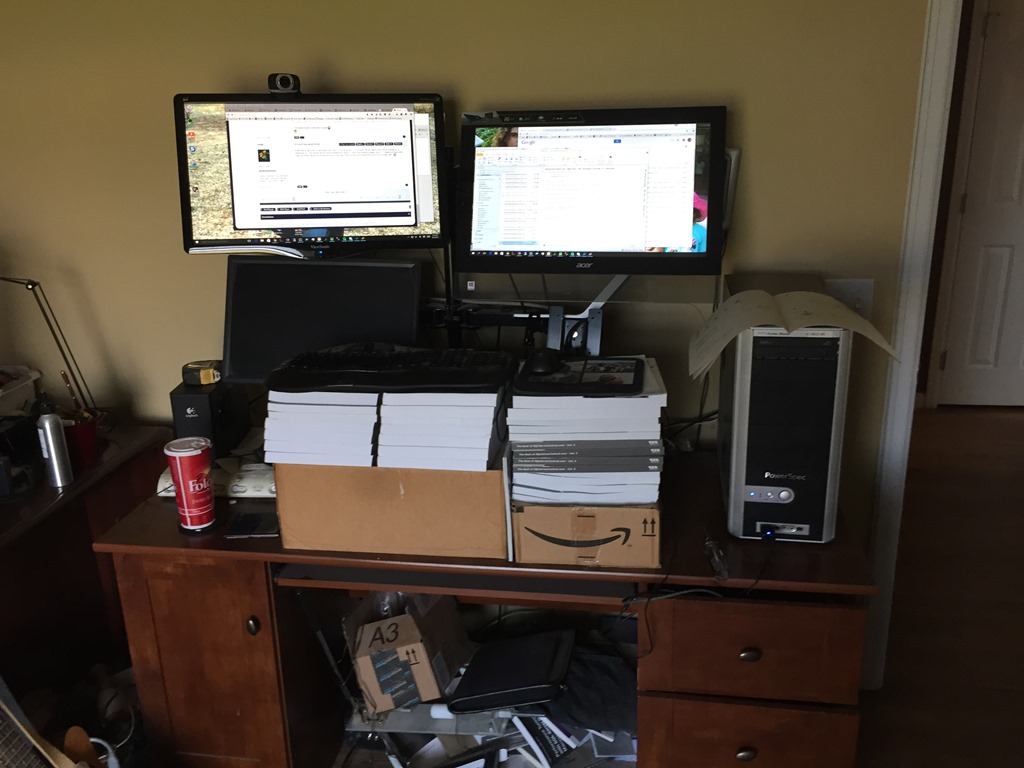
    It’s been a long time since I wrote about my workspace, however I made a change recently. This was the "short term test" situation I set up a couple years ago:

    Photo Aug 24, 9 14 19 AM

    After just using boxes for a few days, I decided I liked things and got monitor stands. However I left my boxes in place for the keyboard and mouse. Mostly because I wanted a few months of playing with heights.

    I actually did experiment, adding and removing books a few times, but mostly I let things languish. I wanted to build my own keyboard stand, but kept finding excuses. I lived with the setup, getting annoyed with no good place to place a mug of coffee or a piece of paper. Precariously balancing my laptop on the books at times.

    A few weeks ago I saw some friends on Facebook mention they were getting standing desks. I’d seen Brent Ozar’s desk, but had no desire to spent that kind of $$. I wasn’t even sure I wanted an adjustable one as when I sit, I usually go to a table or couch with my laptop.

    Someone recommended a simple desk, which I liked, but wasn’t sure I wanted to ask my boss for $700 for a hand crank desk. However I did spend a few minutes shopping when my daughter asked for a desk for her room. She got a normal desk from Ikea as she’s starting high school and wanted a workspace.

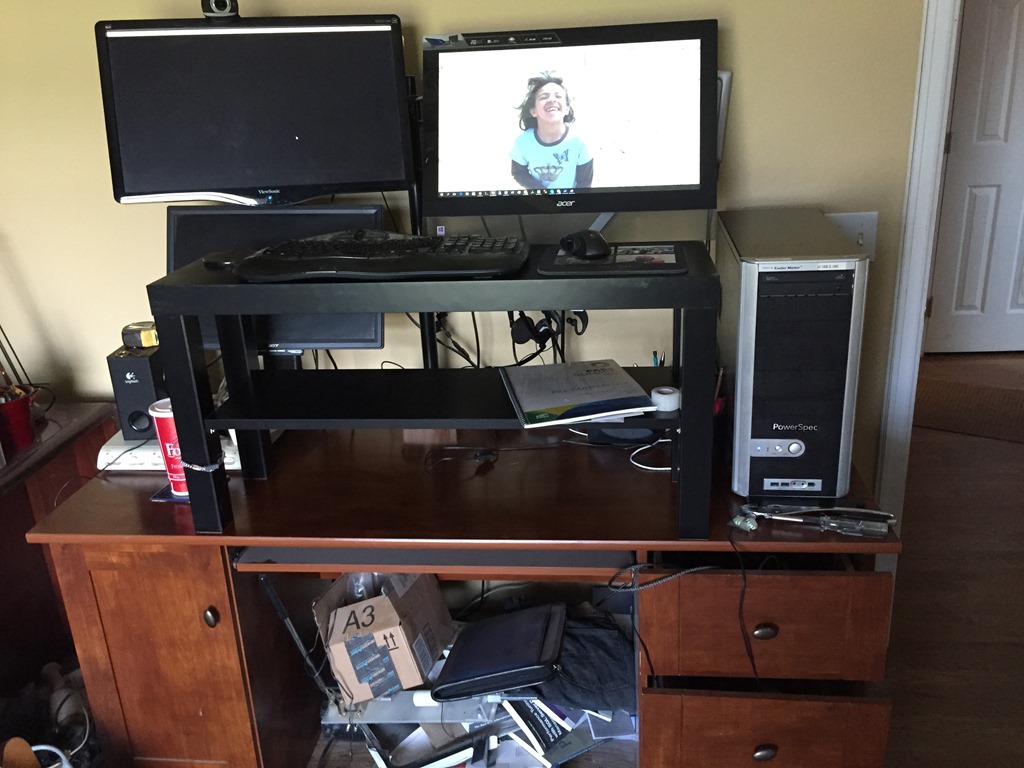
    I saw a $400 electric adjustable one, and was tempted, but decided to go for a $40 upgrade for mine. I got a small table, and added it.

    Photo Aug 24, 10 43 42 AM

    This one isn’t perfect as it’s a touch high. I did add a couple more foam mats and raised myself to a good level, but I’m not sure I love this.

    I do, however, like the extra shelf and space for putting a couple mugs down. I usually have two (coffee and water), so this is handy. I also have space for a few pieces of paper if I need to set them down.

    I’m not sure if this is a good move. For now I want to leave things alone as I’m not in a hurry and want to be sure I would use an up/down desk. I certainly have some tasks that work better sitting down, like webinars, so I am tempted to get a chair and work here at times.

    The one good thing I have going for me is Redgate is good about ergonomics and ensuring a good workspace. I am tempted by the treadmill desks, but I think I’d just as soon just walk away from the desk if I need a break.

  • Have a Think

    I’m used to working at a chaotic pace. I have lots of diverse projects and deliverables that constantly force me to change my focus. I have short term and long term projects. I work with diverse technologies. My workload is a mix of development and administrative tasks. It’s a hectic schedule that gets worse when I travel since SQLServerCentral must continue to run.

    Years ago I was struggling with daily deliverables, the bimonthly SQL Server Standard magazine, and a couple book projects a year. It was maddening, especially when my business partners also wanted me to experiment with ways to grow our business. I wondered, how would I ever find time to dream up new ideas or implement a proof of concept.

    Andy Warren helped me slow down by scheduling “thinking time.” He told me it was important, and he had to make some at his job. Carve out an hour once a week or so and just spend time thinking about a project. Don’t do; just think.

    I have kept that advice in mind over the years, and I try to take some time to just think about the tasks I need to accomplish. I don’t worry about actually getting anything done, but instead try to just think about the best way to move forward. I don’t always succeed, but I continue to try to make time and just think.

    Whether you run a business or just write code for one, I think the art of stopping and thinking is a bit lost. So few of us actually stop to spend some time planning. Instead we’re very quick to start writing code or trying out a configuration change. While I am a proponent of experimenting, I still think it’s worth taking a few minutes and just consider different ways to experiment. Often we can choose better experiments if we have a plan.

    Try it this week. Take ten or fifteen minutes and think about the next task rather than diving right in. You might find it to be a more valuable tool than just experimenting.

    Steve Jones

    The Voice of the DBA Podcast

    Listen to the MP3 Audio ( 2.7MB) podcast or subscribe to the feed at iTunes and LibSyn.

  • SQL Data Generator–Masking Production Data

    This is a series on SQL Data Generator, covering some interesting scenarios I’ve run into. If you’ve never tried it, SQL Data Generator is a part of the SQL Toolbelt. Give it a try today with an evaluation today.

    I learned a new trick with SQL Data Generator that I wasn’t aware of previously. I think this is a good idea for masking some of that production data that you might not want developers to have.

    Let’s start with a production table. In my case, I’ve created a Sandbox_Prod database with a table in it for employees. I’ve added a few records that contain some sensitive information.

    CREATE TABLE Employees
    (
    empid INT IDENTITY(1,1)
    , EmployeeName VARCHAR(250)
    , EmpployeeEmail VARCHAR(250)
    , active TINYINT
    , salary money
    , pwd VARBINARY(max)    
    )
    ;
    GO
    INSERT INTO Employees
    VALUES  ( 'sjones', 'sjones@sqlservercentral.com', 1, 10000, ENCRYPTBYPASSPHRASE('The User Sample', 'MyS%83ongPa44#word')) 
         ,  ( 'awarren', 'awarren@sqlservercentral.com', 1, 20000, ENCRYPTBYPASSPHRASE('The User Sample', 'Ano$2therS%83ongPa44#word') )
         ,  ( 'rsmith', 'rsmith@sqlservercentral.com', 1, 5000, ENCRYPTBYPASSPHRASE('The User Sample', 'Kedj93m@@83ongPa44#word'));
    
    GO


    I’ve got a second database, called Sandbox, that simulates my development environment. I’ve got the same table, but without any data in it.

    What I want to do is move some of the production data to my development area, but not all of it. Some of the production data needs to be masked.

    SQL Data Generator Sources

    I can use SQL Data Generator from Redgate to do this, by using a data source that actually exists. In this case, I’ll create a new project and point it at my Sandbox database. I’ve deselected all of the tables except my Employees table.

    2015-09-22 16_31_57-Cortana

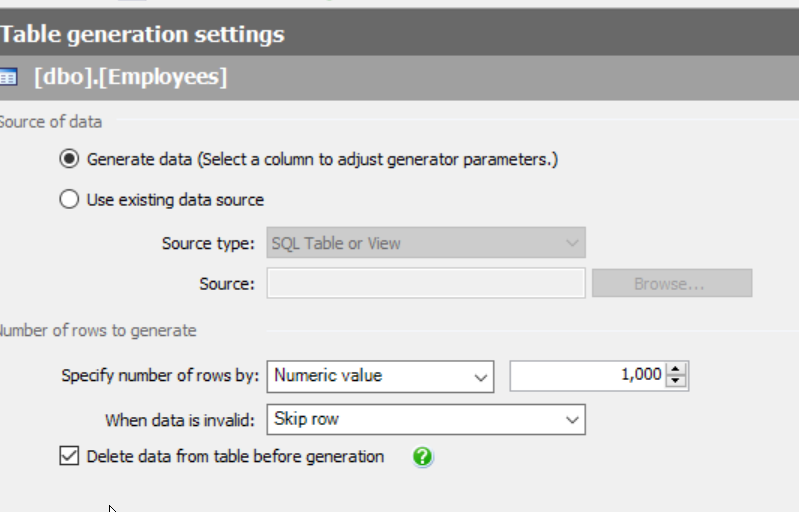
    When I pick my Employees table, I see the familiar generation screen on the right. Most of you are like me and notice the number of rows and the option to delete data.

    2015-09-22 16_32_54-SQL Data Generator - New Project _

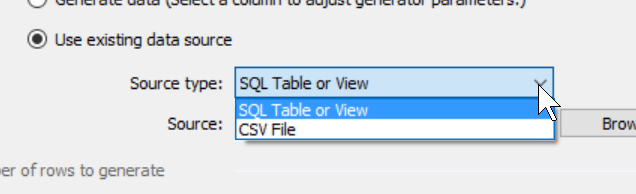
    However there’s another option. I can select the “Use existing data source” radio button instead. When I do this, I have a few choices for data. I can use an existing table or a CSV file. Both of those can be good choices, especially if I have sets of data I want to load into the table. Either one can help me to build known, specific data sets for development (or testing).

    2015-09-22 16_35_19-SQL Data Generator - New Project _

    In my case I will choose an existing table. When I do this, I click the “Browse” button and I get a connection dialog for SQL Server. I pick my instance and the production database.

    2015-09-22 16_35_26-SQL Data Generator - New Project _

    I click “Next” and then get the chance to select the table to use. In this case, I’ll pick the Employees table.

    2015-09-22 16_39_03-Select SQL Table or View

    When I return to the main SDG screen, I see the table listed as the source, but my preview shows the actual production data. This is because I’ve mapped the production table as a source, and it will be used as it currently exists.

    2015-09-22 16_40_12-New notification

    That’s not what I want. I want to mask the email address and the salary. However, now I can change things like I might do for any random data generation.

    Let’s first click in the EmployeeEmail column. When I do that, I see the following, the column with its source set as the existing column in the production table.

    2015-09-22 16_59_52-SQL Data Generator - New Project _

    However the drop down gives me lots of choices, including an Internet email generator.

    2015-09-22 17_00_07-

    If I select, then my preview changes. Now the image below shows production data for all columns other than the email.

    2015-09-22 17_01_23-New notification

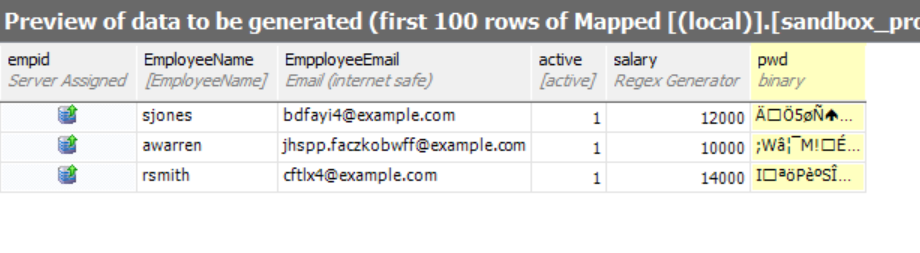
    I can repeat this for the salary (and password to be safe). When I do that, I’ll see random data for those columns and production data for others.

    2015-09-22 17_03_26-New notification

    I can repeat this for all tables in my project, mapping through data that isn’t sensitive, and masking data that is. It’s a tedious process, but it’s a one time process for specific data. Once this is done, every restore can have the project run and the data masked. If production DBAs do this refresh, then developers never see sensitive information