I have been a "watch" guy for most of my life. Ever since I was a teenager, I’ve almost always worn a watch, usually a Timex, that lets me track time. At one point I really had the goal of being successful enough to buy a Rolex, but at some point that fell away. I decided I liked something that was lighter and more durable.
A few years ago I lost a watch, taking it off for karate and forgetting about it in my bag later. I found it months later, but in the intervening time, I tried to make do with my cell phone. I found it annoying to pull out my phone to check the time. I also found myself spending time on the phone more, when I could do something else.
I was intrigued with the idea of smart watches, and I’ve looked at a few. I backed a Kickstarter project, thinking I’d get the watch and use that with my phone. The project got delayed, I got more annoyed with my phone, and eventually I got a device that didn’t work. It needed a charge every night, and the quality was slow. The app was also flaky, crashing often.
At this point I was disappointed and still wanted a watch. It was close to Christmas, so I bought myself a Pebble watch. It was on sale, only about $60, just slightly more than the $40 I’ve paid for Ironman style digital watches.
I did look at the various Android Wear watches, and the Apple watch, but they seemed to be flaky, as well as very expensive. A watch is a tool for me, not something I wanted to spend a lot of money on. Plus, I wasn’t sure how well the integration would work and how much I’d use it, so I wanted a cheaper experiment.
Getting Oriented
I was somewhat fascinated with the Pebble. It was about as simple a device as you’d want, and it just worked. I can’t speak for the Android experience, but I suspect it was as simple as the iPhone one. I essentially plugged it in, and when it had a little charge, I could connect it to my phone through Bluetooth using the Pebble app.
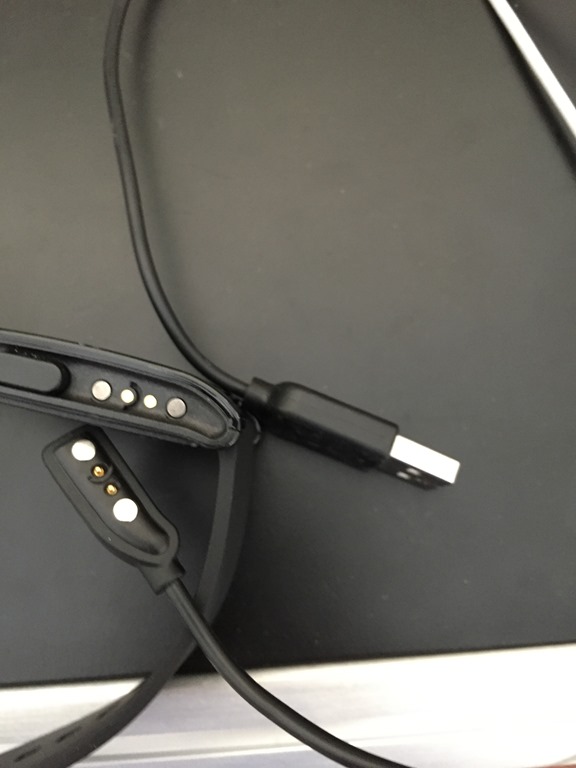
The small box the Pebble came in just had the watch and a cable. You can see the multiple contact cord (with USB) and the matching connectors on the watch. This is a magnetic connection, like some laptops use. It easily connects and disconnects.
Charging seems to be fast, as I’ll get a low battery warning and can connect it to my desktop, having it charged in a couple hours.

The watch itself has a nice display, that’s easy to read. There are lots of watch faces you can choose. I tend to use something simple like this:

That gives me dates and times, which I like. I also have this one, which I’ve used when I want to get away from time and work. It’s just a simple display to remind me not to worry about time. This is one I use on weekends regularly.

You can download faces from the Pebble app store, and they mostly appear to be small and fast. I’ve loaded 4 or 5 on my watch that I can choose from. There are some really interesting ones that you can get.

There’s an app store, and while you can download a bunch to your phone, you can only have 8 on your device. It’s easy to remove and add them, with a few taps on the phone and a short delay. I’m surprised how quickly they load, given the slow, bloated software I find elsewhere.

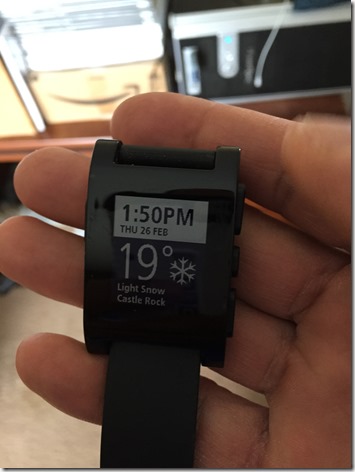
Some of the apps do time, some do other things. I’ve got this Weather Channel app, that gives me time and weather wherever I am, which is nice when traveling.
It’s a basic watch, so I needed to find a stopwatch app to use. That surprised me, but it makes sense.
I also worried about the display, but it’s easy to read during the day, and a shake of my wrist will bring up a brief backlight. That’s really handy at night when I might want to check to see if I’ve overslept in a hotel room.
45 Days Later
I initially played around with lots of watch faces. I found some neat ones, but I quickly discovered most were a bit hard to read when I was in a hurry, or driving, which is when I usually need the time. I decided that a basic display suited me better.
I’ve messed with apps, but for the most part, I want this to be a watch and a notification device. Controlling music or getting ESPN scores isn’t want I need. Those things might be handy, but as I appreciate time away from my device more and more, I want it to do less.
Battery life is great. I bought a second charging cord for traveling, and promptly forgot it on my trip to the UK in February. I had charged the device Monday morning before leaving for the airport and had the watch work until Friday morning. I’d realized I didn’t have a cord and turned off notifications sometime Wednesday, but that was still impressive. I’ve since put my cord in my laptop bag.
There isn’t a lot of notification that the battery is going down. I’ll get a 20% battery note, or a low battery, and I don’t have a lot of time (a few hours) before it just turns off. I dislike that. I need to find a battery app for the device (I’ll do that shortly).
The notifications just work. The ones that normally appear on the lock screen (texts, Word With Friends, etc.) appear on my phone. That’s super handy, especially while driving. I can see a text and decide what to do. It’s even more handy with 2FA notes from Google or WordPress. I don’t have to go find my phone. I can read things on my watch. Apps don’t have to be "pebble aware" as my Tempo calendar alerts just appear on the watch. No configuration.

It’s water proof to the extent I’ve worn it in the shower. I wore it in the pool once, for a lap, but didn’t like it and was worried, so I pulled it off. The band is a little annoying for me, so I tend to take it off when it’s going to get wet. I may look for another band at some point.
Overall, I’m very happy with the Pebble and there isn’t really anything else I want from a watch. I don’t want color if I give up any battery. I think the bluetooth cost is minimal, and haven’t noticed issues with my phone. I think it’s a great investment, and if you want a basic smart watch that gives you time and notifications, this is it.