Author: way0utwest

  • Bucket List Data

    I made a bucket list over a decade ago after hearing an interview with Ted Leonsis, former President of AOL. He had an interesting list, and while mine was more pedestrian, I have managed to knock off quite a few items, though there are more I’d like to get to. Actually, I need to redo my list and re-think my life as it’s changed since I first wrote things down.

    Over the years, I’ve also tracked other sorts of data about my life, things that just intrigued me. I had my running streak (1500+ days), 14ers climbed (4), states visited (38), books read each year (75-100), and more. I’m not quite sure why numbers have a fascination for me, but they do and perhaps that’s why I like working with technology and data.

    I’m sure that many of you share a similar passion for numbers, so I wanted to ask you this week:

    What interesting data points do you track, or have you tracked, about your life?

    It could be something with your family, hobbies, sports, weather, or something else. If there’s something you track and would like to share, let us know. If you have some interesting way of tracking data, or even an application you’ve worked on, I’m sure there are others that would find the data interesting.

    Steve Jones

    The Voice of the DBA Podcast

    Listen to the MP3 Audio ( 1.9MB) podcast or subscribe to the feed at iTunes and LibSyn.
  • It’s Not Just Poor Coding

    We hear regularly about SQL injection continuing to be a problem (it is) and malware causing data loss for many companies. We’ve got misconfigured firewalls and backup tapes being lost. However even if we could solve all those issues, we’d still have security issues.

    A new study shows that many workers share a tremendous number of files with coworkers, and potentially friends on a regular basis through the various cloud services. I don’t worry so much about cloud service providers being hacked themselves, or their employees selling information. It could happen, and probably does, but it’s also likely just isolated incidents that have limited impact. However I’m more worried about the poor security practices of the employees.

    Many people tend to use the same passwords on different sites (a bad practice). They also often open attachments from “friends”, unaware of how dangerous it can be to pass along and share documents that can embed malware. Malicious coders are becoming smarter, learning to make their actions more subtle, often only infecting a device to use it to send emails or files to other users who are the real target of the malware. With all of these issues, it’s much more likely that a user will end up creating their own hack for malicious servers than targeted attacks will work. It’s also highly possible that many users will share documents with friends, unaware that they might be exposing corporate data to the general public with confusing settings in some of these services.

    Ultimately I’m becoming more cautious about sharing information with others. I won’t open many files sent to me by people I don’t know well, and never look at any “humorous” attachments. I won’t accept a USB key from you and plug it into my laptop. It’s sad because we’ve built some amazing services to allow us to communicate easier and faster than ever before, however we’ve also not built these applications with an eye towards security first, and convenience second.

    Steve Jones

    The Voice of the DBA Podcast

    Listen to the MP3 Audio ( 2.6MB) podcast or subscribe to the feed at iTunes and LibSyn. 
  • T-SQL Tricks – Templates in SSMS

    There are lots of little tricks that you can use to become more proficient, and efficient, at writing T-SQL. Here’s a short one that might be more for administrators, but I think for developers it’s very handy as well.

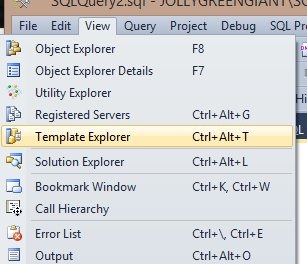
    SQL Server tools have included templates for years. I first started using them in Query Analyzer with SQL Server 2000. The tools have changed, but we still have templates in Management Studio (SSMS). We can access the templates by exposing the Template Browser from the View menu (as shown below).

    templates1

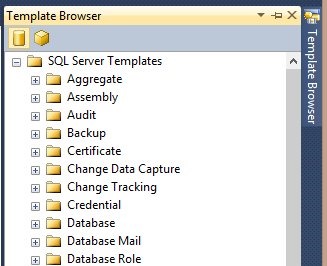
    We can also use the CTRL+ALT+T shortcut. Either of these will give us a tab on the right side of our SSMS main window, opposite the Object Explorer, as shown below.

    templates2

    Like all the windows in SSMS, I can detach this, move it, auto hide, etc.

    Each of these folders contains a series of default scripts that are installed with the tools. For example, I can look at the Backup folder and see three scripts in there. I can grab one of them with a left click and "drag" it to the query window and the script will appear in the query window as I’ve shown here.

    templates3

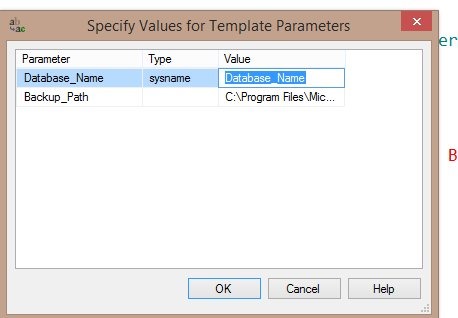
    A CTRL+Shift+M will give me the parameters in the script, which I can replace with my own values (or accept the defaults).

    templates4

    Many of these are generic, but they are useful. I’d encourage you to take a look at them and use them when you can.

    You can customize these, but that’s for another post.

  • Double Up During Trips

    Would you do this? Combine two calls, like an INSERT and then a SELECT, into the same batch sent from a ADO.NET client? It’s a proposal from Visual Studio Magazine to combine code into one batch instead instead of making two query calls (and two round trips).

    It’s an interesting idea, and for those programmers that are older, we probably unconsciously think about this all the time. We still remember when bandwidth was measured in kbps and processing power in MHz, and we often consider those resources to be valuable. We try not to waste them, precisely because they impact performance. Perhaps that’s why we recoil at some of the ORM frameworks and other programming structures that make development easier but are tremendously chatty in how they communicate with our servers.

    I know that programmer salaries are high, and that labor is one of the more expensive parts of building software. However rather than building inefficient applications that will create customer complaints, shouldn’t we be educating our developers more to ensure they write efficient applications? They can still use a framework or template of some sort, but they should do so in an efficient way. Along with training, using code reviews and keeping everyone on a central VCS where all code is visible can help spread knowledge throughout your staff.

    I realize that many managers are loathe to invest in developers’ knowledge when those developers might leave your company for another position, but imagine that a manager elsewhere is investing in his developer. It’s entirely possible those other developers then come to work for you. Ultimately we all benefit if we work to spread and build better software development practices throughout the industry.

    Steve Jones

    The Voice of the DBA Podcast

    Listen to the MP3 Audio ( 2.1MB) podcast or subscribe to the feed at iTunes and LibSyn.