Author: way0utwest

  • Disable the Charms Bar – Making Windows 8 Better

    One of the things that’s bothered me is the way the charms bar frequent popping out as my mouse moves to the upper or lower right. I do this as I’m trying to reach the “x” to close a window or adjust time zones. The bar pops out and it’s annoying.

    I initially searched for a way to stop this, but didn’t find one. However I must not have searched correctly as I found an article recently that shows how to do this.

    It’s a registry hack, so hit the Start menu and type “regedt32” and hit enter. Nothing returns in search, but it runs. Follow the instructions, and the charms bar won’t appear as you move your mouse around.

  • Hack Resistant

    Security should be on the forefront of every data professionals’ mind. It doesn’t matter if you are developer, administrator, or other position, you ought to be considering the security implications of changes you make to the database. More and more data is being stored in databases, and often it’s moved between databases as well. Whether that’s to data warehouses, or development environments, we ought to be considering security to be more a part of our daily work and process rather than something limited to specific systems.
    Vendors are trying to make systems more secure. I see the encryption capabilities grow with each version of SQL Server, and new features have been added, like TDE, to help technology professionals secure their data. Other vendors have introduced other safety mechanisms, and one caught my eye by claiming to be “hack resistant“. It’s the ZenithVault database says it is practically impossible for hackers to gain access to storage systems and steal confidential information. It supposedly does this by “data splitting”, moving parts of data onto separate servers.
    It sounds like a good solution, in the same way that TDE is a good solution. If someone is able to access your physical files, they won’t be able to read the data in them. That’s a good precaution, and it works well in TDE’s case (I can’t speak for ZenithVault), but it’s also not hack resistant.
    The biggest hacking problem that I see in the world today is with SQL Injection. Since legitimate accounts can access your database, often through web-based front ends, and SQL Injection uses these same accounts to access data, none of the encryption and security capabilities you set up protect you. None of these items come into play when you have code that allows hackers to inject their own commands through your existing application, web based or not.
    Secure coding is important, and it’s something that we should all require and practice as we build software. Your application might not access secure data today, but that might change in the future.
    Steve Jones

    The Voice of the DBA Podcasts

    We publish three versions of the podcast each day for you to enjoy.

  • SQL Server Needs Tempdb

    I saw a post recently where someone noted they had moved tempdb like this:

    USE master; GO ALTER DATABASE tempdb MODIFY FILE (NAME = tempdev, FILENAME = 'c:\tempdb.mdf'); GO ALTER DATABASE tempdb MODIFY FILE (NAME = templog, FILENAME = 'c:\templog.ldf')

    This gives you the message the tempdb has been moved, and it will take effect on restart. If you restart, however, you’ll often find the service doesn’t restart and you get a “network error” when you try to connect. This is because the service is down.

    If you check the error log, you might see this:

    2013-07-05 13:20:48.65 spid9s      Clearing tempdb database.

    2013-07-05 13:20:48.65 spid9s      Error: 5123, Severity: 16, State: 1.

    2013-07-05 13:20:48.65 spid9s      CREATE FILE encountered operating system error 5(Access is denied.) while attempting to open or create the physical file ‘c:\tempdb.mdf’.

    2013-07-05 13:20:48.65 spid9s      Error: 17204, Severity: 16, State: 1.

    2013-07-05 13:20:48.65 spid9s      FCB::Open failed: Could not open file c:\tempdb.mdf for file number 1.  OS error: 2(The system cannot find the file specified.).

    2013-07-05 13:20:48.65 spid9s      Error: 5120, Severity: 16, State: 101.

    2013-07-05 13:20:48.65 spid9s      Unable to open the physical file "c:\tempdb.mdf". Operating system error 2: "2(The system cannot find the file specified.)".

    2013-07-05 13:20:48.65 spid9s      Error: 1802, Severity: 16, State: 4.

    2013-07-05 13:20:48.65 spid9s      CREATE DATABASE failed. Some file names listed could not be created. Check related errors.

    You might also see an operating system error 5 (access is denied) if the files exist. In all likelihood, the problem is security for your service account. The SQL Server service account shouldn’t have rights to all folders and files on the system. If it does, you’re doing something wrong.

    I had thought (incorrectly) that SQL might start, but be in a read-only state without tempdb. However Gail Shaw pointed out this was incorrect, and when I tested this, she was right. SQL Server won’t start.

    What can you do?

    A few options here.

    • The brute force approach
    • The more elegant approach

    The more elegant approach is specified in Books Online, in Move System Databases. In the failure recovery procedure, you start SQL Server with Trace Flag 3608, issue the alter commands, and then restart the instance without the trace flag.

    The brute force approach, which I have tested, is to move the tempdb files to this location (they didn’t exist in my situation). You’ll need admin permissions to do this. You can then change the service account to one with permissions to see the files (like an admin), and restart the instance. From there, connect, and issue the ALTER DATABASE commands as shown above, with the correct path.

    If you need help configuring permissions, use this article.

  • The Desktop

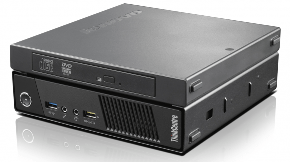
    eweweew-580x323Lots of IT professionals I know have moved to laptops for their daily work. This allows them to keep their work handy, no matter where they are. If they need to work from home, or on a trip, they have their tools with them. It’s a good move for many people, but I wonder if it’s what the majority of professionals want. As a side note, if you have a work laptop, with work data, you ought to be using whole disk encryption.

    When I worked as a production DBA, it was handy to have a laptop to connect to work from home and check on things. However I felt this was a double edged sword, with the responsibility of carrying the laptop with me, and the expectations of management that I would be “more available” than if I didn’t have a portable work machine.

    Recently I thought about this when I saw a release for a new desktop PC that is “no wider than a golf ball“, the new ThinkCentre M93 from  Lenovo. It’s small, and powerful, with enough power for many developers and administrators that might work in the technology area. It’s also one of those machines that I might consider portable.

    To me this might be the best of both worlds. Something that’s a desktop, removing me from the responsibility and obligation to take it home with me every night. However small enough that if I did need to work at home, to monitor a process, or get something done away from the office, I could pack it up and use it at home.

    I wonder how many of you have laptops from work, or desktops, and if you prefer one or the other. I used to appreciate an employer picking up the expense of a laptop, but these days I’d prefer to buy my own and let the employer keep their equipment in the office, and out of the rest of my life.

    Steve Jones

    The Voice of the DBA Podcasts

    We publish three versions of the podcast each day for you to enjoy.