Author: way0utwest

  • Thirty Hours at Home

    This is a busy travel week for me, and one of those times that stresses out everyone in the household. I attended SQL Saturday #197 – Omaha over the weekend, arriving home Sunday morning from my trip. I had a good time at the event, my first time to Omaha, and would like to go back again sometime.

    However it’s a quick turnaround for me. Fortunately I have packing down to a science since I’m leaving today at 2:00 for Las Vegas and the first SQL Intersection conference. I have two talks to deliver on Tuesday and a few sessions I’d like to see Wednesday before I head home again.

    Back in time to cook a couple meals (and extra leftovers) for the family and spend a day with everyone before heading back out of town. These are tough times, and it’s a lot of support from the family that allows me to do this.

    I’ll have the same type of turnaround at the end of the month between SQL Saturday #175 – Fargo and SQL Bits.

    I may have to limit some trips later in the year after this month, so please don’t be offended if I decline any offers to speak.

  • The Memory Cube

    How would you like memory in your SQL Server that’s 15 times as fast as your current DDR3 DRAM? I know I would, and since memory is often one of the things that can dramatically speed up, or hinder, SQL Server performance, this article about new memory cubes is good news. Over 100 companies have signed on to the specifications for three dimensional DRAM, which stacks memory dies on top of each other.
    How much better is the performance? Try 160GBps for this cube against the 11GBps that we typically see from DDR3. Even DDR4 is only 18-20GBps of aggregate bandwidth. What’s more, this new technology should require less power. That’s a good sign as more and more data centers are finding that power and cooling are significant issues and can end up being a significant percentage of the total cost of operating computer systems.
    This technology isn’t quite ready for production, as the prototypes only hold 2GB and 4GB of memory right now. However I would expect that to grow quickly as memory companies look to get production cubes out in 2013. The deployment will likely start in network devices and other environments where extremely high speed memory is needed, but I could see that server computers, especially those slated to handle large numbers of virtual machines, will move to this technology once capacities get over 32GB. At that point, there could be lots of OLTP systems that would benefit from faster access to memory, especially those systems backing high volume, (relatively) low storage systems.
    The bottleneck for many systems will continue to be the disk drives, but if you can process more data in memory, at a much faster rate, I’m sure there are lots of DBAs that would love to use this technology to reduce the number of complaints from their clients.
    Steve Jones
  • Development, Operations, or Accounting

    These kinds of problems should not happen in the cloud.
    These kinds of problems should not happen in the cloud.

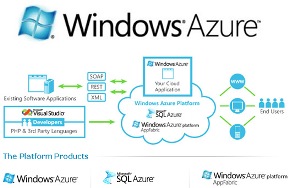
    I think the idea of a platform of services, such as Windows Azure provides, is a great idea. I’d love to be able to stop worrying about hardware in many cases, and even skip some of the infrastructure of networking and managing specific machines. Just having services that I could deploy to that run my database and code, would smooth out some of the hassles of Information Technology in many companies.

    However the services have to work and work well.

    I’ve had concerns with AWS and their outages, though Netflix has run a thriving business on that platform and learned to work within that service. I think the Azure platform is similar, and they’ve had a few outages, I do have concerns over where their outages have occurred. There was an expired certificate, then supposedly maintenance, later revealed to be heat issues.

    These issues bother me. Some are unavoidable, but some aren’t. I’m particularly concerned about the expiration of security certificates. This happened again recently to Azure, and it shouldn’t. I don’t know if this was a problem with the development groups that build applications using certificates, the operations groups that administer systems, or the accounting groups that might need to purchase new certificates, but part of what the “cloud” should bring is expertise and better qualities of service from the people doing the work.

    I can hire semi-competent people that don’t pay attention to details and suffer my own outages. At least then I know I’m to blame and I can replace them. However moving to a service like Azure or AWS means giving up a lot of control. If I can’t count on better services than I get in-house, I’m not sure there are many advantages to moving.

    Steve Jones


    The Voice of the DBA Podcasts

    We publish three versions of the podcast each day for you to enjoy.

  • The Windows on a Mac Experience

    I’ve had a Macbook Air for almost two years now, getting one in the fall of 2011. It was the first Mac I’ve had as a professional in the IT world, and I thought it was a great machine. I had read reviews from Brent Ozar, Joe Webb, and Aaron Bertrand. I had seen these gentlemen speaking and working on their machines at various events and finally decided I’d had enough plastic and cheap construction from vendors.

    Over the last decade, I’ve had as my laptop:

    • 2 Dell Dimensions
    • Toshiba Qosmio
    • Lenovo W510
    • HP Netbook

    Of these, the netbook is still in use by my daughter. One of the Dells, from 2003 actually, still works though the wireless radio is almost dead. The others have all died with various motherboard or power issues. Actually the other DELL may work. The battery died and I couldn’t find an adapter, so I moved on from that machine.

    When I moved to the Air, and OSX Lion, it felt like a complete switch at first. The OS works differently, and I was slightly concerned. I knew I could run Windows easily with VMWare Fusion, and that was my first purchase. After powering up the machine and getting connected to my network (a snap in OSX, despite me not knowing much about it), I downloaded Fusion.

    A Few Differences

    Installing things on a Mac is somewhat strange. It often involves a window that asks you to copy a folder into your Applications folder. That’s about it, and it starts working. Once I had things running, I could easily pin them to my dock for easy access, however the thumb-and-three-finger pinch was how I primarily found most applications, preferring to keep my dock clean.

    A few things took getting used to and re-configuring for me. The lack of a delete key might have been the most frustrating thing for me. I learned the Function+backspace works, but that was never a natural keystroke for me. Alt+tab, the cut/copy/paste commands work the same, though with the Command key instead of control. Right clicking was accomplished by configuring the two finger click to pop up the menu.

    However for the most part, things just worked. I easily worked with the machine, and even switched back and forth between Win 7 (under Fusion) and OSX without issues. My daily work of going through email, writing, browsing, all worked well. The main apps I used (Chrome, Evernote, SQL Server, twhirl) ran fine. One of the hardest things to get used to was the lack of a need to click an “OK” button once I’d made a change.

    I tried the full screen versions of some apps (Chrome, Safari, Pages, Evernote), but I found it to be annoying for me. I preferred a few windows that I could switch between easily. I never used the Dashboard thing, and for the most part this was a tool that did it’s job.

    The downsides of some software was apparent with OSX. No Live Writer, which I’d depended on extensively. I never did find an OSX replacement I liked. I also found Keynote to be a pain at times with some of my slides, especially shapes like connectors. They would be moved in Keynote, which was a pain to reformat. A few other minor software utilities I couldn’t run on OSX but found replacements for were slightly annoying, but not a big deal.

    The Things I Loved

    I have to say that I loved all the gestures and natural scrolling on the Mac. Using two fingers to move up and down through pages of text felt incredibly natural. When I borrowed my wife’s Wintel laptop and that didn’t work, it was annoying. I’ve had an iPhone for about 3 or 4 years, and that might have helped, but I instantly loved scrolling, as well as pinch and zoom. I never want a trackpad with buttons again.

    The startup routine, especially from sleep, was amazing. I could actually grab the machine from my bag in an airport, sit down, and start working inside of 10 seconds. It felt like no sooner had I opened the lid than I could type in my password. I haven’t had a Win 8 laptop, so we’ll see how that goes, but compared to all my other machines, this was one of the best things.

    Backup – Using Time Machine is just slick, smooth, and easy. Way smoother than anything I’ve seen under Windows. I could get back files much easier than I could with any Win 7 or earlier OS.

    The size – thin and light. I could grab the machine with my thumb and index finger by one corner and carry it. Haven’t found another laptop I could do that with.

    The last thing I really enjoyed was the ability of the machine to remember things. It remembers network connections, it pops up login boxes, it remembers settings with projectors. I’ve had some Wintels that did this, but none as well or smoothly as OSX.

    Conclusion

    Overall it was a fantastic laptop for me. I presented on SQL Server topics at two or three dozen events, giving probably a 100 talks with this machine and it worked every time. The one crash I had during a presentation was my VM locking up. I flipped back to Keynote and finished my talk while the machine restarted.

    This was the best built, best performing (ergonomically) laptop I’ve ever had. If I could get to 16GB with this thing, I’d still be using it.

    I guess there’s one more really annoying thing and that’s the lack of the easy ability to delete files. Right clicking and sending to the trash, or dragging there never felt right. I wish I’d have been able to highlight a few files and press a “delete” key.