Merry Christmas and Happy Holidays to everyone in the SQLServerCentral community.
I hope very, very few of you are working on this holiday Tuesday. I’m off, spending the holidays in the mountains with my family, including my oldest back from Seattle for a week. It’s a tradition for us to spend either Christmas or New Years skiing, and this year we’ve decided to spend a week in Steamboat Springs.
I’ve left you with some holiday bloopers to enjoy and I’ll be back with some end of year thoughts later this week.
This was a very interesting book years ago to read.
This editorial was originally published on Mar 3, 2008. It is being re-run as Steve is traveling.
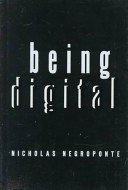
Years ago I read Being Digital by Nicholas Negroponte and while I enjoyed the book, there was one very interesting story in there. Dr. Negroponte was crossing the border from the US to Canada and customs stopped him, checked his computer, and asked what the value was. He responded with “$2,000,000”, which is a lot of money. The customs person seemed taken aback and had expected some sort of value closer to $2000-5000. He responded that the bits inside, meaning his writings and other data, were way more valuable than the hardware.
That’s how I feel about my laptop and why I love my 1GB and 2GB flash drives. I rarely travel, but I back up my documents, which are mostly text documents, before I go and keep the flash drive separate from my laptop in case of problems. I can always buy a new laptop if I need it, but I can’t easily replace the data.
Some of you might have seen this article where a woman is suing Best Buy for US$54M because they lied about her stolen laptop and deceived her. Now I think this is an outrageous amount and it’s like the woman that received millions from McDonalds for being burned by their coffee. both ladies deserve compensation, but it should be in line with what happened. You can make the point without suing for an outrageous amount. Even $1M would make the point, and that would be too high. Sue them for $100,001 if you want attention. That might be more in line with the cover up that occurred.
This really brings to mind two different things to me. First, keep good backups of your important data. I try to organize my stuff into a few areas and then get that to fit onto media that I can physically separate from my first machine. My wife used to go so far as to keep a 2nd laptop hard drive in her suitcase that contained copies of everything. That way if her laptop was stolen or damaged, she should plug the second drive in another laptop and be off and running.
It’s easy to think of the physical device as being valuable, but I think for most of us the digital information inside is way more valuable than the hardware. And I think this is a trend that will continue over time, with the bits value dwarfing the electronics.
And if you haven’t backed up your data recently, you might want to stop and make a quick copy of the important stuff.
Steve Jones
The Voice of the DBA Podcasts
The podcast feeds are now available at sqlservercentral.podshow.com to get better bandwidth and maybe a little more exposure :). Comments are definitely appreciated and wanted, and you can get feeds from there.
Today’s podcast features music by Everyday Jones. No relation, but I stumbled on to them and really like the music. Support this great duo at www.everydayjones.com.
I really appreciate and value feedback on the podcasts. Let us know what you like, don’t like, or even send in ideas for the show. If you’d like to comment, post something here. The boss will be sure to read it.
I’m off again, taking a week in Steamboat Springs with my family for the Christmas holiday. We’re spending a week up there, including my oldest son who came back from Seattle to see us.
It seems like I’ve been gone a lot, with guest editorials and re-publishing old pieces in 2012. That’s good as it means I’m taking most of my vacation. At least I think so. When I look back I see:
a few days with my wife in the spring
a couple days to work around the house on projects
four days for camping
seven days of skiing around the holidays
four ski days in the spring
two other ski days this fall
That’s not quite all my vacation, but it’s close.
I wanted to get through all my vacation this year, and really make sure I took time away from work. It’s easy to get sucked into work, especially when you work at home and work on a flexible schedule. However I truly believe that getting away from work and spending time enjoying the rest of your life.
If you haven’t taken your vacation this year, make that a goal for next year.
Hopefully this isn’t the load you see on your servers, but do you know what level of tps would cause this?
I was taking to someone recently and this person had a large transaction load on their SQL Server. At least, I thought it was a large load. This person said they experienced 1000tps most of the time and this made maintenance, DR planning, and more a challenge. That’s a lot lower than the TPCe performance system that has 4,614tps, but it’s nothing to sneer at. That feels like a significant load to me.
However it’s been awhile since I worked on a variety of systems as a consultant. I often see the forums at SQLServerCentral showing only tens of transactions/sec, based on the performance data that you can see at monitor.red-gate.com. This is the actual data from our servers and it seems like a low number to me.
This week I was trying to decide what 1000tps really means. Is this a busy system, maybe even an edge case if this is the average for your system over a week or month? Is it a representative system for many companies? I wanted to see what others report from their systems this week:
What are your average and peak tps for most of the systems you manage?
I’d like to hear about 1 or 2 systems that you consider to representative of the loads in your environment. Taken across your business time, whether that’s 9-5, 24×7 or something else, can you get the average and peak values for your transactions/sec and disclose them? You don’t need to let us know about your application or company, though industry would be nice.
I’m curious how busy systems are for some of you and whether this presents you with challenges for migration, upgrades, virtualization, DR, maintenance or more.
Steve Jones
The Voice of the DBA Podcasts
We publish three versions of the podcast each day for you to enjoy.