Author: way0utwest

  • More CPU Means More Data


    sailors
    Better modeling requires more CPU and a lot more data.

    Moore’s law has held true for computer resources for a long time. I don’t know how long it will continue to work in the future, but I am interested to see if it can continue to work for the rest of my career. I don’t know that it will, with our newer CPU designs approaching the limits of physics, but I’m sure that research is under way to find ways to vastly improve our processing capabilities. Look how far we’ve come from the Apollo guidance computer, which landed 3 men on the moon, and had a fraction of the power of almost all of today’s cell phones.

    I ran across an article that talked about modeling sailing conditions to help sailors design faster and more stable boats. Just like many other types of modeling, this is a way to use computer simulations of various real world events to test designs of new products. This can save lots of time and money as fewer prototypes can be built and many more design ideas can be tested before a final design is chosen. More intensive modeling means more processing power is needed, but it also means more data is needed.

    We see this more and more in business. We want to get answers faster, often by running more complex business simulations. To get our answers faster we need more processing power. However as we upgrade our machines and enhance our CPUs, we also add more and more data to our databases. The additional data, while beneficial to making better decisions, also slows down our queries. The additional data is also a challenge to load, manage, and store, which is something we need to ensure we are learning to do better.

    Processing costs are going lower and lower. These days with the large clusters in the cloud that anyone can rent for a few thousand dollars, extremely complex simulations can be run. The code to run them, however, is still something that we need to produce. Just as the scientists  have developed complex models that accurately test new designs, each of us must learn how we can write more efficient queries that analyze our business data and take advantage of the constant improvement we see in processing capabilities. Otherwise the advances in CPU power might be negated by rapid data growth.

    Steve Jones


    The Voice of the DBA Podcasts

    We publish three versions of the podcast each day for you to enjoy.

  • Finding DDL Triggers

    Triggers are the types of objects in SQL Server that are easy to lose track of. There isn’t an obvious way to tell that a table has a trigger on it and since most tables don’t have triggers, this is one of the things people often miss when troubleshooting unexpected results.

    DDL triggers are worse, since they aren’t tied to particular tables, but rather events. How can you find DDL triggers in your environment?

    There are a few ways. I’ll show you visually and in code.

    The GUI

    I like the Management Studio GUI to find information, and to quickly get code written. With SQL Prompt installed, I can get great intellisense that makes it easy to find parameters, names, objects, etc. I don’t like to run the actions from SSMS, but rather use the Script button and save the code, and execute it in a query window.

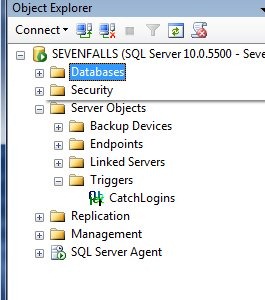
    In looking for server-side triggers, there is a “Server Objects” folder in the tree.

    ddl3

    Here is where you find your backup devices, endpoints, linked servers, and server level triggers. In this case, I can expand the folder (shown above) and find the trigger I created recently.

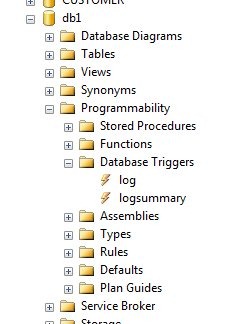
    At the database level, there’s a similar structure. Inside of a database, we find there is a programmability folder, which contains all the code items I can create in a database.

    ddl4

    In here we can see there is a Database Triggers item, and inside there are two triggers that I setup inside this database.

    You have to go look for these triggers, but if you’re wondering if they exist, you can find them here.

    Code

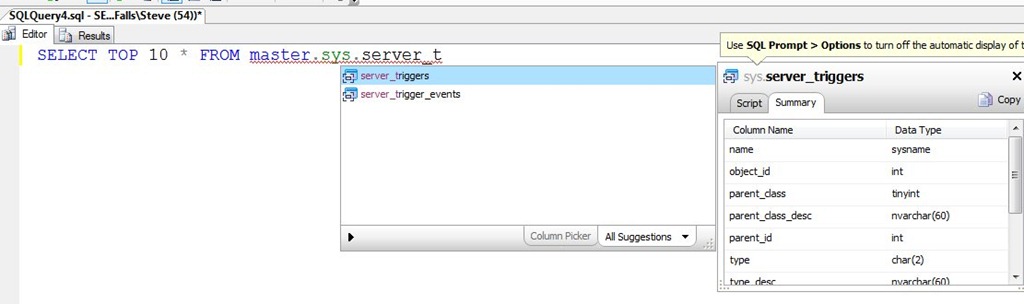
    The best way to look for triggers quickly is with code. Without resorting to BOL, I suspected there was some DMV that contained trigger code. As you can see below, I was right as typing SSF (a shortcut in Prompt), followed by “master.sys.server_t” got me this result:

    ddl5

    If I then examine the results from the server_triggers table, I get my one trigger at the server level.

    ddl6

    This is only part of the information needed as the server_trigger_events table has the events that will fire this trigger. I can query that to see I only have one event here:

    ddl7

    If I join in the events, then I can clean this up and get this:

    select
      t.name
    , t.object_id
    , t.is_disabled
    , te.type_desc
     FROM master.sys.server_triggers t
       INNER JOIN master.sys.server_trigger_events te
         ON t.object_id = te.object_id

    Which shows me the trigger, its ID, and the event’s.

    ddl8

  • Labor Day Bloopers

    The raw footage of all the mistakes I’ve made since the Fourth of July.

    Part 1

    Part 2

  • Creativity

    down tools suggestions
    How many ideas would your group come up with in a month of creative thought?

    At Red Gate we have “Down Tools Week” a few times a year. This is the same idea as the ShipIt days at Atlassian or the 20% time at Google; it’s a chance for employees to have free reign to work on some project, approved as being semi-business related, with the chance to present their work to the company at the end. I think it’s a really cool idea, though I’ve yet to come up with an idea that I’d want to take a week off to work on.

    When I look at companies and think about the time spent on various projects and efforts, I think much of it is useful, but I’m not sure it’s critical. All too often we get caught up in the idea that getting project X done or finishing a piece of software will make or break a company. The reality is while the item might be important, most of the time it will be later than scheduled, and the company will survive. I’m sure there are exceptions, but they’re rare. Most of the time things run late, which makes me question whether or not managers should be pressing so hard to get every project finished on time.

    What if you shelved all work from your developers (or markers, business analysts, etc.) for a month? What if you let them think about what they could do to make the company better, or improve operations, or maybe just find a way to make their job easier?  Would they innovate or just waste time? 37 Signals did just that, taking the month of June off to let people that weren’t running day to day operations work on whatever they wanted. They got a lot of ideas, some of which they are going to implement.

    It sounds crazy, but if a small company can do it, one where everyone wears multiple hats, couldn’t you do with with your department? I’m sure you could. Now if you can only convince management that “thinking time” can be just as important as the rest of your daily job.

    Steve Jones


    The Voice of the DBA Podcasts

    We publish three versions of the podcast each day for you to enjoy.