Author: way0utwest

  • Benefits

    Still a 1/2 gallon

    One of the ways in which some companies have tried to keep the prices of their products down is by changing the packaging. It used to be that you would buy a half gallon of ice cream or laundry detergent, but now you’ll find that often you are getting slightly less for the same price you used to pay. For the former that might be a nice way of lowering your portions but for the latter that’s just annoying. I find that to be a subtle point of deception by some companies, and it likely will continue into future.

    For those of us that work for a company, we might find a similar erosion in an area that we have come to expect a certain level of benefit. A recent survey from the Society for Human Resource Management found that many companies were lowering the level of benefits that they offer to workers. The costs of those benefits have been rising, and as companies try to keep a certain level of profitability, it seems workers are feeling some of the effects.

    I think most of us expect that our health benefits will cost more in the future, at least under the current state of healthcare in the US. Many of us are also sure that the days of regular bonuses are gone for now, but there are some other subtle benefits that you might not realize are disappearing. Tuition reimbursement is going away at many companies, perhaps with the idea that the education isn’t as valuable to companies as in the past. Charitable donations have declined, and it seems less companies are allowing casual dress or flexible work time. That might not impact the technology groups yet, but it’s a trend that concerns me, and perhaps should concern you. Benefits might become more of an issue in the future, especially as you change jobs.

    It’s not all bad. There are more companies offering gyms to workers, which I think is great, and more companies offer cell phones to employees. That last trend, however, seems to be leading more of a liability than a benefit.

    Steve Jones


    The Voice of the DBA Podcasts

  • Basic Computed Columns

    I ran into an issue recently with a computed column, which I’ve rarely used, so I investigated them and wrote this short piece in computed columns, mostly as a reminder for me.

    What’s a computed column?

    You can read the BOL definition, but basically it is a column whose value is based on the values of other columns in a table. By having SQL Server perform the calculation, you prevent errors in the logic, or more likely, get around the chance that some application might forget to perform an update.

    Let’s say I have this simple orderdetail table.

    CREATE TABLE OrderDetail
    ( OrderID INT
    , ProductID INT
    , Qty INT
    , Price NUMERIC(10, 2)
    , LineTotal NUMERIC(10, 2)
    )
    

    If I want to add a simple order to this table, I can do this:

    INSERT dbo.OrderDetail
            ( OrderID ,
              ProductID ,
              Qty ,
              Price ,
              LineTotal
            )
    VALUES  ( 1 , -- OrderID - int
              23 , -- ProductID - int
              10 , -- Qty - int
              8.50 , -- Price - numeric
              85.00  -- LineTotal - numeric
            )
            

    Note that in this case I have to perform the arithmetic of having the line total equal to the price multiplied by the quantity. The math is:

    Linetotal = Qty * Price

    85.00 = 10 * 8.50

    However if I were to make a mistake in the arithmetic and insert $84 instead, or even $8.50, the SQL Server would not catch this.

    Instead, I could use a trigger to calculate this value, but triggers seem to have other overhead and force me to maintain them. Instead I could use a computed column, I can save space by not persisting these columns, or I can persist them and index them if needed.

    In my simple example, I could change my table to be this:

    DROP TABLE dbo.OrderDetail
    go
    
    CREATE TABLE OrderDetail
    ( OrderID INT
    , ProductID INT
    , Qty INT
    , Price NUMERIC(10, 2)
    , LineTotal AS (Qty * Price)
    )
    GO
    INSERT dbo.OrderDetail
            ( OrderID ,
              ProductID ,
              Qty ,
              Price
            )
    VALUES  ( 1 , -- OrderID - int
              23 , -- ProductID - int
              10 , -- Qty - int
              8.50 -- Price - numeric
            )
    go

    The LineTotal value is not stored in the table, which isn’t a big issue in this case. In fact, it means that I am saving a few bytes per row, which could translate into quite a few rows for this table (meaning less pages, less I/O, more chance of this remaining in the buffer pool, etc). The tradeoff is the computation is performed for this result set for every query. Which is better? It depends Winking smile

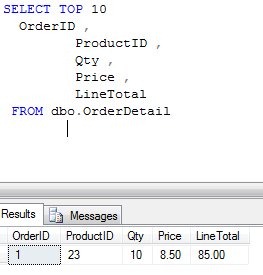
    Notice that I don’t have a value for my computed column in the insert statement, but the results from this version are the same as the previous one:

    computecol

    In fact, if I try the first insert above, which has the LineTotal in it, I get this error:

    Msg 271, Level 16, State 1, Line 1

    The column "LineTotal" cannot be modified because it is either a computed column or is the result of a UNION operator.

    That’s a simple look at computed columns. Are they useful? I’ve never really worried about them, allowing either a stored procedure or the application to handle any logic like this. In general I dislike storing computations, even defined ones like this, but that’s me.

    Use them if they fit your environment.

  • Going Big with SSDs

    Nimbus Data just sold 100TB of SSDs to eBay

    I found a report recently that eBay had implemented 100TB of SSD storage from Nimbus Data for their virtual infrastructure. That’s a huge amount of very fast storage, which definitely helps explain how the eBay auctions seem to run so quickly. Apparently eBay isn’t the only company that’s moving to SSDs for part of their infrastructure as Facebook spent $69million on FusionIO storage.

    SSD storage isn’t cheap, with eBay reporting $25k for a 2.5TB device, which is about 2.5 times the cost of my rough pricing from Dell for a similar HDD device. The SSDs have amazing performance, though I’m not sure what the reliability is compared to HDDs. There are plenty of vendor studies that promise long lasting drives, but I think we’ll have to see what more people report as they deploy these drives over time.

    I’ve never worked in a company similar to eBay or Facebook that had a very large IT budget and could afford to over-spend to achieve high levels of performance. I’ve always had to analyze the price/performance ratios and choose hardware that met our needs, at a reasonable price. However I am glad that companies that need high performance are willing to try new technologies, and hopefully release the results of their investment at some point in the future.

    More and more people are starting to implement SSD drives, but not as their only storage. I find companies using these drives in limited places, as tempdb drives, log drives, or for certain filegroups. The premium paid for these drives means they need to be used where they provide that highest level of performance for the price, which isn’t every place you store data in SQL Server.

    As SQL Server DBAs, we need to learn more about the impact of SSDs in different parts of our systems, plan for them to fail  more often than HDDs for now, and more importantly, consider designing in some type of archiving or partitioning strategy that can tier storage into faster, and slower, sets of data.

    Steve Jones


    The Voice of the DBA Podcasts

  • When Do You Take a Full Backup?

    This series of blog posts are related to my presentation, The Top Ten Skills You Need, which is scheduled for a few deliveries in 2011.

    When is a Full Backup Taken?

    Most people might answer this with “every day”, or “as often as needed”, but those are a little nebulous, and not necessarily correct.

    I do recommend that you backup as often as you can, which is every day for most people. Those with large databases might go once a week, or even once a month, but you want to get a full backup periodically. If you have a really large database, say 50TB or greater (in 2011), you might opt for a yearly SAN snapshot of some kind, but you need some full backup as a base.

    So when do you backup your database? Here’s a list of some times you might think about:

    • As often as you can on a regular schedule (daily, weekly, monthly, etc)
    • Before applying a Service Pack or CU*
    • Before applying a Windows patch*
    • Before upgrading your application*
    • Before a large data load*
    • After restoring your instance in a DR situation

    That last one might throw people, but I’ve seen more than a couple situations where someone recovered a database in a DR situation and never setup backups. And there was another failure.

    Whenever you create a database, either from scratch or after a restore, make a backup.

    * Note that if you have Enterprise Edition or above, you can use Database Snapshots to substitute for a full backup in some of these situations.