Author: way0utwest

  • The PASS Data Community Summit 2024 Call for Speakers

    The PASS Data Community Summit call for speakers and volunteers is open. You have until April 10 to submit something, and you can do that here: Data Community Summit CFS.

    I have tended to submit every other year, though I did put in one session last year, which was rejected. See, it happens to everyone and it’s no big deal. The volunteers didn’t like my session and didn’t choose it.

    I submitted a couple of sessions this week, and you should as well. If you’ve every presented at a user group, SQL Saturday, or even to your team internally, take a chance. Write an abstract and send it in. If you need help, the Speakers Library here has resources for you: https://www.newstarsofdata.com/speaker-improvement/

    This is a great chance to start growing your brand and improving your career.

    Take a chance and submit today

  • A New Word: Rubatosis

    rubatosis– n. the unsettling awareness of your own heartbeat, whose tenuous muscular throbbing feels less like a metronome than a nervous ditty your heart is tapping to itself, as if you casually remind the outside world, I’m here, I’m here.

    I practice yoga, breathing, and often my heart and breath are calm. My resting heart rate is about 51bpm across the last year. In general, even during some exercise, I don’t think or hear my heart.

    However.

    There are times when it’s pounding, and at weird times. I might wake up, and my heart isn’t racing, with the rate still in the 70s, but I can literally hear the pounding in my ears. I can feel it in my chest, like it’s letting me know that it’s there.

    It’s rubatosis and it’s annoying at night since the noise sometimes stops me from falling back asleep quickly.

    From the Dictionary of Obscure Sorrows

  • An Experimental Mindset

    I wrote a post about Git recently since I’ve found far too many people who didn’t know Git well (or at all) and they seemed hesitant to experiment and learn.

    Is this because of being too busy? Do we have so many people who are working in tech where “it’s just a job” and not because they enjoy technology? Or has management in too many places beaten people down to the point they don’t want to try things? Perhaps your coworkers are resistant to change (or lazy) and you don’t want to discuss new ideas with them.

    In working with software and databases, I marvel at all the ways in which we can mold and change the system to match the creative ideas we come up with. I’m pleasantly surprised when someone solves the same problem I do, but in a very different way. Even using the same language/tools/frameworks, we can often come up with a variety of solutions that work well. I think we teach each other something when we compare disparate solutions.

    When I was learning about computers, we were encouraged to experiment. Those who were willing to try things and learn from them were often more excited by the task, and I think these were often those who went on to successful careers. I’ve found the people who don’t like to experiment or try something new, even when there is no risk, are often limited in both their accomplishments and opportunities.

    I don’t expect those who enjoy experimenting with technology to work more than others. I’d prefer that everyone have a balanced life that separates time at work from personal time, and limits the investment in your skills to a reasonable level. Live and enjoy your life outside of technology, but when you do work, make an effort to do your best work, while working to improve what “best” is for you.

    Try something new this week. Solve a problem, use a new tool, read about new technology, and write a little code. It’s good for you.

    Steve Jones

    Listen to the podcast at Libsyn, Spotify, or iTunes.

  • SQL Compare Force Column Order in a Table

    I had a client that was concerned about SQL Compare behavior when a developer adds a column to the middle of a table. I wanted to reassure them, so I wrote this post to show how SQL Compare behaves by default.

    This is part of a series of posts on SQL Compare. 

    Making a Table Change

    Let’s assume I have this table in a database:

    CREATE TABLE [dbo].[Product]
    (
    [ProductID] [int] NOT NULL,
    [ProductName] [varchar] (50) NULL,
    [ProductDesc] [varchar] (1000) NULL,
    [ProductSize] [char] (1) NULL,
    [ProductWeight] [int] NULL,
    [ProductColor] [varchar] (20) NULL,
    [StatusID] [int] NULL
    )
    GO
    

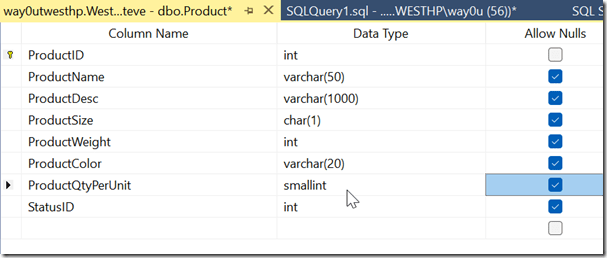
    I want to add a column to this table, called ProductQtyPerUnit. However, I decide to add this before that StatusID column so all my product data is together.

    Note: This shouldn’t be done. Don’t worry about order of columns. Deal with that in your INSERT/SELECT statements instead.

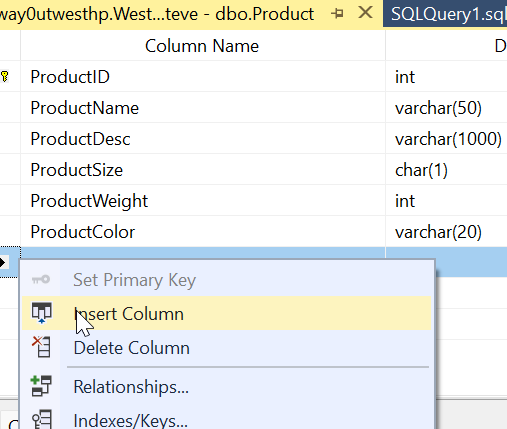
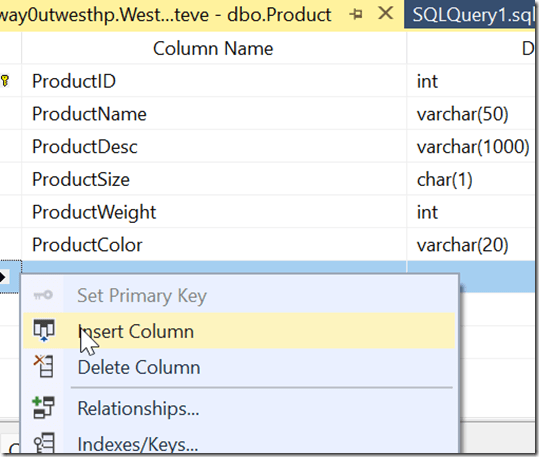
    If I do this in the SSMS designer, I’ll right click the table and select INSERT Column.
    2024-03-12 12_23_15

    Then I can add the column, as appropriate to my table.
    2024-03-12 12_24_54

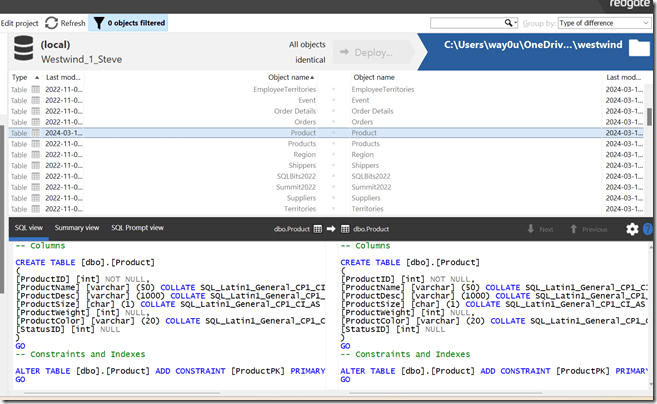
    Before I save this, I’ll create a scripts folder and compare things. As you can see, things are in synch.
    2024-03-14 13_10_46

    Now I’ll save the change.

    SQL Compare Behavior

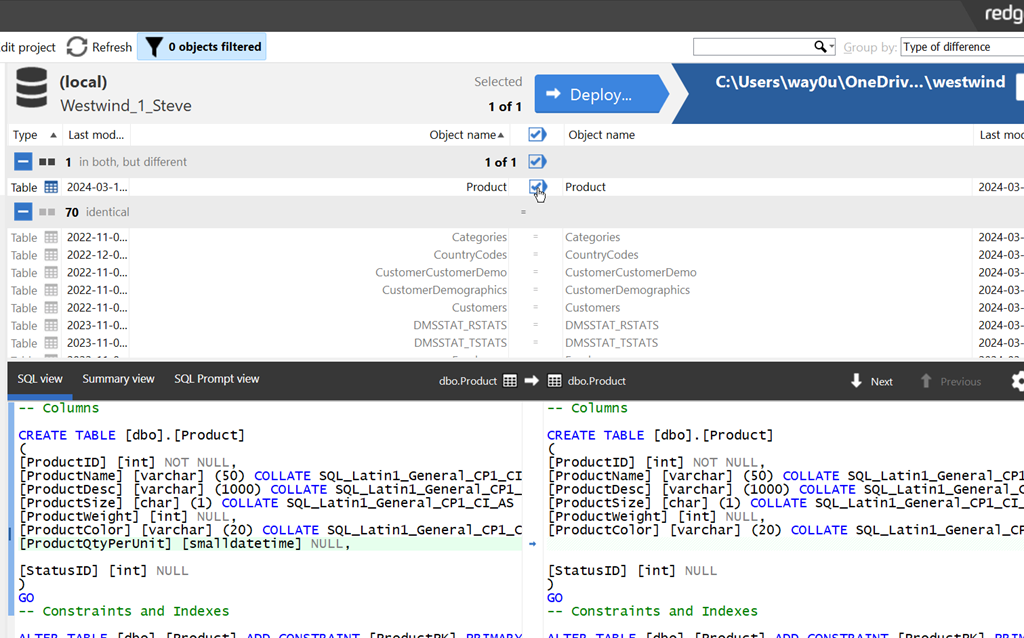
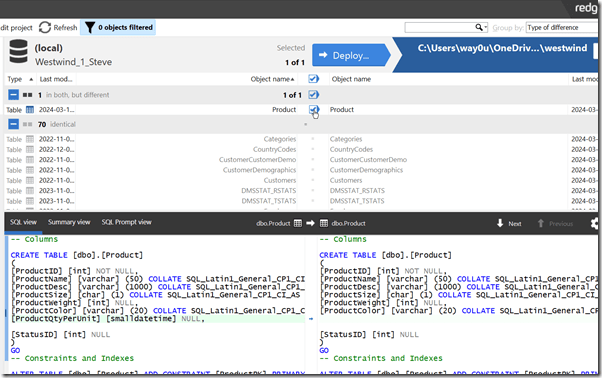
    Now I’ll refresh my project. When I do that, I see a difference, as I should. Note that SQL Compare detects the change, and shows the new column in the middle of the table.
    2024-03-14 13_12_56

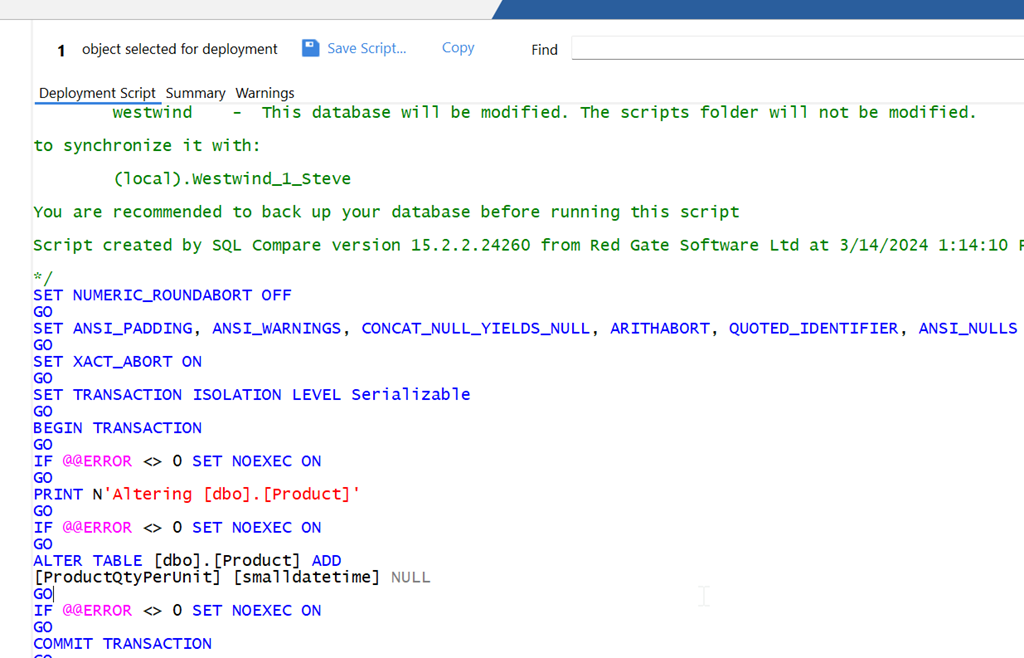
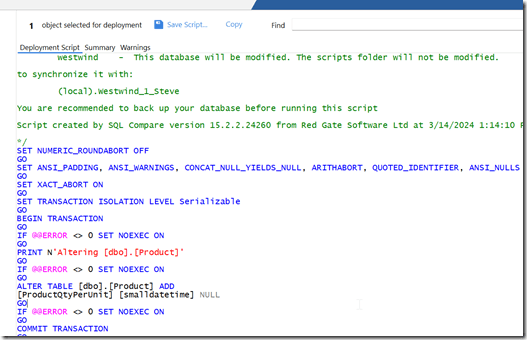
    I’ll click Deploy and generate the deployment script. When I do that, I see the script below. Note that SQL Compare has just added a column, not rebuilt the table.
    2024-03-14 13_14_21

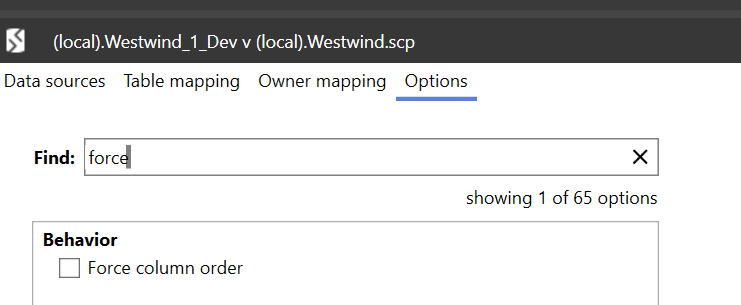
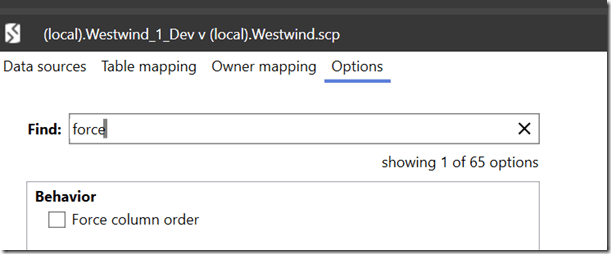
    This is controlled by the Force Column Order option, which is off by default. This is the way we’d like to have the tool behave, as rebuilding tables is unnecessary.

    I’ll close this dialog and then click Edit Project and select the options tab. I can search for Force and see the option is off.
    2024-03-14 13_15_32

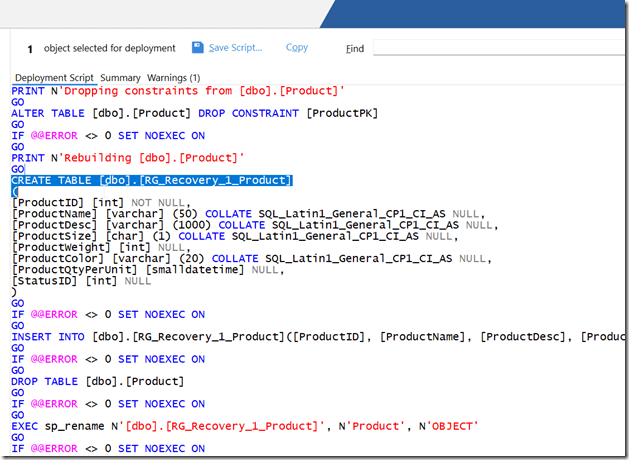
    to show how this works, I’ll check the checkbox and then recompare. Now when I generate the deployment script, I see this. The deployment wizard opens to this warning.

    2024-03-14 13_16_30

    If I view this script, you can see below that this part of the script creates a new table and then renames it after data is moved and the old table dropped.
    2024-03-14 13_17_13

    In general, you should leave this option off all the time. The physical order of columns doesn’t matter.

    If you haven’t used SQL Compare from Redgate, it’s the industry standard for SQL Server schema comparison and an amazing tool. Download an eval today and give it a try.