The event has a great schedule (scroll down) with quite a few sessions that I will try to watch. Take a minute and flip through the list. If anything catches your eye, block your calendar and register today.
A few years ago SQL Prompt added a command palette to let you search the commands available. This is similar to the same concept in Visual Studio Code, ADS, and various other tools. This post looks at how to get to this tool in SSMS.
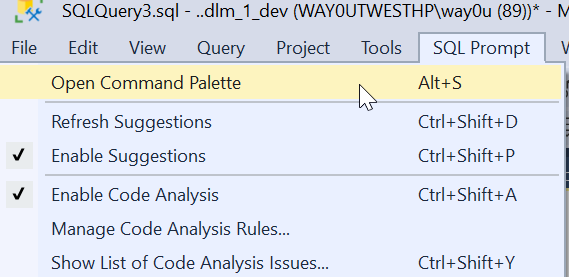
You can also open the Command Palette from the menu. In the SQL Prompt menu, it is the first item. You can also see there is a shortcut of ALT+S below here.
When I click this, I’ll see the full list of palette commands. This is a large window, and across the top I can filter things. In the complete list, you see various things: objects, snippets, and refactoring commands. We also have the Prompt behavior settings as well.
For example, I could look for things with “brackets”. I see a few things that are relevant. I can pick any of them if I want that apply to my code or change the behavior of the tool
Adding to the Menu
If you can’t remember the shortcut. or don’t want to use the menu, you can add this as a button in the toolbar. Here’s the easy way. When you installed SQL Prompt (or the Toolbelt), there is a Redgate toolbar added. Mine looks like this:
I clicked the “Add or Remote buttons ” and got a list of buttons on this toolbar. I can click “Customize if I like. That opens the dialog below.
Now click “Add Command”. That gives you a list of items in all the menus in SSMS. Pick the SQL Prompt menu on the left (first one). Then scroll down and find “Open command palette” in the right side. Select it and click OK.
Now you have this in your toolbar.
Now one click, and you have the palette.
FWIW, you can use this trick to add any menu item to a toolbar that you want.
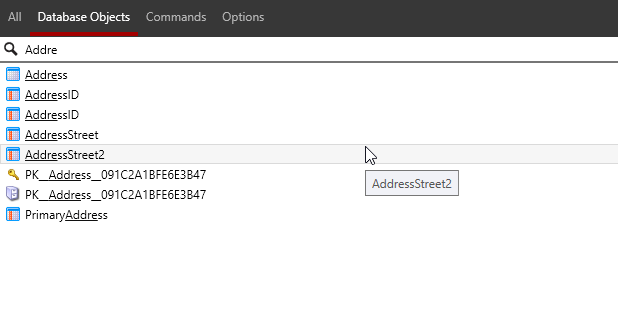
UPDATE: A comment asked about partial matches, and you can see I see partial matches for “Addre”.
Flyway is a command line tool with lots of options and parameters. Working with those is a pain, but we’ve made this easier in Flyway Desktop 6.5+. In this tip, see how you can add parameters to your Flyway command.
I’ve been working with Flyway Desktop for work more and more as we transition from older SSMS plugins to the standalone tool. This series looks at some tips I’ve gotten along the way.
Flyway Options
There are a lot of options in Flyway that you can use, and we added a dialog in Flyway Desktop to make it easy to construct a command line call. However, we also made the FWD tool work better recently, removing the need to save your changes.
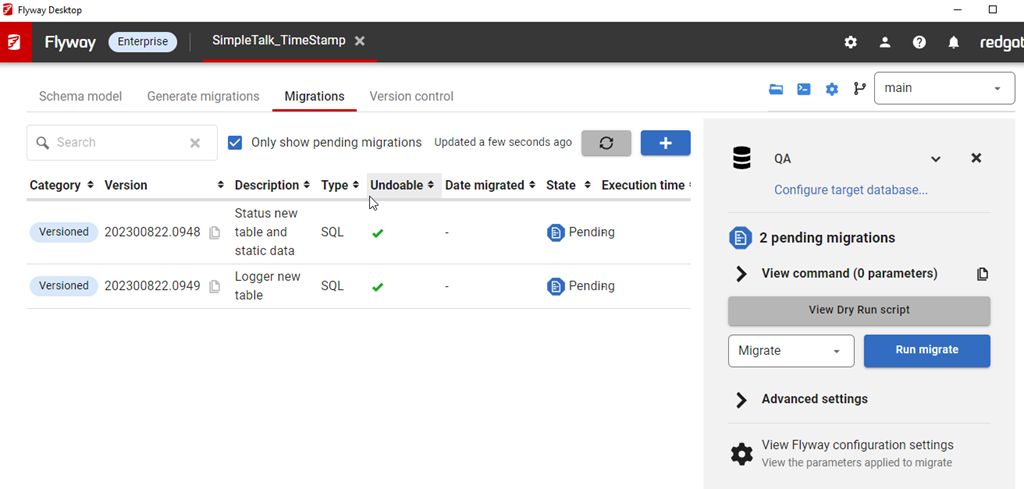
In the migrations tab, I have all my migrations listed, and on the right side, I can see the command that would be run with the Flyway CLI.
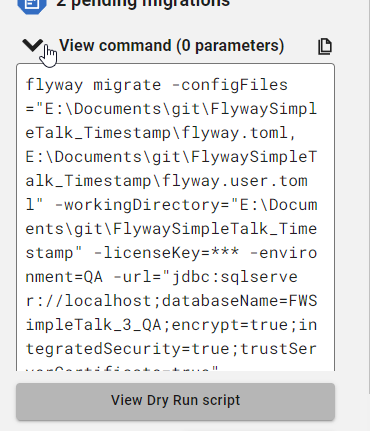
If I click “View command”, I can see this command, which has a number of parameters by default.
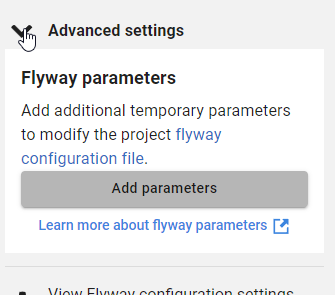
However, often I want to add other parameters. Below this dialog is the Advanced settings area, which is where we add parameters.
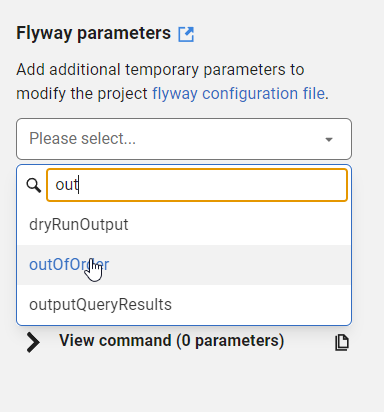
If I click Add parameters, I get a list of all the parameters, and I can type in the list to filter them down. For example, I often want outOfOrder, so if I type “out” I see this listed.
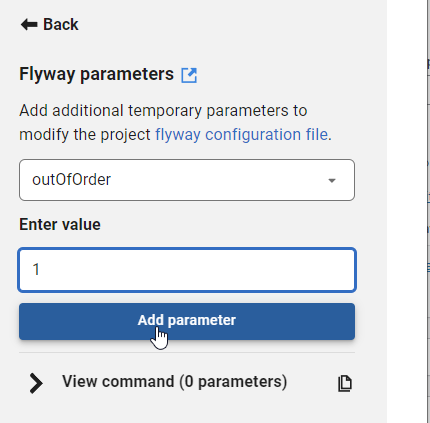
I can select this and then enter a value for the parameter. I showed in a previous tip how you can easily copy migration numbers, which is handy for using in some of these parameter values.
Once I enter a value, I can click “Add parameter”. Of course, if I’ve done something silly, like enter an integer for a true/false value, the GUI tells me.
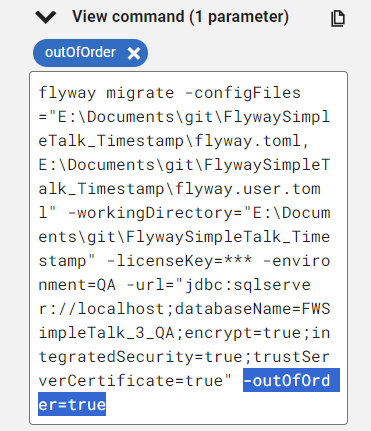
If I add this, then it’s reflected in the command, which is what I’d copy and paste into some deployment tool like Azure DevOps, GitHub Actions, Octopus Deploy, etc.
Try it out today. If you haven’t worked with Flyway Desktop, download it today. There is a free version that organizes migrations and paid versions with many more features.
There’s a great scene in Field of Dreams where James Earl Jones says that people will come. It’s in response to the voices Kevin Costner hears early in the movie. This is the climax of the movie, where Costner makes a financial decision to trust his instincts and hope his farm will be saved.
In many cases, organizations do just this. They build something, assuming people will come. They may have some data, research, or other reasoning as to why why people will use what they build. However, that’s not always the case. Sometimes they build something and hope people will come, much like Field of Dreams.
I wondered about this recently with some friends when discussing SQL Server on Linux. Quite a few people I know haven’t seen any Linux installations inside their organizations. Others are consultants and haven’t experienced any work on Linux, which is interesting. I’ve heard people at Microsoft state there are plenty of installations out there, but I’ve found few people who have moved from Windows.
I know a lot of people who work in the Microsoft data stack aren’t familiar with Linux. This is despite all the articles and writings the last few years trying to teach people about Linux and how SQL Server runs well. I also see articles like this one, which claims Linux uses more CPU. This is despite Red Hat saying Linux runs SQL Server well and leads in benchmarks from TPC, at least the TPC-H results.
I learned at the various command lines in school, with a lot of time spent on Unix systems. Even with X-Windows, I often used the interface to open multiple shells to get work done. However, a lot of people have not worked at the command line very often. Despite the popularity of PowerShell, I find no shortage of Windows-based knowledge that struggles with certain concepts, like quoting and piping results between commands.
I don’t know how many systems run Linux v Windows. Azure states that over 50% of their VMs aren’t Windows, but Linux. I suspect a lot of those are likely web servers or other systems and not database platforms. They don’t seem to publish how many databases are SQL Server on Linux, and I have no idea if Azure SQL Databases (or MI/Synapse/Fabric/etc.) run Windows or Linux. I suspect it could be either, but most likely Windows.
Do you feel comfortable running SQL Server on Linux? Is your organization considering it? I don’t know I think it’s worth the savings in license costs. Not that Windows is cheap, but the effort to train, learn, and work on a second OS might not provide any savings for years. Maybe not ever if you can’t get work done smoothly and quickly.