Author: way0utwest

  • Using AI with Data Tasks

    The hot new technology of the year is AI. Between ChatGPT, Copilot, and generative AI, it seems that this is invading the world of computing at an incredible rate. Whether this becomes really useful and valuable or not is something that we will seem over time. There have been plenty of trends in this area in the past that haven’t become as ubiquitous as the hype would lead you to believe.

    I’ve done some light experiments with AI on my blog. To date, I haven’t found this to be that useful, other than a few cases where I basically used an AI to search the web for me. Rather than read a bunch of SSC or Stack Overflow results, the AI summarized things.

    Somewhat.

    I definitely had to test and verify the code more than I feel I’ve done with code posted in a forum. Of course, I do less experimenting because the AI results were a little more targeted to what I needed, rather than my cobbling knowledge and partial solutions together. I’m also not sure which I prefer.

    I would like to use AI for data work, and there is an article that talks about some of the ways that we’ve used AI in the past. Data profiling has made sense, and I can see value here. For data security, I’m not sure how helpful AIs have been. I’ve looked at some products, and I don’t know that I think any of them do a great job of identifying data. They do make it easy for whoever is assigned the task by doing some of the work, but they aren’t a panacea. They make mistakes, just like humans do.

    I do think data observation and looking for anomalies is a place where AI can really shine, but that’s not the data work that many of us do. It matters, but for most of us, this isn’t something we deal with.

    The future of AI was more interesting. The idea of data homogenization, taking data from different sources, and fitting it to a data model is interesting. Of course, the AI can’t make too many mistakes, or the time correcting might overwhelm the time saved. I think we see that now with humans who we ask to ETL data. If they aren’t good at it, or make lots of mistakes, those of us overseeing them might just do the entire job ourselves.

    I know that AIs are still new and immature, and while there is a lot of potential, they feel like junior staffers now, needing more handholding and micromanaging than I like to do. Perhaps they will change our careers and the way we work, but I don’t know how quickly, or even how deeply. Already I find lots of companies putting restrictions on what their employees can do with AI, which makes me think this might be more a targeted, niche technology more than a general, use-it-everywhere solution.

    Steve Jones

  • The DevOps Roadshow(s) from Redgate

    I’m back from an office trip this week to Pasadena. I had the chance to go to the office, do some internal training for people, and spend time with our US reps and SEs. It’s valuable for me to get to know people better when I’m remote and I’m glad I get to the offices a time or two a year each.

    However, now I’m prepping for more travel. In case you haven’t seen, I’m taking a roadshow this fall. Not just me, but Grant and Ryan as well.

    2023-08-09 11_58_44-Photo - Google Photos

    We’re going around the country, and here are the dates I know about:

    • Houston – Aug 24 (Steve)
    • Chicago – Aug 30 – (Steve and Ryan)
    • Manchester, UK – Sep 4 (Steve)
    • Bristol, UK – Sep 6 (Steve)
    • New York – Sep 7 (Ryan or Grant)
    • London – Sep 8 (Steve)
    • Boston – Sep 20 (Steve)
    • Atlanta – Oct 11 (TBD, not Steve)
    • Jacksonville – Oct 19 (Grant)
    • San Diego – Oct 25 (Grant)
    • San Francisco – Nov 1 (Steve)
    • Seattle – Nov 13 (Steve)

    It’s a busy travel schedule for me, but not a lot of work prepping, which is usually the hard part. Last week and this one are prepping (and likely next week), so it’s a little busy now.

    I’m excited to visit these cities. I’m a little bummed I won’t make Jacksonville or San Diego as I have friends there, but those are vacation days for me to see my daughter at university. Maybe I’ll get back to those cities next year.

    We don’t have all the links up yet (some are above), but they should be coming soon. Keep an eye on the Events page.

    If you’re coming to the PASS Data Community Summit and don’t have a pre-con on Tuesday, consider coming to see me. Hopefully the reg will go up soon.

  • Friday Flyway Tips: Copying the Migration Number

    It’s a small thing, but copying the migration number can be a pain. However, we’ve made this easier in Flyway 6.5.4.

    I’ve been working with Flyway Desktop for work more and more as we transition from older SSMS plugins to the standalone tool. This series looks at some tips I’ve gotten along the way.

    Lots of Migration Numbers.

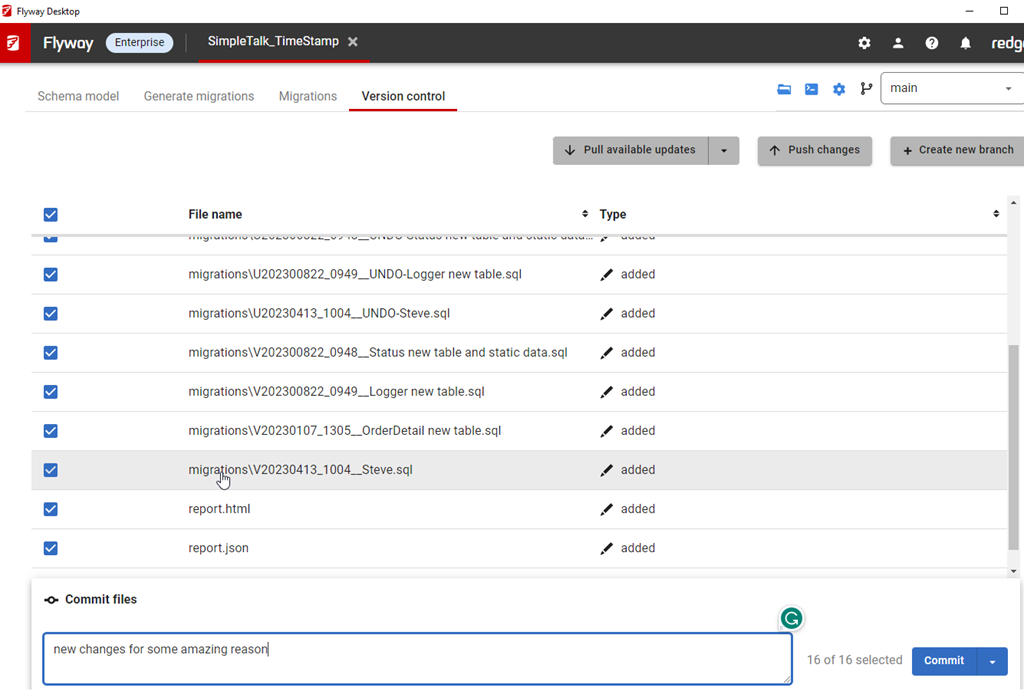
    I’ve got a lot of migrations in this project. You can see below in the image, noting the scroll bar goes up and down here.

    2023-08-10 12_30_54-Flyway Desktop_thumb[1]

    These are easy to read numbers, but some companies use dates and times. Like this:

    2023-08-10 15_06_25-Flyway Desktop

    Those are harder to read, but more importantly, easy to mis-type. If you were using flyway migrate or undo with a specific version, you don’t want to make a mistake.

    We’ve made it easy in Flyway. We added a copy button, which you can see below. This is to the right of each migration. I missed this until a dev pointed it out.

    2023-08-10 15_06_38-Zoomit Zoom Window

    If I click this, the version is copied. I can paste it into the search, as shown here.

    2023-08-10 15_06_57-Flyway Desktop

    Or an email.

    2023-08-10 15_07_18-Untitled - Message (HTML)

    A small change, but a handy one. One way to make working with Flyway smoother and reduce mistakes. That’s a big part of DevOps, trying to reduce mistakes.

    Of course, you have to click the right line. Winking smile

    Try it out today. If you haven’t worked with Flyway Desktop, download it today. There is a free version that organizes migrations and paid versions with many more features.

    Video Walkthrough

    I made a quick video showing this as well. You can watch it below, or check out all the Flyway videos I’ve added:

  • Taking Advantage of Conferences

    I’ve been very lucky in life to go to many conferences throughout my career. I’ve gone as both an attendee and a speaker, and I have found them to be valuable in helping me continue to grow and thrive in my career. This is across many employers, some of which I don’t think had particularly great benefits. Plenty of people I worked with did not get to attend any conferences, and some of them felt resentful. I understand that, but I think that many employers are willing to invest in training and conferences when there is a return for them.

    I started going to ComNet in DC, as a young professional wanting to learn. It was close enough to drive up and go for the free day and then return home. A few colleagues and I would make the trip once a year and talk with vendors, chat with attendees, and learn more about computer networking. Across a couple of years, we had moved from thinnet and thicknet to ethernet and IPX to IP, and this was a place where those technologies, and many more, were being discussed.

    During (and after) the event, I worked hard and improved my knowledge. I got things done at work. I got extra things done at work. I got my normal work done better. I solved more problems than in the past. Part of this was growing and learning, part was improving my troubleshooting, research, and testing skills.

    Some of it was meeting a few people at a conference I could email later and ask a question.

    As I changed jobs, I moved more into development and data work. I got the chance to go to TechEd and the PDC. I became involved in PASS and started attending the annual summit. I learned a lot in different sessions, and I made a lot of networking contacts with others. Many became friends, and many of them have helped me answer questions since then. I learned to not just attend a conference, but bring something back. Usually knowledge and always some swag to give out to co-workers. A gift for the boss that approved the trip was also a good idea.

    I continue to do this today. I often attend a SQL Saturday and sit in a few sessions. I still learn something that I can write about or help a client with. I might take a moment to ask a speaker a question that likewise gives me knowledge that I can use in my day job. There’s a payback for my employer when they’ve spent money for me to attend. There’s also a payback for my career as I’m always learning something new.

    This fall is the annual PASS Data Community Summit. It’s in-person, which I know limits who can go, but if you’re looking to be a high performer. If you get things done at work and your company values you, perhaps you can make a case that you are the person that will take advantage of a conference. Convincing others that you’re worth investing in, and proving you are, is a good skill to have. Take your best shot at it, and maybe you’ll get the chance to register and come. If not, the worst case is someone says no but learns that you want to drive your career forward.

    PS – Don’t delay. Prices rise on Sep 21.

    Steve Jones

    Listen to the podcast at Libsyn, Stitcher, Spotify, or iTunes.