Author: way0utwest

  • Flyway Desktop PoC–Adding a Shadow and Baseline Script

    In the last post, I created a baseline marker for Flyway in each database. This set the version in the dev and QA databases to v1. However, I also need a baseline script, at least the tool asks for one, so this is the process if you have objects in your production or other downstream databases.

    I’ll do this for SQL Server and then PostgreSQL.

    Why do this?

    The main reason to create a baseline script is to note which objects already exist in production. For these objects, I don’t want to track these are changes in their current form.

    For example, if I already have a CountryCodes table in production, when I create a project, I want to tell Flyway Desktop that this table exists in production, so if the dev version matches, don’t add this to scripts. If it doesn’t, then I’ve done something in development and need an ALTER script deployed to prod.

    What was the Other Baseline?

    The first baseline in this post, is a version marker. I hate that this is the case, but both Flyway (pre-Redgate) and Flyway Desktop (evolved from SQL Change Automation), had the concept of a baseline, but these were somewhat different things.

    Flyway Baseline – The initial version of the database. Don’t deploy any scripts that are <= to this version.

    Flyway Desktop Baseline – A script that has the structure and code of all objects that exist in the target database(s).

    We can create a baseline script for Flyway, which looks for a B script, but the baseline command expects that you create this script manually. This is used to populate a new database with the baseline migration script prior to running all other scripts.

    Setting up the Baseline Script

    Flyway Desktop makes it easy to create a baseline script, and in fact, prompts you to do so.

    In my project, if I go to the Schema Model (first) tab, I see there is an object in Development. This was the table I created when I set up the database. The goal is to get this table to other environments.
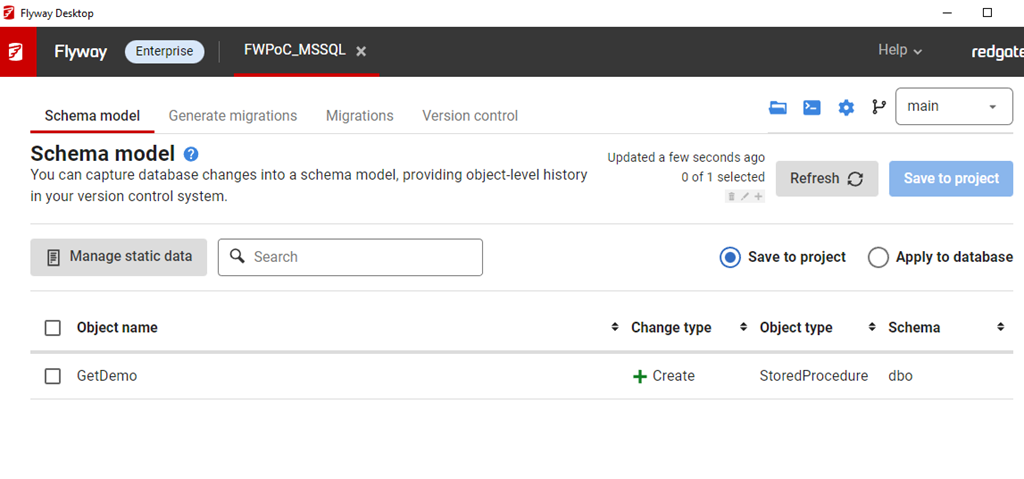
    2023-04-04 16_10_58-Flyway Desktop

    This table doesn’t exist in QA. I do have the flyway_schema_history table, which was the result of the baseline command.

    2023-04-04 16_15_58-SQLQuery4.sql - ARISTOTLE_SQL2022.FWPoc_1_Dev (ARISTOTLE_Steve (77))_ - Microsof

    If I go to the Generate Migrations (second) tab, I see this. The first thing that the tool wants is a Shadow database.
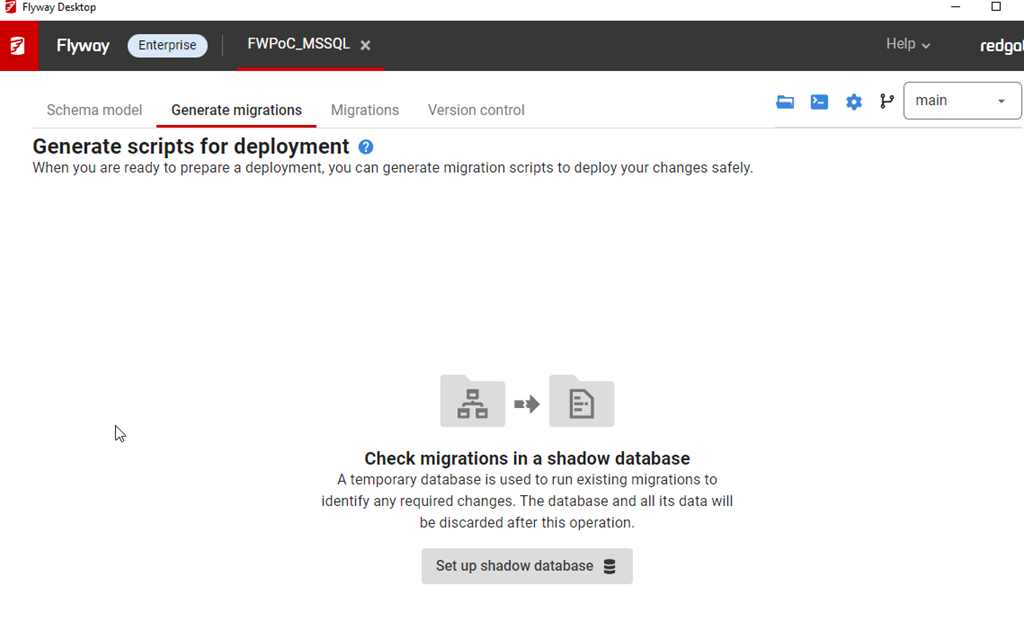
    2023-04-04 16_12_55-Flyway Desktop

    The shadow is essentially a development V-1 (v minus one) version. This is where I test all migrations, compare the state with development, and then determine what’s changed. This is just a regular database, but I create this outside of Flyway Desktop. For me, I created a database (FWPoc_1_Dev_Shadow) and then clicked Set up shadow database to get this dialog. You can name this anything.

    I enter details, and test the connection before saving this. In general, this ought to be saved to my user settings as I’ll have my own shadow different from other developers. I DO NEED to click the “ok to erase data” box.
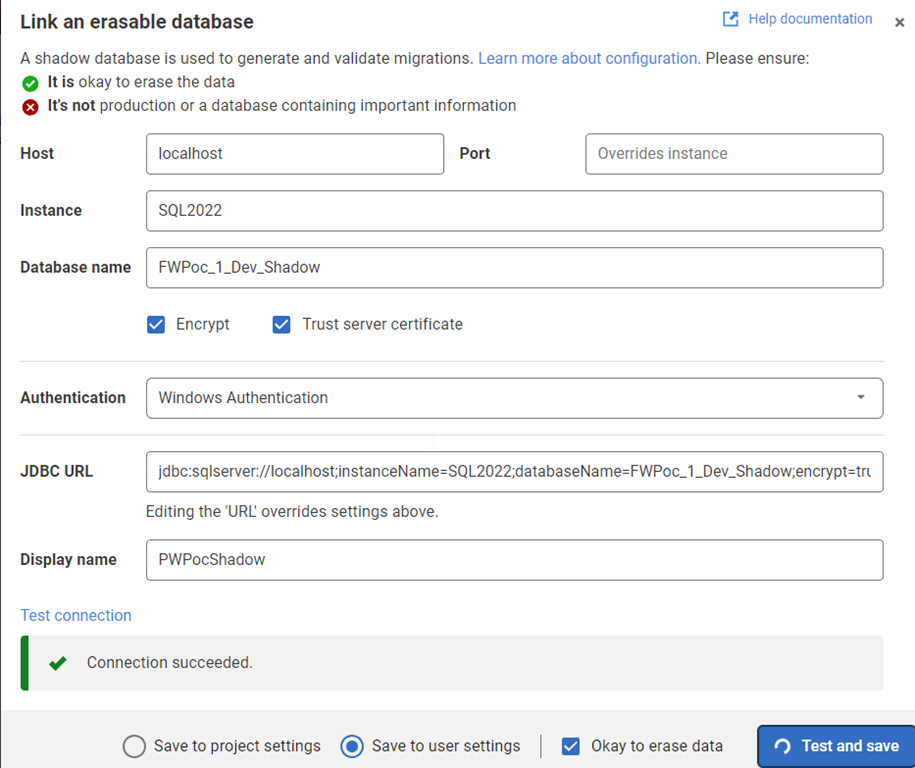
    2023-04-04 16_14_09-Flyway Desktop

    Once this is done, I now see another prompt on the Generate Migrations tab. Now I need a baseline script. I don’t have anything, but I will click the button.
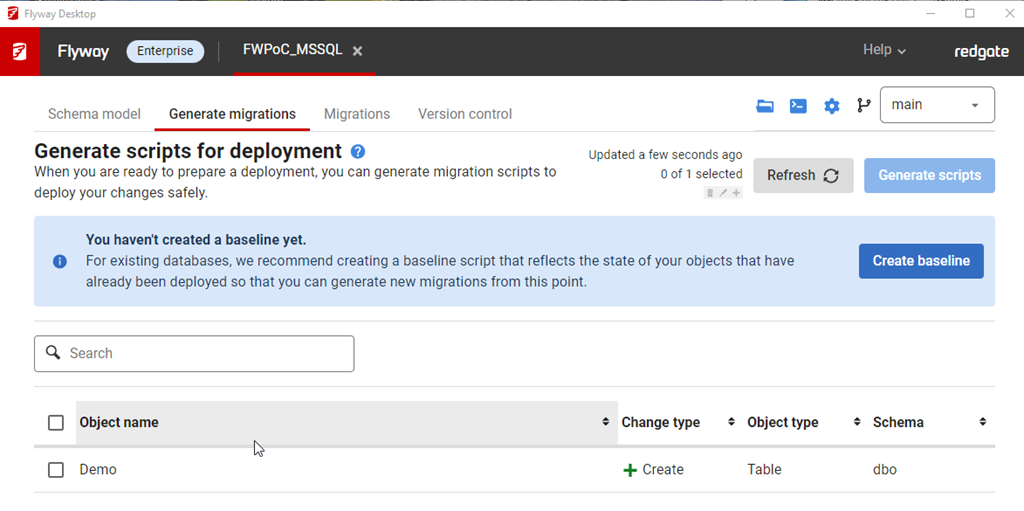
    2023-04-04 16_14_28-Flyway Desktop

    This gives me a dialog to pick a target database. This target is used to get the initial set of objects to populate in the baseline script. You can use production or a copy (recommended) as the target database.
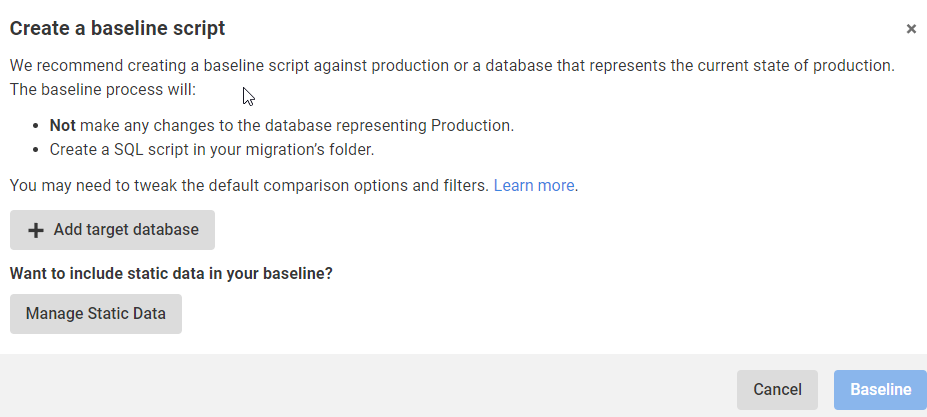
    2023-04-04 16_14_41-Flyway Desktop

    My QA is the same as prod, so I add that with the proper connection string and then I see the target here for the Baseline. I am ignoring static (or lookup/reference data for now). I’ll click the Baseline button.

    2023-04-04 16_15_25-Flyway Desktop

    This runs and … nothing.

    Which makes sense, as there is nothing in my target database. I actually get an error after this, which tells me that it doesn’t make sense to baseline an empty database.
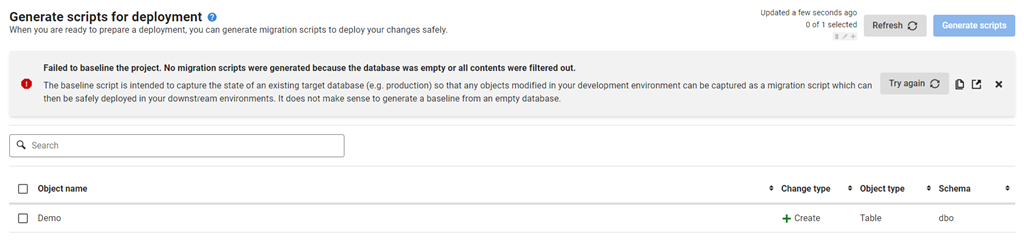
    2023-04-10 12_38_51-Flyway Desktop

    I wish that were surfaced earlier. In any case, if I close this, I get the same image above, saying I don’t have a baseline. For now, I’ll ignore that.

    Summary

    Not much happened in this post. I added a shadow database, which I’ll use to generate scripts. I tried to baseline, but that errored, as it should. I really don’t need a baseline, so I’ll come back to this later in another format.

    For now, I’ve advanced the SQL Server project. I’ll actually repeat these steps for the PostgreSQL one, but it’s really creating a new database for the shadow and setting a connections string. Everything else looks the same.

    The next post will actually generate a script and deploy this to QA.

  • Big Data Downsides

    Companies often want more data to help them make decisions on how they run their business. There has been this quest to gather and analyze as much data as possible to increase the efficiency of their operations to help reduce costs or increase profits. This has led to the importance of data as an asset, and the need for more data professionals in many organizations.

    That’s good for many of us that work with data.

    However, using data to try and improve your efficiency has a downside. It can lead you to a very narrow focus in your approach. That can be good in narrow, well-defined areas, such as minimizing the distance driven or packing containers. For less focused tasks, such as telling a story or writing code, this can mean you get stuck in a rut and limit your opportunities to improve.

    There’s an interesting article about big data and Hollywood, specifically looking at the types of products produced. Big data analysis leads companies to aim for the most effective types of movies that make money. Good for a company, not so good for society. Arguably, not even good for a company over time as people will tire of the same story, or type of story over time. Eventually, making simple decisions based on past data will start to fail.

    I can see the same thing in other industries as well. Using Big Data to drive decisions can help, but many of the areas where we use these techniques will evolve and change over time. The way we solve problems with code change over time as we develop new tools, techniques, platforms, languages, etc. There isn’t a perfect way to design a database or write a CRUD app precisely because new capabilities or new possibilities emerge. You could say the same things about marketing, manufacturing, medicine, and many other endeavors.

    This isn’t to imply big data and complex analysis isn’t helpful or useful. It’s just not everything. We need to balance human input, with some creativity, some instinct, some diverse thought, and some guessing. Most importantly, we ought to experiment and learn, not only from what machines might extrapolate, but from how humans change their thinking over time.

    Find a balance, accepting some imperfection in your process and in the world at large. Hopefully that will lead you to some success.

    Steve Jones

    Listen to the podcast at Libsyn, Stitcher, Spotify, or iTunes.

  • Creating a Simple Graph in RedisGraph

    I delivered a session on graph databases, and in it I used RedisGraph to show how you can work with graph data on that platform. This blog shows a basic creation of a graph in RedisGraph. This isn’t intended to be a comprehensive post, but more a basic look at the code to work with graphs.

    Adding Data

    I connect to Redis with the command line. If you don’t know how to do that, I covered this in another post. Once I’m connected, I can run this code to create a graph and a node:

    GRAPH.QUERY Northwind "CREATE (:employee {employeeID: 10, firstName:'Steve', title:'President'})-[:REPORTS_TO]->(:employee {employeeID: 11, firstName:'Tia', title:'CEO'})"

    This will create a graph, two nodes, and one edge between them. This starts with GRAPH.QUERY, which let’s Redis know this is a graph query. I then give the name of the graph, which is Northwind since I based this on the Northwind dataset.

    Next I use a Cyper language CREATE and enter the data in what is very similar to JSON. I label a node (employee), add the properties and values (employeeID and firstName with 10 and Steve as values).

    I use the square brackets with the edge name in between this and another node. This will get me the results shown below. You can see that one label, two nodes, six properties, and 1 relationship created.

    2023-03-24 15_34_05-cmd - redis-cli

    I can get the employee nodes with this code:

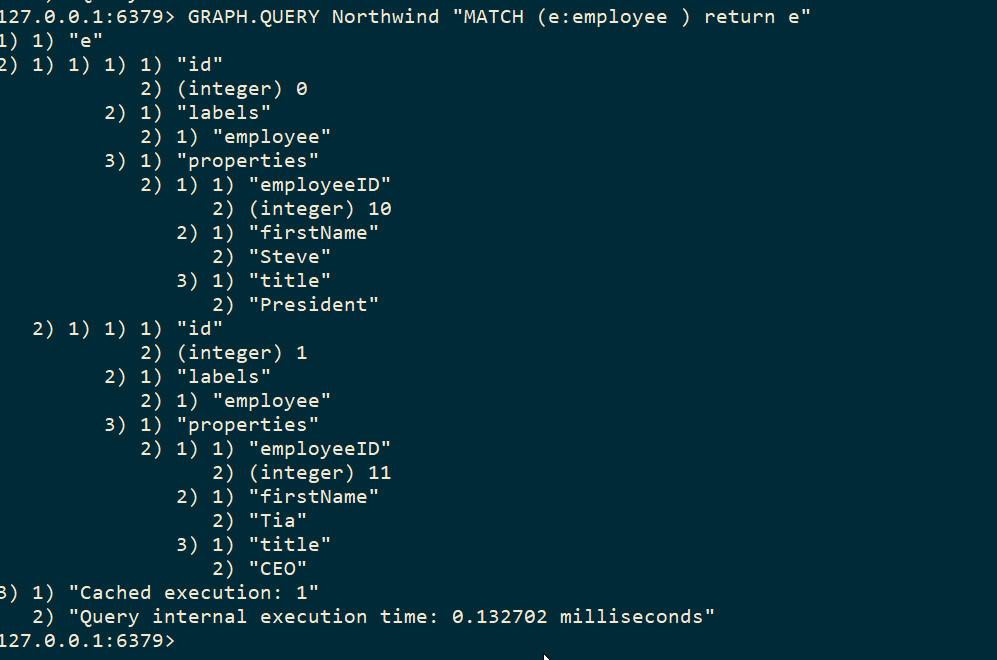
    GRAPH.QUERY Northwind "MATCH (e:employee ) return e"

    This returns the two nodes.

    2023-03-24 15_37_23-cmd - redis-cli

    If I want to see the relationship, I need to ask for that with this code:

    GRAPH.QUERY Northwind "MATCH (e:employee)<-[:REPORTS_TO]-(sub) RETURN sub.firstName as employee, e.firstName as manager"

    This returns my graph as a series of data elements.

    2023-03-24 15_37_23-cmd - redis-cli

    Tada!

    There is more you can do and certainly you can create more complex (or larger) graphs in Redis. The drivers from various languages should return JSON to you that you can deserialize and visualize or otherwise process results.

    A lot of this is basic, but if you want to experiment with Redisgraph,  a container and the CLI is a good way to get started.

  • A Prompt Engineer

    No, Redgate Software isn’t hiring for SQL Prompt. I’m sure quite a few of you depend on SQL Prompt and would like more engineers working on it. Maybe a few of you would find that an interesting piece of software to work on.

    Rather, a Prompt engineer is someone that works with AI, trying to get a system to produce better results. I can’t decide if this sounds like an interesting job that stretches your brain or the equivalent of a mediocre developer that just keeps copying something from Stack Overflow, hitting compile, getting an error, and repeating that cycle.

    I can picture a scientist using their voice to continually correct some AI system by saying “no, that’s not quite right. I want to see more blue” or some other type of guidance. Is this job the equivalent of raising a digital toddler?

    I actually found one of these jobs on Indeed.com. For a company in San Francisco, a hybrid position paying between US$175k-335k to help create steerable AI systems. I’m not entirely sure what this is, but at that pay rate, it is tempting to learn.

    I think AI systems are fascinating, especially for someone that has done some development and can see how difficult it would be to specify an algorithm that can handle some tasks. Like composing some prose result. Or suggesting code based on what you’ve typed. These are some handy features that have been added to some IDEs and services.

    GitHub CoPilot is interesting, and if you haven’t tried it, I think it helps Java/C#/app programmers. Go watch some videos or sign up for a trial. I am not sure about these helping us in database work. There is probably a little more work needed before an AI delivers help for your particular database issue. However, I’ll be testing and working with some tools to see what I think.

    If you are interested in AI and have a lot of patience to train models, and a lot of patience to work on data cleansing and loading, then maybe you can find a new career in AI. It might be a fad, but I don’t think it will ever go away, and I do think there will be a lot of opportunities in this space in the next decade.

    Note: If you find this interesting, I had a discussion recently with a few others in a webinar.

    Steve Jones

    Listen to the podcast at Libsyn, Stitcher, Spotify, or iTunes.