Author: way0utwest

  • Daily Coping 24 Sept 2021

    I started to add a daily coping tip to the SQLServerCentral newsletter and to the Community Circle, which is helping me deal with the issues in the world. I’m adding my responses for each day here. All my coping tips are under this tag.

    Today’s tip is to walk away from your desk for 5 minutes. Find a quiet place and just be.

    I struggle to take short breaks from my desk. I have no problem burning an hour at the gym, but taking 5 minutes mid morning or in the late afternoon is a struggle.

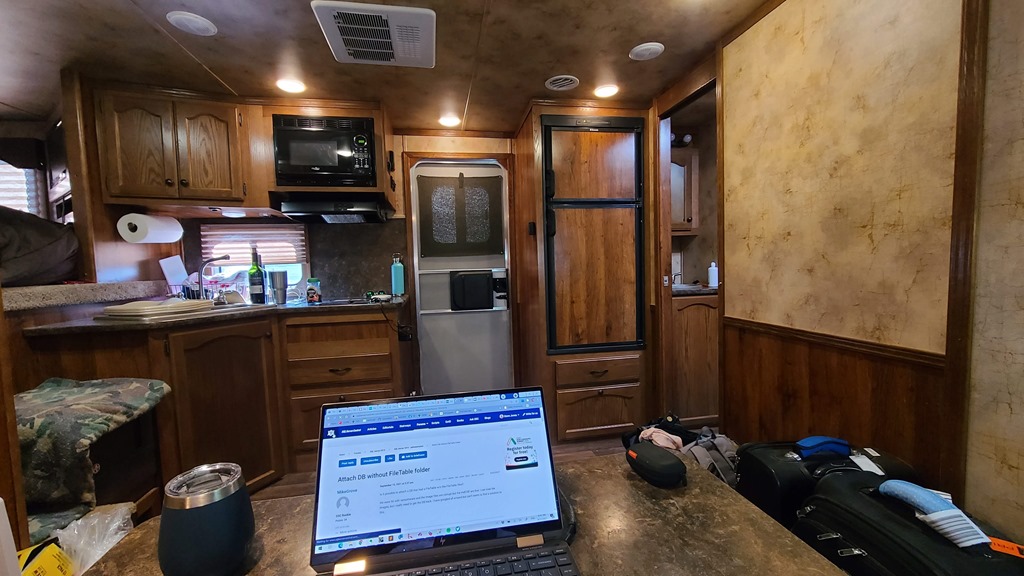
    As I wrote this, I was in Santa Fe with my wife, working in our horse trailer.

    20210917_093602

    I am taking some breaks to go film her competitions, but those are set events and it’s about a 5 minute walk, a 15-20 minute film, and then 5 minutes back. Good breaks, and I’m getting in some movement, but it’s not relaxing. I feel stressed to get back to work.

    However, I saw this tip and decided to try it. I got up, walked outside, and just looked around at the Santa Fe day. This is the view just outside the door.

    20210917_105837

    I decided to just come out a couple times today, stand here, enjoy the warm air, and just look around. No agenda, no purpose.

    It was a nice break. We’ll see if I can do this more when I get home.

  • Daily Coping 23 Sept 2021

    I started to add a daily coping tip to the SQLServerCentral newsletter and to the Community Circle, which is helping me deal with the issues in the world. I’m adding my responses for each day here. All my coping tips are under this tag.

    Today’s tip is to touch base with a friend and share something you appreciate about having them in your life.

    I don’t do this enough. I did earlier in the pandemic, but I’m starting to try and rebuild some of this habit.

    Today I reached out to a friend in Denver and texted back and forth for a few minutes to catch up and schedule lunch. I told them how much I appreciate the little time we get together and the change to share in each others’ lives.

  • Getting Up and Running with Dapr

    I’ve heard about Dapr a few times from developer friends, but hadn’t really understood it that well. I had a webinar coming up, so I decided to spend a bit of time working with it to understand how it might function with an application.

    I went to https://dapr.io/, and saw the basic outline of Dapr is in this video from their site. I also found this getting started video from Donovan Brown.

    What I gathered from this research is that Dapr is really a set of containers that run alongside your app or act as middleware between different components, including state stores. Most of us might think of a state store as a database.

    As a part of my learning, I went through some of the getting started tutorials.

    The Tutorial

    I followed the getting started tutorial. The first thing was to open a cmd prompt with administrative privileges and run this:

    powershell -Command "iwr -useb https://raw.githubusercontent.com/dapr/cli/master/install/install.ps1 | iex"

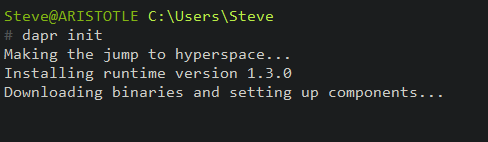
    Next, I needed to update. I ran the “dapr inti” in an elevated cmd line. I love the first part of this:

    2021-09-13 15_58_38-cmd - dapr  init (Admin)

    I already have Docker installed, with Linux containers, so I can quickly continue.

    I need to start an app so that dapr can run as a sidecar. I don’t have an app configured, but I can run this as a blank one, according to the docs:

    dapr run --app-id myapp --dapr-http-port 3500


    The next step is to test this. I am supposed to use curl to post an http request with this command:

    curl -X POST -H "Content-Type: application/json" -d '[{ "key": "name", "value": "Bruce Wayne"}]' http://localhost:3500/v1.0/state/statestore

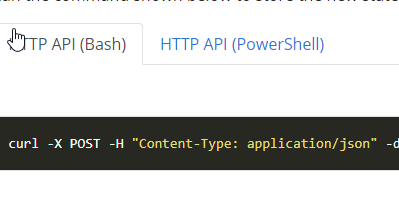
    When I do that, I get an error. Apparently, this doesn’t work in Windows, and really, it’s a bash request. Since I’m using the Windows CMD Prompt, I’m unable to read the instructions.

    2021-09-13 16_12_30-Use the Dapr API _ Dapr Docs

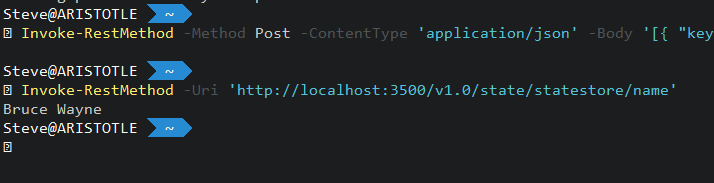
    I need to click the PowerShell option and get the Invoke-RestMethod cmd. When I do that, I see that the state is working.

    2021-09-13 16_13_16-C__Users_Steve

    I can also test this with an interactive connection to Redis. Again, in the tutorial, this lets me get to the data store.

    2021-09-13 16_14_40-cmd - docker  exec -it dapr_redis redis-cli

    That was most of the tutorial. I worked with the config file, and then looked at the Hello, World tutorial. Overall, this was pretty simple and worked well for me.

    My Thoughts

    There is a lot of stuff going on here. The concept of a sidecar, is really a container that gets a network call from your app to do something. Then the sidecar does something else. It’s like middleware, or an app server in the older client/server or 3 tier architecture, but without the tight coupling and dependency. More importantly, this allows dapr to scale out and run as a separate process rather than being part of a monolithic entity.

    More work, but also more consistency and this gest you used to building an API rather than having developers inconsistently connecting things together.

    The goal here is really to think about microservices.  I don’t know if I think that’s the best way to build thing, but it is a trend, I like the cloud native focus, and it’s helpful to understand something about this when talking with developers about pros and cons.

    By the way, after my webinar with Donovan Brown and Mark Fussell, I learned this doesn’t require microservices or containers. It can run in many different software models, but abstracts away a lot of the SDK and API struggled with different technologies.

  • To Inifinity and Beyond With 1=1

    There is one thing that Aaron Bertrand won’t get mad at me for doing and that’s creating an infinite loop with a WHILE (1=1) pattern. He wrote about this recently in a tip, noting that it’s easy to create an infinite loop with code like this, something that never ends well.

    I have purposefully written infinite loops in the past. A long, long time ago Radio Shack would put out TRS-80s on display, and a few of us would type a quick BASIC program to perform some math work on the screen over and over with an infinite loop. It crashed at some point with an overflow, but for a period of time, it would look neat on the screen. Less neat to the salespeople who weren’t always sure how to stop it and demonstrate something else without resetting the machine.

    I’ve also created infinite loops by accident at various jobs. Those experiences have left me a little concerned about any loop that doesn’t have a defined time to end. I usually use a technique similar to Aaron, ensuring the loop ends. If needed, I add a call that can repeat the entire process if more data needs to be updated after the current loop ends.

    There are plenty of people who spotted the error in the code and think they wouldn’t create that problem in their looping code. However, I think few of us work alone on code for an employer, across time. Often someone else comes in to refactor or “improve” our code. The next person that adjusts this loop might join back to the main table and not realize they are creating an infinite loop. You’d hope they’d test this and find the problem, but I continue to see lots of “little fixes” deployed without being tested.

    This is one reason I want a DevOps style process for database code, complete with automated testing. If you write a piece of code, you are responsible for including a test in the pull request so that the CI system can verify your code passes the test. This isn’t a perfect system and it might not prevent all bugs, but at least a test will exist and someone can then check both the code and test and perhaps use the issue as a teaching moment.

    We try and avoid loops in SQL Server, but that isn’t always possible. As with most techniques in programming, we should strive to learn the best ways to use them, know the weaknesses, and avoid building code that has major flaws now. Maybe we also ought to add that we should ensure our code doesn’t lead less experienced developers in the future to make simple mistakes. I’d say the 1=1 looping code does this, and I agree with Aaron; it should be avoided.

    Steve Jones

    Listen to the podcast at Libsyn, Stitcher, Spotify, or iTunes.