Author: way0utwest

  • What’s Your Vision for PASS?

    The PASS election slate was released for 2020. The candidates and their statements are::

    1. Hamish Watson (@thehybriddba)
    2. Joey D’Antoni (@jdanton) – Community Matters–Why I’m Running for the PASS Board of Directors
    3. Jose Rivera –  (@SQLConqueror) –
    4. Lori Edwards (@loriedwards)-
    5. Matt Gordon (@sqlatspeed) – Why I Am Running for PASS Board
    6. Robert Fonseca (@roberto_mct) –
    7. Steph Locke (@TheStephLocke) – I’m Running for the PASS Board

    Not everyone has a statement, though you can read their bios and applications on the PASS Site.

    PASS is at a turning point in the organization, with the pandemic and the move of their main fundraiser to a virtual event. Across the last two years, I’ve been a member of PASS, a supporter, and a critic with my own thoughts and ideas about the organization.

    However, I’m not sure where PASS should go. There is a lot of enthusiasm for the organization from some, and no shortage of criticism. I see both sides, but what I’m not sure about is what I want PASS to be or do in the future. I suspect the organization will change, but into what?

    I’d ask that each of the candidates outline a vision for what PASS should be. Not tactical specifics or complaints, but ideally, what do we want from the organization. What would represent the members and be a great community group?

    Hopefully we’ll see something before Wednesday, when voting starts.

  • Daily Coping 6 Nov 2020

    I started to add a daily coping tip to the SQLServerCentral newsletter and to the Community Circle, which is helping me deal with the issues in the world. I’m adding my responses for each day here.

    Today’s tip is to get outside and observe the changes in nature around you.

    I was sick recently. Worn out, tired, and took a few days off. During that time, I was inside, didn’t go out to the store, and really didn’t work very much. I didn’t really go outside for a couple days, which unusual for me.

    When I felt better, I told my wife I’d help her get a few things done. Walking outside, feeling the change in weather, which has been dramatic a few days this fall in Denver, and seeing animals, was good for the soul. I even took a little video and enjoyed a moment with baby Phoebe.

    This make most things better

  • Daily Coping 5 Nov 2020

    I started to add a daily coping tip to the SQLServerCentral newsletter and to the Community Circle, which is helping me deal with the issues in the world. I’m adding my responses for each day here.

    Today’s tip is to set a goal that links to your sense of purpose in life.

    My purpose in life is to help others. I do this in a few ways, but one of them that I’ve been wanting to tackle is to find a new way to volunteer locally.

    Today, I’m setting a reminder to take my volunteer day from Redgate this year and spend it with a local group.

  • Redgate SQL Data Masker Refreshing Schema

    This is a quick blog to help me remember what is going on with the Data Masker product. This is for the SQL Server version, but I believe the Oracle one is very similar.

    I added a new column to a table, and I had a masking plan already built. How do I get my masking plan to show the new column?

    Here is my masking plan:

    2020-10-27 10_56_12-simpletalk_5_prod_ Data Masker for SQL Server

    I added a new column to the DCCheck table, which is under rule 01-0026.

    2020-10-27 11_00_47-SQL Change Automation - Microsoft SQL Server Management Studio

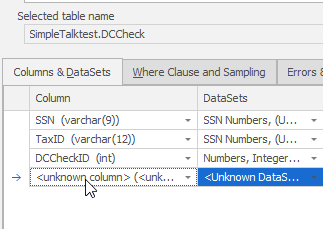
    If I open that mask and add a new column, I get this, but I can’t expand the dropdown. All the columns in this table are masked, and data masker doesn’t know about the new one.

    2020-10-27 10_57_23-Edit Substitution Rule

    I need an updated schema, as the rules do not update in real time. To get this to work, I need to return to the masking plan and double click the controller at the top. This is the schema manager for my set of rules.

    Note: If I mask different schemas, I need different controllers.

    Once this opens, I can see my connection to a database. In my case, I’m building this in dev areas, so it’s pointed to the QA environment.

    2020-10-27 10_57_50-Edit Rule Controller

    If I click the “Tools” tab at the top, I see lots of options, one of which is to refresh.

    2020-10-27 10_57_57-Edit Rule Controller

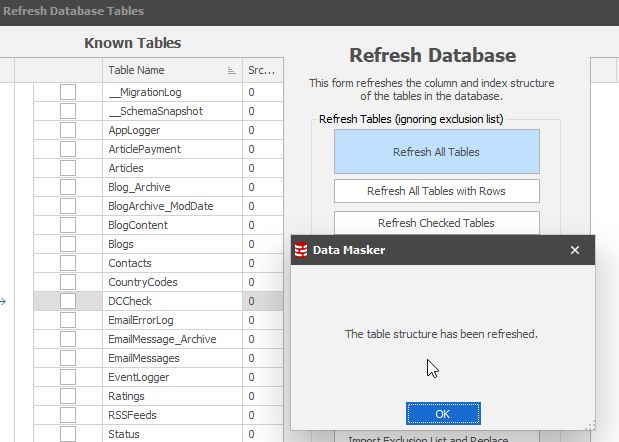
    Once I pick that one, I have a bunch of more options, which gets confusing, but I can click the “refresh all tables” at the top, leaving everything alone. Once that’s done, I get a note.

    2020-10-27 10_58_12-

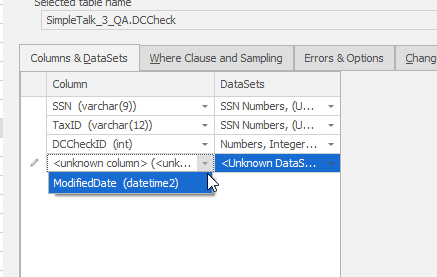
    Once I get this, I can return to my rule, and when I add a new column, and I see it listed.

    2020-10-27 10_58_29-Edit Substitution Rule

    This isn’t the smoothest flow, but data masker isn’t something that is likely to be in constant use. For many of us, adding new schema items is relatively rare, so we can adjust our plans as needed.

    The one good thing is that I can easily find where I need to add a column, as opposed to digging through a number of .SQL scripts.