Author: way0utwest

  • Confidential VMs

    Ever since we started to offload workloads to hardware that we didn’t physically control, there have been security concerns. I remember when this started with application service providers and web workloads. This has continued to be an issue as more and more types of workloads have moved to cloud vendors and other hosting providers.

    Google is trying to ameliorate some of the concerns by offering customers confidential VMs. These are special types of VMs, using encryption and hardware capabilities to protect the workloads from any unauthorized access. I don’t know to what extent this practically protects a workload compared to a non-confidential VM, as the details are a bit confusing. I’m sure there is some extra protection, but the weak point in most cases here is still likely the humans that use credentials to access the VM. I’d suspect a determined attacker would try to hack the sysadmin and their laptop rather than the VM itself.

    In any case, Google is trying to ensure the added encryption doesn’t cause any workload degradation. Hardware can likely help her, but I’m not sure that you can perform encryption and decryption without using more resources. There might be minimal impact, but there has to be some resource impact. At least compared to a non-confidential VM.

    I’m glad there is research and work still happening to find ways to improve security for systems that we might no longer control. I think that’s increasingly the trend. Whether you go with a cloud vendor like AWS, Azure, GCP, etc., or you look to host with a Rackspace like provider, more and more of our infrastructure is being outsourced, and I don’t know that the trend will reverse itself anytime soon. Even if it does, the more we can provide security hurdles against unauthorized access, the better.

    Steve Jones
    Listen to the podcast at Libsyn, Stitcher or iTunes.
  • Daily Coping 3 Aug 2020

    I started to add a daily coping tip to the SQLServerCentral newsletter and to the Community Circle, which is helping me deal with the issues in the world. I’m adding my responses for each day here.

    Today’s tip is to reset yourself for the month ahead with a goal for the next 30 days.

    I can’t believe it’s August and we’re still in a semi-lockdown. When this started in Feb/Mar, most people, myself included, thought we’d get back to a more normal existence than we have now by this time.

    In any case, as I struggle with the longevity of this, and the sameness, I know I need to focus on myself, try new things, and find ways to cope. With that in mind, I’m going to reset a few things in life.

    First, I’m going to try and build a more steady schedule that includes workouts during the day to break up things. I’m also going to do some walking as my dog heals by taking her to different places away from our property. There is a large dog park, and I think the time away will do her, and me, good.

    Second, I’m doing to try the Pomodoro technique for working, focusing for 25 minutes and then taking a break. With the dog and distractions, I’m not sure 5 minutes away is enough, but I’m going to try and work on deeper focus for these times, then a break, then get back to it. I’ll set aside some of these periods to check social media for the SSC posts and to interact a bit with people.

    We’ll see if this helps me reset to this new way of working.

  • Research on the Changing Workplace

    One of the things that I have admired about Microsoft is their desire to invest in research and try to learn more about subjects that relate to their core business. Microsoft Research has a number of fascinating projects underway all the time, and I enjoy browsing the site once in awhile.

    However, they don’t just limit research to this group. They are a data driven culture, and it seems they are constantly using metrics and instrumentation to measure how the entire business works and to glean insights into how they might work better. Recently I saw a report on Microsoft’s new work-from-home workforce, driven by a group that helps companies better work with their own employees.

    Work has changed for many people in the world in 2020, and very dramatically for some. At the same time, many companies have had to drastically alter they continue to do business, recognizing that many technical employees could work from home and be as effective as they are in an office. Microsoft has analyzed their own data, and continue to do so as they seek to understand how the pandemic has changed things for employees. They do find some longer work days, more networking, and more social events.

    Interestingly, meetings are slightly shorter, which is something I’ve noticed as well. It’s almost as if the effort to walk to a conference room means people have invested more in spending an hour there. With remote meetings, I find more people are willing to cut short a meeting and end it early when they can. The downside is that there are more meetings, at least for this group.

    The importance of management is something they noticed, as well as a larger burden on managers that they must deal with as they have more meetings with employees. I’ve actually gone to every other week meetings with my manager for a time, though I’m not sure I like that. I’ll give it another month and then see what I think. I appreciate the extra work for managers, but I also know that managers should be enabling employees, which should be a big part of their job. If that means a bit of hand holding, I think that’s important.

    The two most interesting things in the piece to me were that some of the authors’ clients are planning on a two year work from home, and that work-life boundaries are blurring, especially on weekends. For the latter, I think we sometimes find work to be an anchor, and we may need to spread our 40-ish hours across 7 days to deal with the challenges of family during the week. All the challenges of children, maybe other adults and meetings, etc. can impact when we work. The one thing we certainly need to avoid is having 40-ish hours become 50-ish.

    For the former, if you plan to be at home for two years, why not just make that forever? I’d think the adaptations employees, departments, and workflows make after that amount of time might not be worth undoing.

    Steve Jones

    Listen to the podcast at Libsyn, Stitcher or iTunes.
  • Office Upgrade – A Secret Lab Chair

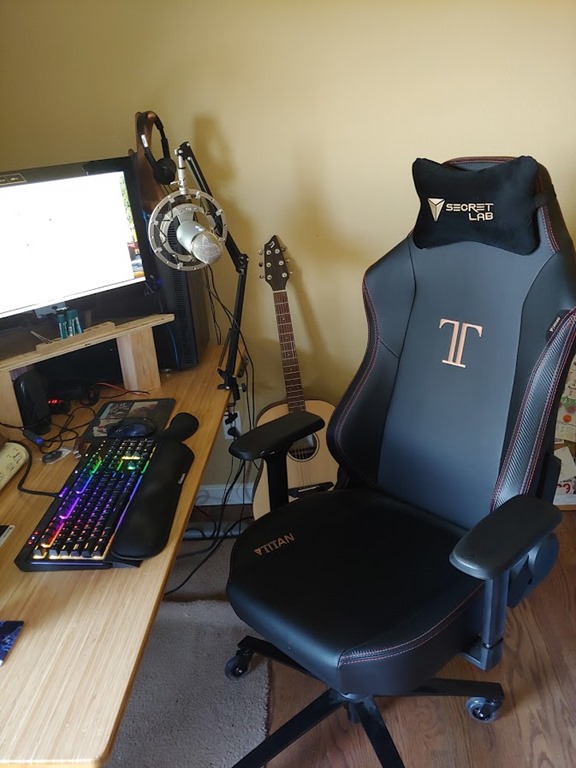
    Last year I wandered over to Glenn Berry’s house for some lunch and a chat. While I got to see his home brewing setup and the latest in computer hardware, one of the neat things that stood out was a Secret Lab chair. It’s a nice looking chair, but when I sat in it, it put my $79 Office Depot chair to shame.

    I thought about it for a few months, but since I travel a lot, I wasn’t overly concerned. Then the pandemic and lockdown hit, and I was at my desk every day, and likely for the foreseeable future. I decided my back could use a little more support and an upgrade.

    I looked through the list and decided on a Titan chair. I’m 6’, 225lbs, and this seemed to be the chair to get. I ended up with a PU Leather version, fairly plain, without any special designs. There are some neat ones, but I’m a simple guy. Plus, no one sees this and the $50 for some special edition would make my wife just laugh at me every day.

    Here’s the chair in my office.

    20200717_125910

    Since I got this a few months ago, it’s more comfortable to sit in and it supports my back well. I like that I can easily adjust the back tilt, as I like to sit up straight most of the time, but I can lower it for calls or more relaxed situations where I’m not typing.

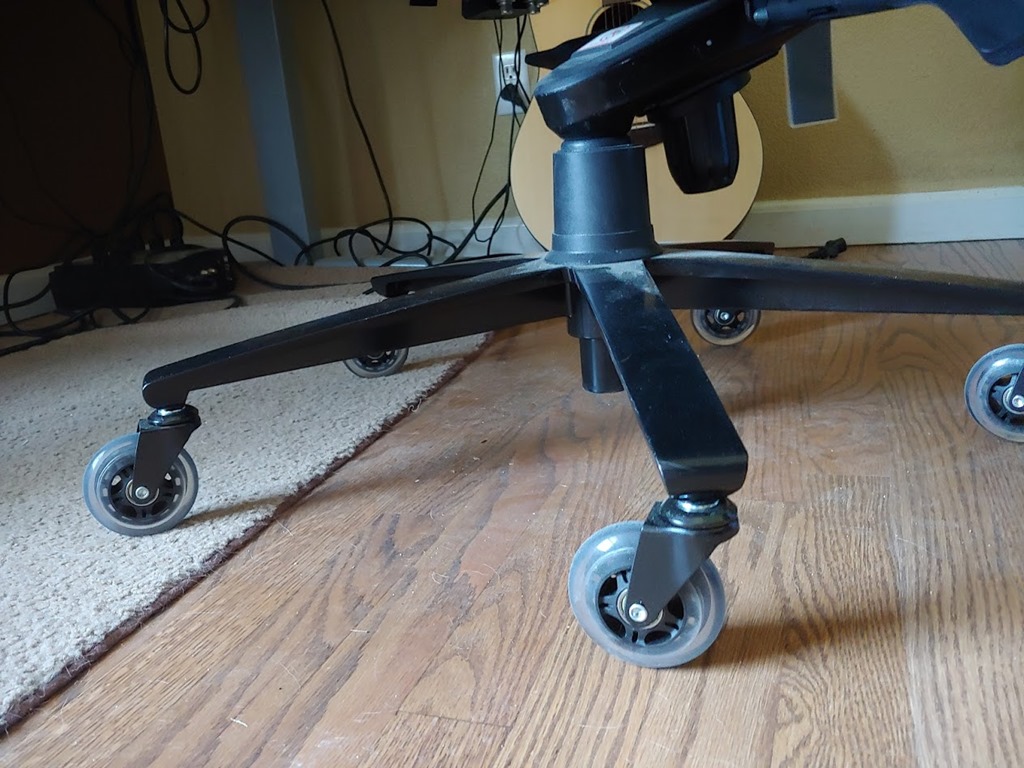
    I even upgraded it with some rollerblade-like Oasis wheels recently after we refinished our floors. These are fantastic and the chair now glides across the floor and carpet without any snags.

    20200717_125916

    This is a nice home office upgrade. It’s not cheap, but it is something to think about if you plan on spending a lot of time at your desk. Your boss might even cover the cost as an investment in you. It never hurts to ask.

    I got my chair for $379 early this year, and you can, too. They’re $399 now, but you can use this link to get $20 off and start enjoying a better experience at your desk.