Author: way0utwest

  • Reviewing 2019 Career Goals

    According to this post, I rate 2019 as a Failure. Of the books I planned to read, I read 2. I started 2 others, but they’re in progress, even right now.

    This post is a look at what happened and why, along with a few ideas on what to do better in 2020. Look for the new goal post next week.

    The Challenges of 2019

    This is really a set of excuses, or at least it sounds that way to me. Ultimately, I just didn’t focus on my career very well. I’m somewhat hoping that doesn’t matter, but I’ve tried to live by “hope for the best, plan for the worst.”

    I started out strong with my reading, going through these books 3-4 times a week at night, practicing with some code. It was a nice break after work or after the gym to learn something. Despite coaching and being busy with my family, I was making progress.

    That failed in March for a couple reasons. One, I was struggling with a project in my life that needed time and two, I committed to deliver some content for another vendor. Those items created a lot of stress, and reduced the energy I had for career time outside of work.

    Add to that the amount of travel I did in 2019. I spent a lot of time on planes, going over 140,000 miles from April to November. While one would think that sitting on a plane is a good time to read, it’s not a good time to learn for me. For a number of these topics, I need to be in front of a PC, and often on a plane, I don’t. I want to relax and escape. If I work, it’s because I need to, and then I’m writing or reviewing something for work.

    I had planned to skip a few months of reading work, and even wrote about this. However, I never got back to this and I got used to dismissing my reminders to check goals. That was a mistake on my part.

    I also got distracted with other technologies, doing more work with containers last year, which is OK, but it wasn’t part of my plan, and more importantly, I didn’t update the plan.

    Doing Better in the Future

    How can I do better in 2020? That really starts for me this week, with my return from a sabbatical.

    First, I need to keep a plan handy. This year, I’m going to put the plan in my reminder appointment, and that way I can review it each time the reminder comes up. I’ll also be able to adjust it and write a post that reflects the updates.

    That’s the second thing. Each update needs to include the plan and progress indicators. I’ll do that, if for no other reason than to understand where I am. I don’t mind not making the goals, but I want to know and decide to not make them for good reasons.

    I also need to account for the fact that I am a busy person and some portion of my schedule is out of my hands. I think aiming for 4 books a year is realistic for me, with 6 being the likely goal. I do get busy, and I realize that part of why I love reading is that it takes me away from life. I need to account for the need to spend time reading non-technical books.

    I also think I need to better think about the things I do outside of work and career. I have a lot of interests, and those things need time. That means less learning for me.

    I also think about the need to cement some of this learning in other areas, so I’d like to actually add in some project work that uses skills I’ll work on. I think that’s important, and like many of you, my work doesn’t always give me the chance to use new skills. To ensure I do capture some learning, I likely need to actually build something.

    I’m not sure how things will go, but I plan on creating goals now and then writing an update every month.
  • Reviewing Your Past Efforts

    It’s about the start of a new year for me now. I know, it’s late February, and we’re almost a sixth of the way through the year, but I’ve been on sabbatical. In fact, with planning for the break, I’ve really missed almost two months of work at this point. I deliberately did not make any resolutions or planning at the end of 2019, since 2020 wouldn’t really start for my career until about now.

    Now is the time to plan, and I will do some writing on my blog for the things I want to tackle, but I also want to think about my plan. The main reason for this is the SQLskills newsletter from Jan 7 (#214), in which Paul Randal wrote an interesting editorial on the start of the New Year. There are a few things in the newsletter, but one of the items was about resolutions and planning for the new year, but by starting the process while looking at the previous year.

    I wrote about learning goals last year, and then blogged a bit about them throughout the first third of the year. I then pivoted a bit, with an outside commitment that ate up a bunch of my personal time. Despite having a reminder in my calendar, I never got back to the books I’d planned on reading.

    2019 Rating : Failure

    I’ll do more of a review on my blog, and then planning, but the important things I got from Paul’s note is that I didn’t go a good job of not only reviewing last year, but also I didn’t end up reviewing it periodically after a few months. Not only did my goal fail, but my review of my goal failed.

    There’s a lot to be gained from some self-analysis, and maybe even a review of your analysis by a spouse, partner, mentor, or close friend. In my case, I ended up doing more speaking and traveling than I’d expected, didn’t even complete my commitment, focused my reading time on fiction and escaping from life, and really ignored a bit of my career goals.

    I don’t know if I’ll do better this year, but just writing this and thinking about the process will help me do something different. Hopefully you are keeping up with your goals, but if not, maybe you need a mid year review, as I’m doing now.

    Steve Jones

    Listen to the podcast at Libsyn, Stitcher or iTunes.

  • Data Orchestration

    We continue to deal with larger and larger data sets all the time. In fact, it seems that most people find themselves outgrowing the capabilities of some of their OLTP databases, often RDBMS stores, and need to upgrade hardware or re-architect software. It doesn’t matter if you have a 100GB database on a few cores or 10TB on dozens of cores, there is often a need to upgrade to meet our workload demands.

    In addition to the transactional needs, there is a growing demand for reporting and analysis workloads. Some people use a separate warehouse, and some want to just query data where it is. Certainly ETL processes and platforms have grown tremendously over the last few decades for those that want to implement the former process, but there is plenty of demand for the latter. In fact, I’m amazed how many customers have inquired if Redgate’s SQL Clone product will enable them to do this and spread their workload to other systems (it’s not designed for this).

    I’ve been thinking that with SQL Server 2019 we will start to access data where it lives, not move it to another place we want it. To me, this is more of what future data orchestration might involve. I ran across an article that takes a slightly different approach, thinking AI and other products will help better move data around, and perhaps that’s true, but I do think more and more we want to query data where it lives, and use larger, distributed compute platforms to do this.

    The scale out capabilities of SQL Server 2019, with the separation of compute and storage in Big Data Clusters, is a huge change that I think will be the future for many of us that look to meet reporting needs. The ability to grow hardware to match the workload needs is huge. This alone is a good reason to think about doing this in a hybrid or public cloud scenario.

    Of course this doesn’t come cheap, easy, or quick. There is work to be done to evolve systems, but it is an area I think is worth experimenting in during the coming year. I bet many companies would be interested in some PoC work here to determine how to better meet the reporting requirements of larger data sets. Perhaps this is something you suggest to someone in your organization.

    Steve Jones

  • Schema Filtering in SQL Prompt

    I love SQL Prompt, and I’m regularly impressed by the enhancements our teams continue to make in the product. One item that I found interesting recently was schema filtering. This post takes a quick look at this feature.

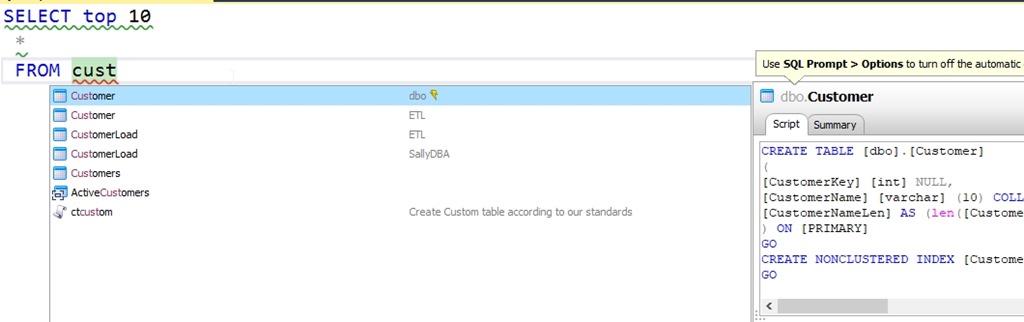
    If I go to look for an object, intellisense is amazing. In this case, I’ll type “SSF <tab> cust”. I’ll see this:

    2020-02-27 15_03_37-ObjectDefinitionBox

    There is the customer table first, and as we see on the right, this is the dbo.customer table. Below this, we see there is a Customer table in the ETL schema and two CustomerLoad tables, which are in two different schemas.

    I might actually be working in one of those schemas. Let’s say I’m an ETL developer. I don’t want to accidentally be coding against dbo.Customer when I want to use ETL.Customer. Certainly I might need each one, but in this case, I might just care about loading stuff into the ETL schema and want to work there.

    I can add filtering in SQL Prompt by going to the Options and then the Connections section. As you can see below, I have a drop down for schemas.

    2020-02-27 15_05_03-SQL Prompt – Options

    The default is all schemas, in all databases, but I can change this. I can set a filter. In this case, I’ll choose the “Only load…” option. When I do this, I see a generic wildcard here.

    2020-02-27 15_06_45-SQL Prompt – Options

    I see schemas for all servers and databases. However, I can set filtering for a specific server and database. Or a database on all servers, or certain servers, but all databases. Here I’ll just edit the schema.

    2020-02-27 15_06_05-SQL Prompt – Options

    This will change behavior to only show the ETL schema in all databases on all servers. Now when I type the same thing, I see the ETL schema objects only.

    2020-02-27 15_08_32-ObjectDefinitionBox

    Good, right? Plus, the refreshes and loads are faster. The downside here is that in another database, I see no tables.

    2020-02-27 15_09_14-CandidateList

    I can fix this, and just look in that one database by entering the database name. I’d suggest you set this by server and database, just so you are clear what behavior is happening, but it’s up to you.

    This was a request from developers that do work in some large schemas, and only want to see those objects. It’s been added to SQL Prompt, so update today, upgrade, or download a trial and give it a try.