Author: way0utwest

  • T-SQL Tuesday Live–31 Mar 2020

    I’m hosting another live T-SQL Tuesday event tomorrow, which is really just a casual video meeting for anyone that wants to join and take a break from work, life, or anything else.

    In this time of difficulty, I think this is a great coping mechanism that might help you keep in touch with the community. I know it’s certainly good for my mental health.

    This week the theme is: Securely connecting

    Most of us are remote now, and we’re often at home. This can prevent some challenges. Networking aside, security is still a concern. What you are doing? Jump boxes, rdp to servers or your desktop at work or something else?

    We’ll start with this theme, but we’ll see where the conversation goes. We’ll also do a health check with people, talk about anything good that’s happened?

    I’ll use Zoom with this meeting URL: Removed (see the most recent post for the URL)

    The date: Tuesday, March 24, 2020, and time:

    • 13:00MDT
    • 15:00EDT
    • 19:00UTC

    Just an hour. Jump on, say hi, give us your thoughts, problems, or just listen.

  • Looking Back

    Things always go wrong. Those of us that build or operate software know that we will have failures at times. These could be while applying a patch, deploying a new system, during a spike in traffic, or perhaps just a mechanical failure somewhere. Most of us fix things and move on, as there’s always plenty of other work.

    In a few organizations in which I’ve worked, whenever we had a large issue, we had a retrospective. I think we defined large issue as a VP or CTO become involved, but in any case, we sometimes had to have a retrospective meeting on why things went wrong. Usually these weren’t blameless, or psychologically safe. They didn’t end up being good meetings, nor did they serve to prevent future problems.

    In today’s software world where we want to adopt DevOps and build better software, we need retrospectives, both when problems occur, but also periodically as we finish major portions of work. We want to learn and become better at building software, so it pays to spend some time actually assessing how we work as a team. I ran across a post from Thoughtworks that talks a bit about how to make these better.

    I don’t completely agree with the post, and I certainly think that a retrospective won’t solve all the issues we’ve had. Nor should it. I really see the growth and adaptation of a software team as taking time. When we find lots of problems, the key to making the software development process better is to decide on something to change and try it.

    I’m all for an evolutionary approach for a couple reasons. The first is that change is hard and disruptive. If we can change just one or two things, then most of our work continues forward. I don’t want a new set of coding techniques and a new build process at once. The second thing is that any change we make might have other consequences. We see this constantly in the world. We try to alter one thing and other parts of our process change. If we change too much at once, we might introduce lots of other problems.

    Let’s grow and change in small ways, but do so on a regular basis. This is both for the way we work as a team and get our software to customers, as well as the techniques we use to write code. Let’s code better, refactor older code when we can, and learn to improve our skills and techniques each month. We’ll have a healthier code base over the long term and a healthier team as well.

    Steve Jones

    Listen to the podcast at Libsyn, Stitcher or iTunes.
  • Daily Coping 30 Mar 2020

    I’ve started to add a daily coping tip to the SQLServerCentral newsletter, which is helping me deal with the issues in the world. I’m adding my responses for each day here.

    In the newsletter today, I wrote this: Share what you are feeling and be willing to ask for help.

    This is a tough one for me. I’m fiercely independent and hate asking for help if I can do something. I should be able to handle this myself. I’m not sick, my family isn’t sick. No one I know is that sick, and only a few are a little sick. I only personally know of two people that have lost their jobs.

    However, this pandemic has affected me. It’s all over the news, it’s heartbreaking and maddening.

    I am sad for those that have lost someone or are suffering.

    have sympathy for those losing their jobs, especially low income workers.

    I’m maddened by those that haven’t taken this seriously.

    I’m sharing here, and I’ve shared some of this with my wife and kids. We commiserate a bit and get things off our chests. I also have learned to ask my wife for help, to listen, to hold me, to just be there. It’s helpful, though this is still hard.

    I’m working to close off from news, but not from people, which is a challenge. I’m working to keep my temper and emotions in check. I’m asking you to help me do that. If I’m upset, I’d appreciate a gentle reminder that things will be OK.

  • Going Dark in SSMS

    I haven’t been a big fan of dark mode in many tools, but I’ve been giving it a try in some applications as my eyes age. I decided to try it in SSMS, which wasn’t as easy as I’d hoped.

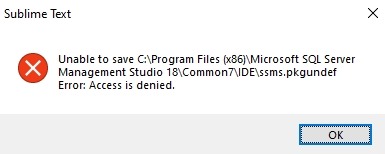
    I had heard this was coming, then found some notes it wasn’t coming, and eventually landed on Pinal Dave’s blog that shows how to enable it. I followed the instructions, but had this issue in Sublime Text.

    2020-03-19 11_09_26-Sublime Text

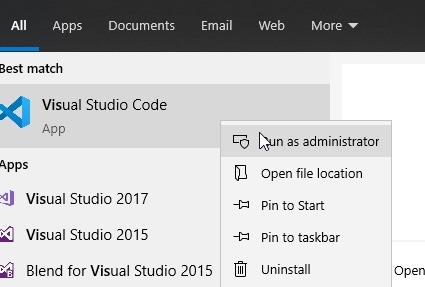
    That’s easy to fix. In my case, I didn’t want to restart Sublime in administrator mode, nor did I want to mess with permissions. I decided to use VS Code, since that’s the other default program that appears with many files. I started it in admin mode:

    2020-03-19 11_09_48-SQLQuery1.sql - Plato_SQL2017.sandbox (PLATO_Steve (65))_ - Microsoft SQL Server

    I accepted the UAC dialog and then clicked File | Open. From there, I pasted in this path: C:\Program Files (x86)\Microsoft SQL Server Management Studio 18\Common7\IDE

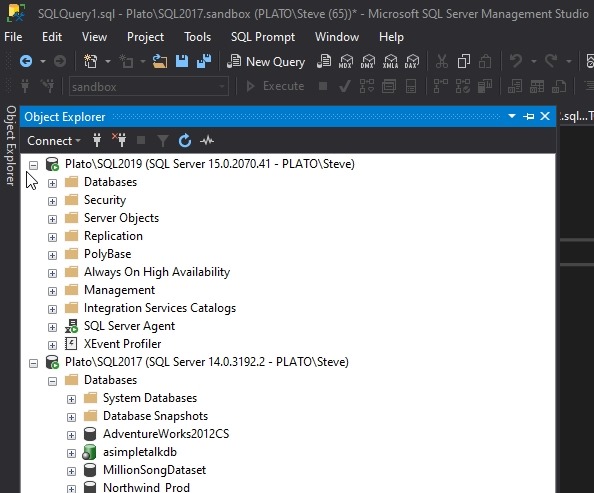
    I picked ssms.pkgundef and opened it. Uncommented the last line for the dark theme and saved the file. Then I restarted SSMS and:

    2020-03-19 11_11_39-SQLQuery1.sql - Plato_SQL2017.sandbox (PLATO_Steve (65))_ - Microsoft SQL Server

    Voila!

    ish. Not everything is dark.

    2020-03-19 11_12_01-SQLQuery1.sql - Plato_SQL2017.sandbox (PLATO_Steve (65))_ - Microsoft SQL Server

    This one is particularly annoying to me.

    2020-03-19 11_12_12-SQLQuery1.sql - Plato_SQL2017.sandbox (PLATO_Steve (65))_ - Microsoft SQL Server

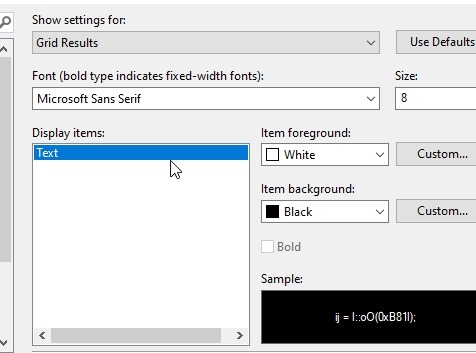
    I did try to alter some items, such as my grid results:

    2020-03-19 11_19_34-Options

    This somewhat works:

    2020-03-19 11_20_54-SQLQuery1.sql - Plato_SQL2017.sandbox (PLATO_Steve (64))_ - Microsoft SQL Server

    I’ll stick with it for a bit, but I’ll have to see how much the white sections bother me, especially with the Object Explorer.

    I don’t know why this is so hard, or why it’s a low priority. When I look at some of the feedback and posts, this is upsetting to plenty of people and it would seem like something that shouldn’t be hard to fix. However, I know this is a thick, old client, and perhaps no one wants to touch the code? I’ve certainly seen that before in other orgs. Perhaps Microsoft isn’t so different.