Author: way0utwest

  • The DBA’s Twelve Days of Christmas

    On the first day of Christmas my new DBA sent to me
    A table with a primary key

    On the second day of Christmas my new DBA sent to me
    Two Foreign Keys, and
    A table with a primary key

    On the third day of Christmas my new DBA sent to me
    Three stored procs
    Two Foreign Keys, and
    A table with a primary key

    On the fourth day of Christmas my new DBA sent to me
    Four database roles
    Three stored procs
    Two Foreign Keys, and
    A table with a primary key

    On the fifth day of Christmas my new DBA sent to me
    Five execution plans
    Four database roles
    Three stored procs
    Two Foreign Keys, and
    A table with a primary key

    On the sixth day of Christmas my new DBA sent to me
    Six unnested views
    Five execution plans
    Four database roles
    Three stored procs
    Two Foreign Keys, and
    A table with a primary key

    On the seventh day of Christmas my new DBA sent to me
    Seven maintenance jobs
    Six unnested views
    Five execution plans
    Four database roles
    Three stored procs
    Two Foreign Keys, and
    A table with a primary key

    On the eighth day of Christmas my new DBA sent to me
    Eight tables to remove
    Seven maintenance jobs
    Six unnested views
    Five execution plans
    Four database roles
    Three stored procs
    Two Foreign Keys, and
    A table with a primary key

    On the ninth day of Christmas my new DBA sent to me
    Nine unit tests
    Eight tables to remove
    Seven maintenance jobs
    Six unnested views
    Five execution plans
    Four database roles
    Three stored procs
    Two Foreign Keys, and
    A table with a primary key

    On the 10th day of Christmas my new DBA sent to me
    Ten database containers
    Nine unit tests
    Eight tables to remove
    Seven maintenance jobs
    Six unnested views
    Five execution plans
    Four database roles
    Three stored procs
    Two Foreign Keys, and
    A table with a primary key
    On the 11th day of Christmas my new DBA sent to me
    Eleven Extended Events
    Ten database containers
    Nine unit tests
    Eight tables to remove
    Seven maintenance jobs
    Six unnested views
    Five execution plans
    Four database roles
    Three stored procs
    Two Foreign Keys, and
    A table with a primary key
    On the 12th day of Christmas my new DBA sent to me
    Twelve tickets already closed
    Eleven Extended Events
    Ten database containers
    Nine unit tests
    Eight tables to remove
    Seven maintenance jobs
    Six unnested views
    Five execution plans
    Four database roles
    Three stored procs
    Two Foreign Keys, and
    A table with a primary key

  • Double Check Your Math

    Performing calculations in our applications is important. In fact, if we do any sort of math, we really want to ensure that our results are what we expect. That seems obvious, but I’ve run into applications where the code deployed didn’t quite calculate things as expected. In fact, there are all sorts of cases where someone was using a type of rounding that didn’t work well. You can read about a number of stories in this article, some of which were very expensive.

    While much of the work of calculations is done in application software, there are powerful capabilities in a database platform that are useful, especially when working with more than a row of data. It seems that even when developers want to treat an RDBMS as a storage location, they still will manipulate data with SQL functions to get results from a query that are easier to work with in their application.

    Some of us might use FLOOR(), CEILING() , ROUND(), or other mathematical functions in our work. We should be sure this is what the actual specification calls for, and that we are performing the calculations correctly. After all, mathematics in computers are often not as precise as we’d like them to be, or perhaps, not as we’d expect them to be.

    This is one reason I think you should have database testing. Clients have had the wrong calculations in production, sometimes for years. When we make switches based on values, or we perform a calculation designed to somehow round or trim a number, we may do so incorrectly. I’ve seen incorrect discount rates, tax calculations, and more in production systems.

    Even if you don’t want to write tests for most of your database query code, you ought to at least ensure that any math calculations have some testing around them that documents the expected behavior with easy to use numbers. This might not prevent mistakes, but it does give you a way to explain what you expect to happen in the code, verify it works, and show the input and output to a client. Perhaps their set of eyes on your test and test data will prevent silly mistakes in your math algorithms.

    Steve Jones


  • Backwards Compatible Symmetric Keys in SQL Server 2017+

    I discovered recently that there was a change made in SQL Server 2017 to the way that symmetric key passphrases are hashed. There’s a KB article that notes the fix, but basically the passphrases used to be encrypted with SHA1. That’s cryptographically insecure, so the algorithm was updated to SHA2.

    This is a problem, and can cause some issues. I’ll show the issue and then how to get around it.

    No More Decryptions

    Let’s say I have a SQL Server 2016 instance and database. I run this code:

    CREATE SYMMETRIC KEY SalaryKey
    WITH ALGORITHM = AES_256
    , IDENTITY_VALUE = 'Salary Protection'
    , KEY_SOURCE = 'Protect this from hackers'
    ENCRYPTION BY PASSWORD = 'SomeReallyStr0ngP@ssword';
    GO
    OPEN SYMMETRIC KEY SalaryKey DECRYPTION BY PASSWORD  = 'SomeReallyStr0ngP@ssword'

    UPDATE dbo.Employees
      SET EncryptedSalary = ENCRYPTBYKEY(KEY_GUID('SalaryKey'), CAST(Salary AS VARCHAR(50)))
    GO

    I can easily decrypt this data:

    2019-12-05 12_12_54-SQLQuery2.sql - Plato_SQL2016.sandbox (PLATO_Steve (66))_ - Microsoft SQL Server

    Let’s now say I move this data to SQL Server 2017. It could be a restore, some ETL, replication, etc. In any case, I have the data there.

    Now, if I drop the symmetric key, or it doesn’t exist, I need to recreate it. These are supposed to be deterministic, which means I can run the code above and get the same key. I’ve done this on SQL 2014 and SQL 2016 databases, and I can decrypt data encrypted in another database if I use the same code to create the key. Let’s try this. I’ll run this code:

    CREATE SYMMETRIC KEY SalaryKey
    WITH ALGORITHM = AES_256
    , IDENTITY_VALUE = 'Salary Protection'
    , KEY_SOURCE = 'Protect this from hackers'
    ENCRYPTION BY PASSWORD = 'SomeReallyStr0ngP@ssword';
    GO
    OPEN SYMMETRIC KEY SalaryKey DECRYPTION BY PASSWORD  = 'SomeReallyStr0ngP@ssword'
    SELECT top 10
      e.EmpID
    , e.EmpSSN
    , e.Salary
    , CAST(DECRYPTBYKEY(e.EncryptedSalary) AS VARCHAR(50)) AS DecryptedSalary
    , e.EncryptedSalary
      FROM dbo.Employees AS e
    GO

    I get this:

    2019-12-05 12_15_24-SQLQuery1.sql - Plato_SQL2017.sandbox (PLATO_Steve (54))_ - Microsoft SQL Server

    Why do I get NULL? SQL Server can’t decrypt this data, so it returns a NULL This isn’t supposed to happen, but the hash change caused this.

    Let’s fix this.

    A Trace Flag

    The KB article linked above mentions that trace flag 4631 will fix this. Let’s try it. I’ll run this code:

    DROP SYMMETRIC KEY SalaryKey
    DBCC TRACEON( 4631)
    GO
    CREATE SYMMETRIC KEY SalaryKey
    WITH ALGORITHM = AES_256
    , IDENTITY_VALUE = 'Salary Protection'
    , KEY_SOURCE = 'Protect this from hackers'
    ENCRYPTION BY PASSWORD = 'SomeReallyStr0ngP@ssword';
    GO

    Now, let’s open the key and requery:

    2019-12-05 12_19_32-SQLQuery1.sql - Plato_SQL2017.sandbox (PLATO_Steve (54))_ - Microsoft SQL Server

    Hmm, this doesn’t seem right. With a little experimentation, I discovered the trace flag needs to be global, or it can be enabled instance wide. Let’s do that.

    DROP SYMMETRIC KEY SalaryKey
    DBCC TRACEOFF( 4631)
    DBCC TRACEON( 4631, -1)
    GO
    CREATE SYMMETRIC KEY SalaryKey
    WITH ALGORITHM = AES_256
    , IDENTITY_VALUE = 'Salary Protection'
    , KEY_SOURCE = 'Protect this from hackers'
    ENCRYPTION BY PASSWORD = 'SomeReallyStr0ngP@ssword';
    GO

    Now we query, and this works.

    2019-12-05 12_21_38-SQLQuery1.sql - Plato_SQL2017.sandbox (PLATO_Steve (54))_ - Microsoft SQL Server

    Most people don’t deal with column encryption, but if you do, be aware of this.

  • Using Parameters in #SQLPrompt

    I am a big fan of snippets in SQL Prompt, often using them in demos to quickly get code written. However, I’ve liked the idea of snippets and templates for a long time. These are great time savers, and they can dramatically improve productivity and code quality.

    How? If you have certain constructs in your environment that developers struggle to remember or implement, make a snippet. This makes things very easy and consistent. It’s a great way to help younger developers learn as well.

    Here’s an example.

    Create Primary Keys

    I have worked with no shortage of developers that build tables like this:

    CREATE TABLE Shipper
    ( ShipperKey INT NOT NULL
    , ShipperName VARCHAR(100)
    , ShipperAddress VARCHAR(100)
    , ShipperCity VARCHAR(100)
    , ShipperRegion VARCHAR(20)
    , CountryCode CHAR(3)
    )
    GO

    This isn’t a great design, but more importantly, deploying this results in a heap. Perhaps another issue is that there are no indexes, which isn’t usually a good idea.

    A better idea might be a table like this:

    CREATE TABLE dbo.Shipper
    ( ShipperKey INT NOT NULL CONSTRAINT ShipperPK PRIMARY KEY
    , ShipperName VARCHAR(100)
    , ShipperAddress VARCHAR(100)
    , ShipperCity VARCHAR(100)
    , ShipperRegion VARCHAR(20)
    , CountryCode CHAR(3)
    )
    GO
    CREATE INDEX Shipper_Region ON dbo.Shipper (ShipperRegion)

    Now we can’t template all of this, but we can do a few things. I’ll show you how Prompt facilitates this.

    A Customized Snippet

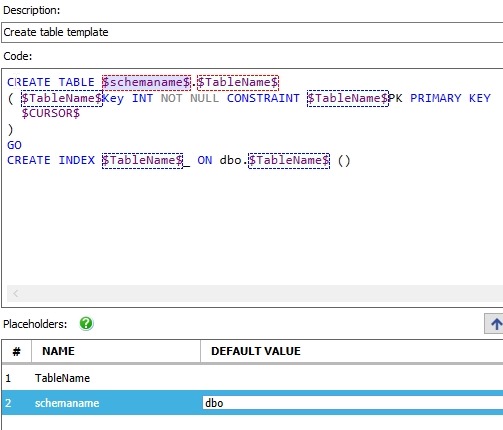
    Let’s start with the basic code. I know I need a table name, I’ll want a PK, and I want to help someone add at least one index. With that in mind, I’ll build this snippet code. Note that I’ve replaced the table name with a parameter. I did this with a search and replace in the script.

    CREATE TABLE dbo.$TableName$
    ( $TableName$Key INT NOT NULL CONSTRAINT $TableName$PK PRIMARY KEY
       $CURSOR$
    )
    GO
    CREATE INDEX $TableName$_ ON dbo.$TableName$ ()

    You can see this in the SQL Prompt Snippet Manager. Note that the parameter (or placeholder) has been inserted in the bottom by Prompt.

    2019-12-10 21_07_39-SQL Prompt - Create New Snippet

    One other thing I might do is add a schema placeholder like this:

    2019-12-10 21_08_35-SQL Prompt - Create New Snippet

    Note that I’ve added a default for schema, as this is usually dbo. I’ll also click the up arrow to the right to ensure schema is entered first.

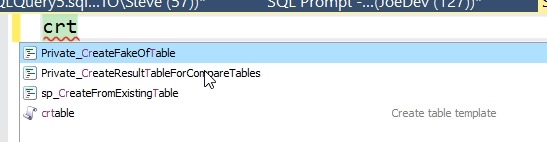
    Now, let’s use this. I’ll save this and close the options. Then in a new query window, I’ll type my snippet beginning as “crt”. I see this:

    2019-12-10 21_09_41-CandidateList

    My snippet is listed. I can select it and I’ll then see this code. See how Prompt has inserted my snippet, but already highlighted the schemaname parameter and given me the intellisense of the schemas in my database.

    2019-12-10 21_11_28-SQLQuery4.sql - Plato_SQL2017.sandbox (PLATO_Steve (64))_ - Microsoft SQL Server

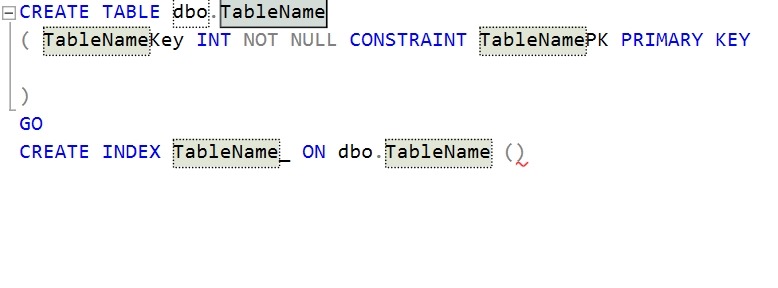
    I’ll type dbo and Enter. Prompt moves to the next placeholder parameter. Here I see TableName highlighted all over.

    2019-12-10 21_12_31-SQLQuery4.sql - Plato_SQL2017.sandbox (PLATO_Steve (64))_ - Microsoft SQL Server

    If I type “Shipper”, I see this.

    2019-12-10 21_12_40-SQLQuery4.sql - Plato_SQL2017.sandbox (PLATO_Steve (64))_ - Microsoft SQL Server

    Now I’ll hit Enter again. This time Prompt puts the cursor where I need it to start entering other columns.

    2019-12-10 21_13_45-SQLQuery4.sql - Plato_SQL2017.sandbox (PLATO_Steve (64))_ - Microsoft SQL Server

    I can easily enter my columns, and now my table has a PK. What’s more, if I enter a few columns and run this, I’ll see an error.

    2019-12-10 21_14_33-SQLQuery4.sql - Plato_SQL2017.sandbox (PLATO_Steve (64))_ - Microsoft SQL Server

    The table was created, but the index statement isn’t correct. While this doesn’t necessarily ensure developers follow naming standards or create an index, at least this will get them to think about it. They can correct the statement by adding a column to the index statement between parenthesis, and hopefully change the name.

    If you haven’t seen how Prompt can really improve your coding, download an eval today and give it a try. If you have it, take advantage of snippets.