Author: way0utwest

  • A Smooth Laptop Setup

    A little over a week ago, I got a new laptop. This was late on a Sunday afternoon, and I went home to spend time with me wife. After dinner, we relaxed with a little TV time. While trying to decide what to watch, I opened the laptop and started the Windows setup process. This post talked about how smoother and simple things were for me, though certainly not seemless as I’ve had on OSX machines. Still, it went well.

    Windows

    The first part of getting a new Windows machine going is usually the account. I have a Microsoft account I use for a few things. It’s actually an old Hotmail account, but it’s worked well for me.I entered this, and it linked to a few things I already had set up, including my OneDrive. This bootstrapped quite a bit of the process.

    I then checked Windows Update (nothing to apply) and upgraded to Windows 10 Pro. Once this was done, I opened the Windows Store and applied a few updates from there. While this was running, I did two things.

    Chrome

    I prefer Chrome as a browser, and I keep some settings linked to this browser, like bookmarks, some throwaway user/pwds, and settings. I usually start by opening Edge on a new install and going to Chrome and installing it. I could to this separately, but it’s usually my first step.

    Chocolatey

    This is my go-to install system. It’s yum or apt-get for Windows and I’ve used it for close to a decade now. I go to the website, and grab the script. Since I usually don’t have DropBox yet, and that’s where I have lots of stuff, I start here. Run this in an admin command prompt that’s got PowerShell running:

    Set-ExecutionPolicy AllSigned or Set-ExecutionPolicy Bypass -Scope Process
    Set-ExecutionPolicy Bypass -Scope Process -Force; iex ((New-Object System.Net.WebClient).DownloadString('https://chocolatey.org/install.ps1'))

    Those two things get the package manager running. Once this is done, I usually start grabbing stuff I know I need. I used to have a long list of things to install, but since my needs change over time, I usually go with this:

    choco install dropbox -y
    choco install evernote -y
    choco install greenshot –y
    choco install spotify –y

    These are the main things I want, and really need. While these are running, I usually go get the o365 portal from work and start that install, because it’s long.

    With every laptop, I somewhat change the things I install. I posted I was doing this and Aaron Nelson dropped me a link to his gist of database pro software: https://gist.github.com/SQLvariant/d29ffd1e9905992318b4585c83399328.

    This is a great list, and I immediately added some of these items. I don’t use all of these, but I use many.

    • SSMS
    • ADS
    • Git
    • VSCode
    • PowerBi
    • VS
    • Python
    • Sublime Text
    • Slack
    • Teams
    • Docker Desktop

    I do need SQL Server, but I held off since I wasn’t sure if I want to install it or just run containers. I’m debating this as I write this. I’m really tempted to skip an install and set up folders for holding db/log files at specific versions.

    Once these tools were installed, I added the Redgate Toolbelt, missing that in Aaron’s list. I saw Kendra tried this and it worked, but I was half paying attention and just running choco commands while watching a movie.

    Just in glancing at the machine on a dresser a few times and typing a few commands had most of the machine set up in the space of a 2 hour movie. It was Holiday in the Wild, if you’re wondering. An enjoyable movie.

    More to do, but really typing a few commands, I had most software installed that I need.

    Now I just need to decide what to do about SQL Server.
  • Prompt in ADS

    Ever since VS Code and Azure Data Studio came out, people have been asking for SQL Prompt to port over. I’ve been right there with you, though unsure of the value, given how UI dependent Prompt is for users.

    Things have changed.

    sql-prompt_early-access_social-graphic_1200x630

    There’s an EAP program, with an early look at the formatting part of Prompt in ADS.

    I’ve been using this for a few weeks, and it’s different, but it works well. All my styles from SSMS are ported and linked, and it’s a quick set of keystrokes, albeit different ones, to format code.

    I’m curious to see what others think, so join the program if you want formatting in ADS and are willing to give some feedback.

  • Finding Your Own Career

    Building a career is hard work. It takes time and focus to move along a path that you choose for yourself. What I have seen across a few decades of work is that most people don’t bother to find a path, and are happy to wander from job to job, finding new positions or projects when they are forced to do so. As much as I advocate for others to continually learn, there’s nothing wrong with wandering randomly through a career, sticking with a job or employer as long as you can.

    The one thought that I’d like to see everyone adopt is a conscious decision to do so. Make the choice to have the career you want, and the life you want, whatever that is for you.

    Recently on Twitter, there has been a lot of career advice that I’ve seen posted. One very interesting item was that a developer shouldn’t compare themselves to anyone else. They should be proud of what they’ve done and work towards the goals and achievements that mean the most to them. Good advice, but often hard to follow.

    Most of us only see a fraction of the world, and a limited view of potential opportunities for languages, projects, positions, and skills. We often do look at others’ accomplishments and then try to model ourselves in some way to be like others. Not completely but we may choose to learn a skill another has, or pass a test that someone else completed, or maybe go work for the company that a colleague has enjoyed. There’s nothing wrong with that.

    Think about what others do and decide what aspects of that you’d like to adopt. As much as I’ve coached others to think for themselves, make their own decisions, and be proud of the things they accomplish, I also want them striving forward. That often requires a goal and an ideal, which we often find in others we admire. Compare yourself to others, but don’t judge yourself by their standards. Decide on your own if you’re living up to the measurements that make sense to you.

    Steve Jones

    Listen to the podcast at Libsyn, Stitcher or iTunes.

  • Exporting a Table to CSV in PoSh–#SQLNewBlogger

    Another post for me that is simple and hopefully serves as an example for people trying to get blogging as #SQLNewBloggers.

    I saw someone struggling with exporting some data from a table in a CSV, and decided to give it a try. I think there were a few things that were broken, but here is the basic idea.

    The Scenario

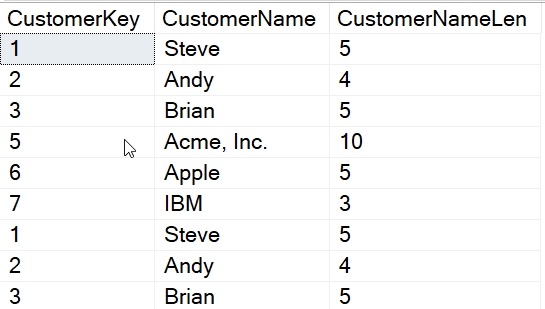
    I want to get all the data from a table into a CSV. As a setup, I have a table that looks like this:

    2019-12-02 13_01_11-SQLQuery10.sql - Plato_SQL2017.sandbox (PLATO_Steve (56))_ - Microsoft SQL Serve

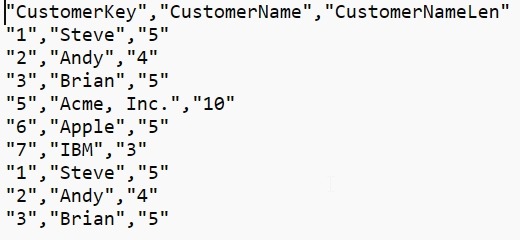
    What I’d like is this data in a CSV, with a format like this:

    "CustomerKey","CustomerName","CustomerNameLen"
    "1","Steve","5"
    "2","Andy","4"
    "3","Brian","5"
    "5","Acme, Inc.","10"
    "6","Apple","5"
    "7","IBM","3"
    "1","Steve","5"
    "2","Andy","4"
    "3","Brian","5"

    Let’s make that happen.

    PoSh to the Rescue

    If you have SQL Server and the Powershell module installed, you can use the Invoke-SqlCmd cmdlet. This takes parameters for a query and a server that you want to use. There are other parameters as well, but I’ll keep this simple.

    The parameters I’ll use are a query with three part naming and then an instance. Here is the command:

    Invoke-Sqlcmd -Query "SELECT * FROM [Sandbox].[dbo].[Customer]" -ServerInstance "Plato\SQL2017"

    Now we want to get that data out to a CSV, and we can use the Export-Csv cmdlet for this. For me, I often want to avoid extra work, though in the past, I’d have set the output of the Invoke-SqlCmd to a variable. I don’t need to here, so I can use pipe the output to the cmdlet like this:

    Invoke-Sqlcmd -Query "SELECT * FROM [Sandbox].[dbo].[Customer]" -ServerInstance "Plato\SQL2017" |
    Export-Csv -Path E:\Documents\sql\Customer.csv –NoTypeInformation

    This will create a new file for me, called Customer.csv.


    2019-12-02 13_15_17-sql

    In here, we have our data.

    2019-12-02 13_01_52-E__Documents_sql__2019Dec02_125737.csv - Sublime Text

    Easy, and quick. You could even type this from the command line, without saving the code.

    SQLNewBlogger

    A quick look at a common task. In this case, I was helping someone, but I’ve had the need to do this myself, and fixing someone else’s code actually taught me something here. I’d use this as a story of solving a problem in an interview with new technology (PoSh).

    Solving the problem was about 10 minutes work, and really, this took about 15 minutes to set up, get working, and clean the code a bit. I also had to change a few of the other issues to make this simpler, but those will be good posts in the future.