Author: way0utwest

  • Setting Permissions for a SQL Server backup folder–#SQLNewBlogger

    Another post for me that is simple and hopefully serves as an example for people trying to get blogging as #SQLNewBloggers.

    While testing a script recently, I needed to set a few backup folders for my instance. This was a striped backup, and using one folder wouldn’t make sense. In modern OSes, we can’t just create a folder and expect that our processes can read it. We need to explicitly set permissions.

    It’s fairly easy for SQL Server, but since it wasn’t obvious, I decided to take a minute and document this.

    If I create a folder, say c:\sqlbackup, I see this kind of thing in properties on my Window 10 machine.

    2019-10-08 14_53_19-SQLBackup Properties

    If I click “Edit”, I get a similar view.

    2019-10-08 14_53_27-Permissions for SQLBackup

    Now, my SQL Server process can’t access this. If I try to restore a backup from here, I’ll get a permissions error.

    That’s fine. In the Permissions, I can click Add and I’ll get this dialog.

    2019-10-08 14_53_35-Select Users or Groups

    From here, I can enter “NT Service\MSSQLServer” or “NT ServiceMSSQL$SQL2017” for a named instance. My named instance is SQL2017.  Note the space in “NT Service”

    2019-10-08 15_00_49-Select Users or Groups

    If I click the “Check Names”, this will resolve for the built in service account.

    2019-10-08 15_00_53-Select Users or Groups

    Then I can click OK and set the appropriate permissions.

    If your service account is something not built in, it’s usually easy to find and add, but for build in accounts, you need the “NT Service”.

    SQLNewBlogger

    You can take a simple thing here that you needed to solve and write about it. This took my about 5 minutes to solve, playing with different names, and then about 5 minutes to write.

    Showcase your knowledge today.

  • Experiment First

    Not too long ago, I had a sales engineer contact me about a script that a customer needed. It was similar to others we have for various Redgate tools, but also different enough that the customer needed help. In fact, I also needed some help.

    I asked a question on Twitter, mostly because I was busy and wanted to know if someone had solved the (partial) problem that I had. I got a number of responses, none of which were direct solutions, but many of them contained some hints. At the time, I filed these away because I didn’t have time to work on anything, but I knew that asking the question gave me a few starting places.

    A day later, I started to experiment, but ran into a few issues. The PoSh script wasn’t doing what I expected, which is always frustrating. I almost started to ask questions, but then I decided to work through the process. After all, I’d already interrupted friends on Twitter with my original question, and I ought to experiment a bit before I asked others to do my work for me.

    This was a script designed to find the latest files and build a restore. My first problem was that no data came back from the backup set. I double-checked my data, but didn’t see anything. I then set a variable for the parameter and another to get results. I started to get some information, which led me to review my work again. I realized I’d mis-typed something as a direct parameter, but had corrected it in the variable assignment. First lesson, really proofread carefully.

    The data I first got back didn’t quite make sense, so ran this through Get-Member. I didn’t find any property that looks like what I wanted, at least not intuitively. Rather than ask or post a question, I started just checking properties. Eventually I realized the data was there, but not under the name I’d have used or expected. Sometimes just digging through the properties and methods is the best way to learn.

    Lastly, with a bunch of data in my object, I needed the top 1 item. Stack Overflow helped point me in the right direction, and I solved my own issue by reading a few different things people had done. With a little research and experimentation, started off by a few questions of others, I had a script that I could give to a customer.

    While our management might expect us to know everything about our jobs, often they know this isn’t the case. Technology and platforms change quickly and expand widely to the point that few of us know everything about anything. What management and others really expect is that we can learn to solve our own problems, with some help from others, but also some ability to learn and experiment.

    At SQLServerCentral, we have great forums for SQL Server questions. Stack Overflow is a great spot for lots of general technology queries. Plenty of people are willing to help, but often with some sketch of a solution, expecting you to do some work to mock a scenario and then take answer and adapt them to your environment.

    There are lots of people in the world willing to help you, but they don’t want to do your job. Ask questions when you don’t know, but also plan to spend your own time experimenting and learning about how and why an answer might work. Before you post a followup question, be sure you experiment and see what you can teach yourself. You will likely learn something and maybe next time you’ll be the one answering a question for someone else.

    Steve Jones

    Listen to the podcast at Libsyn, Stitcher or iTunes.

  • Fragmented or Centralized Data

    I read a piece recently that talks about the hassles of copying data multiple times for different applications. In my experience, I haven’t seen this to be the main problem with data. It’s not often that we might replicate, in a general sense, data across different data stores to support different applications. Certainly lots of ETL jobs exist to copy data to new stores for different purposes, which perhaps is what the author is implying.

    The idea of protecting data is one that is becoming a greater concern for many organizations. In fact, I’d argue that a number of the recent high profile data breaches in the last couple years involve copying data from some RDBMS store to an ElasticSearch server that isn’t secure. Any movement of sensitive data, whether to warehouse or Power BI report, should be in a secure way.

    For years we’ve had minor issues with data security in Excel worksheets; a similar problem continues to exist with both data stores and reporting tools that might contain copies of data. In some sense, this is actually no different than the problems of losing paper reports in the distant past.

    The solution given in the article is to share data from a single store among more applications. That’s been the practice in many places I’ve worked, with the challenges of additional load and performance concerns on the data store. Modern distributed SQL Servers can use AGs or (after SQL Server 2017), Kubernetes, to scale out and potentially handle the loads, but those choices aren’t without their own resource costs and challenges.

    Ultimately, we aren’t going to get away from moving data around. Certainly we have needs to deal with dev/test environments even if we don’t have any other data movement. While I do think the future of large data workloads will involve less movement, we aren’t going to eliminate movement.  We may build more applications that connect to a single data store, which is likely as our platforms become more powerful and enable scale-out capabilities to meet workload growth.

    We also need to ensure that copies of data made for different purposes as well protected. Most businesses need to develop better skills and habits to limit sensitive data in dev and test environments, as well as proper access controls for data copies that are used in production environments.

    Steve Jones

    Listen to the podcast at Libsyn, Stitcher or iTunes.

  • Launching SQL Compare with Context

    Years ago Redgate Software started some work to link our tools together. I remember early efforts, about which I had dubious thoughts as to the value. I hadn’t looked at how the work had progressed until a little earlier this year, when I started examining in more detail some features I had missed.

    One of these is in SQL Source Control, as it relates to SQL Compare. I often don’t have SQL Compare running, but I will find places where I want to look at the quick differences between one database and another, or between the database I’m working on and source control. While I can easily launch SQL Compare, or find a project with that is set up, it’s slightly annoying to have to find a file or create a new project and load a context.

    Much easier to use SQL Source Control.

    The Product Menu

    In SQL Source Control, there is a Redgate icon in the upper left corner. When I’m working in SSMS, I can quickly switch over to the SQL Source Control (SOC) tab and click the icon.

    2019-09-04 17_50_14-SQL Source Control - Microsoft SQL Server Management Studio

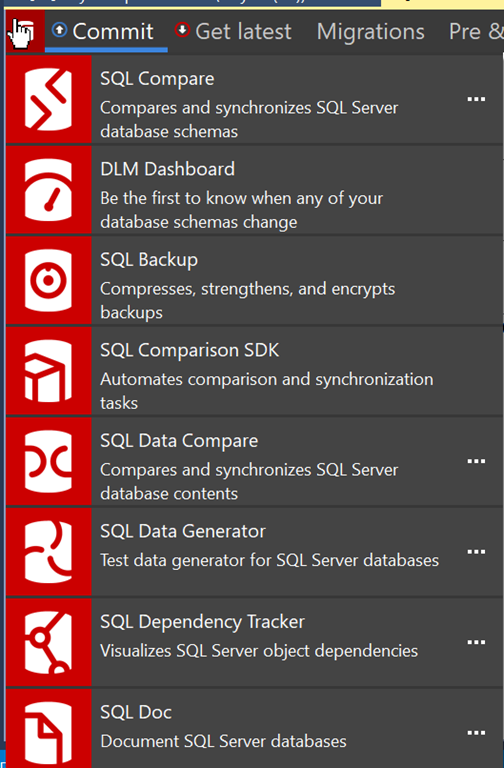
    This will open a long menu, with a list of my Redgate tools. SQL Compare is at the top, and all other tools listed below.

    2019-09-04 17_50_21-

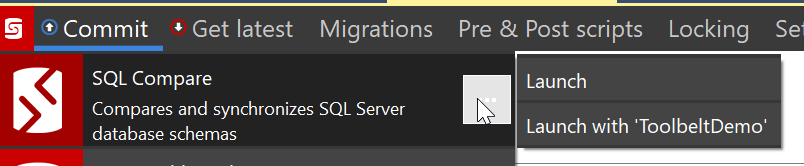
    If I click the ellipsis in the SQL Compare pane, I’ll get a couple of options.

    2019-09-04 17_50_32-SQL Source Control - Microsoft SQL Server Management Studio

    If you don’t see these options, then the database you’re working on isn’t linked to a VCS. That’s a separate problem.

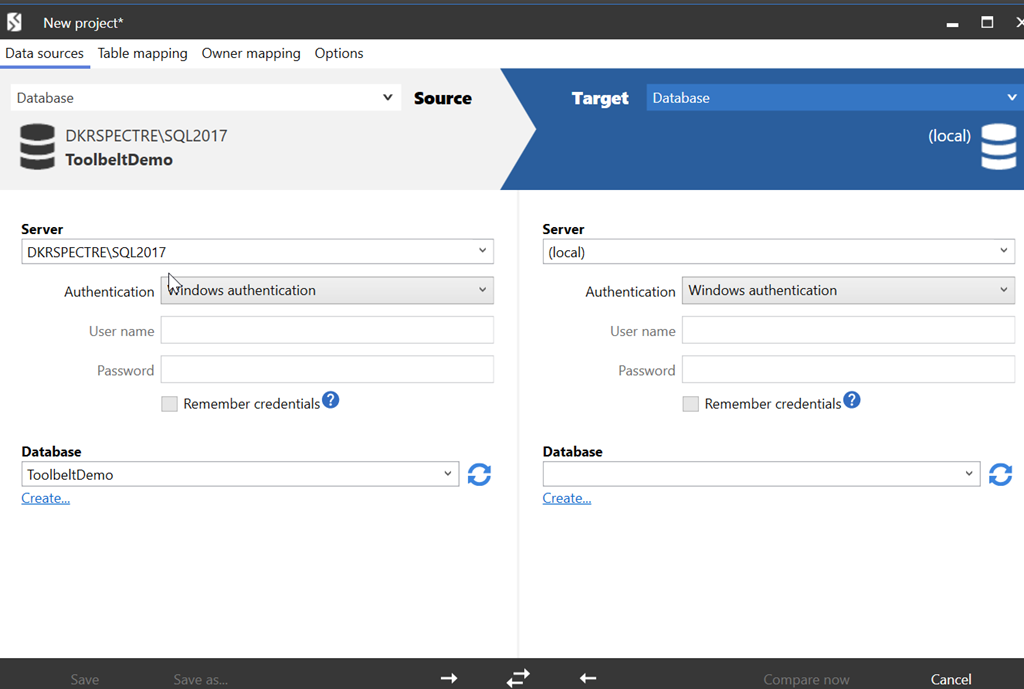
    This feature, however, is designed to fit into our DevOps solution, bringing the tools together for those people that are working inside of the Redgate process. In this process, I can quickly launch many of the tools with context. When I click the “Launch with ‘ToolbeltDemo’, I see this when Compare opens.

    2019-09-04 17_54_03-New project_

    My current database is listed on the left. I can then pick a database on the right, or a backup, project, etc., and run the comparison.

    A minor time saver, but a nice touch that eases my mental focus. If I continue to work, or check something while I wait for SQL Compare to launch, I know when I come back that half the work is done.

    You can launch other products as well, in a similar manner, making your workflow move along a little smoother.